
3D Printing
News Back to school deals Contact us
Home / Reviews / Hands-on Review: PLA Filament
qidi

Hands-on Review: PLA Filament

Editors rating:

Exotic 3D printing materials are great and I’ve had a lot of fun reviewing BigRep’s flexible, high-temp, fast-printing, and transparent materials. Today, though, we’re going back to ol’ reliable: PLA. This tried-and-true material may seem boring when compared to the carbon-filled nylons and polycarbonates that are readily available but there are solid reasons that PLA still dominates the market. But do those reasons apply to BigRep’s PLA? We’ll find out!

When PLA hit the consumer 3D printing market, it was presented as an alternative to ABS, the most popular printing material at the time. ABS is a petroleum-derived thermoplastic that’s heavily used in injection molding so it wasn’t specifically engineered for 3D printing. It works, but it requires not only a heated bed but also an enclosed (and, ideally, heated) build chamber to prevent severe warping. PLA, on the other hand, doesn’t even require a heated bed, though results will be more consistent with a slightly heated bed. It’s also derived from plant sugars, making it renewable. Even though some of the mechanical properties of PLA are inferior to those of ABS, the accessibility and printability of PLA earned it the top spot in the market.

I went with BigRep’s Purple PLA and the first thing I noticed is that it’s professionally packaged and spooled. It’s uniformly round as well. It loaded without issue into the Ultimaker S5 with standard PLA settings and all objects were printed at 200°C (hotend) and 60°C (bed). We begin with Benchy, printed with 0.15mm layers.
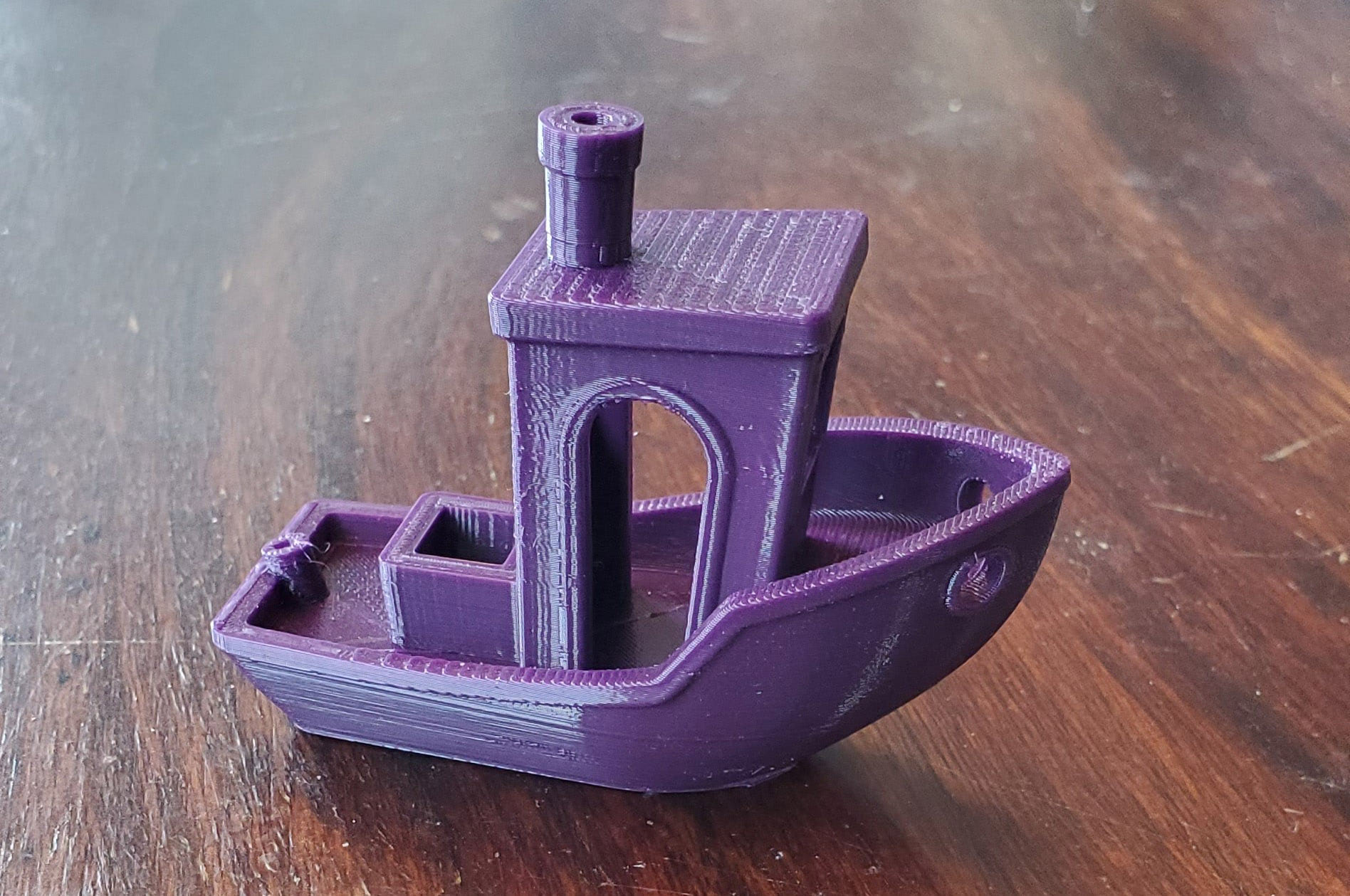
PLA benchy

And it’s exactly what I was expecting: flawless. The overhangs are smooth, the bridging is clean, the pillars are straight, and the smallest details are visible. It’s prints like this that cause people to reach for PLA, especially when printing something new. Let’s move on to the All In One 3D Printer Test.
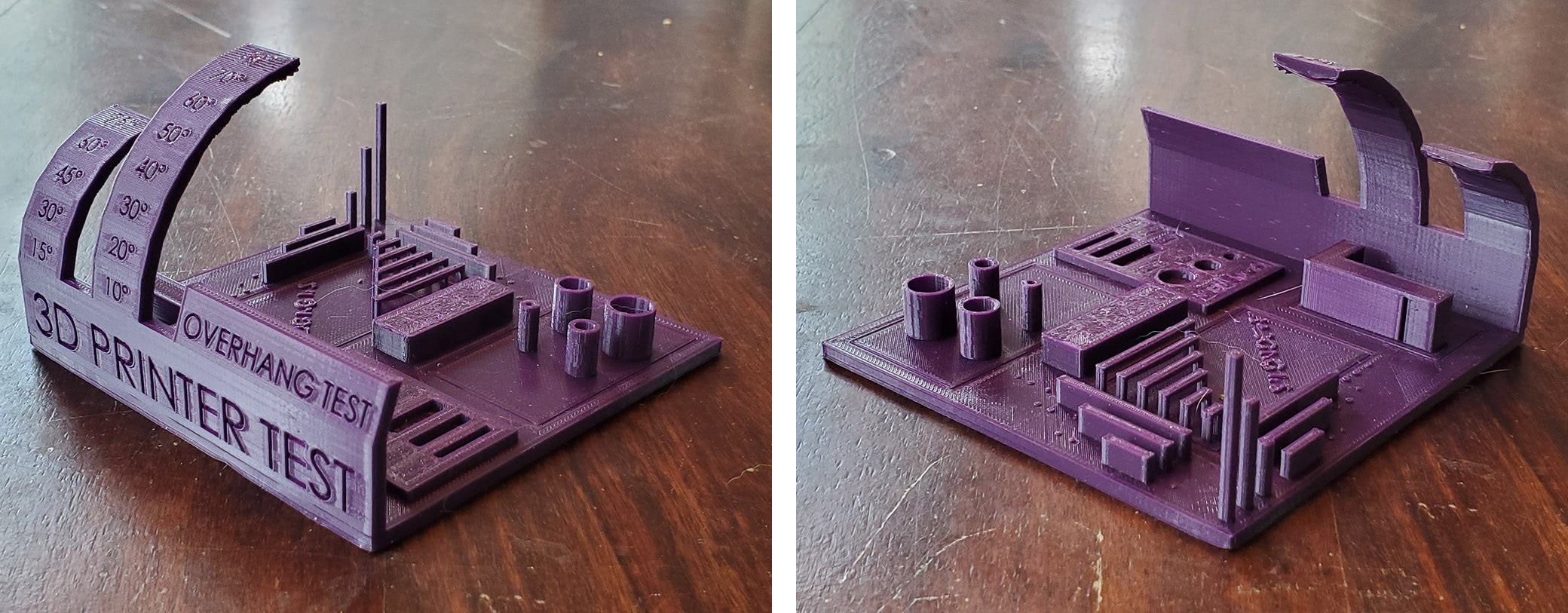
PLA 3d printer test

Another excellent showing, though not as perfect as the Benchy print. At around 75° of overhang, the quality of the underside of the arch starts to deteriorate. That’s quite a steep angle, though, so that’s still a decent result. Other than that, everything else looks good. The pillars have straight edges and no stringing, top surfaces are solid, and the circles and squares are within spec. And the bridging looks very promising so let’s see how it measures up in the Bridging Test.
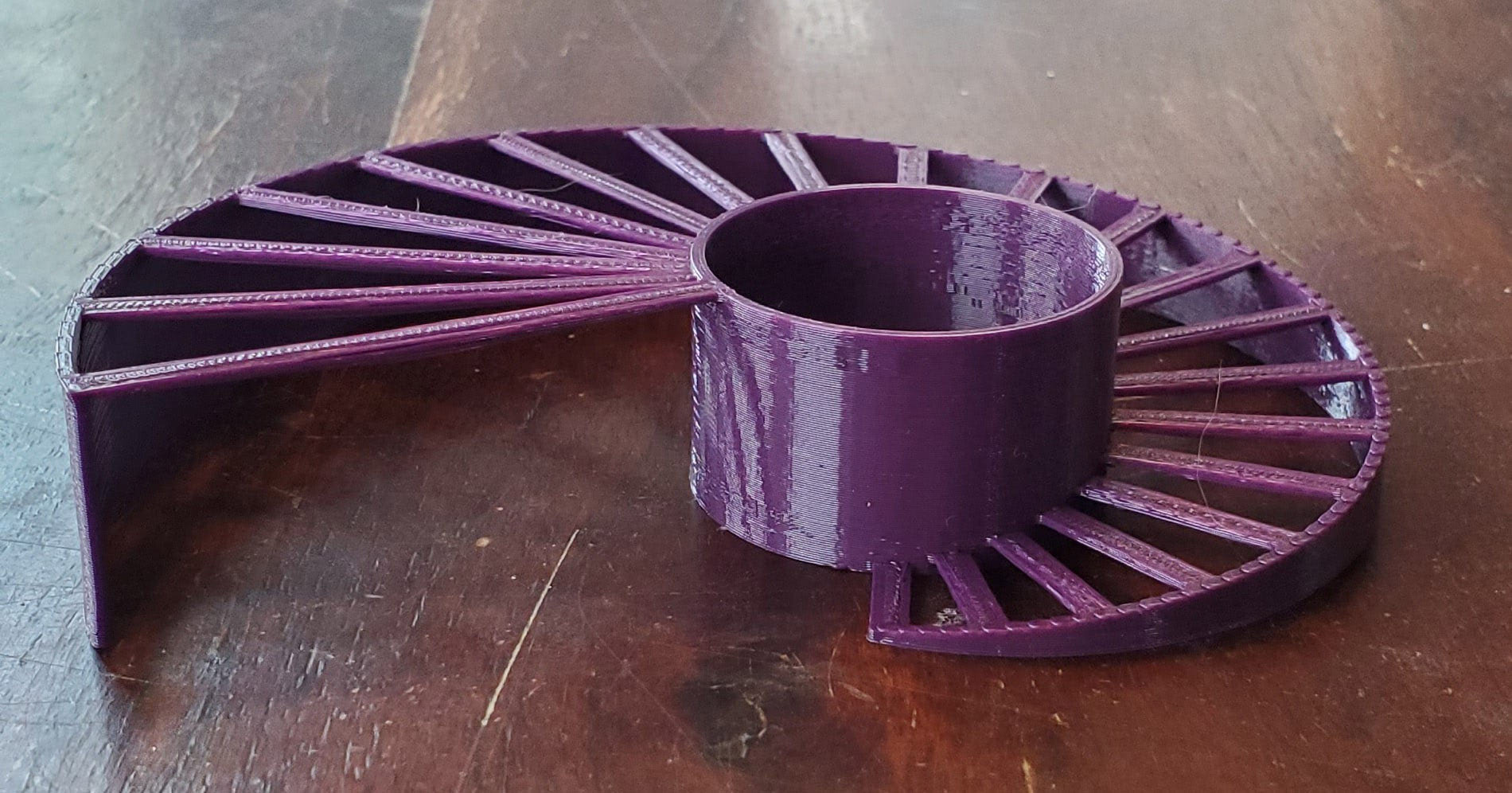
PLA bridging test

Top marks! This perfect print is the result of using default print settings and serves as a testament to the ease-of-use of this material.

One of the drawbacks of PLA is its low heat deflection temperature, making it unusable in most outdoor applications. To see if that’s true of this PLA, a rectangular bar was printed, measured, annealed in an oven, and then measured again for any changes.

  • Original dimensions: 20.03mm x 120.2mm x 5.94mm
  • Post-annealing dimensions: 19.9mm x 117.85mm x 6mm

Those are significant changes. The specimen was also slightly bowed after the annealing process so this material is not suitable for outdoor or hot applications.

Layer adhesion was tested by printing three Vertical Tensile Bars and breaking each one under load. They broke at 95lbs, 80lbs, and 73lbs, which is the widest range yet but also the second-highest average at 82.6lbs.

Another selling point of PLA is its dimensionality, a trait that’s necessary to successfully print parts that have tight tolerances like snap-fit parts and moving joints. So I wanted to test the PLA on a print-in-place piece with moving parts, something that also happens to be naturally purple. This Cute Mini Octopus!
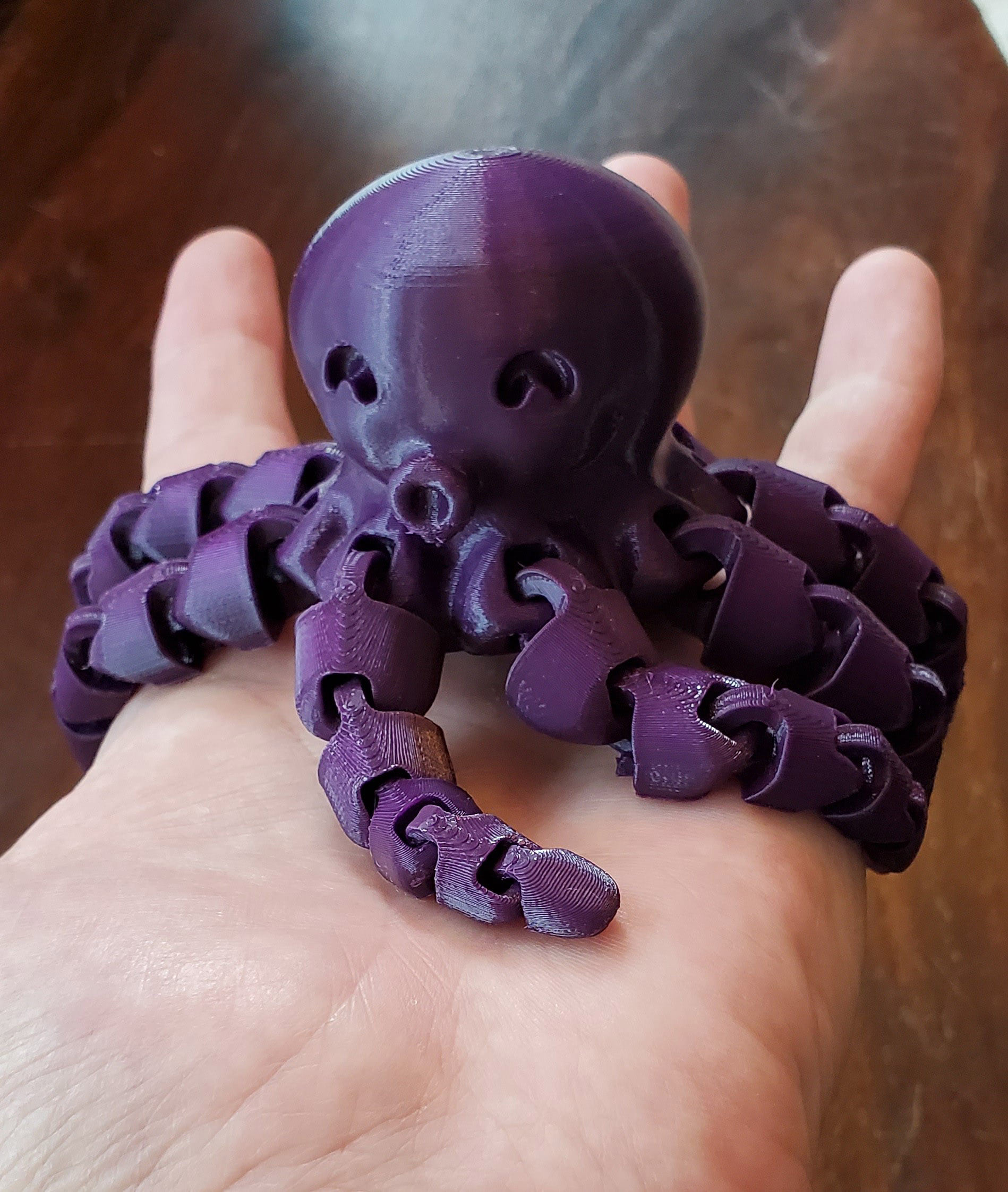
PLA octopus

This little octopus is as moveable as it is adorable. Every arm (yes, octopi have arms, not tentacles) flexes at each joint, making for very fluid movements when it’s swung back and forth. This object has 40 joints with tight tolerances and was printed with the same default settings as the rest of the prints in the review. That’s quite a feat.

Conclusion

PLA should be easy to print with and result in quality parts. BigRep’s PLA is and does. The finish is incredibly smooth and a bit glossy. Overhangs come out well and bridges come out even better. PLA may not perform well in the heat, but with superior layer bonding users can count on sturdy parts in most indoor environments. And when it comes to printing parts with tight tolerances, there’s no more reliable material than PLA. For everyday printing, this is what I’ll continue to use.

Share:
WhatsApp Twitter Facebook LinkedIn Buffer Reddit E-mail
About the author | Cameron Naramore
Cameron is a 3D printer and CNC operator. He's fond of cooking, traveling, and science fiction.
Join our newsletter

Our newsletter is free & you can unsubscribe any time.

Latest posts

ORNL and Boeing 3D-Print a Nearly Two-Ton Mold for Aircraft Parts

Oak Ridge National Laboratory and Boeing 3D-printed a nearly two-ton steel mold for stamping thermoplastic composite aircraft parts.

3D Printing Metal

Meshy 7 Review: From a Designer’s Drawings to Four-Colour Board Game Pawns, With No Modelling Skills

Game designer Sonja Uittenboogaard (swurls.nl) draws her own characters. I took three of them, a dragon, an owl and a wizard, and tried... read more »

News

Creality Pika: The Pocket AI 3D Scanner That Wants Scanning to Feel Like Taking a Photo

Creality has shrunk a dual-mode 3D scanner to the size of a compact camera, given it a touchscreen and two swappable batteries, and... read more »

News

How to 3D Scan With Your Phone in 2026: Apps, Technique, and Limits

Yes, you can 3D scan with your phone, and the results are better than the price of admission suggests, which is zero. A... read more »

Scanners

LLNL Researchers Inspect Direct-Ink Prints Layer by Layer With Cameras

Lawrence Livermore mounted cameras on a direct-ink printer so software can measure filament diameter and flag broken strands before a part leaves the... read more »

News
LLNL Researchers Inspect Direct-Ink Prints Layer by Layer With Cameras

CMU Researchers Turn a Single Photo Into Snap-Fit 3D Printed Parts

Carnegie Mellon software takes a photo, splits the object into 3D parts, and adds peg-and-socket joints so the pieces print and snap together... read more »

News
CMU Researchers Turn a Single Photo Into Snap-Fit 3D Printed Parts

Artec Neo: Artec 3D Launches a Tolerance-Driven Handheld Metrology Scanner

Artec 3D says its new handheld blue-light scanner delivers 0.025 mm accuracy at target-anchored features only, while capturing the whole part in color... read more »

News

MIT Spinout 3D Prints Building Trusses From Recycled Plastic

Atlas Building Composites, a spinout of MIT mechanical engineering research, 3D prints structural trusses from shredded single-use plastic fused with fiberglass, including a... read more »

Construction
MIT Spinout 3D Prints Building Trusses From Recycled Plastic

MIT Researchers Let Users Repair AI-Generated 3D Models Before Printing

MIT CSAIL, with Google and Northeastern, built software that generates 3D models from prompts and lets users fix printability defects with language and... read more »

News
MIT Researchers Let Users Repair AI-Generated 3D Models Before Printing

Elegoo Day Sale 2026: The Four Best Prices, And How The Rest Compare

Elegoo Day runs to September 29 with up to 54% off. Four prices are the lowest we have on record, the material tiers... read more »

News

Social

  • Facebook Facebook 3D Printing
  • Linkedin Linkedin 3D Printing
Join our newsletter

Our newsletter is free & you can unsubscribe any time.

banner
banner
  • Creality Hi Combo

    • - Print size: 260 x 260 x 300 mm
    • - up to 16-color printing
    More details »
    $399.00 Creality
    Buy Now
  • Snapmaker U1

    • - Print size: 270 x 270 x 270 mm
    • - multi-color printing with SnapSwap
    More details »
    $849.00 Snapmaker
    Buy Now
  • Flashforge Adventurer 5M

    • - Print size: 220 x 220 x 220 mm
    • - 600mm/s travel speed
    More details »
    $299.00 Flashforge
    Buy Now
  • Flashforge Guider 3 Ultra

    • - Print size: 330 x 330 x 600 mm
    • - dual extruder system
    More details »
    $2,999.00 Flashforge
    Buy Now
  • Flashforge AD5X

    • - Print size: 220 x 220 x 220 mm
    • - dual extrusion system
    More details »
    $399.00 Flashforge
    Buy Now
  • Qidi Max 4

    • - Print size: 390 x 390 x 340 mm
    • - active cooling air control
    More details »
    $1,219.00 Qidi
    Buy Now
  • Qidi Q2

    • - Print size: 270 x 270 x 256 mm
    • - enclosed heated chamber up to 65°C
    More details »
    $580.00 Qidi
    Buy Now
  • Anycubic Photon Mono M7

    • - Print size: 223 x 126 x 230 mm
    • - 10.1 inch 14K screen
    More details »
    $279.00 Anycubic
    Buy Now
  • Anycubic Kobra S1 Combo

    • - Print size: 250 x 250 x 250 mm
    • - budget multicolor printing
    More details »
    $429.00 Anycubic
    Buy Now
  • Creality K2 Plus

    • - Print size: 350 x 350 x 350 mm
    • - multi-color printing
    More details »
    $1,199.00 Creality
    Buy Now

Company Information

  • What is 3D Printing?
  • Contact us
  • Join our mailing list
  • Advertise with us
  • Media Kit
  • Nederland 3D Printing

Blog

  • Latest News
  • Use Cases
  • Reviews
  • 3D Printers
  • 3D Printing Metal

Featured Reviews

  • Anycubic Photon Mono M5s
  • Creality Ender 5 S1
  • The Mole 3D Scanner
  • Flashforge Creator 3 Pro

Featured Industries

  • Automotive
  • Aerospace
  • Construction
  • Dental
  • Environmental
  • Electronics
  • Medical
  • Military
  • Fashion
  • Art
2026 — Strikwerda en Dehue
  • Home
  • Join our mailing list
  • Contact us
Blog
  • Latest News
  • Use Cases
  • Reviews
  • 3D Printers
  • 3D Printing Metal
Featured Industries
  • Automotive
  • Aerospace
  • Construction
  • Dental
  • Environmental
  • Electronics
  • Medical
  • Military
  • Fashion
  • Art
Company Information
  • What is 3D Printing?
  • Contact us
  • Join our mailing list
  • Advertise with us
  • Media Kit
  • Nederland 3D Printing