
3D Printing
News Back to school deals Contact us
Home / 3D Printers / 3D Print Ceramic And Use Your Home Microwave As A Kiln
qidi

3D Print Ceramic And Use Your Home Microwave As A Kiln

April 7, 2021

Chinese ceramic printer company Cerambot has just announced the release of their new ceramic printer, dubbed the Cerambot Eazao, following on the success of the first one that gained them their recognition.

And, as is the case with a few larger companies these days, they have decided to test the waters by releasing the product via a Kickstarter campaign, which you can see here. The first Cerambot was the top earning ceramic printer on Kickstarter until now.

The campaign declares that backers can now turn their home into a pottery workshop by using the Eazao printer and the small Cerambot microwave kiln for firing their potteries.

The Cerambot Microwave Kiln is also available to backers on the Kickstarter page.

This latest product from the company promises to be more stable and faster than before, thanks to its cartesian motion system which is capable of printing at speeds of up to 40mm/s.

That may not sound very fast compared to your average polymer desktop printer, but don’t forget, ceramic slurry is fairly heavy and so is the printhead for extruding it, as you can see in the image below. Slow and steady wins the race in this case.

Typically ceramic slurry printers make use of compressed air for moving the slurry from the reservoir into the printhead. Cerambot points out that this can be dangerous and therefore they have opted for a “push rod” system, which looks a lot like a syringe pump.

The printer is capable of printing in clay and porcelain, and unlike polymers, if you screw up your print here, then you can simply throw the failed print into a bucket of water and create a fresh slurry from your failures, meaning less waste and less cost.

Also, clay and porcelain are more environmentally friendly than FDM polymers, according to Cerambot, so that’s nice.

You can see a video of the Cerambot Eazao in action below.

Microwave

Let’s talk about this microwave kiln for a bit, as it seems fairly integral to the entire system.

Generally, kilns are used to harden ceramics as well as for firing the glaze onto the pottery items. Kilns are generally electric powered these days, and are required to reach temperatures of 800°C to 1200°C. Naturally, your average domestic microwave oven does not typically allow for temperatures of this magnitude.

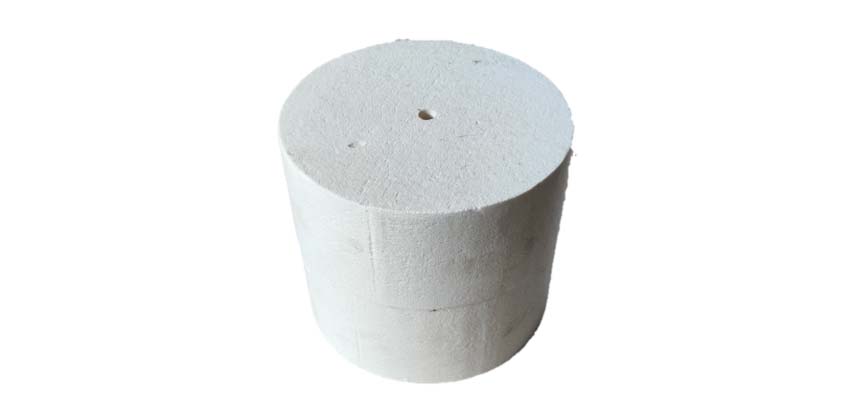
Thanks to the microwave absorbing material (silicon carbide) on the inner cavity wall of the Cerambot microwave kiln (or “crucible”, if you prefer), the rays are converted to heat, and thanks to the insulation (silicon fibers), that heat keeps rising to the point that potteries can be fired. The Cerambot microwave cavity reaches temperatures of 1100-1200°C.
microwave kiln
This mini-kiln fits into your microwave. (Image credit: Cerambot)

The benefit of using a microwave heated kiln system over a traditional electric kiln comes in the energy efficiency of the microwave. Traditional kilns take ages to heat up. Microwave-heated kilns, not so much.

In fact, the entire firing process in the Cerambot microwave kiln takes just 35 minutes to produce fired, glazed pottery pieces.

“Our first generation ceramic 3D printer was a huge success and earned us many fans around the world. In fact, that community of users was key in helping to guide us on our next generation design,” said Jony Liu, CEO of Cerambot.

“We took all the feedback we received and worked hard to improve nearly every aspect of our new printer. Cerambot Eazao is the culmination of our efforts and it makes the ceramic 3D printing experience better than ever with a more rigid Cartesian structure, faster print speeds, and a more intuitive user-friendly design. Now anyone can get creative and start printing ceramics fast.”

Pricing

So, what’s the damage to your pocket?

If you just want the printer, early birds can get one before everyone else for $429 (for shipping in July 2021), and if you want the printer and the kiln, that will cost you $479.

You can buy the microwave kiln/crucible itself for $80 on Kickstarter.

Naturally they plan to mass produce the item and sell to the public after the Kickstarter campaign is done, so if you miss the chance to back it before then, you won’t have to wait too long before you can buy one direct from the company.

plybot
Related Story
Plybot Successfully Completes Crowdfunding for SCARA-type Arm Printer
Share:
WhatsApp Twitter Facebook LinkedIn Buffer Reddit E-mail
About the author | Phillip Keane
Phillip is an aerospace engineer from UK. He is a graduate of Coventry University (UK), International Space University (France) and Nanyang Technological University (Singapore), where he studied Advanced Manufacturing at the Singapore Centre for 3D Printing.
Join our newsletter

Our newsletter is free & you can unsubscribe any time.

Latest posts

SHINING 3D Launches ShiningSpace, a Browser Platform for Real-World 3D Scans

SHINING 3D has launched ShiningSpace, a browser-based platform for storing, viewing, editing and sharing 3D scan data. The company says it accepts models... read more »

News

LLNL 3D-Prints a Bioreactor That Turns Waste Methane Into a Useful Chemical

Lawrence Livermore National Laboratory 3D-printed a bioreactor that uses bacteria in thin lattice walls to turn waste methane into succinate.

News

Snapmaker and Phaetus Launch Liber High Flow Hotend for the U1

Snapmaker and hotend specialist Phaetus have launched the Liber High Flow Hotend for the Snapmaker U1 toolchanger. According to Snapmaker, it delivers up... read more »

News

City University of Hong Kong and Cambridge Open a 3D Printing Centre

City University of Hong Kong and the University of Cambridge have opened a joint centre that will use 3D printing for data-centre cooling... read more »

News

TCT Shenzhen 2026: Seven Highlights to Watch This October

TCT Shenzhen 2026 takes place at Shenzhen World from October 14 to 16 with, according to organizer TCT, more than 250 exhibitors, 80-plus... read more »

Events

ORNL and Boeing 3D-Print a Nearly Two-Ton Mold for Aircraft Parts

Oak Ridge National Laboratory and Boeing 3D-printed a nearly two-ton steel mold for stamping thermoplastic composite aircraft parts.

3D Printing Metal

Meshy 7 Review: From a Designer’s Drawings to Four-Color Board Game Pawns, With No Modelling Skills

Game designer Sonja Uittenboogaard (swurls.nl) draws her own characters. I took three of them, a dragon, an owl and a wizard, and tried... read more »

News

Creality Pika: The Pocket AI 3D Scanner That Wants Scanning to Feel Like Taking a Photo

Creality has shrunk a dual-mode 3D scanner to the size of a compact camera, given it a touchscreen and two swappable batteries, and... read more »

News

How to 3D Scan With Your Phone in 2026: Apps, Technique, and Limits

Yes, you can 3D scan with your phone, and the results are better than the price of admission suggests, which is zero. A... read more »

Scanners

LLNL Researchers Inspect Direct-Ink Prints Layer by Layer With Cameras

Lawrence Livermore mounted cameras on a direct-ink printer so software can measure filament diameter and flag broken strands before a part leaves the... read more »

News
LLNL Researchers Inspect Direct-Ink Prints Layer by Layer With Cameras

Social

  • Facebook Facebook 3D Printing
  • Linkedin Linkedin 3D Printing
Join our newsletter

Our newsletter is free & you can unsubscribe any time.

banner
banner
  • Snapmaker U1

    • - Print size: 270 x 270 x 270 mm
    • - multi-color printing with SnapSwap
    More details »
    $849.00 Snapmaker
    Buy Now
  • Qidi Q2

    • - Print size: 270 x 270 x 256 mm
    • - enclosed heated chamber up to 65°C
    More details »
    $580.00 Qidi
    Buy Now
  • Creality K2 Plus

    • - Print size: 350 x 350 x 350 mm
    • - multi-color printing
    More details »
    $1,199.00 Creality
    Buy Now
  • Qidi Max 4

    • - Print size: 390 x 390 x 340 mm
    • - active cooling air control
    More details »
    $1,219.00 Qidi
    Buy Now
  • Flashforge Adventurer 5M

    • - Print size: 220 x 220 x 220 mm
    • - 600mm/s travel speed
    More details »
    $299.00 Flashforge
    Buy Now
  • Flashforge AD5X

    • - Print size: 220 x 220 x 220 mm
    • - dual extrusion system
    More details »
    $399.00 Flashforge
    Buy Now
  • Anycubic Kobra S1 Combo

    • - Print size: 250 x 250 x 250 mm
    • - budget multicolor printing
    More details »
    $429.00 Anycubic
    Buy Now
  • Anycubic Photon Mono M7

    • - Print size: 223 x 126 x 230 mm
    • - 10.1 inch 14K screen
    More details »
    $279.00 Anycubic
    Buy Now
  • Creality Hi Combo

    • - Print size: 260 x 260 x 300 mm
    • - up to 16-color printing
    More details »
    $399.00 Creality
    Buy Now
  • Flashforge Guider 3 Ultra

    • - Print size: 330 x 330 x 600 mm
    • - dual extruder system
    More details »
    $2,999.00 Flashforge
    Buy Now

Company Information

  • What is 3D Printing?
  • Contact us
  • Join our mailing list
  • Advertise with us
  • Media Kit
  • Nederland 3D Printing

Blog

  • Latest News
  • Use Cases
  • Reviews
  • 3D Printers
  • 3D Printing Metal

Featured Reviews

  • Anycubic Photon Mono M5s
  • Creality Ender 5 S1
  • The Mole 3D Scanner
  • Flashforge Creator 3 Pro

Featured Industries

  • Automotive
  • Aerospace
  • Construction
  • Dental
  • Environmental
  • Electronics
  • Medical
  • Military
  • Fashion
  • Art
2026 — Strikwerda en Dehue
  • Home
  • Join our mailing list
  • Contact us
Blog
  • Latest News
  • Use Cases
  • Reviews
  • 3D Printers
  • 3D Printing Metal
Featured Industries
  • Automotive
  • Aerospace
  • Construction
  • Dental
  • Environmental
  • Electronics
  • Medical
  • Military
  • Fashion
  • Art
Company Information
  • What is 3D Printing?
  • Contact us
  • Join our mailing list
  • Advertise with us
  • Media Kit
  • Nederland 3D Printing