3D Printing
News Videos Newsletter Contact us
Home / How to / Tutorial: 3D Printing Reusable TPU Molds for Epoxy Resin

Tutorial: 3D Printing Reusable TPU Molds for Epoxy Resin

In our review of BigRep’s flexible TPU filament, we discovered that the material works remarkably well for making epoxy resin molds and we promised a tutorial on how to to make them. Epoxy resin is an inexpensive material that’s rather versatile as it’s easy to add colors and objects into the resin and it’s a tough material, so combining it with 3D printing opens the door to all sorts of custom jewelry, decor, figurines, and more. We’ll be making some geometric paperweights today so go ahead and open your favorite CAD software because modeling the mold is the first step.

I use Autodesk Fusion 360 but there are plenty of 3D modeling programs out there that can handle the simple geometries we’ll be working with today. First, we’ll extrude a rectangle up about three-quart of an inch, though molds can be shallower and deeper.
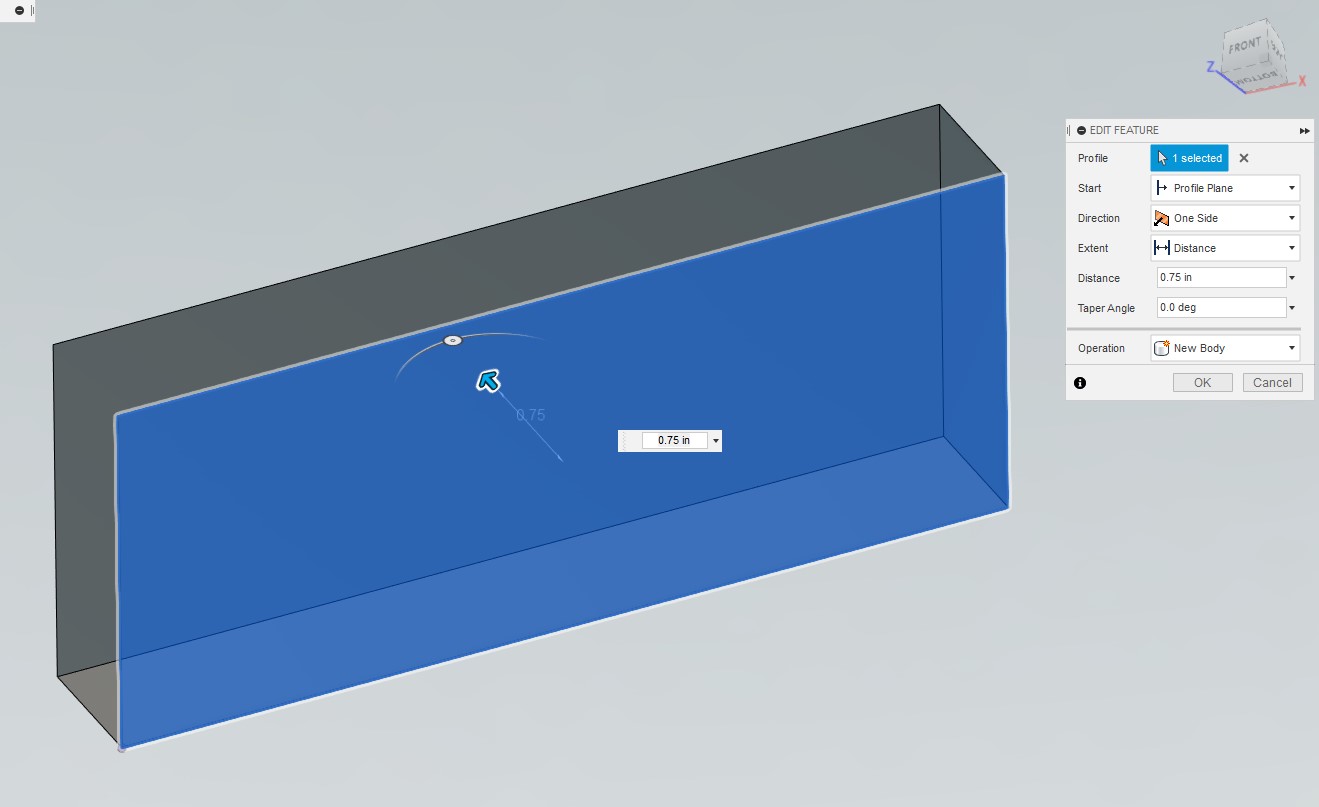
3D Printing Reusable TPU Molds Step 1

After drawing a square on the surface of our new box, we can then cut-extrude that square into the box with a taper angle steep enough for the walls to meet and form a pyramid that’s almost as deep as the box.
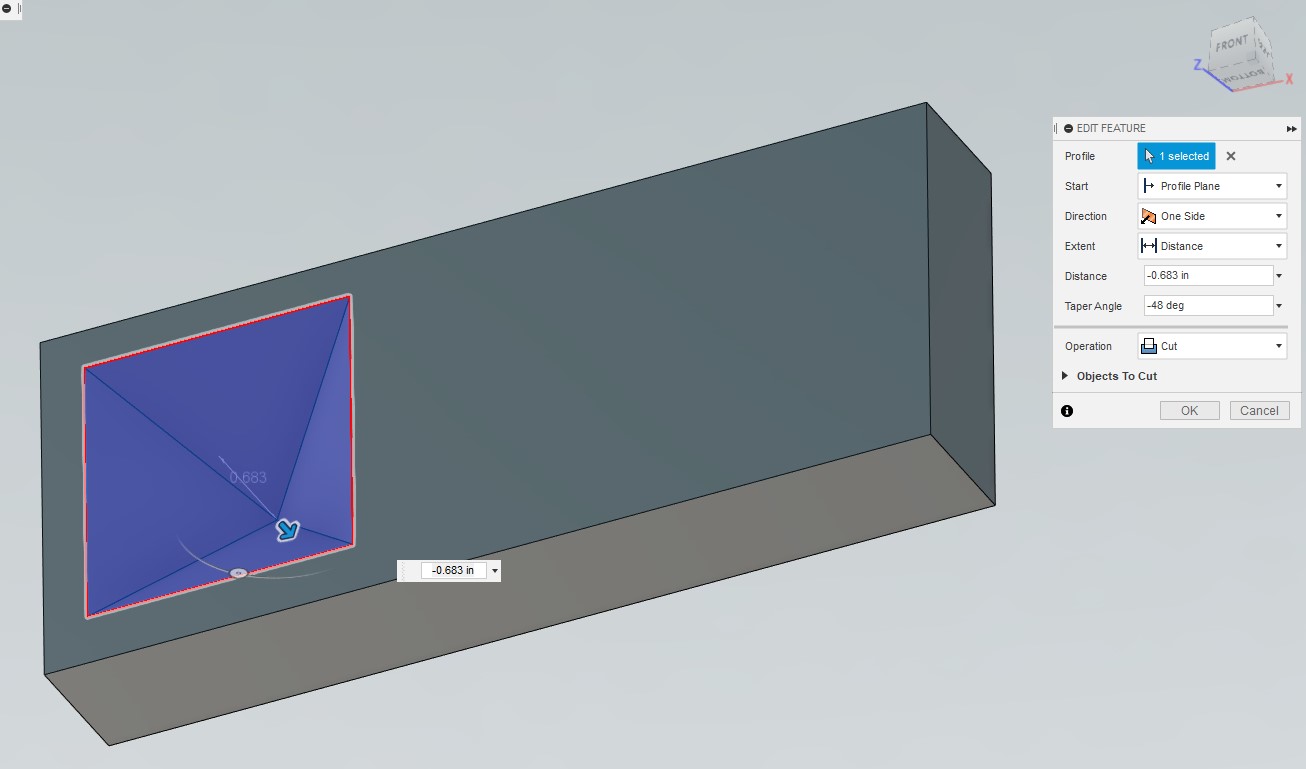
Step 2

Then do the same thing for the three-sided pyramid by cut-extruding a triangle into the box with a similar taper angle.
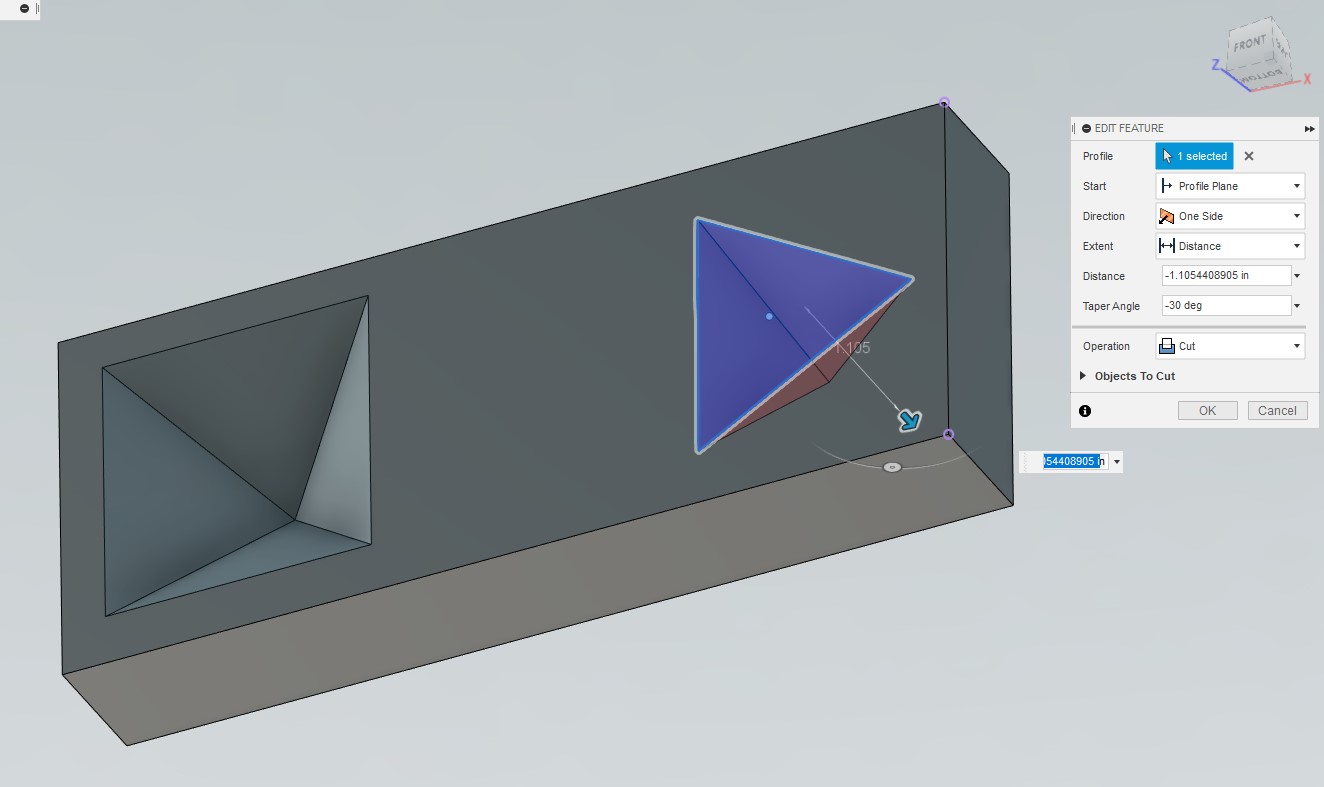
Step 3

Next, draw a semicircle and then revolve-cut that shape around its own axis to create a dome shape.
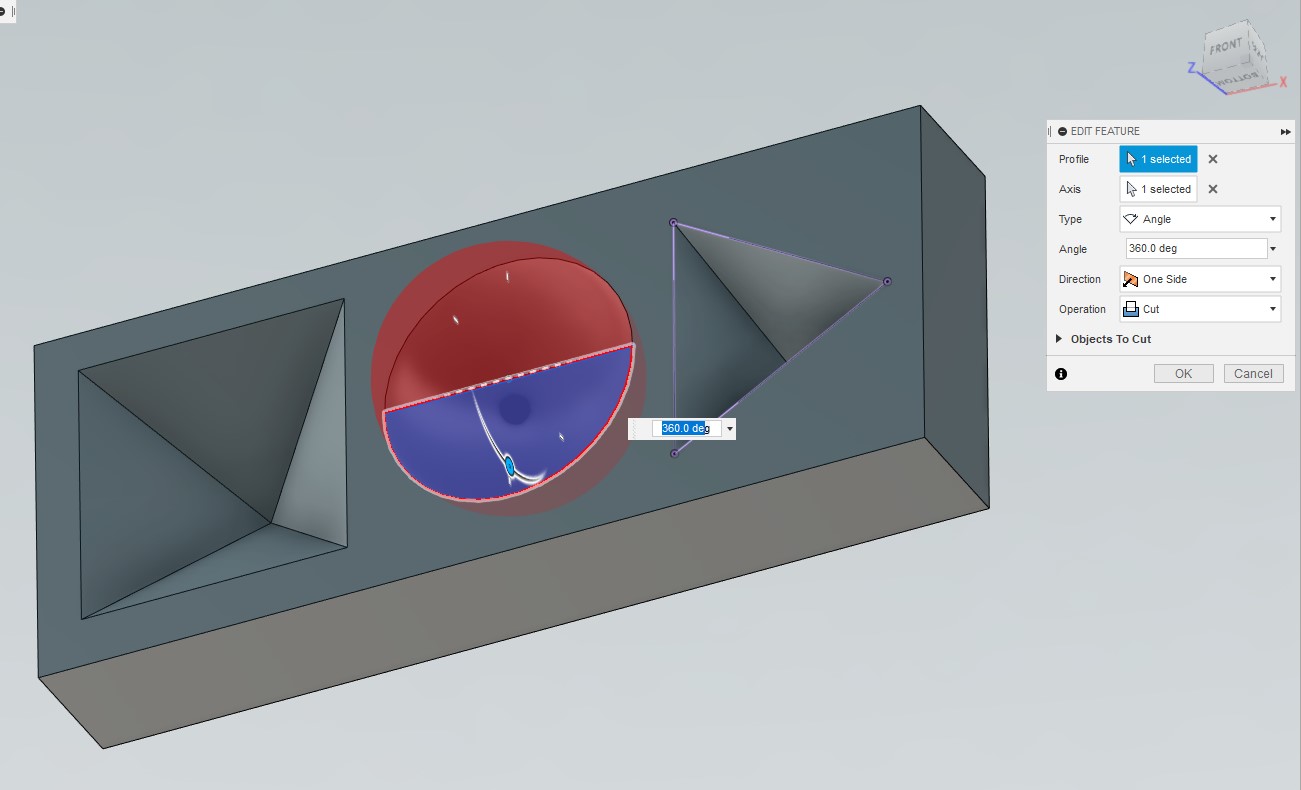
Step 4

Finally, cut away some excess material from the box. This will reduce material usage and print time while also making it easier to flex the resin pieces out of the mold after they’re cured.
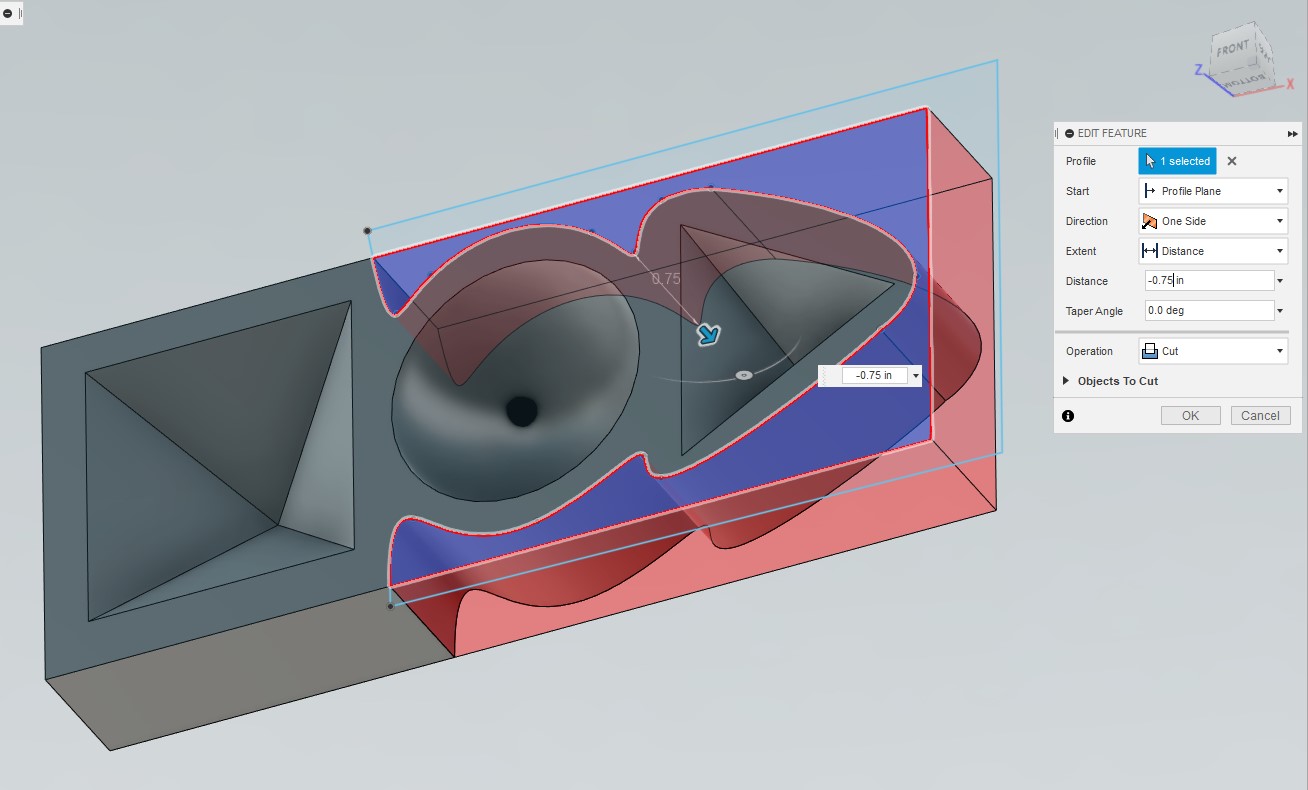
Step 5

This is what the final model looks like.
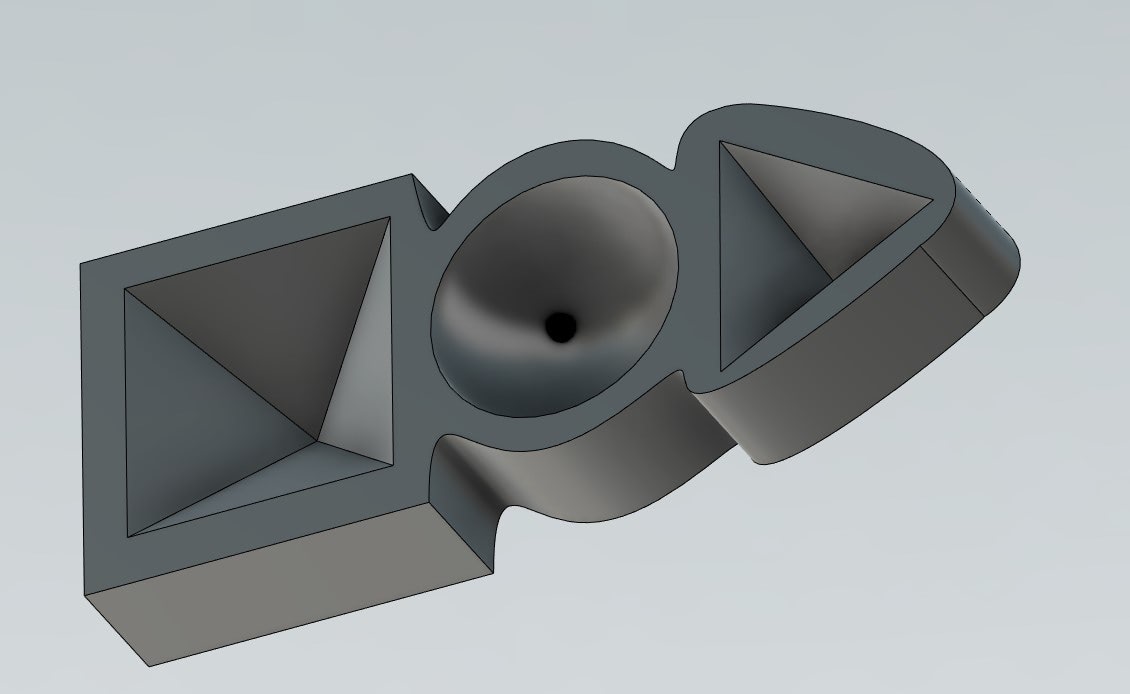
Step 6

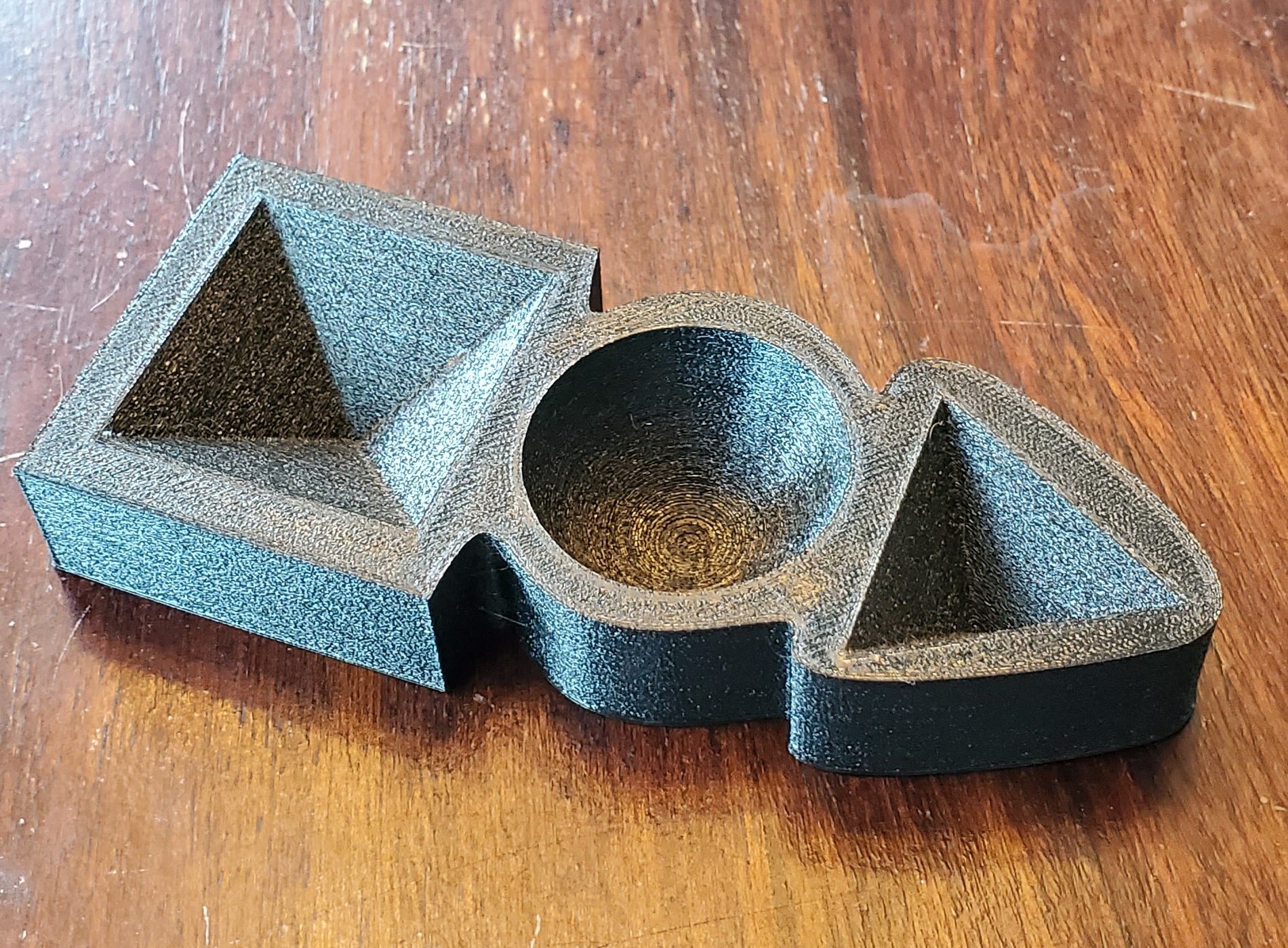
And here it is printed.

Step 7

I used a fine print setting of 0.12mm layers to produce the smoothest walls, which was especially important for the dome. With TPU, it’s a good idea to use a high infill of at least 30% because the material doesn’t bridge well; top surfaces won’t come out solid if the nozzle has to bridge the large gaps of sparse infill.

As for the mixing and pouring the resin, it’s very straightforward. To determine how much resin you’ll need, fill each of the molds with water and then pour the water from the molds into a measuring cup. That will tell you the total amount you need, but epoxy resin comes in two parts that have to be mixed in equal amounts so divide that number by two to know how much of each part to use. I needed 20ml so that’s 10ml each of Part A and Part B, plus some pretty green pigment with sparkles.
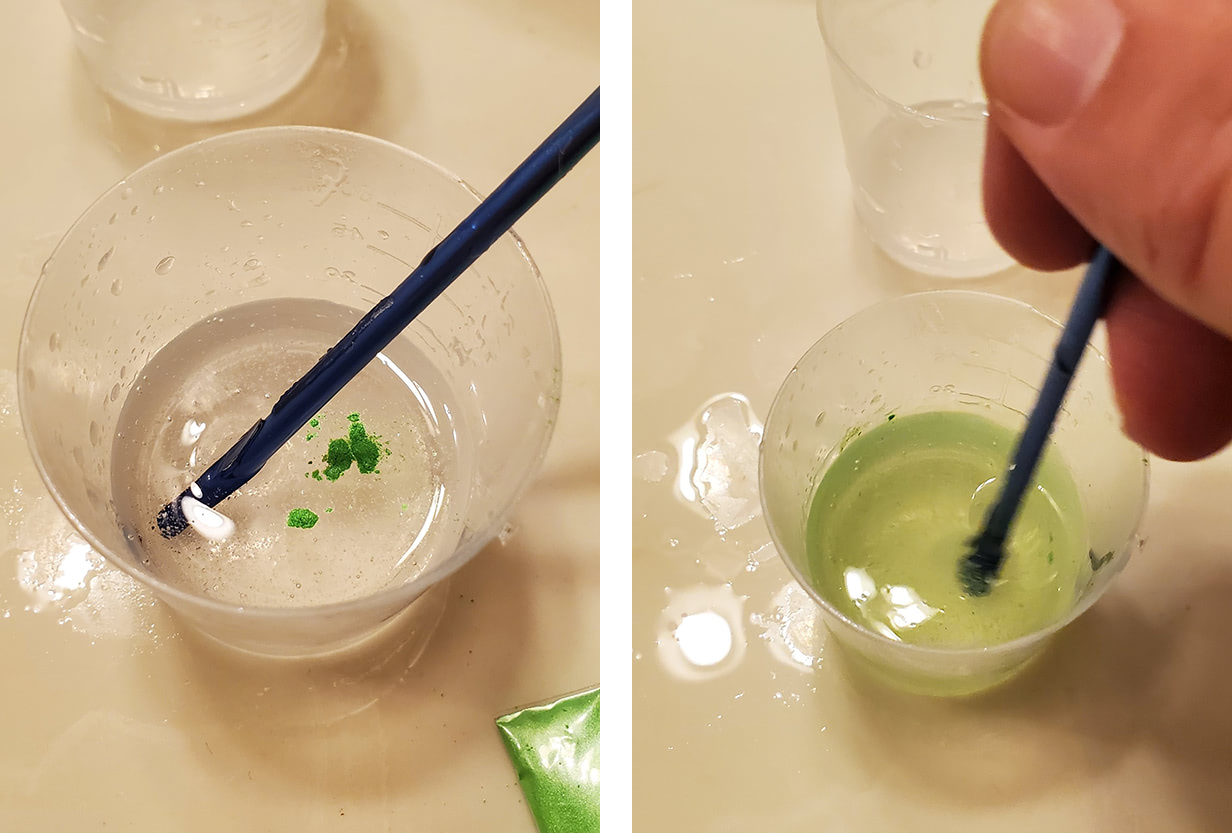
Step 8

Once it’s completely mixed, it’s time to pour into the mold.
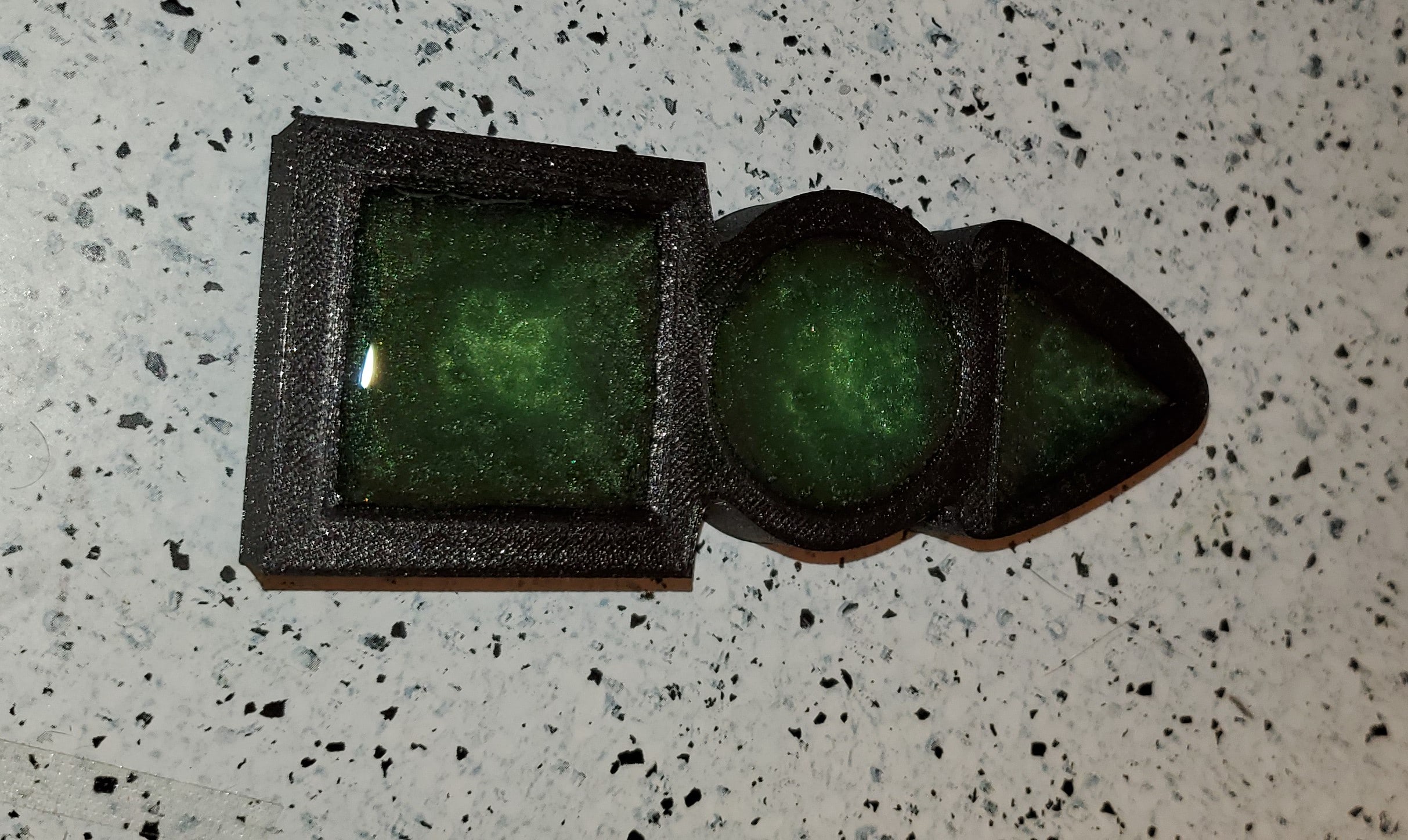
Step 9

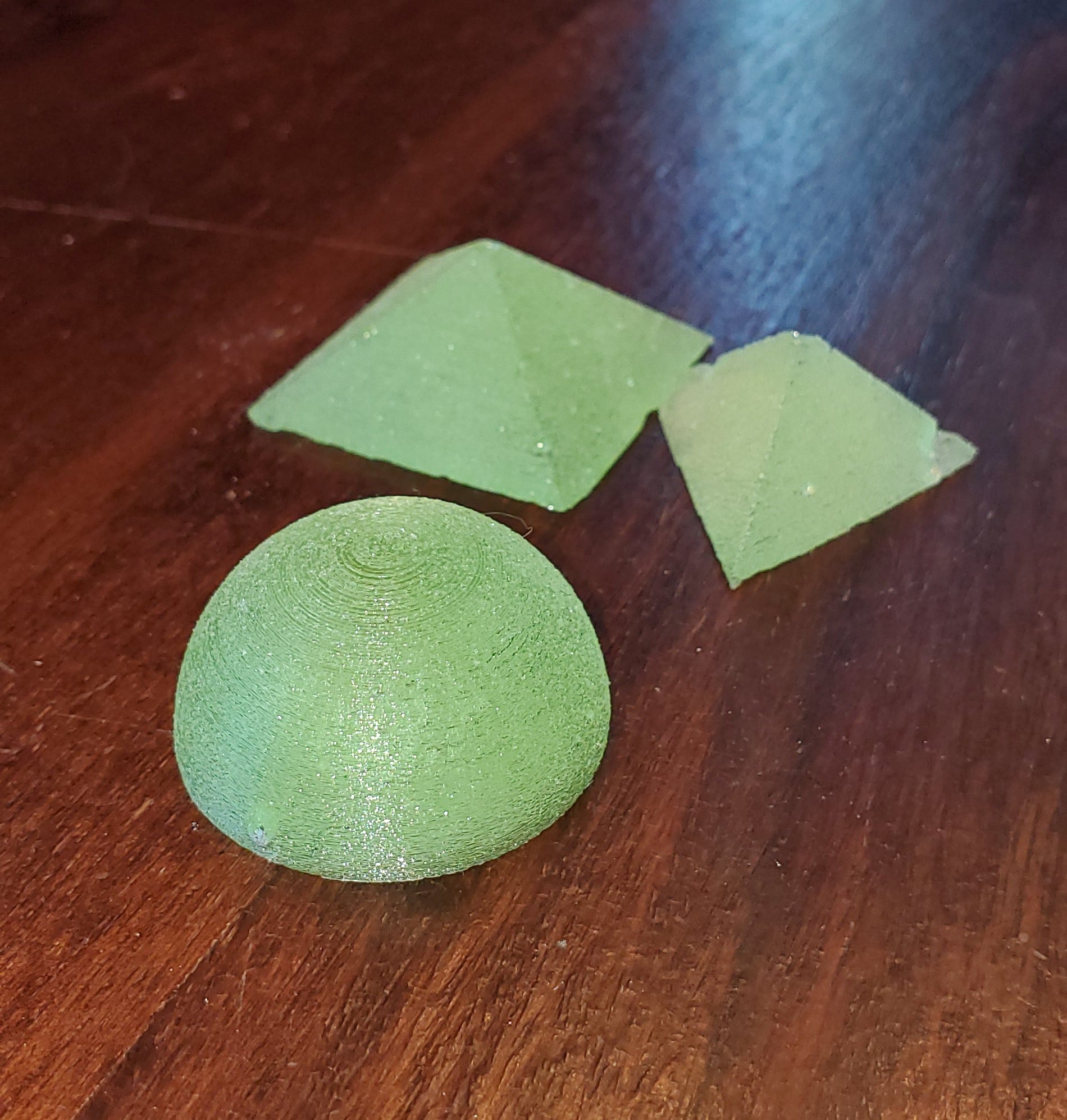
Now comes the hardest part: waiting a whole day for the resin to cure. So fast-forward 24 hours and we get these!
Step 10

Their 3D shape did make these a bit difficult to remove from the mold, and you can see that the three-sided pyramid didn’t come out cleanly. The dome and four-sided pyramid came out well, though. In the future, I’m going to try some PVA mold release for 3D shapes, but for now I’m going to make a mold for some 2D shapes that should come out easier.
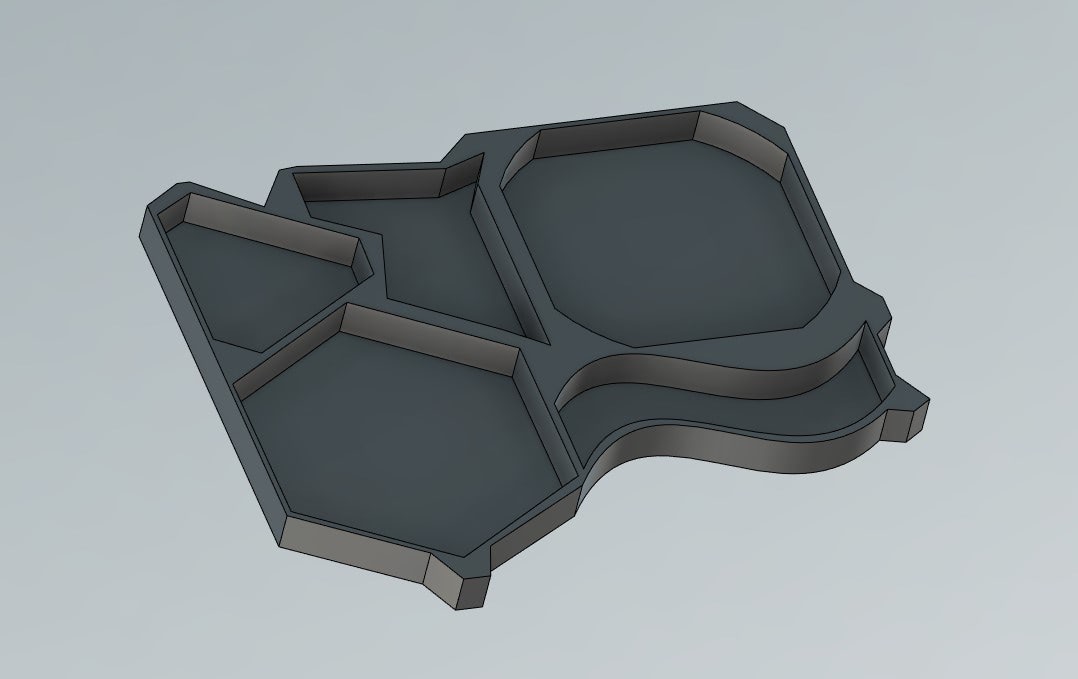
Step 11

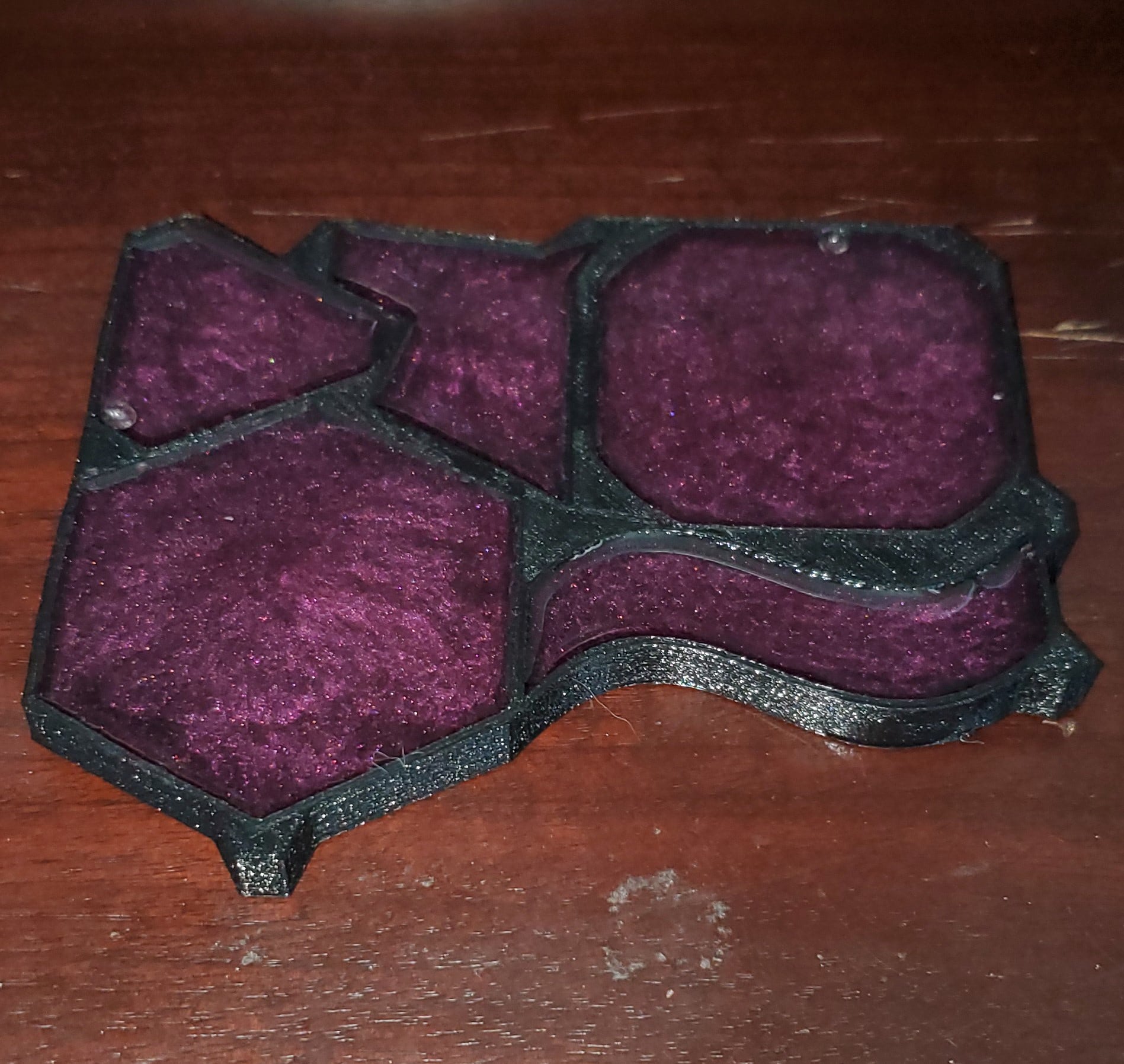
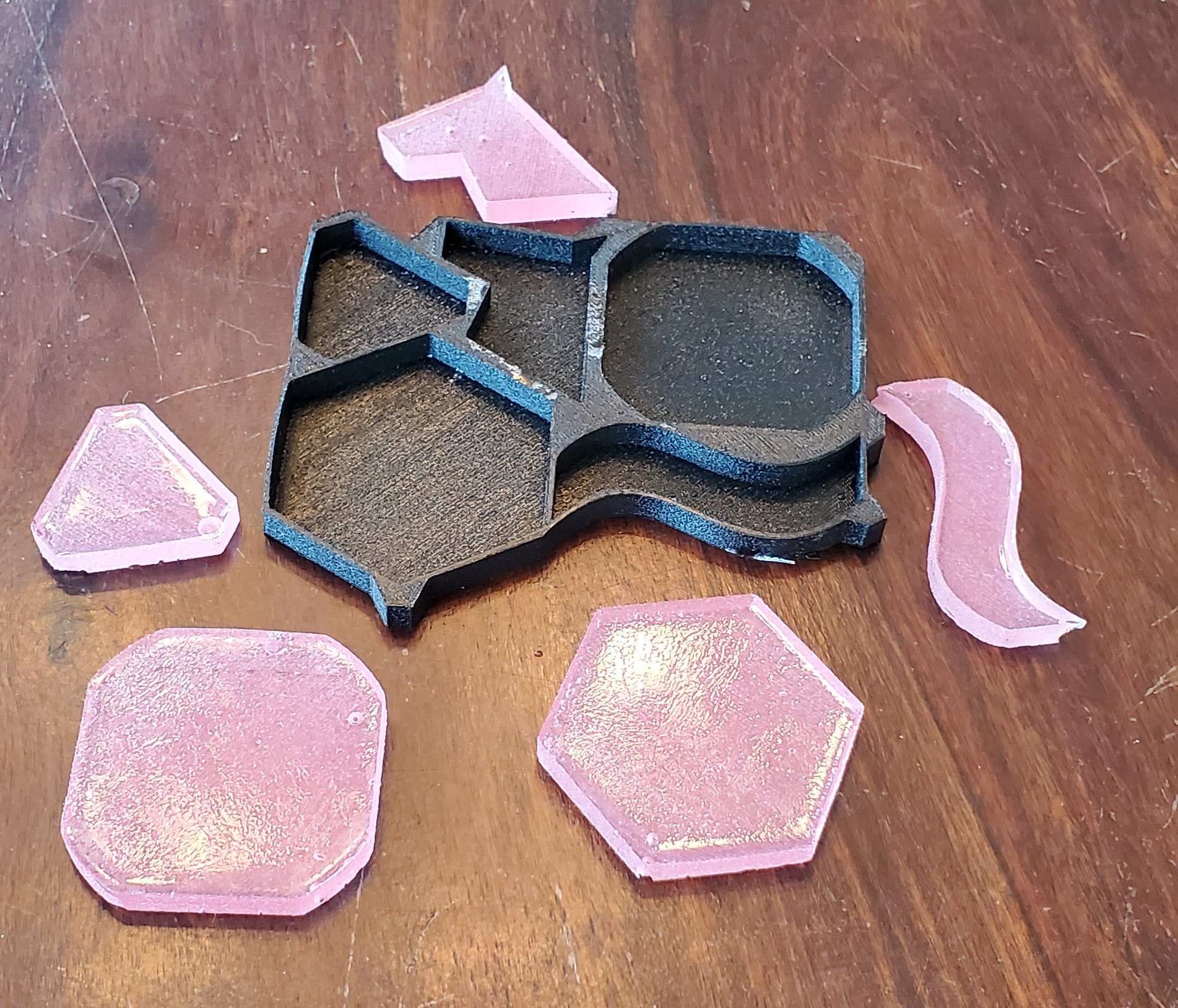
For this mold, I made the walls and bottom layer thinner to allow more bending, which should make the pieces easier to remove. I also added some tabs at the corners to serve as peel points. A red pigment was added to the resin this time, though it looks purple because of the mold being black.
TPU Mold and resin

3d printed tpu mold reusable

Those design changes made a big difference because these lovely rose-tinted pieces were a breeze to remove, and the TPU mold is ready for another run. And that’s all there is to it. All of these pieces, including the 3D shapes, can be sanded and polished to a crystal-clear finish, it just takes a bit of time.

I’m curious to see what others will do with this because it’s rather easy to do and there’s a lot of room for creativity. Show me what you got, 3D printing community.


Related Story
How to Get Stronger FDM 3D Prints
Share:
WhatsApp Twitter Facebook LinkedIn Buffer Reddit E-mail
About the author | Cameron Naramore
Cameron is a 3D printer and CNC operator. He's fond of cooking, traveling, and science fiction.
Join our newsletter

Our newsletter is free & you can unsubscribe any time.

Latest posts

Best TPU Filament 2026: Flexible Picks for Every Shore Hardness

Flexible filament, demystified: the best TPU of 2026 ranked by shore hardness, from easy 95A to soft 85A and high-speed grades, with the... read more »

Filament

Best ABS and ASA Filament 2026: Low-Warp Picks for Enclosed Printers

The best ABS and ASA filament for 2026: low-warp picks for enclosed printers, when to choose UV-stable ASA, and the settings that stop... read more »

Filament

Best PETG Filament 2026: Tough, Weatherproof Picks for Every Printer

The best PETG filament for 2026: tough, weatherproof picks across everyday, high-flow, Bambu, premium, translucent, and budget, with print settings and prices.

Filament

Hands-On Review: Revopoint Inspire 2 3D Scanner

We have recently got our hands on a couple of new scanners from Revopoint, and in this article we will be taking a... read more »

News
Inspire 2 on the tripod again

Best PLA Filament in 2026: Tested Picks for Every Grade

The best PLA filament for every job in 2026: everyday, value, premium, high-speed, matte, silk, and tough PLA+ picks compared, with prices and... read more »

Filament

New Marine Occupational Specialty Combines Welding, Machining and 3D printing

The Marine Corps is consolidating its metal worker and machinist specialties into a single new military occupational specialty, effective Oct. 1, 2026, with... read more »

Military
New Marine Occupational Specialty Combines Welding, Machining and 3D printing

Snapmaker U1 Drops to $849 for Snapmaker’s 10th Anniversary

The Snapmaker U1 brings true tool-changing to a consumer price: four print heads, five-second swaps, and far less filament waste. For Snapmaker's 10th... read more »

News
Snapmaker U1 color 3D printer with four toolheads

TDK to Acquire 3D Printing Firm Fabric8Labs for Up to $400 Million

TDK Corporation has agreed to acquire San Diego-based Fabric8Labs for up to $400 million in cash, the Japanese electronics giant announced June 10.... read more »

3D Printing Metal
TDK to Acquire 3D Printing Firm Fabric8Labs for Up to $400 Million

Formlabs Launches Fuse X1 Industrial SLS Printer Starting at $84,999

Formlabs has announced the Fuse X1, a large-format selective laser sintering 3D printer that starts at $84,999 — less than a third of... read more »

3D Printers
Formlabs Launches Fuse X1 Industrial SLS Printer Starting at $84,999

Superfeet Launches iPhone Scanning for Custom 3D-Printed Insoles

Superfeet is now letting customers scan their feet with an iPhone to order custom 3D-printed insoles directly through superfeet.com. The service requires no... read more »

News
Superfeet Launches iPhone Scanning for Custom 3D-Printed Insoles

Social

  • Facebook Facebook 3D Printing
  • Linkedin Linkedin 3D Printing
Join our newsletter

Our newsletter is free & you can unsubscribe any time.

Featured Industries

  • Automotive
  • Aerospace
  • Construction
  • Dental
  • Environmental
  • Electronics
  • Fashion
  • Medical
  • Military
  • Flashforge Guider 3 Ultra

    • - Print size: 330 x 330 x 600 mm
    • - dual extruder system
    More details »
    $2,999.00 Flashforge
    Buy Now
  • Flashforge AD5X

    • - Print size: 220 x 220 x 220 mm
    • - dual extrusion system
    More details »
    $399.00 Flashforge
    Buy Now
  • Qidi Max 4

    • - Print size: 390 x 390 x 340 mm
    • - active cooling air control
    More details »
    $1,219.00 Qidi
    Buy Now
  • Anycubic Kobra S1 Combo

    • - Print size: 250 x 250 x 250 mm
    • - budget multicolor printing
    More details »
    $429.00 Anycubic
    Buy Now
  • Qidi Q2

    • - Print size: 270 x 270 x 256 mm
    • - enclosed heated chamber up to 65°C
    More details »
    $580.00 Qidi
    Buy Now
  • Anycubic Photon Mono M7

    • - Print size: 223 x 126 x 230 mm
    • - 10.1 inch 14K screen
    More details »
    $279.00 Anycubic
    Buy Now
  • Creality Hi Combo

    • - Print size: 260 x 260 x 300 mm
    • - up to 16-color printing
    More details »
    $399.00 Creality
    Buy Now
  • Snapmaker U1

    • - Print size: 270 x 270 x 270 mm
    • - multi-color printing with SnapSwap
    More details »
    $849.00 Snapmaker
    Buy Now
  • Flashforge Adventurer 5M

    • - Print size: 220 x 220 x 220 mm
    • - 600mm/s travel speed
    More details »
    $299.00 Flashforge
    Buy Now
  • Creality K2 Plus

    • - Print size: 350 x 350 x 350 mm
    • - multi-color printing
    More details »
    $1,199.00 Creality
    Buy Now

Company Information

  • What is 3D Printing?
  • Contact us
  • Join our mailing list
  • Advertise with us
  • Media Kit
  • Nederland 3D Printing

Blog

  • Latest News
  • Use Cases
  • Reviews
  • 3D Printers
  • 3D Printing Metal

Featured Reviews

  • Anycubic Photon Mono M5s
  • Creality Ender 5 S1
  • The Mole 3D Scanner
  • Flashforge Creator 3 Pro

Featured Industries

  • Automotive
  • Aerospace
  • Construction
  • Dental
  • Environmental
  • Electronics
  • Medical
  • Military
  • Fashion
  • Art
2026 — Strikwerda en Dehue
  • Home
  • Join our mailing list
  • Contact us
Blog
  • Latest News
  • Use Cases
  • Reviews
  • 3D Printers
  • 3D Printing Metal
Featured Industries
  • Automotive
  • Aerospace
  • Construction
  • Dental
  • Environmental
  • Electronics
  • Medical
  • Military
  • Fashion
  • Art
Company Information
  • What is 3D Printing?
  • Contact us
  • Join our mailing list
  • Advertise with us
  • Media Kit
  • Nederland 3D Printing