3D Printing
News Videos Newsletter Contact us
Home / Filament / All You Need to Know About Nylon Filament
qidi

All You Need to Know About Nylon Filament

July 22, 2019

Nylon has an enduring popularity within the 3D printing industry. It is applicable to both material extrusion and powder bed fusion 3D printing technologies. It can be difficult to print on a desktop 3d printer, so we’ve gathered a few tips and tricks.

About Nylon

Nylon is a synthetic polymer which is based on polyamides. It’s resilient, strong, durable and a tad bit flexible. Another property is that it’s hydroscopic. This means it absorbs liquids. This makes nylon a good choice when you need to dye your printed part in a certain color. It also means that nylon filament has a short shelf live and is difficult to store.
Related Story
Filament Storage For 3D Printing: Your How-To Guide

Functional 3D printed parts

Since nylon has such a unique durability to flexibility ratio, it is often used for functional parts. Think of prosthetics, medical equipment, connectors and living hinges.
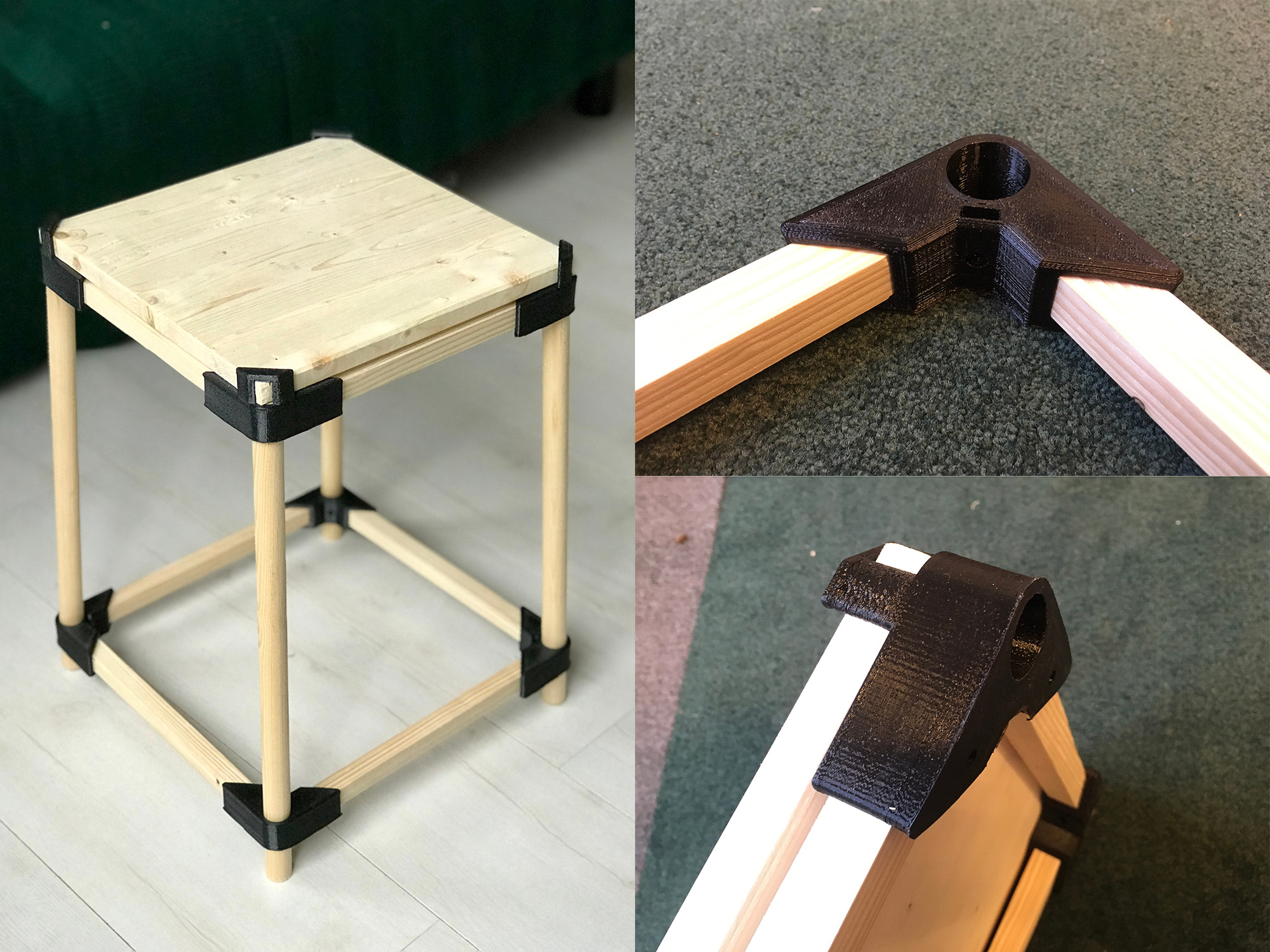
stool 3d printed connectors nylon filament
These nylon connectors were printed on a Dremel 3D45. <a href="https://3dprinting.com/reviews/dremel-3d45-review/" rel="noopener noreferrer" target="_blank">Read our 3D45 review here</a>.

Why Nylon?

Nylon has its own distinct pros and cons:

Pros

  • Nylon is very resilient and durable.
  • Excellent strength to flexibility ratio.
  • Easily colored / dyed.
  • UV resistant and higher chemical resistance than PLA or ABS.

Cons

  • Nylon is very sensitive to moisture and must be kept dry.
  • You’ll need to store nylon filament in a moisture free container or drybox.
  • You might need to dry it in an oven prior to printing.
  • First layers tends to warp.
  • Most nylon brands have a shelf life of max. 12 months.
  • Nylon can (potentially) shrink during cooling so printed parts may be less precise.

Requirements

There are quite a few desktop printers that are capable of printing nylon filament. Due to it’s moisture absorption and being sensitive to temperature changes we recommend to use:

  • A print chamber enclosure (temperature controlled would be even better).
  • Heated bed not necessary for all nylon filaments (yet preferable).
  • Some sort of adhesion spray or glue stick to prevent warping.
warping example 3d printing
Related Story
How to Prevent Warping
fusion 3 fully enclosed 3d printer
Related Story
The Benefits of Fully Enclosed Filament 3D Printers

Print Temperature

Things can get tricky here. Nylons can vary widely in terms of temperatures, cause each brand has their own range of nylons. Temperatures can range from 446 °F / 230 °C all the way up to 572 °F / 300 °C.


Share:
WhatsApp Twitter Facebook LinkedIn Buffer Reddit E-mail
Join our newsletter

Our newsletter is free & you can unsubscribe any time.

Social

  • Facebook Facebook 3D Printing
  • Linkedin Linkedin 3D Printing
banner
banner
Join our newsletter

Our newsletter is free & you can unsubscribe any time.

Featured Industries

  • Automotive
  • Aerospace
  • Construction
  • Dental
  • Environmental
  • Electronics
  • Fashion
  • Medical
  • Military
  • Flashforge Guider 3 Ultra

    • - Print size: 330 x 330 x 600 mm
    • - dual extruder system
    More details »
    $2,999.00 Flashforge
    Buy Now
  • Creality Hi Combo

    • - Print size: 260 x 260 x 300 mm
    • - up to 16-color printing
    More details »
    $399.00 Creality
    Buy Now
  • Qidi Q2

    • - Print size: 270 x 270 x 256 mm
    • - enclosed heated chamber up to 65°C
    More details »
    $580.00 Qidi
    Buy Now
  • Anycubic Kobra S1 Combo

    • - Print size: 250 x 250 x 250 mm
    • - budget multicolor printing
    More details »
    $429.00 Anycubic
    Buy Now
  • Flashforge AD5X

    • - Print size: 220 x 220 x 220 mm
    • - dual extrusion system
    More details »
    $399.00 Flashforge
    Buy Now
  • Flashforge Adventurer 5M

    • - Print size: 220 x 220 x 220 mm
    • - 600mm/s travel speed
    More details »
    $299.00 Flashforge
    Buy Now
  • Qidi Max 4

    • - Print size: 390 x 390 x 340 mm
    • - active cooling air control
    More details »
    $1,219.00 Qidi
    Buy Now
  • Snapmaker U1

    • - Print size: 270 x 270 x 270 mm
    • - multi-color printing with SnapSwap
    More details »
    $849.00 Snapmaker
    Buy Now
  • Creality K2 Plus

    • - Print size: 350 x 350 x 350 mm
    • - multi-color printing
    More details »
    $1,199.00 Creality
    Buy Now
  • Anycubic Photon Mono M7

    • - Print size: 223 x 126 x 230 mm
    • - 10.1 inch 14K screen
    More details »
    $279.00 Anycubic
    Buy Now

Company Information

  • What is 3D Printing?
  • Contact us
  • Join our mailing list
  • Advertise with us
  • Media Kit
  • Nederland 3D Printing

Blog

  • Latest News
  • Use Cases
  • Reviews
  • 3D Printers
  • 3D Printing Metal

Featured Reviews

  • Anycubic Photon Mono M5s
  • Creality Ender 5 S1
  • The Mole 3D Scanner
  • Flashforge Creator 3 Pro

Featured Industries

  • Automotive
  • Aerospace
  • Construction
  • Dental
  • Environmental
  • Electronics
  • Medical
  • Military
  • Fashion
  • Art
2026 — Strikwerda en Dehue
  • Home
  • Join our mailing list
  • Contact us
Blog
  • Latest News
  • Use Cases
  • Reviews
  • 3D Printers
  • 3D Printing Metal
Featured Industries
  • Automotive
  • Aerospace
  • Construction
  • Dental
  • Environmental
  • Electronics
  • Medical
  • Military
  • Fashion
  • Art
Company Information
  • What is 3D Printing?
  • Contact us
  • Join our mailing list
  • Advertise with us
  • Media Kit
  • Nederland 3D Printing