
A 3D printer is a machine that builds a physical, three-dimensional object from a digital design by adding material one thin layer at a time. This layer-by-layer approach is called additive manufacturing: instead of cutting or carving material away, a 3D printer adds material only where it is needed, stacking hundreds or thousands of layers until the finished object takes shape.
If you have ever watched a hot glue gun lay down a bead of plastic, you already understand the basic idea. A 3D printer does the same thing with far more precision, following a digital blueprint to place each layer in exactly the right spot. This guide is part of our complete introduction to what 3D printing is. Below we break down what is inside a 3D printer, how it turns a file into an object, the types available, and what you need to get started.
A 3D printer in four lines
It builds, not carves. Material is added layer by layer until the object exists.
It follows a file. Every print starts as a digital 3D model.
A handful of core parts. Extruder, bed, motion system, and a control board do the work.
Several types. Filament, resin, powder, and metal machines share the same core idea.
Jump to a section
What is a 3D printer? The short answer
A 3D printer is a device that creates solid objects from a digital 3D model by depositing material, usually plastic, resin, or powder, in successive layers. Each layer fuses to the one beneath it, gradually building the object from the bottom up. Because it adds material rather than removing it, a 3D printer can produce complex shapes that would be difficult, wasteful, or impossible to make with traditional manufacturing.
That definition covers everything from a $200 desktop machine printing a phone stand to an industrial system fusing titanium for jet engines. The scale and materials change; the principle does not.
What are the main parts of a 3D printer?
3D printers vary by type, but most desktop machines share the same core components. Once you can name these five, the whole machine stops looking mysterious.
Extruder (print head)
The extruder is the heart of a filament-based printer; think of it as a precise, computer-controlled hot glue gun. It has two halves. The cold end holds a motor that grips the filament and pushes it forward. The hot end melts the filament and squeezes it out through a fine nozzle. Nozzle size (commonly 0.4 mm) affects both detail and print speed.
Print bed
The print bed is the flat surface the object is built on. Many printers use a heated bed, which keeps the first layers warm so the object sticks properly and does not warp or curl as it cools. Beds may be glass, coated metal, or a flexible removable sheet that lets you pop finished prints off with a bend.
Filament or material
This is the raw material the printer consumes. On consumer machines it is usually a plastic filament wound on a spool and fed into the extruder. PLA is the common starting point because it is cheap and easy; PETG and ABS trade some of that ease for toughness. Other printer types use liquid resin or fine powder instead. Our 3D printer filament guide covers the materials in depth.
Motion system (X, Y and Z axes)
A set of motors, belts, and rails moves the print head and bed precisely along three axes: X (left to right), Y (front to back), and Z (up and down). Coordinating these three movements is what lets the printer place material at any point in 3D space, over and over, thousands of times per print.
Cooling fan and control board
A small cooling fan sets the freshly deposited plastic so it holds its shape before the next layer lands. The control board is the printer’s brain: it reads the digital instructions and tells every motor, heater, and fan exactly what to do, and when.
How does a 3D printer work?
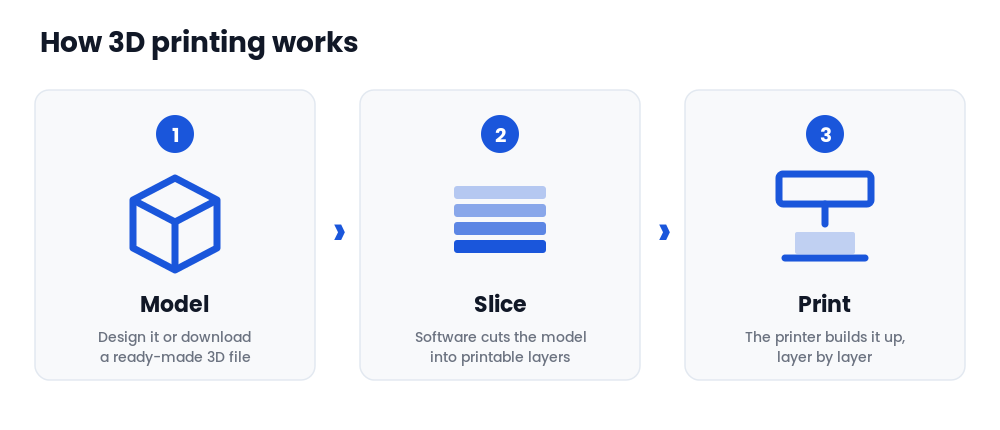
At a high level, a 3D printer follows four stages. You start with a digital 3D model. Software slices that model into hundreds of thin horizontal layers. The printer builds those layers one on top of another. Finally you finish the object by removing supports and cleaning it up.
That is the short version, and it is the same whether you are printing a phone case or a prototype part. We cover every stage in detail, including slicing, G-code, and post-processing, in our dedicated guide to how 3D printing works.
What types of 3D printers are there?
Not all 3D printers build objects the same way. They are generally grouped by the form of material they use:
- Filament (FDM/FFF). Melts and extrudes plastic filament. The most common and affordable type, ideal for beginners and everyday printing.
- Resin (SLA/DLP). Uses UV light to cure liquid resin. Produces very fine detail; popular for miniatures, jewelry, and dental models.
- Powder (SLS/MJF). Fuses fine nylon powder with a laser or heat. Creates strong, durable parts without support structures; used mostly in professional settings.
- Metal (DMLS/SLM). Fuses metal powder for industrial and engineering applications.
Each technology has its own strengths, costs, and ideal uses. For the full comparison, including how each one actually forms a layer, see our guide to the types of 3D printing.
What can you make with a 3D printer?
The range is enormous, which is a big part of the appeal. People use 3D printers to make replacement parts and household repairs, prototypes and product models, toys, figurines and tabletop miniatures, custom tools and organizers, classroom models, and functional end-use parts in industries from aerospace to dentistry. Because every object starts as a digital file, you can download ready-made designs or create your own, and print the same item again whenever you need it. Our overview of 3D printing use cases shows how far this goes in industry.
What do you need to start 3D printing?
Getting started takes three things:
- A 3D printer. For most beginners, an entry-level filament (FDM) machine offers the best balance of price and ease. See our picks for the best 3D printers for beginners.
- Slicer software. A free program that converts a 3D model into printer instructions. We compare the options in our 3D printer slicer guide.
- Filament or material. Matched to your printer and your project.
From there it is a matter of loading a model, slicing it, and pressing print. The learning curve is gentler than most people expect, and free model libraries such as our roundup of the best free 3D printable models mean you never have to design anything to get value from the machine.
Frequently asked questions
Ready to choose your first machine?
Start here
Best 3D Printers for Beginners ↗
Hands-on recommendations for a first machine that works out of the box, with the setup pitfalls flagged before you hit them.
Keep learning
The full process from digital model to finished part, step by step: modeling, slicing, printing, and post-processing.