This article is sponsored content.
Type a sentence, wait five minutes, and walk away with a printable 3MF project file. That is the promise behind Hi3D, an all-in-one AI platform that compresses the entire idea-to-print pipeline into a single workflow. We put it to the test by inventing an original Blokees-style mecha from nothing but a text prompt.
The Core Promise
Enter a prompt. Receive a printable, watertight 3MF project. Start to finish in under five minutes.
For many Blokees collectors, the hobby never stops at the box. The real fun is imagining new characters, alternate armor sets, hidden forms, and original mecha that never shipped in any product line. The catch has always been the toolchain. Turning an idea into a physical model traditionally meant juggling Blender, CAD software, mesh repair tools, and slicing software, plus the years of experience needed to make them cooperate.
Hi3D sets out to remove that complexity. Here is how our five-minute build went, step by step.
What the workflow looks like
| Stage | What Hi3D does | Time |
|---|---|---|
| 1. Concept | Generates character art from a text prompt | Seconds |
| 2. 3D model | Rebuilds a watertight, print-ready mesh | ~2 min |
| 3. Part splitting | Divides the model into logical printable sections | <2 min |
| 4. Connectors | Adds fixed or ball-joint connectors with tolerances | Seconds |
| 5. Print prep | Orients parts and exports an enhanced 3MF | Seconds |
| 6. Print and assemble | You print, then click the parts together | Hands-off |
Step 1: Generate a mecha concept
Inside Hi3D, we entered a single line:
“Chibi Optimus Prime figure, 3D appearance, blue, pink and white color scheme, clean background.”
Within seconds, Hi3D’s image generator, the Nano-Banana model, returned a complete character concept. The real advantage is what Hi3D does next with it. Switching on Multi-View Mode generated consistent perspectives across the head, torso, limbs, and mechanical detailing, so the concept holds together when it reaches the 3D reconstruction step rather than just looking good from one angle. For a lot of hobbyists, that single step already clears the highest hurdle: designing an original character from scratch.
Step 2: Build a high-precision 3D model in two minutes
With the concept approved, one click on Generate 3D handed the job to the Sparc3D engine, which reconstructed a high-quality model in roughly two minutes. The important part is what comes out the other side. This is not a display mesh that looks solid and falls apart at the slicer. It is a manufacturing-ready, watertight model, with structural continuity, topology integrity, and printability handled automatically in the background.
In practice, that erases the stage most makers dread: no Blender cleanup, no Meshmixer repair, no hunting down non-manifold geometry before a print will even start. Hours of manual prep collapse into a couple of minutes.
Step 3: Automatic part splitting
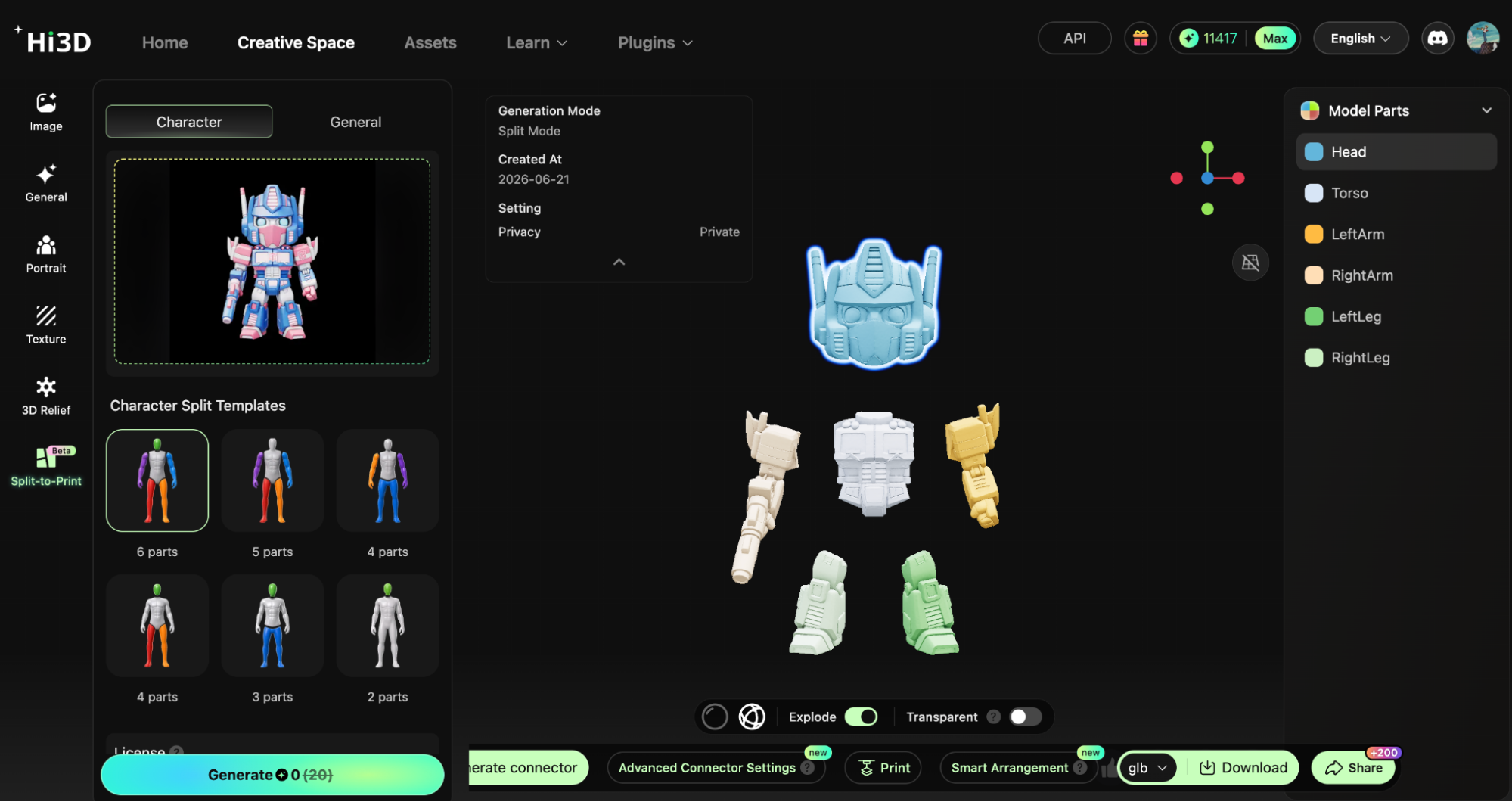
Large mecha are rarely practical to print in one piece. Limbs, armor sections, and weapons usually have to be divided into smaller components, a job that traditionally means manual cutting inside Blender or CAD. Hi3D automates it. The system reads the model structure and separates it into logical sections: head, torso, arms, legs, and weapon assemblies, with each part optimized for printing and assembly. Our complete character was split into multiple components in under two minutes.
Step 4: Automatic connector generation
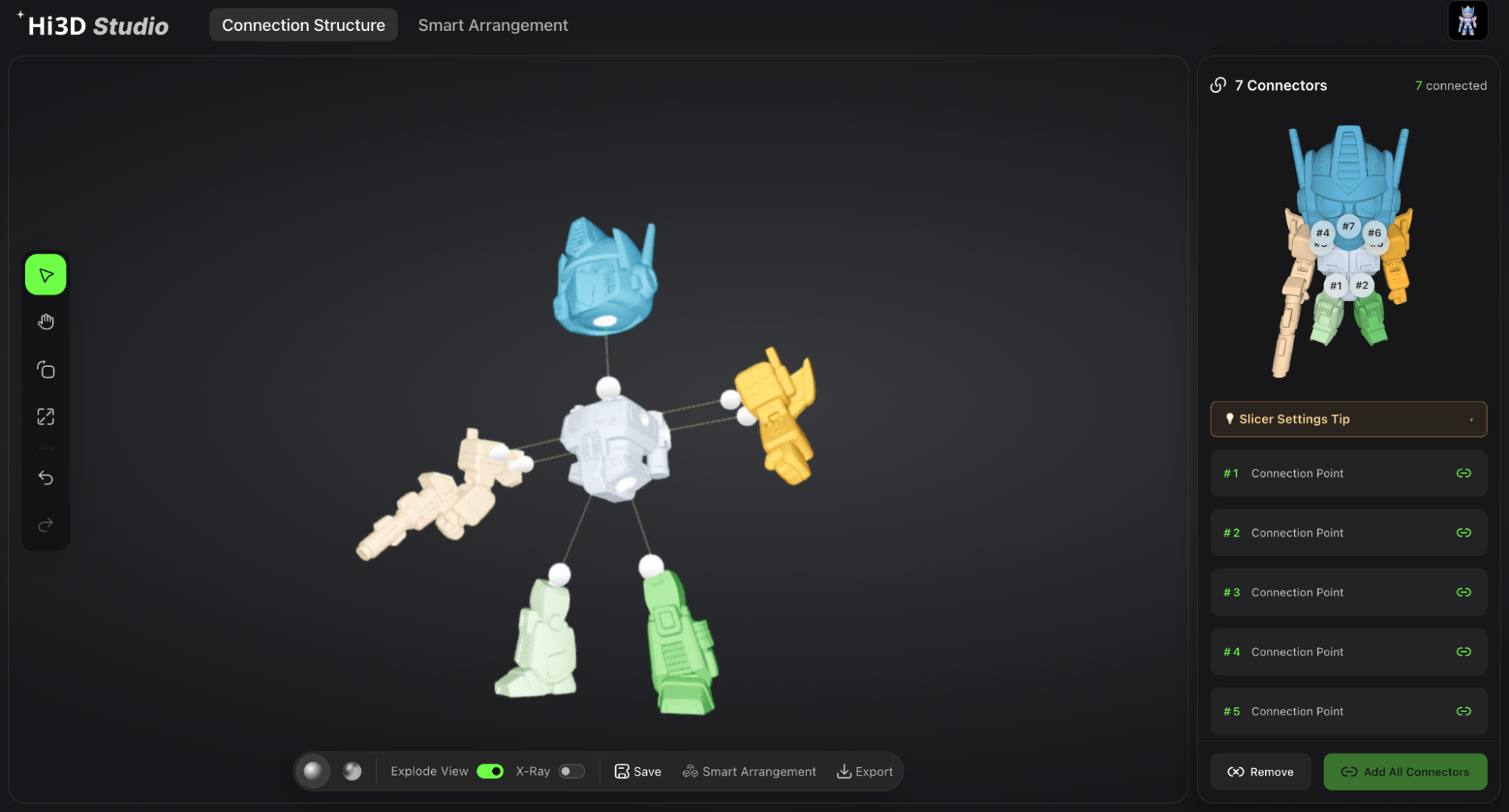
For most hobbyists, splitting a model is not the hard part. Getting the pieces to fit together is. After splitting, Hi3D generates the connector structures for you. You can choose fixed connectors for static display models or ball-joint systems for articulated figures. At the same time, its Press-Fit Tolerance system calculates assembly clearances from your printer settings, nozzle size, and material characteristics. Instead of printing test parts over and over and nudging dimensions by hand, you assemble straight off the build plate. For Blokees-style builders, the result feels closer to clicking together a premium construction toy than engineering a custom mechanism.
Step 5: Smart print preparation
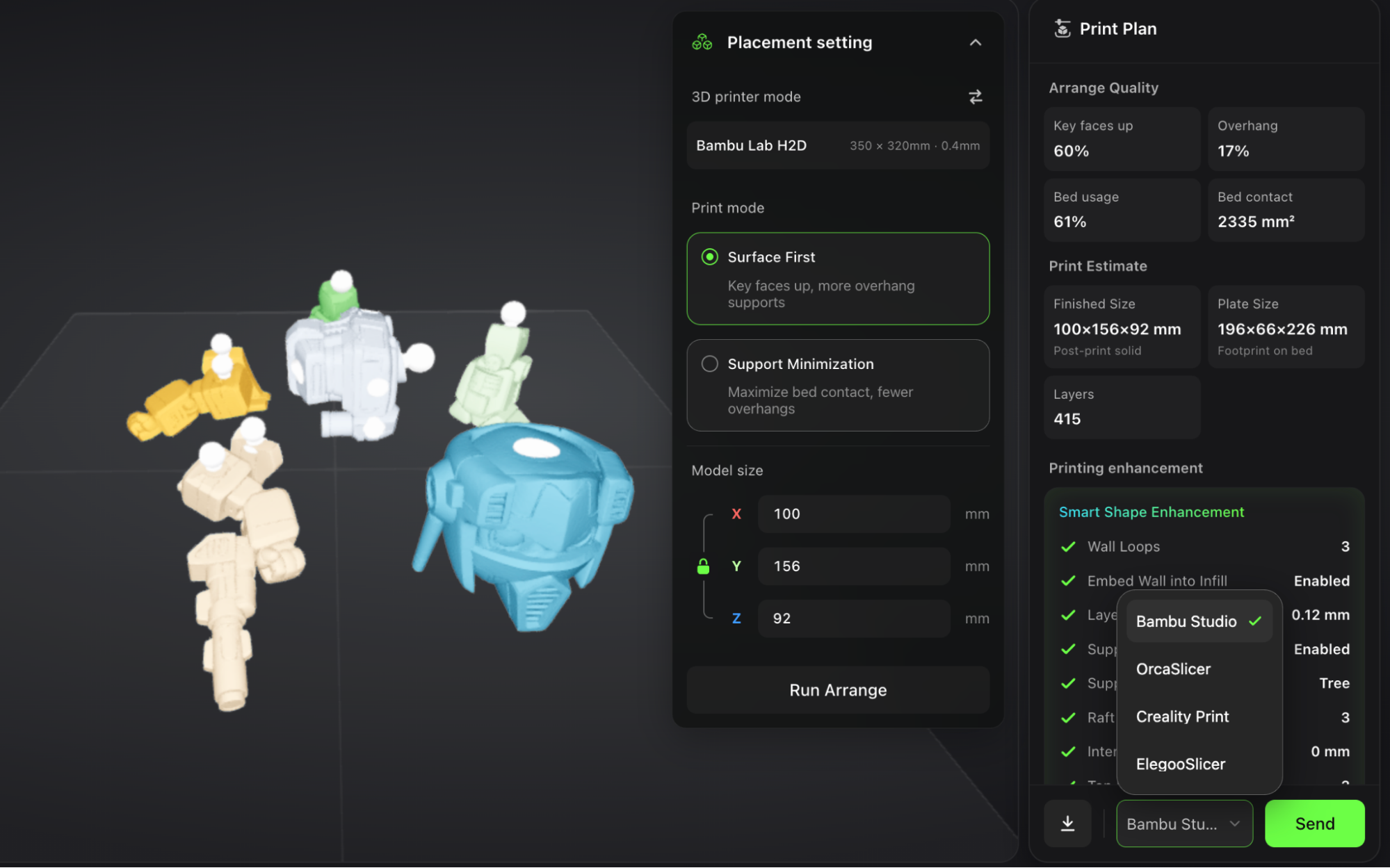
With the model finished, Hi3D prepares it for manufacturing. Its build-plate optimization picks print orientations from the geometry itself: character parts are oriented for surface quality, while mechanical components are oriented to cut support material and shorten print time. The platform then exports an enhanced 3MF project that drops straight into the most popular 3D printer slicers, including Bambu Studio, OrcaSlicer, Creality Print, and Elegoo Slicer. From concept to a print-ready file, the whole sequence takes about five minutes. The rest is down to your printer.
Step 6: From idea to physical mecha
A few hours later, the parts came off the printer and clicked together using the connectors Hi3D had generated. What we held was not just another collectible. It was an original character that had existed, minutes earlier, only as a sentence.
This is where Hi3D gets genuinely interesting for makers and collectors. Rather than spending the evening learning four software packages, you spend it on the idea. Concepts that used to live as sketches, forum threads, or fan art can become physical objects with very little technical effort. For Blokees enthusiasts, that means moving past official releases and building entirely new mechanical worlds of your own.
What is doing the heavy lifting
|
Nano-Banana The image model behind the concept step, paired with Multi-View Mode for consistent perspectives across the whole figure. |
Sparc3D Reconstructs a watertight, manufacturing-ready mesh in roughly two minutes, no manual repair required. |
|
|
Auto Split & Connectors Logical part division plus fixed or ball-joint connectors generated automatically. |
Press-Fit Tolerance Clearances calculated from your printer, nozzle, and material so parts are sized to fit straight off the plate. |
About Hi3D
Hi3D is an all-in-one AI 3D maker platform for makers, hobbyists, and 3D printing enthusiasts. It links the full journey from idea to physical object, combining AI image generation, high-precision 3D reconstruction, automatic mesh repair, intelligent part splitting, connector generation, smart tolerance optimization, build-plate arrangement, and one-click 3MF export in one place.
To mark its first anniversary, Hi3D is running a global creator campaign with subscription discounts, creator competitions, Bambu Lab printers, LEGO prizes, and early access to the upcoming Hi3D 3.0 release. New users also get 300 free credits to try the complete AI-to-print workflow.
Features, credit offers, and campaign details are set by Hi3D and may change. Verify current terms at Hi3D.ai before purchase.