3D Printing
News Videos Newsletter Contact us
Home / Reviews / Hands-on Review: PLX Filament

Hands-on Review: PLX Filament

Editors rating:

As previously mentioned, we’re working our way through reviewing most of BigRep’s filament offerings. Today, we’ll be looking at PLX, a PLA-derived material that’s engineered to be especially versatile. BigRep claims that printer settings can be tuned to print PLX very quickly or to produce “beautifully smooth surface finishes,” all while boasting mechanical properties that rival ABS. If that’s all true, this should be an amazing material. Let the tests commence!

As with all the other filaments we’ve received from BigRep, the PLX is professionally packaged and perfectly spooled. There are no tangles to unwind and there don’t appear to be noticeable deviations in the roundness. It loaded into the Ultimaker S5 using standard PLA settings just fine; all prints were done at 200°C for the hotend and 60°C for the bed.

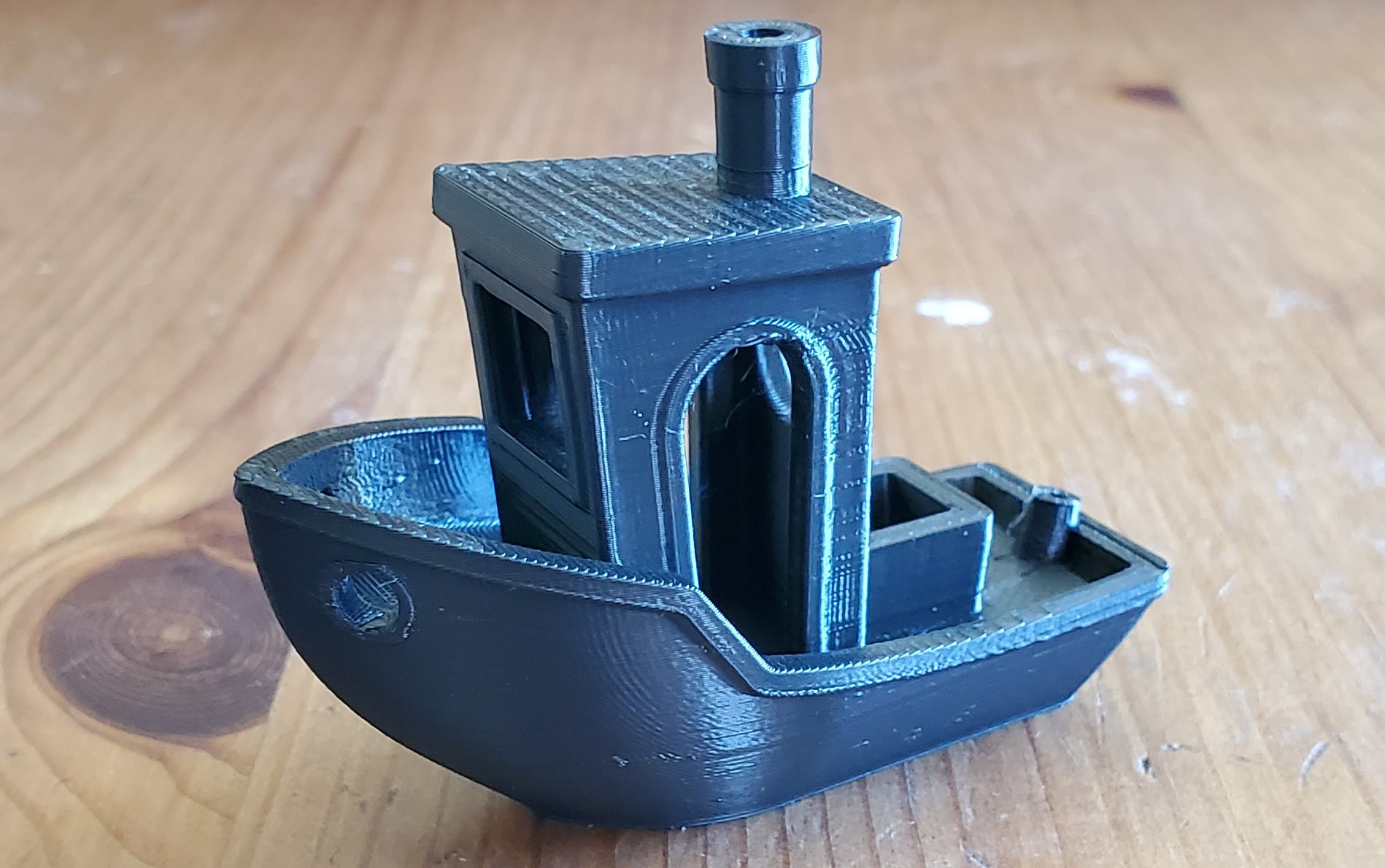
The trusty Benchy gets us started printed in the default 0.15mm layer profile for PLA in Cura.
plx benchy

That’s a very good showing. Every feature is crisp and smooth. There are no signs of trouble on the overhangs of the bow and all the pillars are clean. The material is rather shiny so what look like imperfections are really just glare. That’s one of the reasons I prefer more matte colors but that’s beside the point. This is an excellent first print. Let’s move on to the All In One 3D Printer Test.
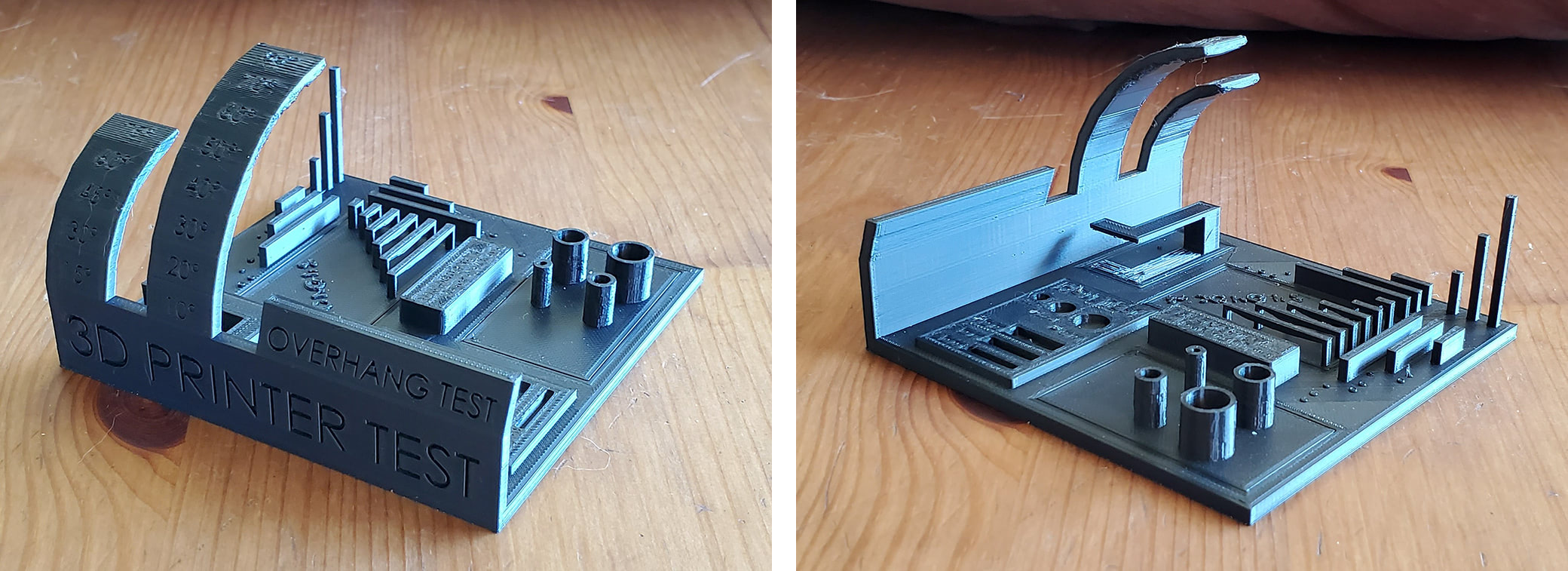
plx filament 3d printer test

Again, an excellent result. Look at how straight the corners of the pillars are. There were only the faintest of strings on the pillars that were easily removed with a light brushing of the fingers. Top surfaces are incredibly smooth and solid. The overhangs don’t start deteriorating until 70+°, which is as good as the best I’ve seen. I don’t usually remove the support (under the floating L shape) when I print this model because it’s included in the model and thus can’t be tuned; that means the gap between the support and the model is static and won’t work as well for all materials and print settings. In short, it’s usually incredibly difficult to remove the support material on this model without breaking the print. But the surfaces came out so well that I decided to try, after taking some pictures first of course. As you can see, the support came out and the part survived. There’s a bit of scarring on the top surface where it was removed but that’s mostly related to the same problem of the support not being tunable in the slice parameters. The only issue is that the bridges are sagging just a bit so let’s see how PLX handles the Bridging Test.
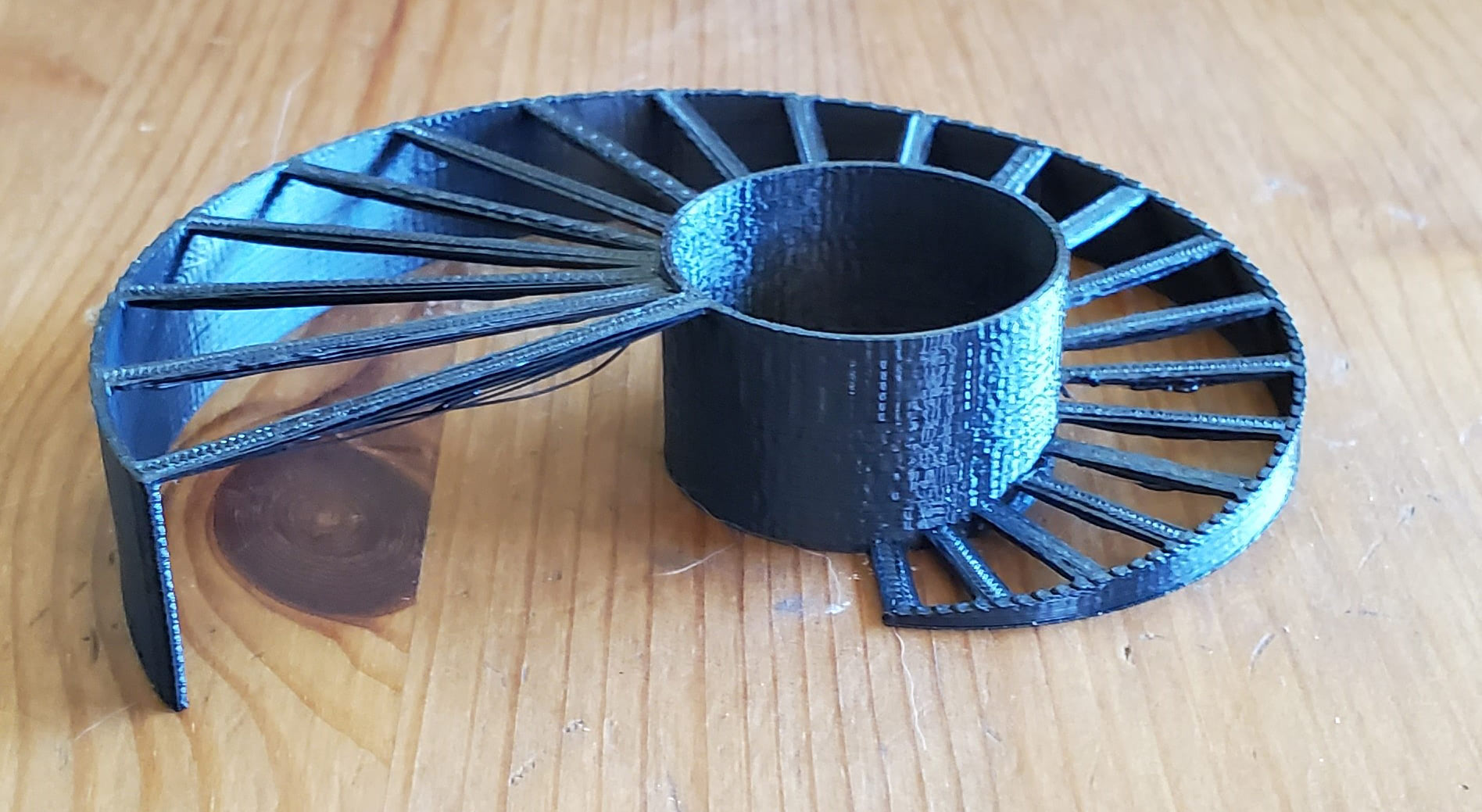
plx bridging

It did alright. Not terrible but we’ve seen better. Most of the bridges are flat on top with slight sagging on the bottom, though several are fairly flat on the bottom as well. Bridging is one of those tricks that usually takes some tuning for each material to get consistent results and I’m working with mostly default print settings for these tests so there’s plenty of room for improvement.

Layer adhesion was tested by printing three Vertical Tensile Bars and applying weight on each one until it breaks. They broke at 63lbs, 65lbs, and 68lbs for an average of 65.3lbs. That’s a good performance, especially for a material that prints so easily.

I also tested heat deflection by comparing the dimensions of a printed bar to its dimensions after going through an annealing run in my oven.

  • Original dimensions: 20.5mm x 120.4mm x 5.95mm
  • Post-annealing dimensions: 20.3mm x 119.2mm x 6mm

It shrank about a millimeter in the longest dimension and got a hair thicker in the Z axis, both of which represent a change of less than 1%. That means PLX is fairly resistant to heat and can be used in a broad range of applications.

Finally, I wanted to test their claims of being able to print quickly and being able to get smooth walls with this material, but I wanted to test both in a single print. I needed a large object that also had a lot of details so the Cthulhu Dice Tower fit the bill perfectly. It’s 200mm tall and has lots of different textures and shapes. To print it quickly, I cranked up the infill print speeds, increased solid layer line width, made it mostly hollow with very little infill, and went with 0.2mm layers. To make it look good, I reduced the outer wall print speeds and outer wall line width.
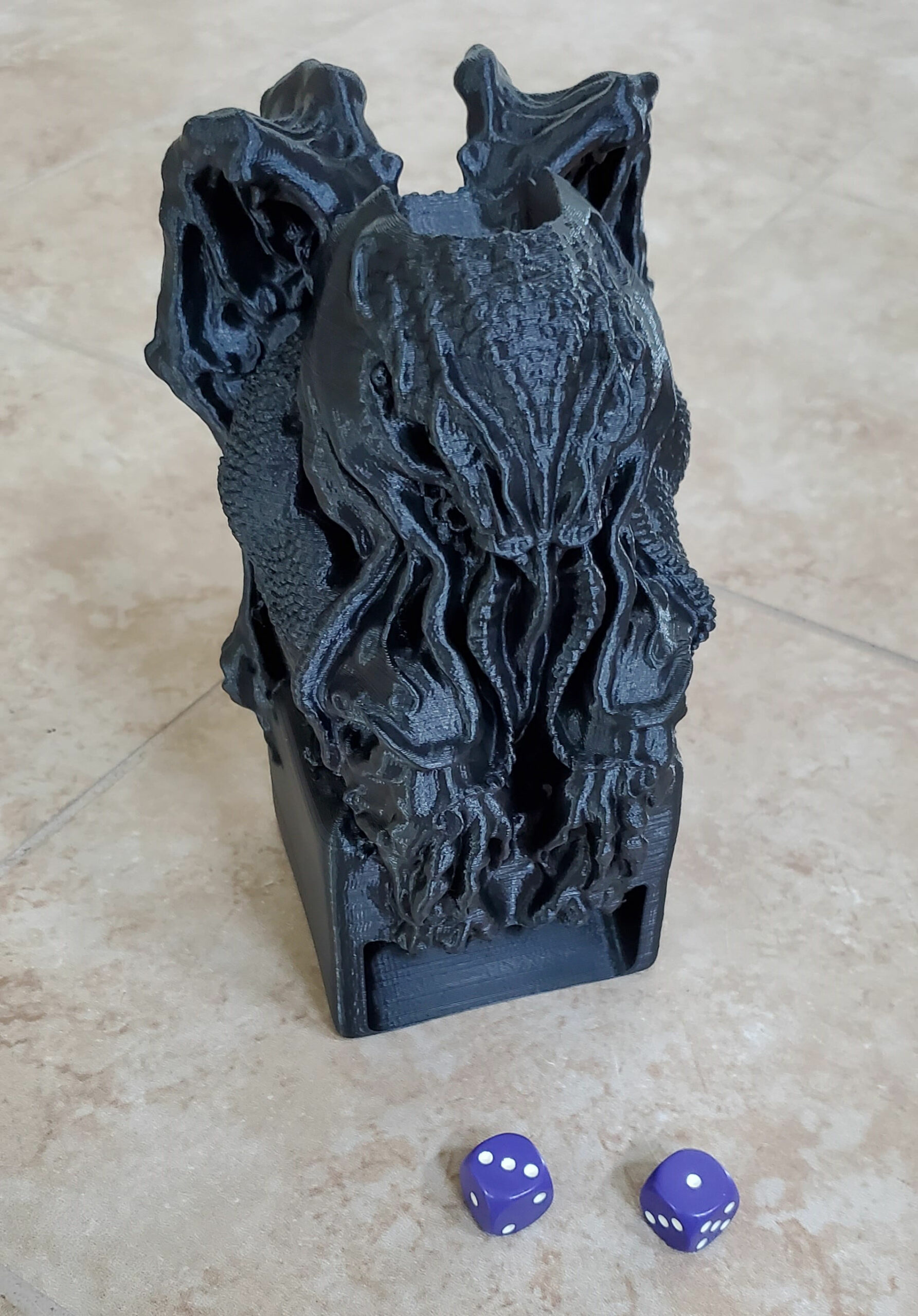
plx filament Cthulhu Idol Dice Tower

This thing took only 14 hours to print and is absolutely gorgeous. The smallest of details are fully captured and the surfaces are like satin. I was planning on painting it but I almost don’t want to because it looks so good as-is. It will be haunting my game cabinet until I decide. So yes, you can print fast with this material and you can get stunning prints, even at the same time. What’s more, the supports (generated in Cura) peeled off with very little effort.

Conclusion

I’m a big fan of PLX. It prints just as easily as PLA with standard print settings and delivers top-notch results. I had no parts peel or warp and every print came out looking great. I generally avoid the use of supports as much as possible but they’re totally manageable with this material. And being able to reduce print times by printing faster is a huge value add for manufacturers of all sizes. BigRep hit it out of the park with PLX.

Share:
WhatsApp Twitter Facebook LinkedIn Buffer Reddit E-mail
About the author | Cameron Naramore
Cameron is a 3D printer and CNC operator. He's fond of cooking, traveling, and science fiction.
Join our newsletter

Our newsletter is free & you can unsubscribe any time.

Latest posts

IU Health Opens FDA-Cleared 3D Print Studio, Cutting Model Turnaround to 24 Hours

IU Health has launched one of the country's first hospital-based, FDA-cleared 3D printing programs, allowing physicians to produce patient-specific anatomical models in-house rather... read more »

Medical
IU Health Opens FDA-Cleared 3D Print Studio, Cutting Model Turnaround to 24 Hours

Three Organizations Sign Agreement to Build Materials Research Hub in Singapore

Three organizations have agreed to establish a shared advanced materials development facility in Singapore, signing a Memorandum of Understanding on June 24, 2026.... read more »

Materials
Three Organizations Sign Agreement to Build Materials Research Hub in Singapore

Phase3D Raises $2.9M to Scale In-Situ Inspection for Metal 3D Printing

Phase3D has closed an oversubscribed $2.9 million funding round to accelerate the adoption of its Fringe Inspection technology for metal additive manufacturing. Quest... read more »

3D Printing Metal
Phase3D Raises $2.9M to Scale In-Situ Inspection for Metal 3D Printing

Newcastle University 3D prints replica of Roman Britain’s most popular board game

Newcastle University and the Vindolanda Charitable Trust have used 3D scanning and printing to create a playable replica of a 1,700-year-old Roman game... read more »

News
Newcastle University 3D prints replica of Roman Britain's most popular board game

Best TPU Filament 2026: Flexible Picks for Every Shore Hardness

Flexible filament, demystified: the best TPU of 2026 ranked by shore hardness, from easy 95A to soft 85A and high-speed grades, with the... read more »

Filament

Best ABS and ASA Filament 2026: Low-Warp Picks for Enclosed Printers

The best ABS and ASA filament for 2026: low-warp picks for enclosed printers, when to choose UV-stable ASA, and the settings that stop... read more »

Filament

Best PETG Filament 2026: Tough, Weatherproof Picks for Every Printer

The best PETG filament for 2026: tough, weatherproof picks across everyday, high-flow, Bambu, premium, translucent, and budget, with print settings and prices.

Filament

Hands-On Review: Revopoint Inspire 2 3D Scanner

We have recently got our hands on a couple of new scanners from Revopoint, and in this article we will be taking a... read more »

News
Inspire 2 on the tripod again

Best PLA Filament in 2026: Tested Picks for Every Grade

The best PLA filament for every job in 2026: everyday, value, premium, high-speed, matte, silk, and tough PLA+ picks compared, with prices and... read more »

Filament

New Marine Occupational Specialty Combines Welding, Machining and 3D printing

The Marine Corps is consolidating its metal worker and machinist specialties into a single new military occupational specialty, effective Oct. 1, 2026, with... read more »

Military
New Marine Occupational Specialty Combines Welding, Machining and 3D printing

Social

  • Facebook Facebook 3D Printing
  • Linkedin Linkedin 3D Printing
Join our newsletter

Our newsletter is free & you can unsubscribe any time.

Featured Industries

  • Automotive
  • Aerospace
  • Construction
  • Dental
  • Environmental
  • Electronics
  • Fashion
  • Medical
  • Military
  • Creality K2 Plus

    • - Print size: 350 x 350 x 350 mm
    • - multi-color printing
    More details »
    $1,199.00 Creality
    Buy Now
  • Qidi Q2

    • - Print size: 270 x 270 x 256 mm
    • - enclosed heated chamber up to 65°C
    More details »
    $580.00 Qidi
    Buy Now
  • Anycubic Kobra S1 Combo

    • - Print size: 250 x 250 x 250 mm
    • - budget multicolor printing
    More details »
    $429.00 Anycubic
    Buy Now
  • Flashforge AD5X

    • - Print size: 220 x 220 x 220 mm
    • - dual extrusion system
    More details »
    $399.00 Flashforge
    Buy Now
  • Qidi Max 4

    • - Print size: 390 x 390 x 340 mm
    • - active cooling air control
    More details »
    $1,219.00 Qidi
    Buy Now
  • Flashforge Guider 3 Ultra

    • - Print size: 330 x 330 x 600 mm
    • - dual extruder system
    More details »
    $2,999.00 Flashforge
    Buy Now
  • Flashforge Adventurer 5M

    • - Print size: 220 x 220 x 220 mm
    • - 600mm/s travel speed
    More details »
    $299.00 Flashforge
    Buy Now
  • Creality Hi Combo

    • - Print size: 260 x 260 x 300 mm
    • - up to 16-color printing
    More details »
    $399.00 Creality
    Buy Now
  • Anycubic Photon Mono M7

    • - Print size: 223 x 126 x 230 mm
    • - 10.1 inch 14K screen
    More details »
    $279.00 Anycubic
    Buy Now
  • Snapmaker U1

    • - Print size: 270 x 270 x 270 mm
    • - multi-color printing with SnapSwap
    More details »
    $849.00 Snapmaker
    Buy Now

Company Information

  • What is 3D Printing?
  • Contact us
  • Join our mailing list
  • Advertise with us
  • Media Kit
  • Nederland 3D Printing

Blog

  • Latest News
  • Use Cases
  • Reviews
  • 3D Printers
  • 3D Printing Metal

Featured Reviews

  • Anycubic Photon Mono M5s
  • Creality Ender 5 S1
  • The Mole 3D Scanner
  • Flashforge Creator 3 Pro

Featured Industries

  • Automotive
  • Aerospace
  • Construction
  • Dental
  • Environmental
  • Electronics
  • Medical
  • Military
  • Fashion
  • Art
2026 — Strikwerda en Dehue
  • Home
  • Join our mailing list
  • Contact us
Blog
  • Latest News
  • Use Cases
  • Reviews
  • 3D Printers
  • 3D Printing Metal
Featured Industries
  • Automotive
  • Aerospace
  • Construction
  • Dental
  • Environmental
  • Electronics
  • Medical
  • Military
  • Fashion
  • Art
Company Information
  • What is 3D Printing?
  • Contact us
  • Join our mailing list
  • Advertise with us
  • Media Kit
  • Nederland 3D Printing