
3D Printing
News Back to school deals Contact us
Home / News / SHINING 3D Launches ShiningSpace, a Browser Platform for Real-World 3D Scans
qidi

SHINING 3D Launches ShiningSpace, a Browser Platform for Real-World 3D Scans

September 24, 2026

SHINING 3D has launched ShiningSpace, a browser-based platform for storing, viewing, editing and sharing 3D scan data. The company says it accepts models from any scanner or workflow, not only its own, and will take over from its existing Digital Cloud storage service.
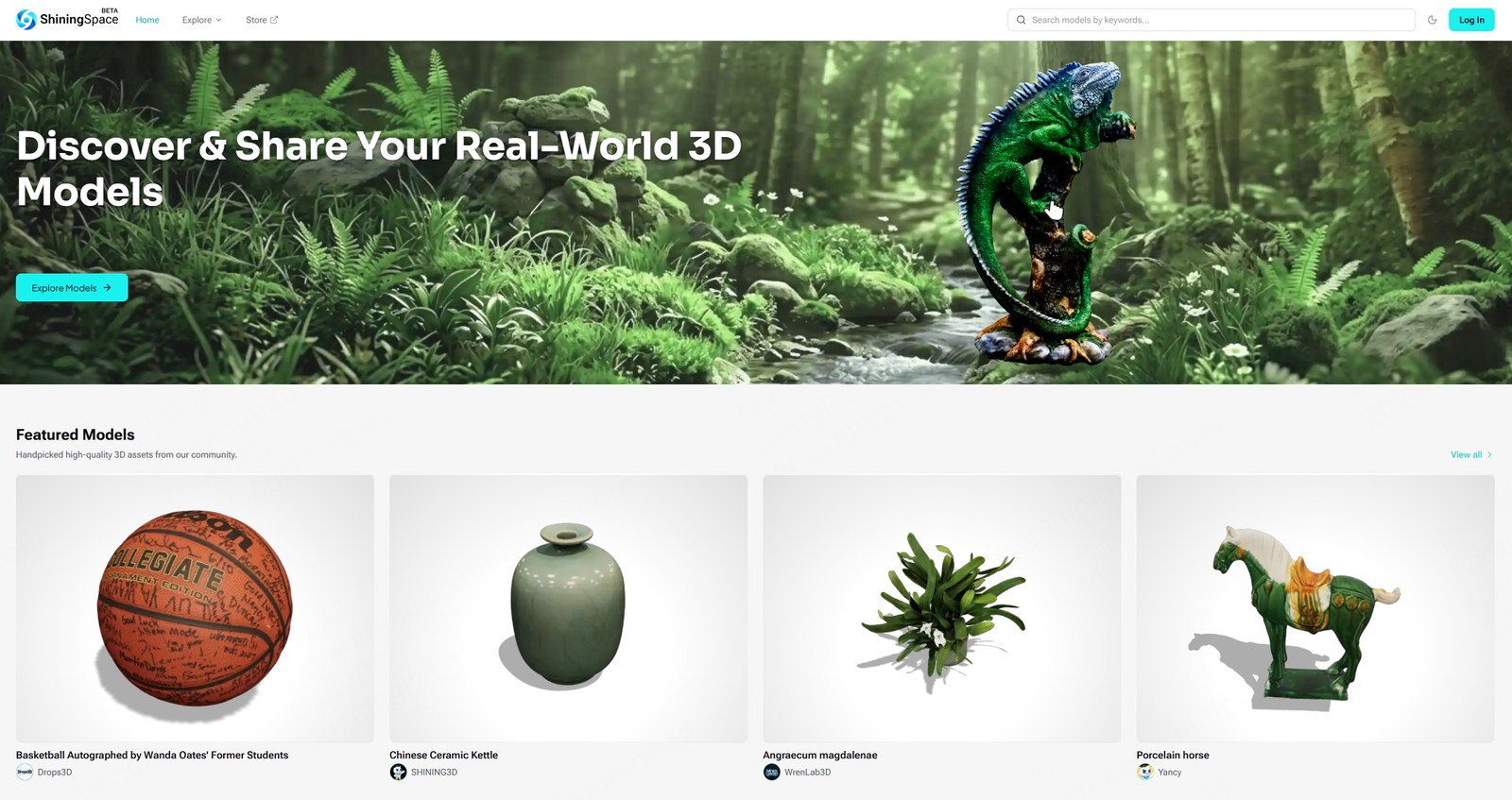
ShiningSpace homepage with featured 3D models from the community

The ShiningSpace homepage and its featured models. Image: SHINING 3D.

Scan data tends to end up in the wrong places. A handheld scanner produces a mesh, the mesh goes onto a laptop, a copy goes onto a USB stick for a colleague, and six months later nobody is sure which file was the good one. ShiningSpace, announced by SHINING 3D on September 23, is aimed at that problem. It is an online library for real-world 3D assets with a viewer, an editor and sharing controls built into the browser, which SHINING 3D says lets a scan be reviewed and passed on without anyone installing software.

SHINING 3D positions the platform as open. According to the company, uploads can come from any scanner or 3D workflow, its own hardware or other brands’. Supported formats are STL, OBJ, PLY, glTF, GLB, FBX and ZIP, with a limit of 500 MB per model file. Accounts can be created with an email address, a Google or X login, or an existing SHINING 3D Digital Cloud account. The interface carries a beta label, which SHINING 3D says it expects to keep through 2027 while the public testing and improvement phase runs; the company has not set a removal date.

A viewer that goes past the thumbnail

The browser viewer offers textured, solid, wireframe, point, X-ray, metallic, matte, normal, UV checker and face orientation display modes. Alongside those sit analysis tools for model quality checks, dimensional measurement, section views, rotation, annotation and fullscreen presentation. SHINING 3D’s pitch is that a reviewer can run quality checks and confirm a dimension without downloading the file or opening a separate application.
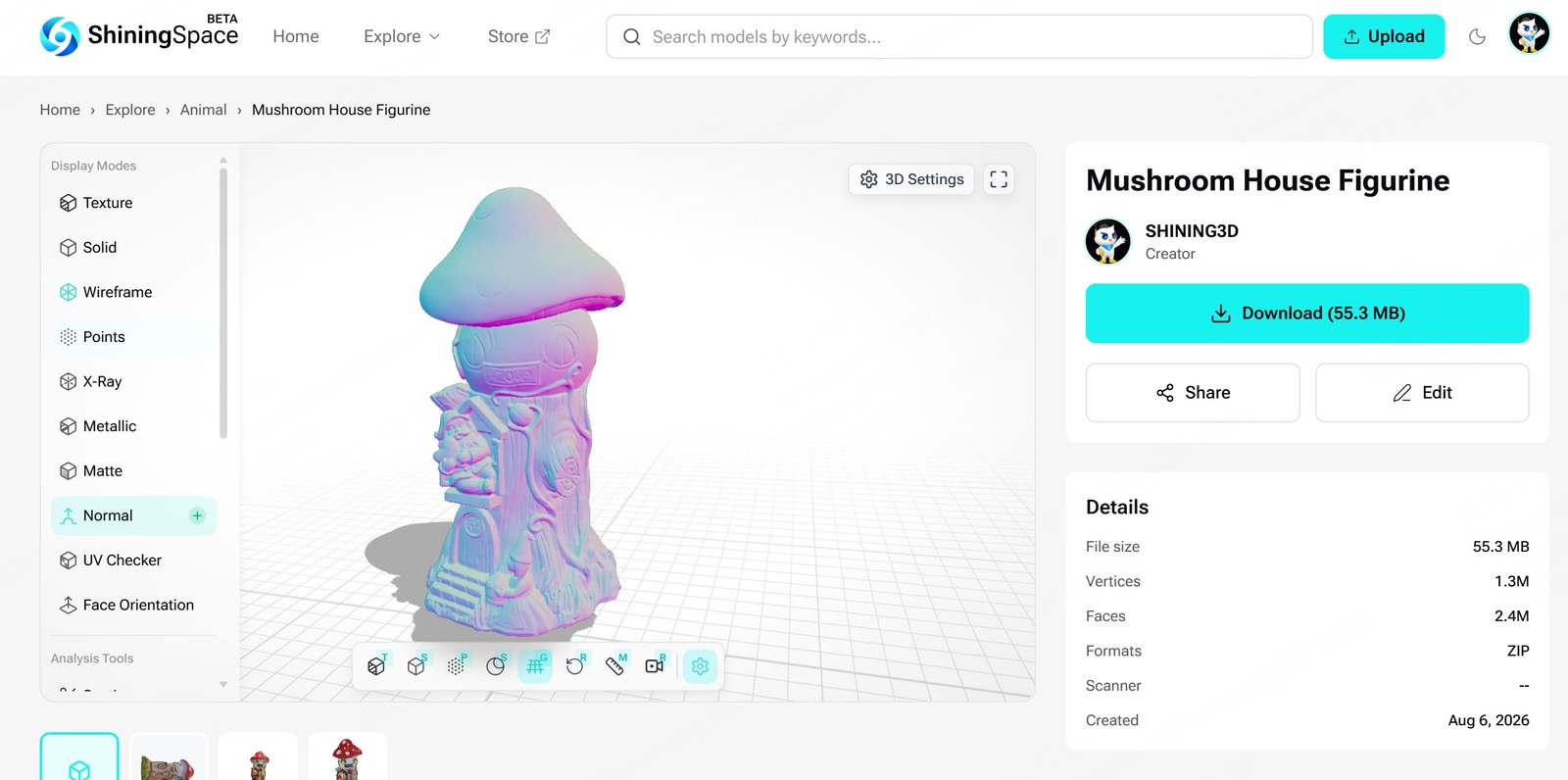
ShiningSpace online 3D viewer showing a scanned figurine in normal display mode with the display mode list

The browser viewer with its display modes and analysis tools. Image: SHINING 3D.

Editing and sharing in the browser

A 3D Setting Editor handles presentation. It covers model transformation, camera settings, backgrounds, post-processing and a free library of HDR materials and texture assets. The intended use is presentation, dressing a raw scan for a client review or a product page without leaving the platform.

Every upload carries a visibility setting. Public models can be viewed and downloaded, preview-only models can be viewed but not downloaded, and private models are visible to the owner alone and count toward the account’s cloud storage. The launch materials do not state pricing or a storage allowance. Sharing is a public link or a QR code, and the company says models can also be published to social media accounts and captured as screen recordings. A Copyright Infringement Notice Policy and reporting tools back the access controls, and SHINING 3D states that the platform supports the applicable requirements of GDPR and the EU Digital Services Act.
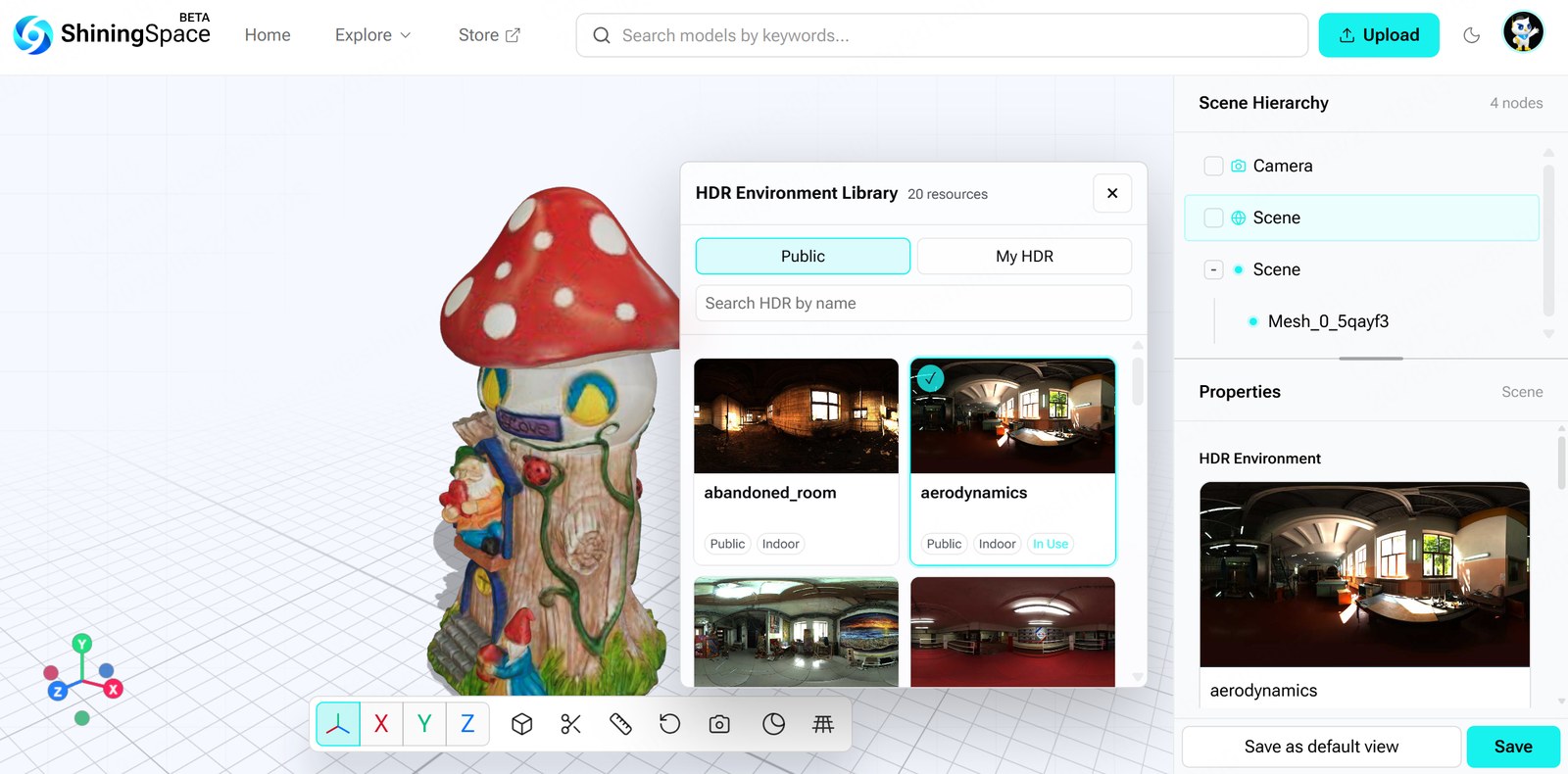
ShiningSpace 3D Setting Editor with the HDR environment library open

The 3D Setting Editor and its HDR environment library. Image: SHINING 3D.

What it means for SHINING 3D scanner owners

SHINING 3D says owners of its scanners have stored scans in its Digital Cloud for years, and that ShiningSpace will take over that role with a larger feature set. Owners of scanners such as the EINSTAR VEGA and the EinScan Rigil series can link their Digital Cloud account and sync scan data straight into ShiningSpace. Existing Digital Cloud users will want to ask the company about the timeline for that handover, and whether Digital Cloud will be retired, neither of which the launch materials state.

“

ShiningSpace is intuitive, easy to understand, and easy to use. I’ve been very impressed with the experience. I also really like the direction ShiningSpace is taking. The platform has a great deal of potential, and I’m looking forward to seeing how it develops.

Amedia Official

3D artist specializing in photogrammetry

Roadmap and launch offer

SHINING 3D lists 3D modeling tools, a model marketplace, scan-to-print workflows, a scan app, 3D and 4D Gaussian Splatting and creator incentive programs as planned additions, without dates. The company is currently inviting early users to upload models and says early participants may receive launch-period promotion, including featured placement and social media exposure.

SHINING 3D, founded in 2004, develops 3D scanning hardware and software for dimensional measurement, quality control, 3D modeling, reverse engineering and digital dentistry. It operates in China, Germany, the United States, Japan and Spain and says it serves customers in more than 100 countries.

Explore ShiningSpace

Create an account, upload a scan in one of the supported formats and try the browser viewer and sharing tools.

Visit shiningspace.com

SHINING 3D paid for this article to appear on 3DPrinting.com. 3DPrinting.com has not tested ShiningSpace; the feature descriptions, roadmap, testimonial and images are SHINING 3D’s own. Last reviewed September 24, 2026.

Share:
WhatsApp Twitter Facebook LinkedIn Buffer Reddit E-mail
About the author | Robert Dehue
Robert is co-founder of 3DPrinting.com and has worked in the industry since the site launched in 2012.
Join our newsletter

Our newsletter is free & you can unsubscribe any time.

Latest posts

LLNL 3D-Prints a Bioreactor That Turns Waste Methane Into a Useful Chemical

Lawrence Livermore National Laboratory 3D-printed a bioreactor that uses bacteria in thin lattice walls to turn waste methane into succinate.

News

Snapmaker and Phaetus Launch Liber High Flow Hotend for the U1

Snapmaker and hotend specialist Phaetus have launched the Liber High Flow Hotend for the Snapmaker U1 toolchanger. According to Snapmaker, it delivers up... read more »

News

City University of Hong Kong and Cambridge Open a 3D Printing Centre

City University of Hong Kong and the University of Cambridge have opened a joint centre that will use 3D printing for data-centre cooling... read more »

News

TCT Shenzhen 2026: Seven Highlights to Watch This October

TCT Shenzhen 2026 takes place at Shenzhen World from October 14 to 16 with, according to organizer TCT, more than 250 exhibitors, 80-plus... read more »

Events

ORNL and Boeing 3D-Print a Nearly Two-Ton Mold for Aircraft Parts

Oak Ridge National Laboratory and Boeing 3D-printed a nearly two-ton steel mold for stamping thermoplastic composite aircraft parts.

3D Printing Metal

Meshy 7 Review: From a Designer’s Drawings to Four-Color Board Game Pawns, With No Modelling Skills

Game designer Sonja Uittenboogaard (swurls.nl) draws her own characters. I took three of them, a dragon, an owl and a wizard, and tried... read more »

News

Creality Pika: The Pocket AI 3D Scanner That Wants Scanning to Feel Like Taking a Photo

Creality has shrunk a dual-mode 3D scanner to the size of a compact camera, given it a touchscreen and two swappable batteries, and... read more »

News

How to 3D Scan With Your Phone in 2026: Apps, Technique, and Limits

Yes, you can 3D scan with your phone, and the results are better than the price of admission suggests, which is zero. A... read more »

Scanners

LLNL Researchers Inspect Direct-Ink Prints Layer by Layer With Cameras

Lawrence Livermore mounted cameras on a direct-ink printer so software can measure filament diameter and flag broken strands before a part leaves the... read more »

News
LLNL Researchers Inspect Direct-Ink Prints Layer by Layer With Cameras

CMU Researchers Turn a Single Photo Into Snap-Fit 3D Printed Parts

Carnegie Mellon software takes a photo, splits the object into 3D parts, and adds peg-and-socket joints so the pieces print and snap together... read more »

News
CMU Researchers Turn a Single Photo Into Snap-Fit 3D Printed Parts

Social

  • Facebook Facebook 3D Printing
  • Linkedin Linkedin 3D Printing
Join our newsletter

Our newsletter is free & you can unsubscribe any time.

banner
banner
  • Creality Hi Combo

    • - Print size: 260 x 260 x 300 mm
    • - up to 16-color printing
    More details »
    $399.00 Creality
    Buy Now
  • Snapmaker U1

    • - Print size: 270 x 270 x 270 mm
    • - multi-color printing with SnapSwap
    More details »
    $849.00 Snapmaker
    Buy Now
  • Creality K2 Plus

    • - Print size: 350 x 350 x 350 mm
    • - multi-color printing
    More details »
    $1,199.00 Creality
    Buy Now
  • Anycubic Photon Mono M7

    • - Print size: 223 x 126 x 230 mm
    • - 10.1 inch 14K screen
    More details »
    $279.00 Anycubic
    Buy Now
  • Flashforge Guider 3 Ultra

    • - Print size: 330 x 330 x 600 mm
    • - dual extruder system
    More details »
    $2,999.00 Flashforge
    Buy Now
  • Anycubic Kobra S1 Combo

    • - Print size: 250 x 250 x 250 mm
    • - budget multicolor printing
    More details »
    $429.00 Anycubic
    Buy Now
  • Qidi Max 4

    • - Print size: 390 x 390 x 340 mm
    • - active cooling air control
    More details »
    $1,219.00 Qidi
    Buy Now
  • Qidi Q2

    • - Print size: 270 x 270 x 256 mm
    • - enclosed heated chamber up to 65°C
    More details »
    $580.00 Qidi
    Buy Now
  • Flashforge AD5X

    • - Print size: 220 x 220 x 220 mm
    • - dual extrusion system
    More details »
    $399.00 Flashforge
    Buy Now
  • Flashforge Adventurer 5M

    • - Print size: 220 x 220 x 220 mm
    • - 600mm/s travel speed
    More details »
    $299.00 Flashforge
    Buy Now

Company Information

  • What is 3D Printing?
  • Contact us
  • Join our mailing list
  • Advertise with us
  • Media Kit
  • Nederland 3D Printing

Blog

  • Latest News
  • Use Cases
  • Reviews
  • 3D Printers
  • 3D Printing Metal

Featured Reviews

  • Anycubic Photon Mono M5s
  • Creality Ender 5 S1
  • The Mole 3D Scanner
  • Flashforge Creator 3 Pro

Featured Industries

  • Automotive
  • Aerospace
  • Construction
  • Dental
  • Environmental
  • Electronics
  • Medical
  • Military
  • Fashion
  • Art
2026 — Strikwerda en Dehue
  • Home
  • Join our mailing list
  • Contact us
Blog
  • Latest News
  • Use Cases
  • Reviews
  • 3D Printers
  • 3D Printing Metal
Featured Industries
  • Automotive
  • Aerospace
  • Construction
  • Dental
  • Environmental
  • Electronics
  • Medical
  • Military
  • Fashion
  • Art
Company Information
  • What is 3D Printing?
  • Contact us
  • Join our mailing list
  • Advertise with us
  • Media Kit
  • Nederland 3D Printing