
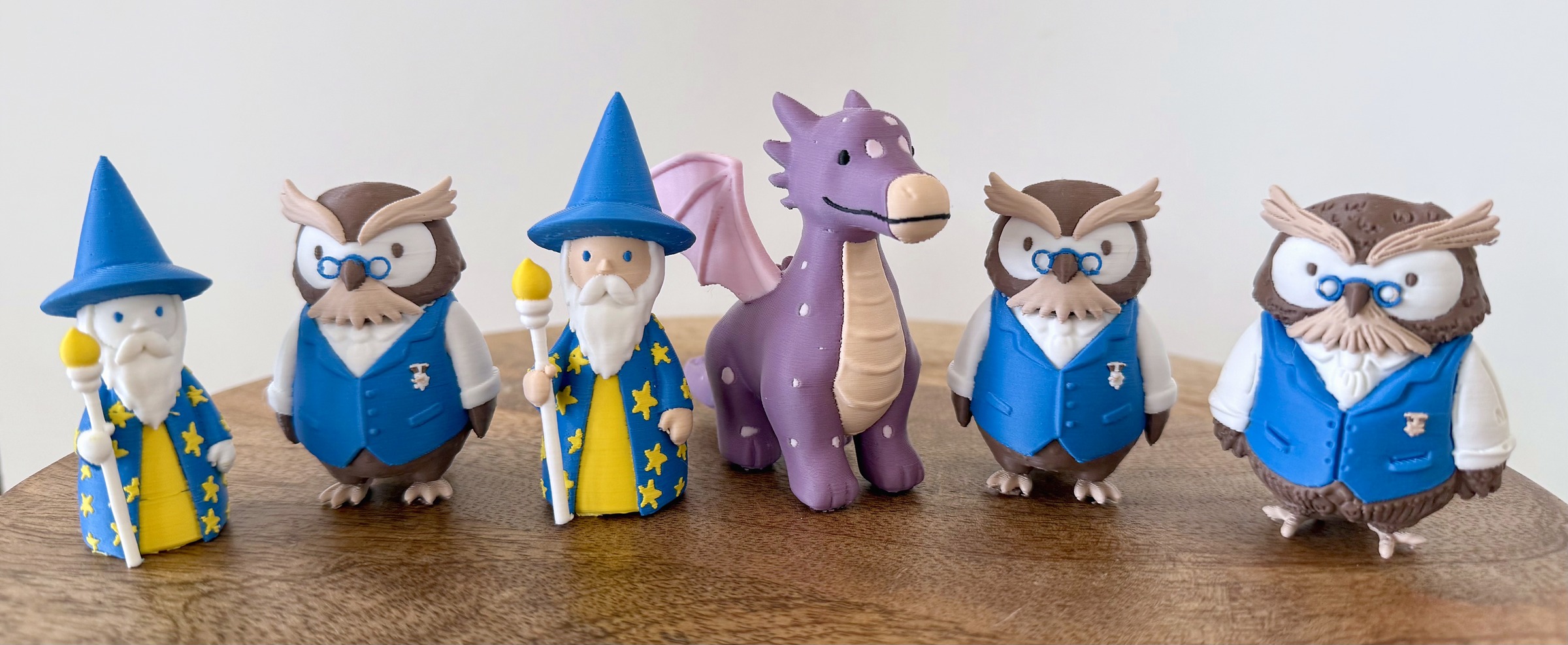
Game designer Sonja Uittenboogaard (swurls.nl) draws her own characters. I took three of them, a dragon, an owl and a wizard, and tried to turn her drawings into four-color printed pawns using Meshy 7.1 and a Snapmaker U1, without opening a modeling program once. Meshy got me there for all three. How much it cost in credits, minutes and filament, and where a human still had to step in, is what the rest of this review is about.
Disclosure
Meshy provided a Pro account and paid 3DPrinting.com an editorial fee for an independent hands-on review; Meshy had no say in the content, rating or timing and did not see the piece before publication. A separate promotional agreement with Meshy’s partnership team exists; the reader code and the affiliate link at the end of this piece come from it, and it had no bearing on the testing or the score. Snapmaker provided the U1 printer free of charge for featuring in this review, and we will publish a separate hands-on review of the U1. Filament throughout was Polymaker Panchroma Matte PLA, also provided. Method: no 3D modeling software was used for touch-ups or recoloring; every model and every color result was generated inside Meshy. Three exceptions are named where they occur: the designer’s sheets were cropped and mirrored in an image editor, the slicer was run with standard settings plus one file-level swap of extruder numbers, and the wizard’s fifth color was merged into its neighbours in the exported file.
Jump to menu
The job: five characters, one board
Quests & Qualities is a serious game for organizations that want to work on team development, set in a magical world and inspired by Dungeons & Dragons. Teams use their strongest talents to outsmart dragons, search for water sources and defeat sea dragons; instead of heavy conversations about pitfalls and conflicts, they solve quests together.
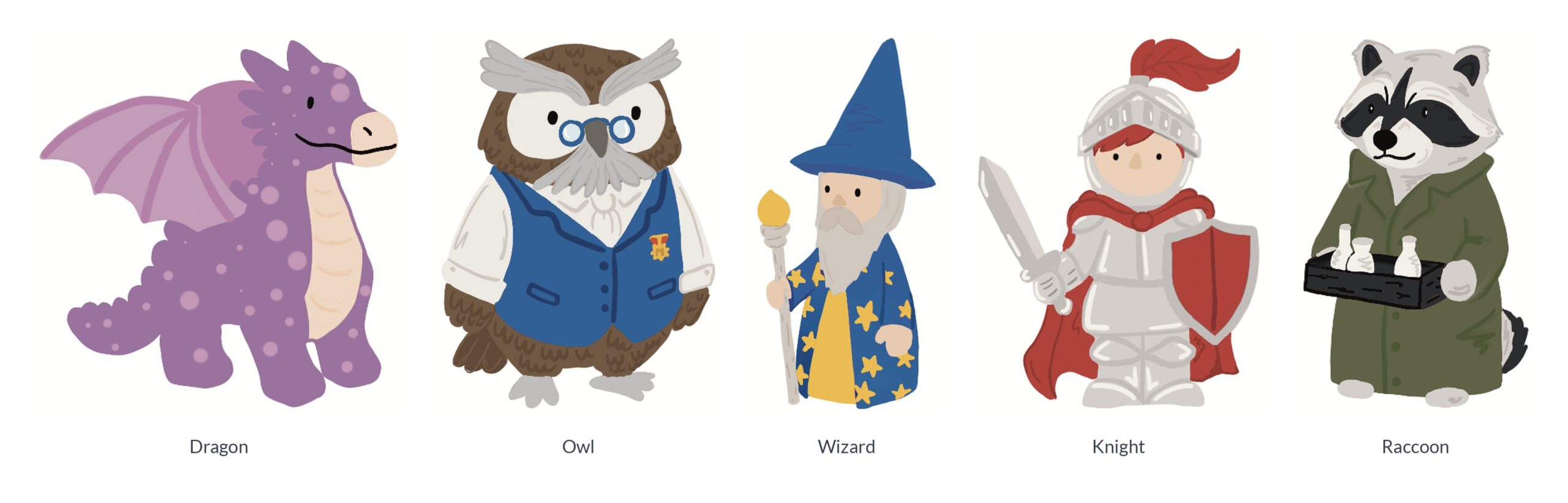
Sonja Uittenboogaard, who designs games under the name Swurls, drew five characters for it: a dragon, a professor owl in a waistcoat, a wizard with a star-covered robe, a raccoon with a tray of bottles and a knight. Each one is drawn in flat colors, four swatches per character, which happens to match the four toolheads on the U1. She gave me the drawings and her consent to use them here, and she will judge the printed set against them, which is the only acceptance test that counts. One question a designer will ask before lending her work: Meshy states that reference images uploaded to its image step are not used to train its models, and that uploads and generations stay in your account until you delete them.
Pawns are a demanding brief for an AI model generator. They are handled by many hands, so thin parts must survive; they sit on a board, so they need a flat base and a readable face from above; and they are a set, so five characters must share a scale and a style. I took the dragon, the owl and the wizard through the full route, from drawing to sliced G-code on the U1. The raccoon and the knight will follow with the recipe the first three taught me.
What Meshy promises and how I tested it
Meshy is a browser tool that turns an image, or several views of the same character, into a textured 3D model. Meshy 7 went live on 10 August; the geometry model in the current interface is labeled Meshy 7.1, with texturing on its own line, still called Meshy 7. Around it sit Google’s Nano Banana image model inside the app, a Multicolor 2.0 tool that segments a textured model into a set number of filament colors and exports a painted 3MF, an Auto Split option that cuts an untextured model into parts, and a Send To menu that hands the file to eight slicers, Snapmaker’s among them. The press kit makes specific claims, and we agreed with Meshy which ones we would check. Most of them hold with a qualifier, and the qualifiers are where the useful advice lives.
Smart Topology, the four-variation re-roll and a fifteen-model slicer pass count were in the plan and did not make the cut. None of them would change the verdict for a multi-toolhead printer. The one omission a single-extruder reader will feel is a printed comparison of Auto Split parts against the single-piece 3MF; that deserves its own article.
Before the three acts, the part that needs no qualifier. Every character I put in came out as a printable, recognizable pawn with its face intact. The owl, given four consistent drawings, was right on the first attempt with nothing else asked of me. On the wizard, the stars ended up painted precisely on their sculpted bumps, which is a thing I did not know a texture stage could do. The Multicolor panel let me type the hex codes of my actual spools and watch the model recolor itself on screen, so the print looked like the preview. Nano Banana lives inside the same app, so a designer’s two drawings became four views without leaving the browser. And the entire review, eleven dragon runs included, cost about one month of the Pro subscription. The rest of this piece is about the edges, because the middle works.
Dragon: learning how Meshy thinks
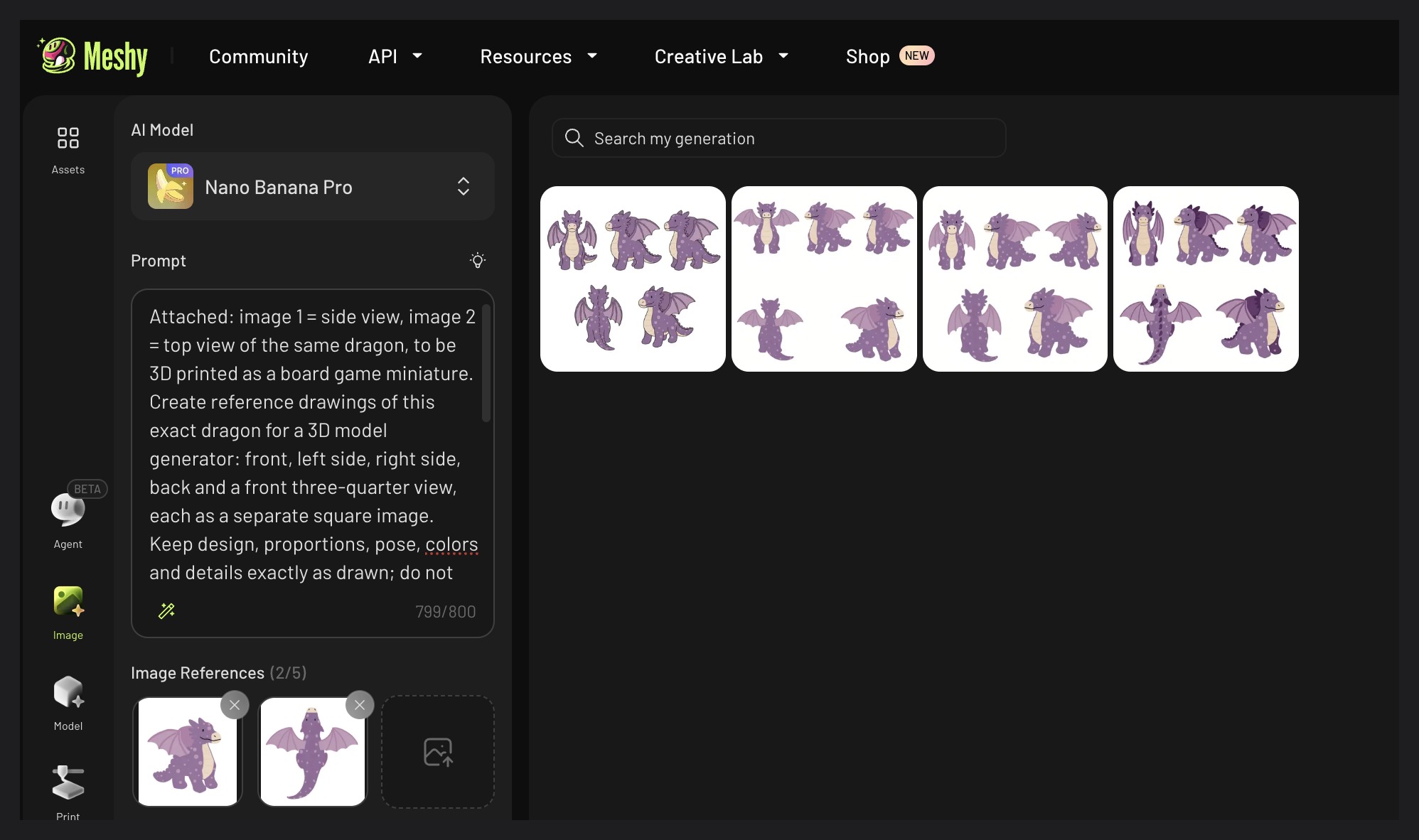
The dragon was my first character and the one I spent the most on, because it started from the wrong kind of input. The designer had drawn a side view and a top view, two different kinds of picture, and the Model tool wants front, left, back and right.
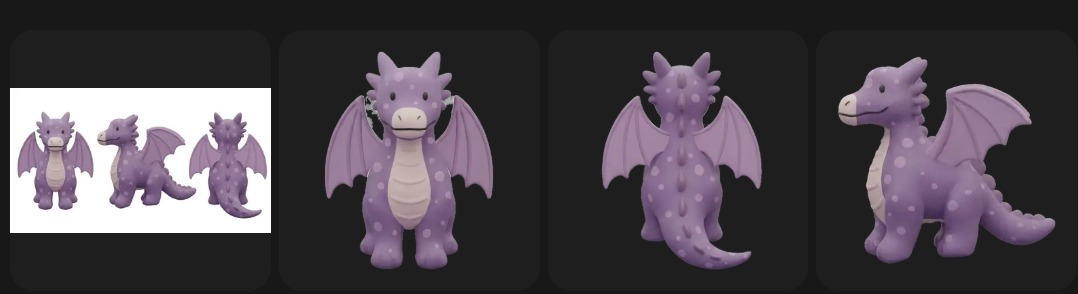
So I asked Nano Banana, inside Meshy, to draw the missing views, and learned three things before a single model existed. The image tool makes 1024-pixel sheets while the Model tool recommends at least 1040 pixels per view. Its Multi-view mode returns three views, not four. And a generated image cannot be sent from the image library into the Model tool’s slots; it has to be downloaded and uploaded again, one view at a time, a chore the Model tool’s own Generate link avoids, as the claims table explains. Two views on paper, four in the slots, all inside one browser tab, is still the headline.
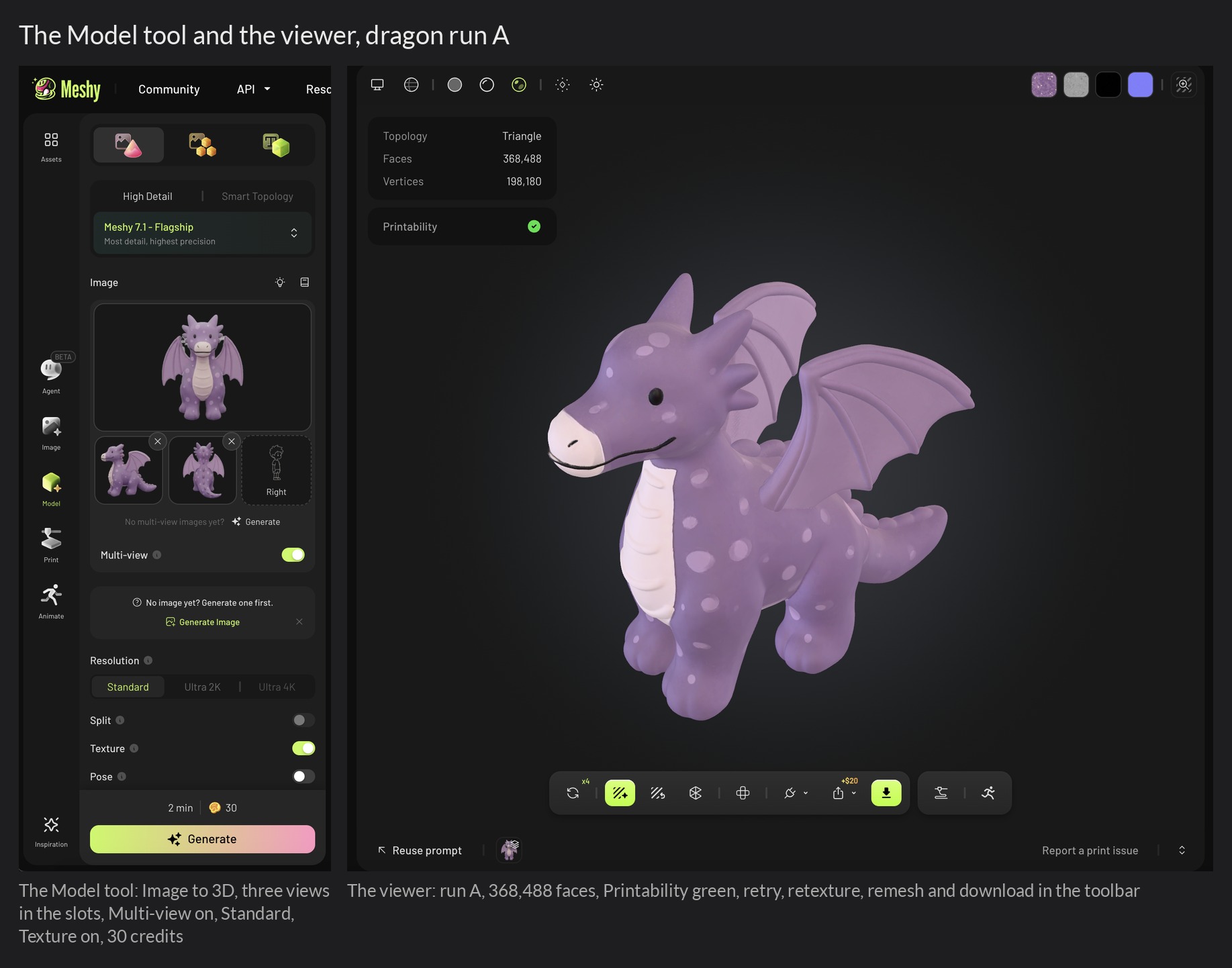
The first model came from one view, by accident: the preview window has a green Image to 3D button that generates immediately, no confirmation, twenty credits gone. The result was faithful on the visible side and had grown its far wing as a separate object floating beside the body. Three views fixed that: both wings attached, proportions close, in 1 minute 38 seconds. Then I spent an afternoon on the face.
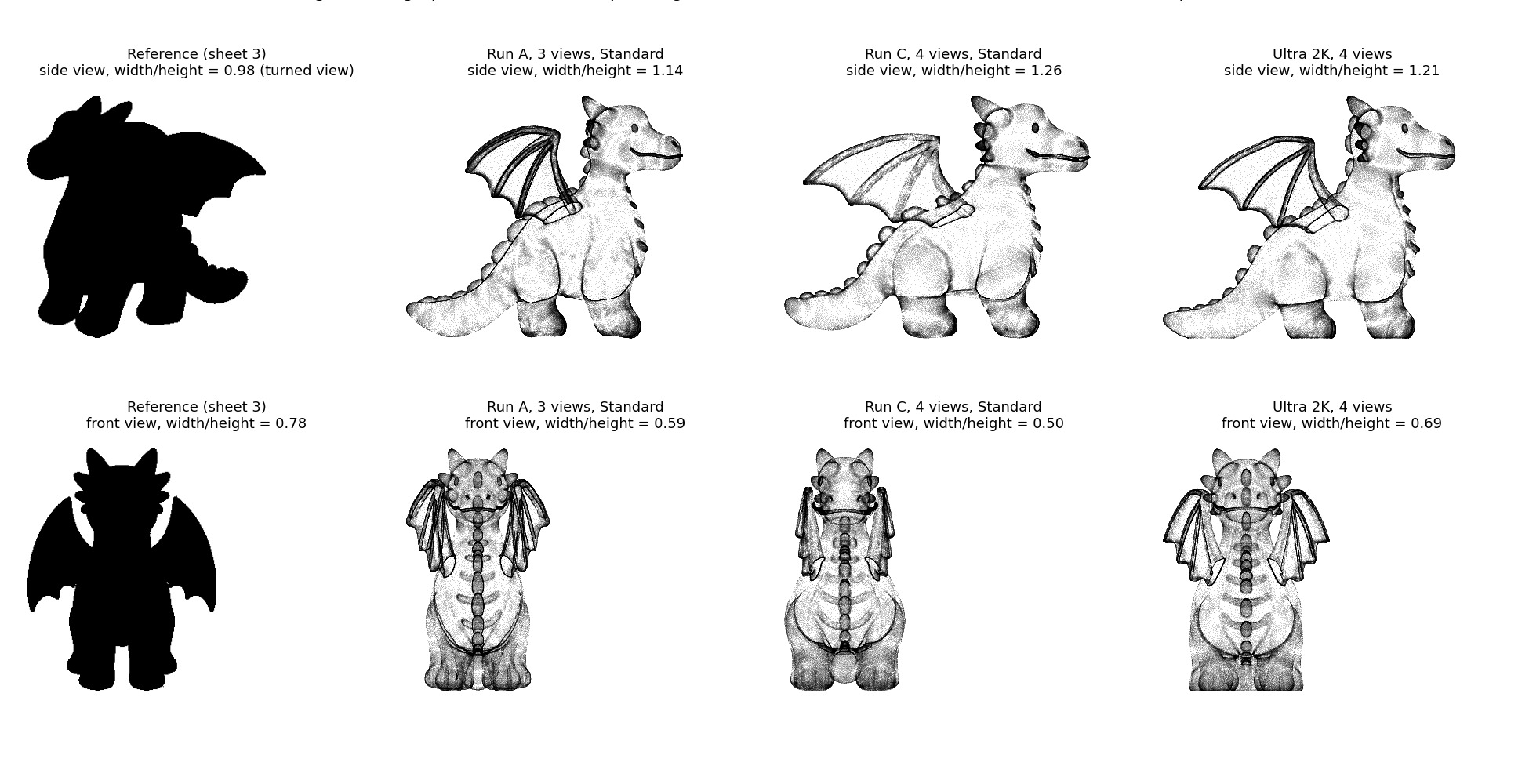
Eleven generations later I could write the rules. Meshy resolves disagreement between views by majority. If three of four views show the wings folded, the wings fold, whatever the front view says; the Main slot carries no more weight than the others. A feature visible in only one view, like the curl of the tail on the generated back view, is voted out.
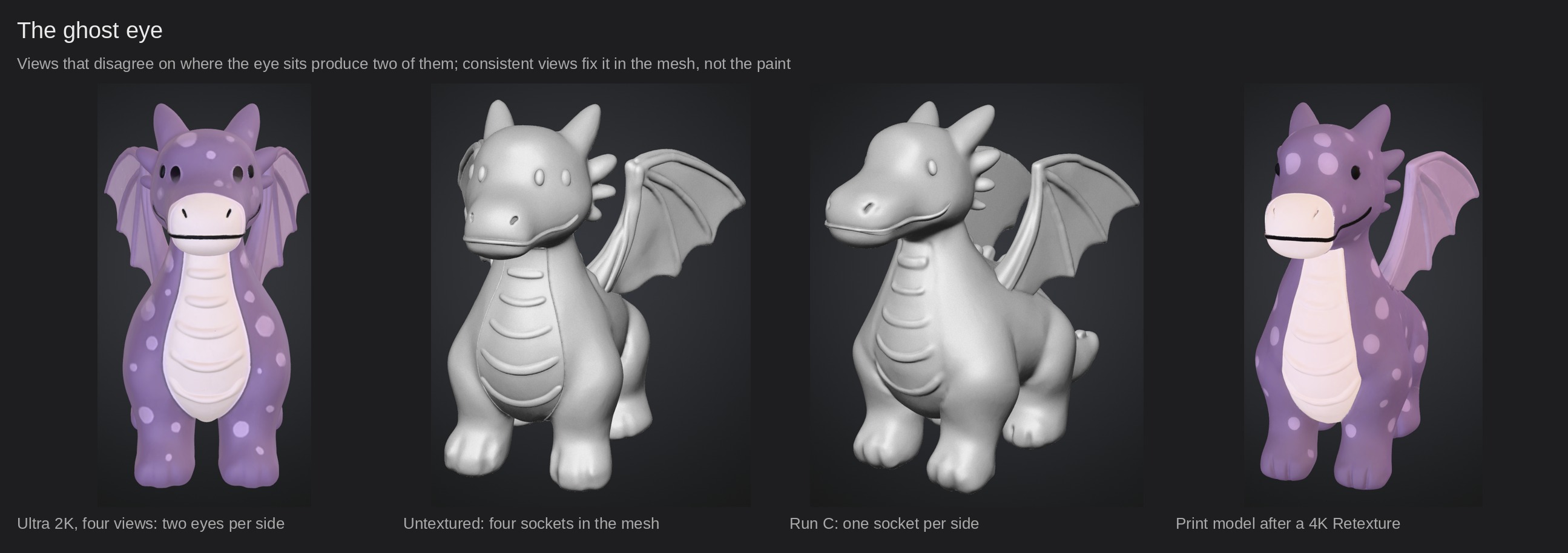
Faces are the fragile part: a slight mismatch in where the eyes sit between the front and the side views produced a second eye, and on one run a second eye socket sculpted into the mesh, so that the dragon had four eyes with textures painted into two of them. That one is worth a sentence of advice: switch the viewer to its untextured mode before you texture anything. One socket per side, and a ten-credit Retexture will fix a doubled eye. Two sockets, and no texture pass will; regenerate with views that agree.
Image Enhancement, a toggle that is on by default and redraws your inputs before generation, turned out to amplify that disagreement rather than cause it; with consistent views it was harmless either way, with inconsistent ones it made things worse. The other lessons, tier by tier and toggle by toggle, are in the table: each row changed one thing and kept the rest.
The printed dragon is that re-roll with a 4K Retexture: clean eyes, a continuous mouth line, crisp spots, and paws painted black underneath by a texture stage that had no view of the soles and reached for the darkest color in the palette. The one thing no run reproduced was the two-tone wing, light membrane with body-colored ribs, which every texture pass rendered in a single color.At 75 mm on the board, nobody will ask.
The designer did not. Her verdict, when the printed dragon reached her: “Completely spot on, exactly as I had drawn him. Only a few spots have disappeared, but I will not lose sleep over that. At first I thought about giving him scales, but I think that would have made him far too busy. So this really is his best version.” Eleven generations to get there, and the one that mattered was judged in four sentences.
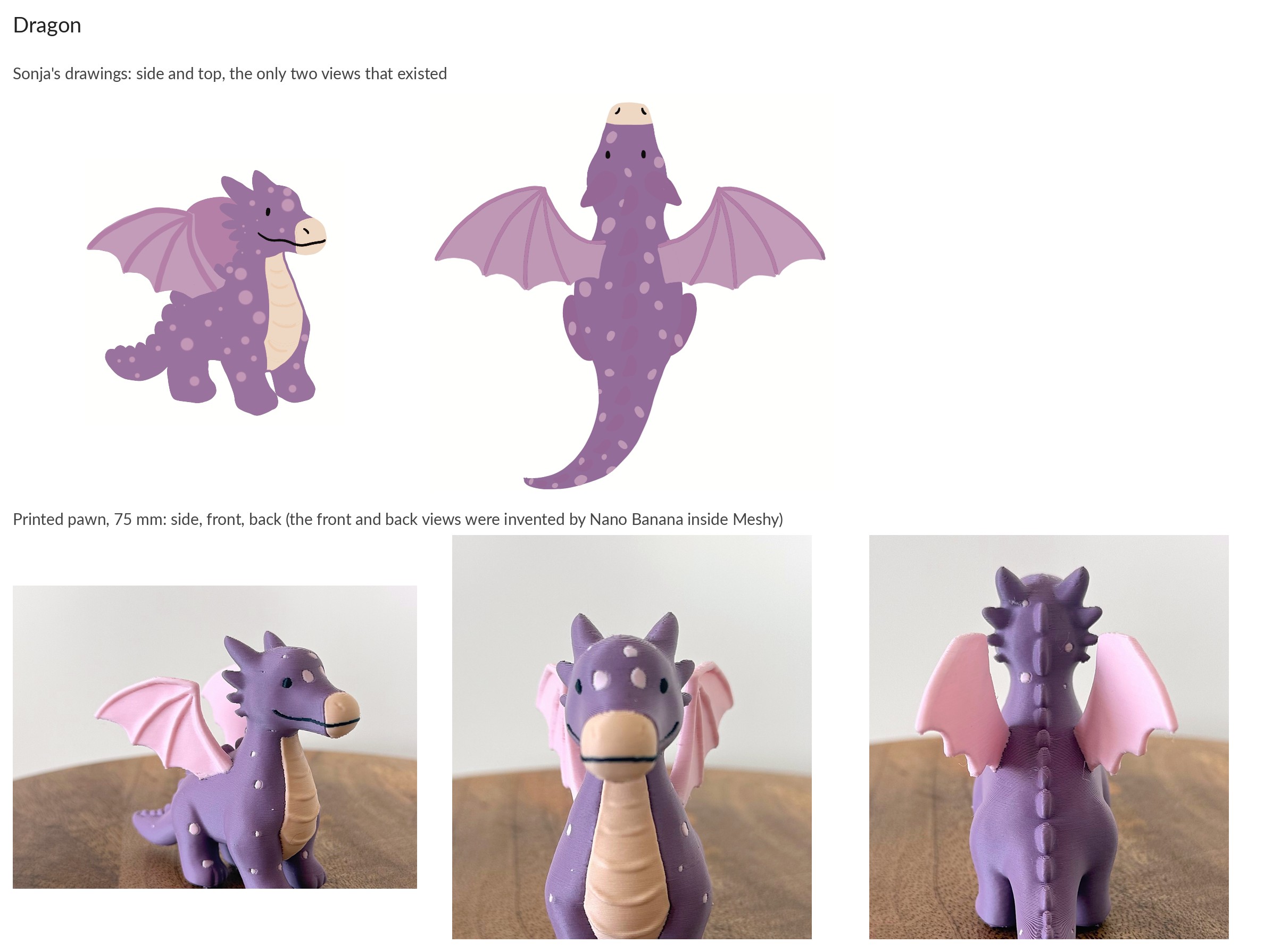
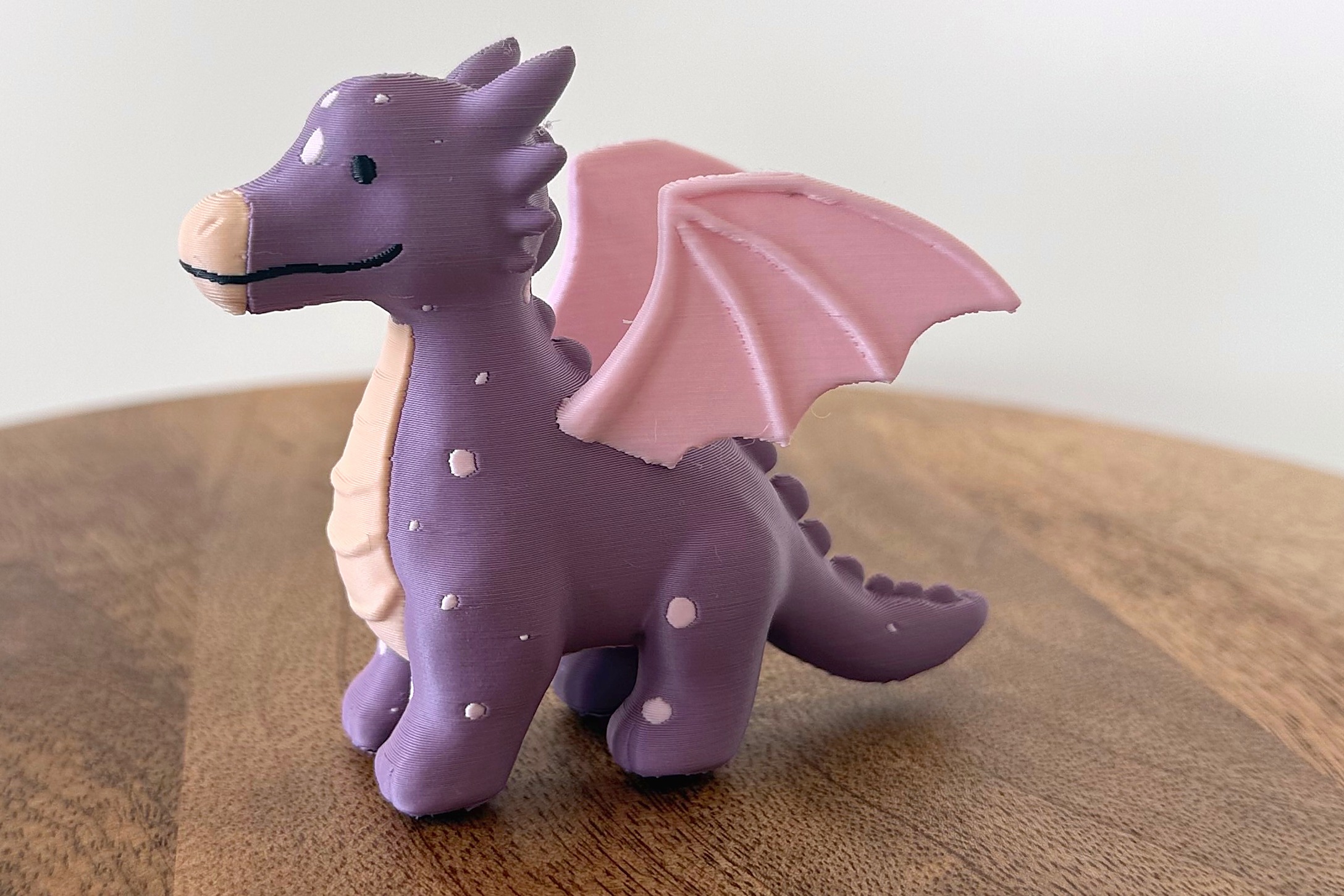
The printed dragon, the re-rolled four-view model with a 4K Retexture, 75 mm.
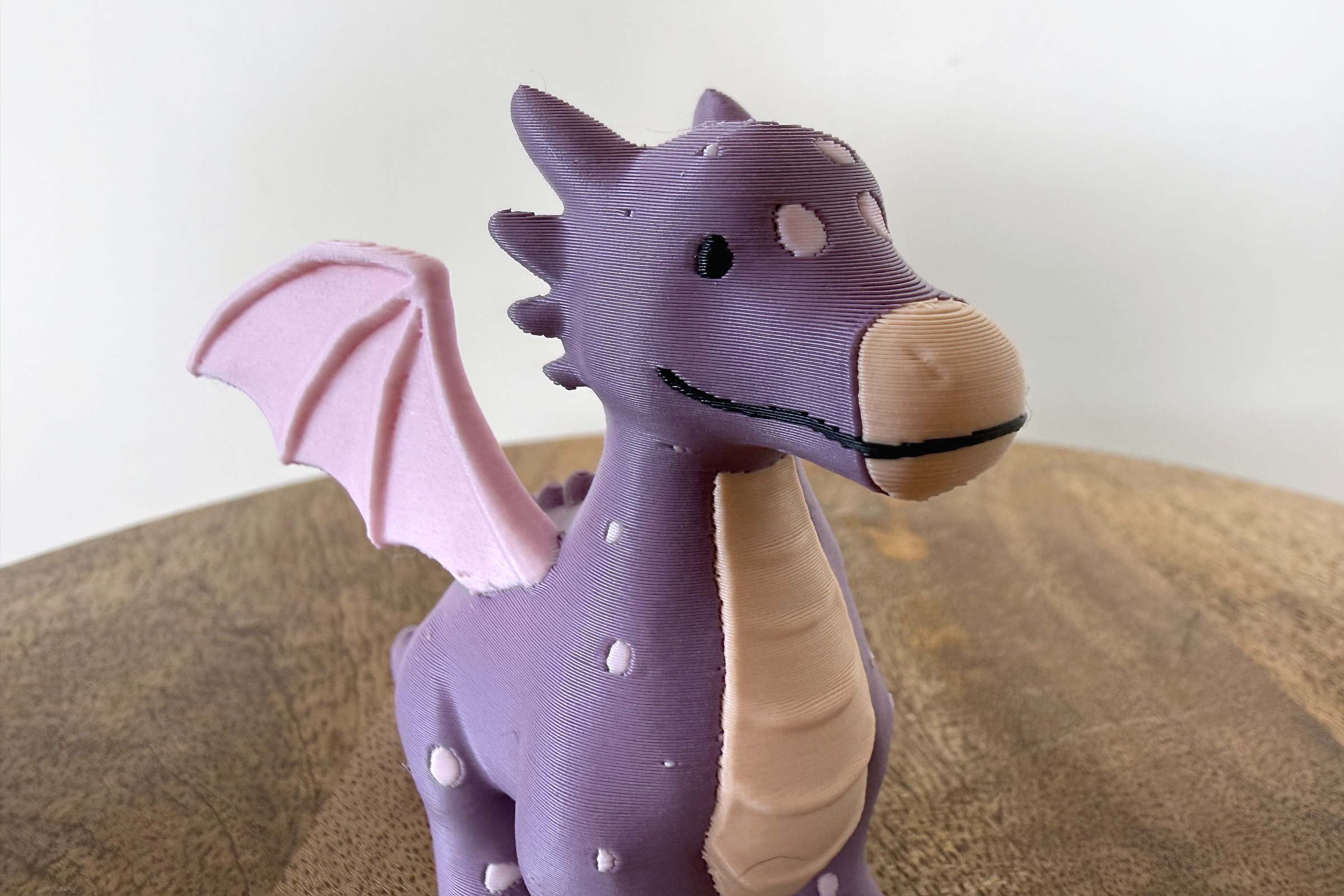
One eye per side, a thin mouth line and crisp spots, at 0.2 mm layers.
Owl: what to feed it
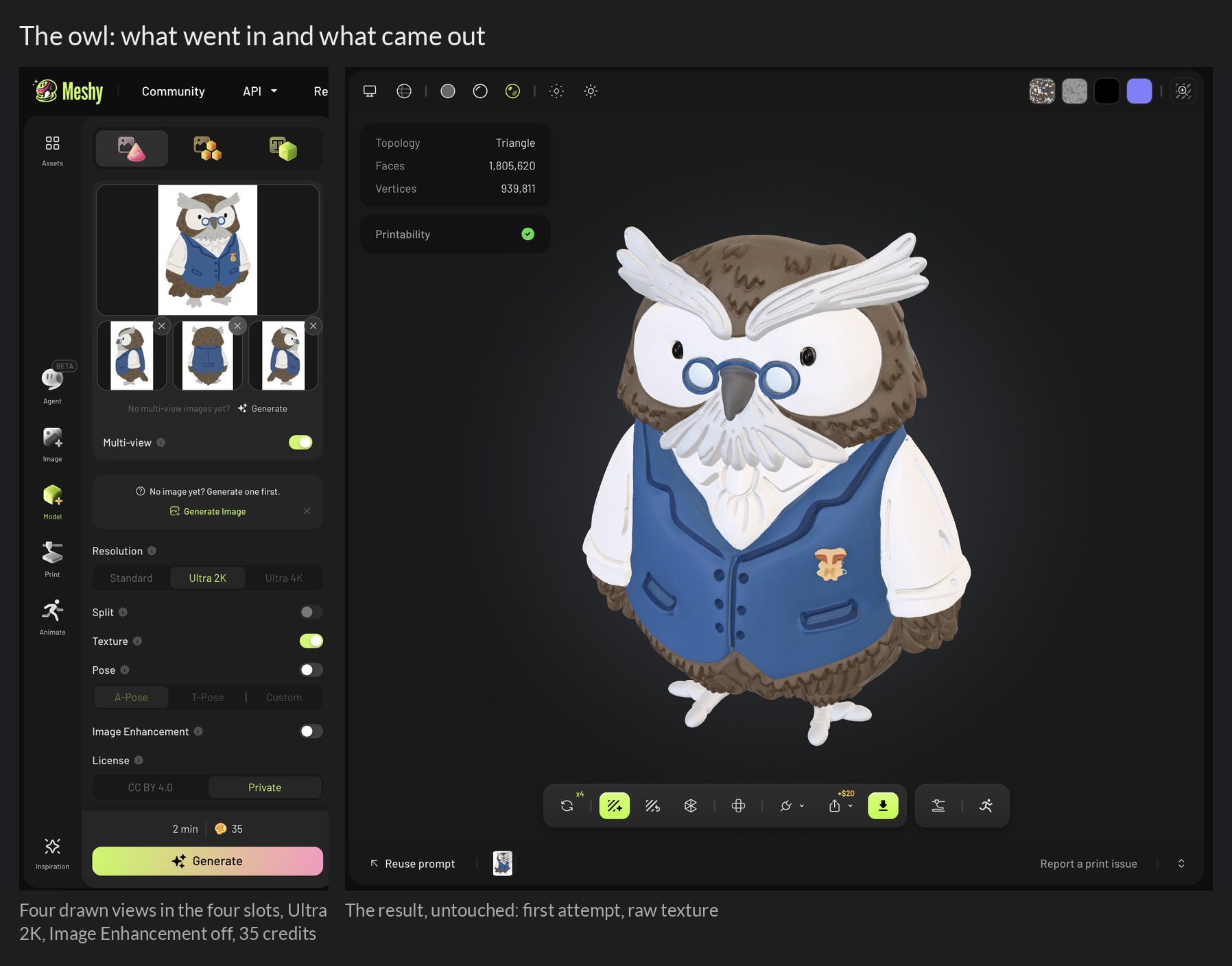
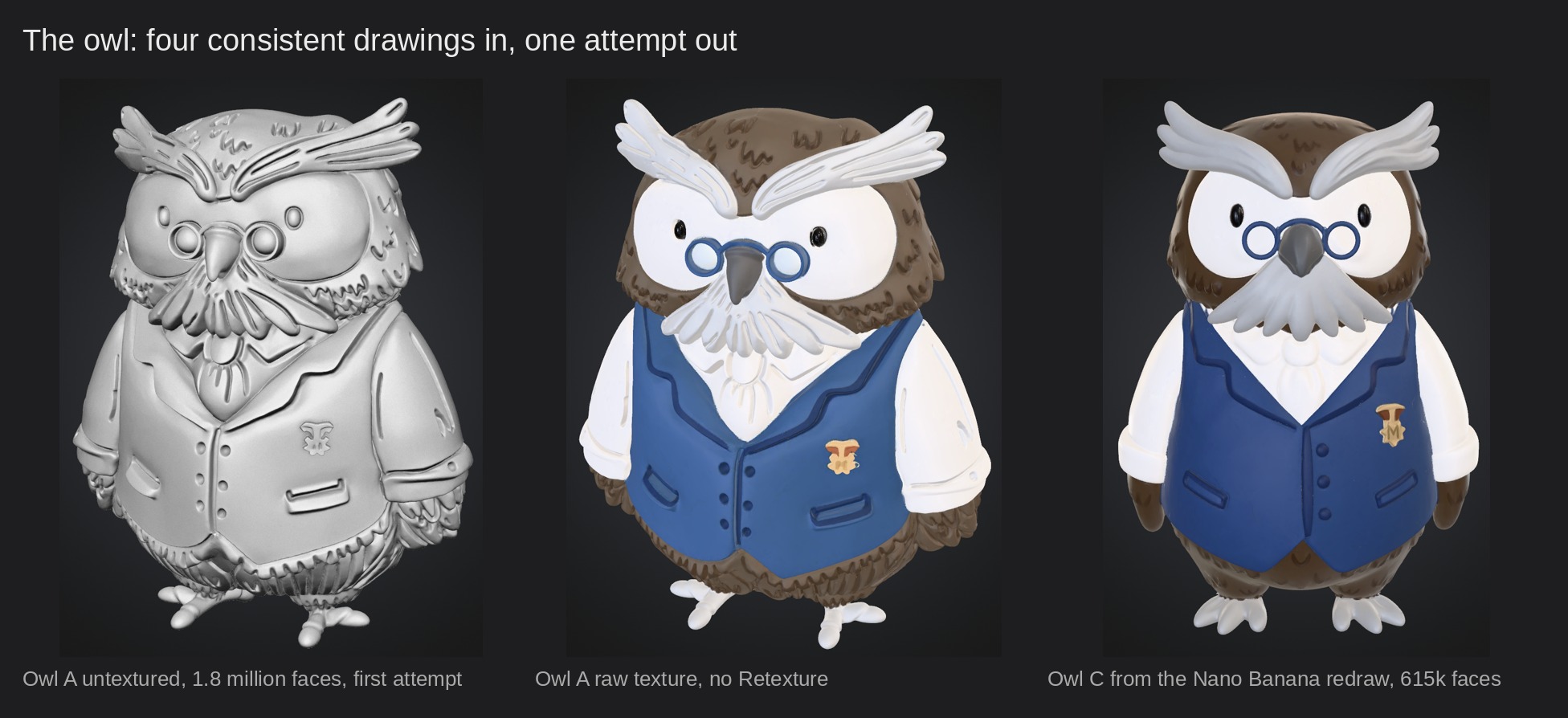
The owl arrived with four consistent hand-drawn views, front, side, back and a three-quarter, all in the same pose and palette. I cropped them from her sheet, mirrored the single side view for the missing flank, put them straight into the four slots with Image Enhancement off, and got the best geometry of the whole review on the first attempt: 1.8 million faces, one socket per eye, glasses rings, moustache feathers, ruffle, buttons, pockets and badge all present as relief, the feather marks carried into the mesh. No Nano Banana, no re-roll, no exploration. The dragon’s afternoon had been the price of inconsistent input.
The texture was another matter. Hand drawings have soft brush edges and low-contrast neighbours, white next to light gray next to cream, and the texture stage blends a few pixels across every boundary. Multicolor 2.0 then quantizes that texture into four colors, and on the first pass it spent its fourth color on the gray blend along every edge instead of on the gray brows and feet the drawing has.
Switching the slot to bright green showed it plainly: green outlines around the glasses, the beak and every feather, nowhere else. Realistic style put the fourth color on the beak and eyes instead. A ten-credit 4K Retexture separated the gray from the white enough that both styles then agreed with the drawing. The point for the article is not the fix, it is who chose: the designer drew four colors, and the tool decided which four survived, three different ways, with no control over any of it.
So I asked Nano Banana for a clean redraw of the owl from all her views and generated again. Variant C came back at a third of the triangles, with the same features and a texture so clean that Multicolor needed no help at all. It also lost some of the stroke character of her drawing and invented a letter on the badge.
I printed all three owls in one go, A, C and a Cartoon-style variant of C on a single plate sharing one prime tower: 9 hours and 9 minutes, 634 tool changes, and every one of them came off with its glasses, badge and buttons intact at 60 mm.
Sonja’s verdict: “They both have their plus points. I like the first one best for the detail of the feathers, but the bottom of its waistcoat now has feathers too. And that extra piece of fabric on the back of the waistcoat is nicer on the set. So as an owl the first one is the nicest, as a waistcoat the set.” The first one is the owl from her own drawings, the set is the pair from the redraw. Her ideal owl is the first one’s head on the second one’s coat, which is a thing Meshy cannot make yet, and which I come back to in the wishlist.
Getting three files onto one plate produced a finding of its own. Meshy assigns extruder slots in whatever order its segmentation finds the colors, so two exports of the same owl carried different slot orders, and the order in the file is the reverse of the list on screen. Import two such files into one slicer project and one owl prints with a beige body and brown brows. I swapped the slot numbers in two files to match the third; a reader without that option prints one character per job, which is no hardship, and gets three correct owls either way. Meshy confirms the slot order is not fixed and says pinning a color to a slot is on its radar; it attributes the assignment to the slicer, but in my files the order already differed before any slicer opened them, so the fix belongs on the export side.
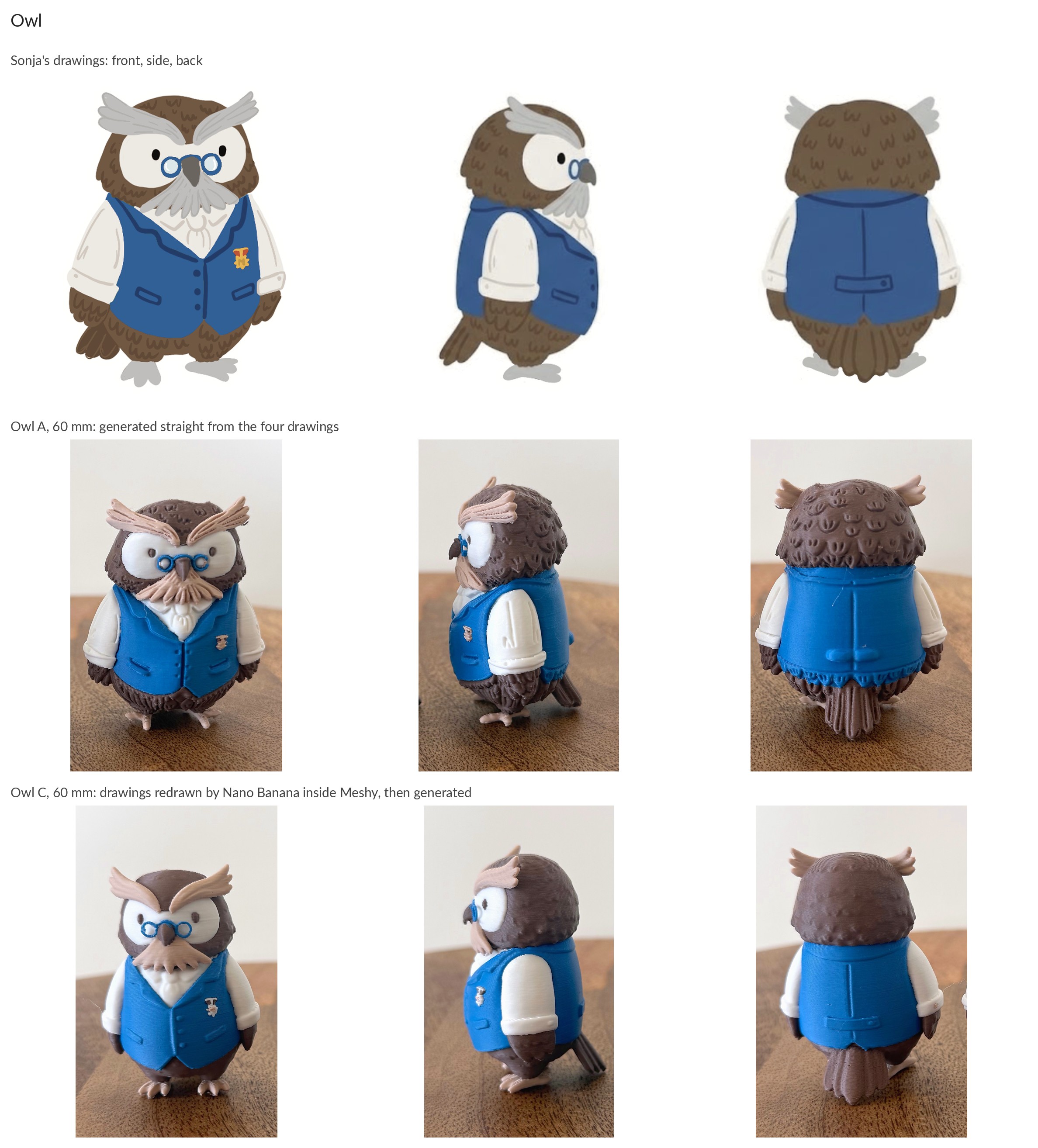

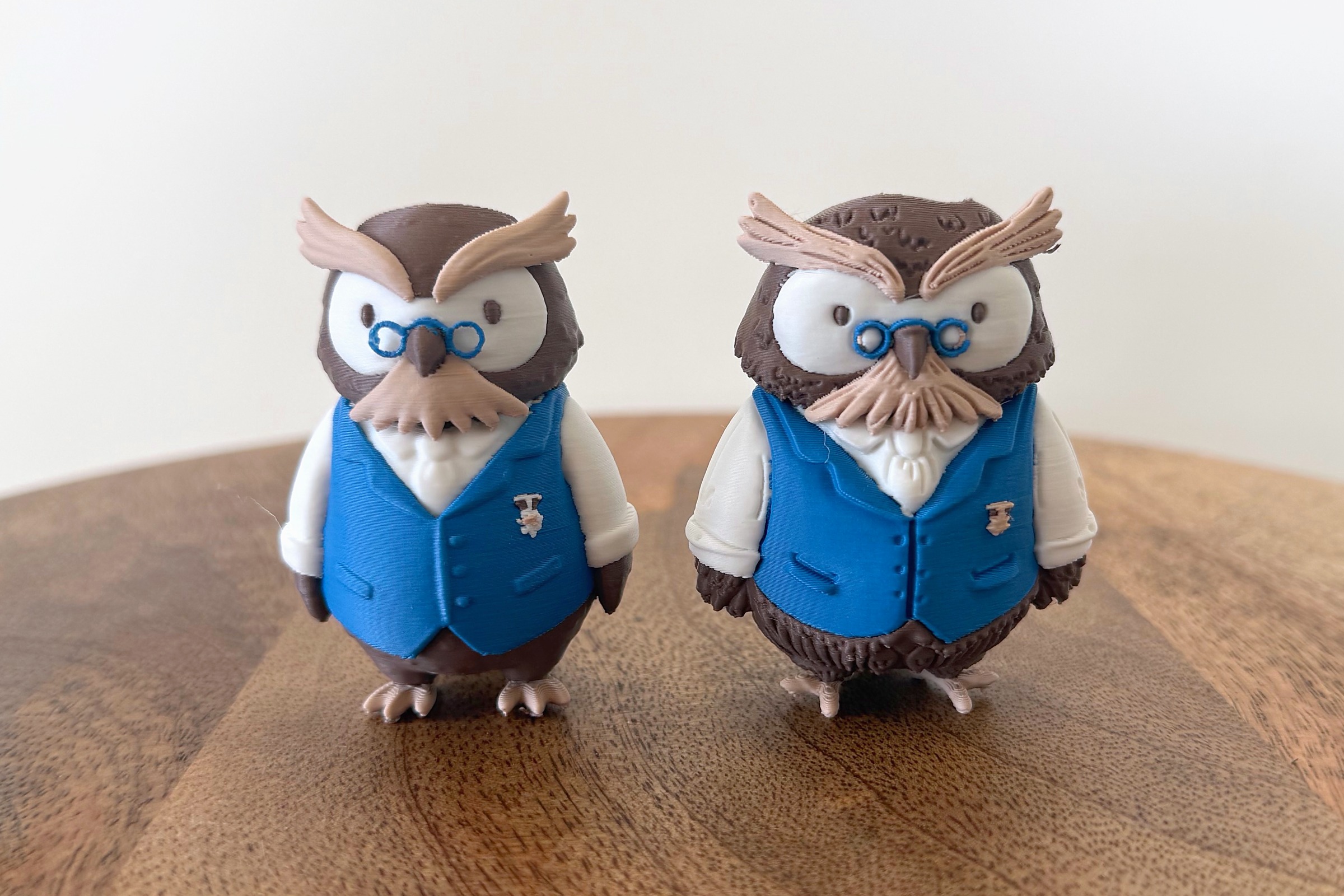
Owl C (left) and owl A (right), 60 mm.
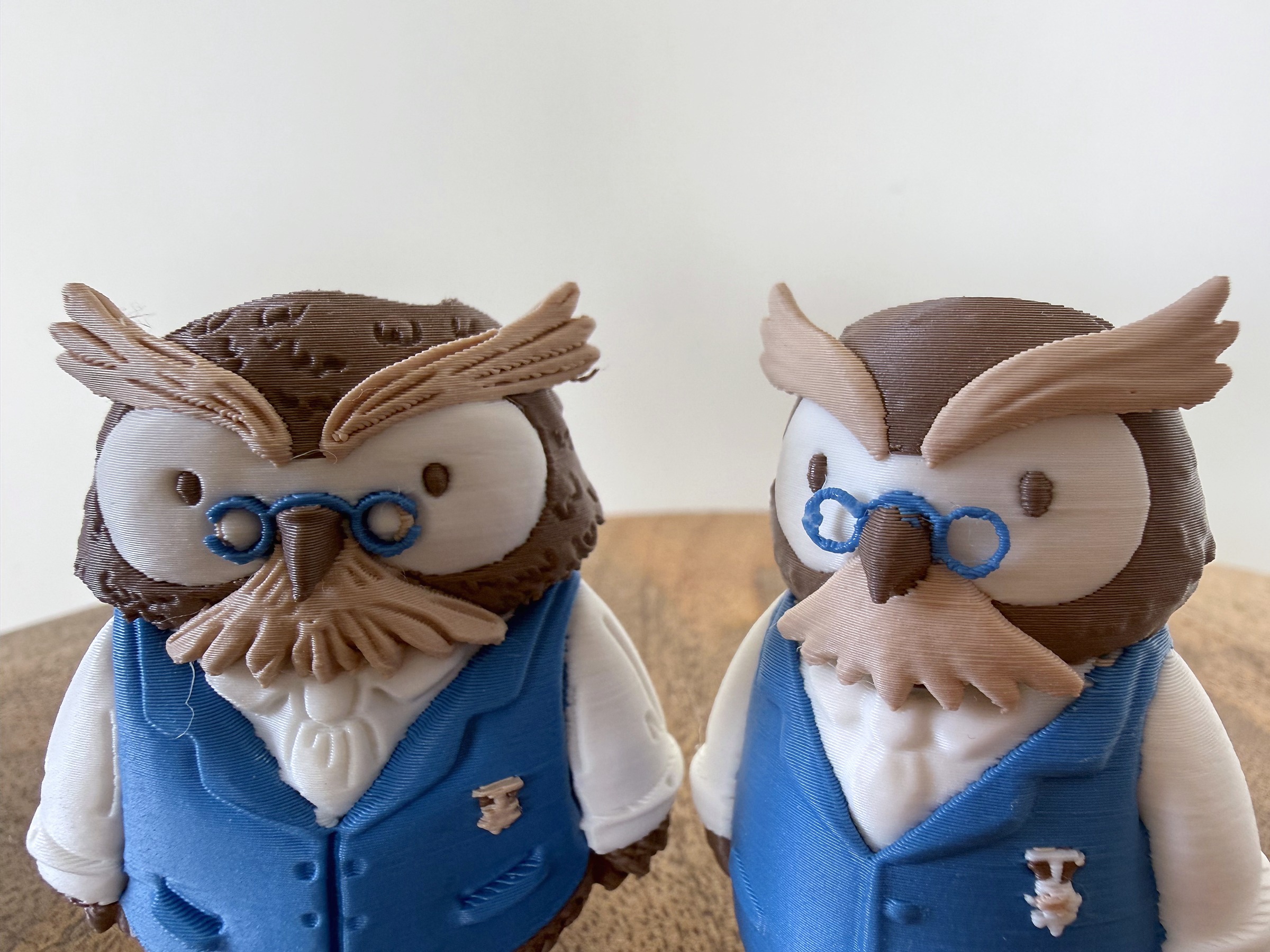
Glasses rings, badge and buttons survive at 60 mm on both. Owl A left, owl C right.
Wizard: the twist
The wizard has a blue robe covered in yellow stars, a white beard, a skin-toned face and a staff, and it taught me two things in one afternoon, one delightful and one not.
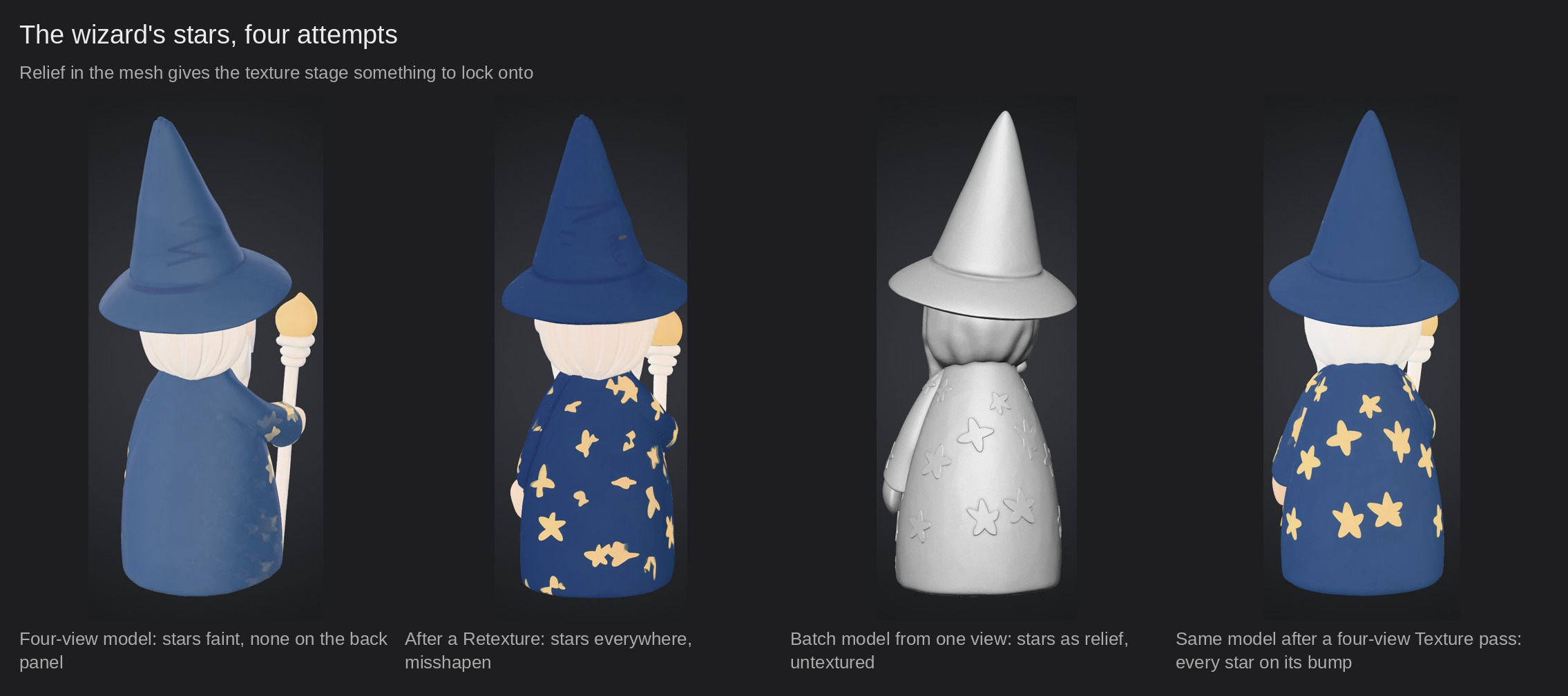
Four consistent drawn views went in as before, Ultra 2K, one attempt, 35 credits, and came out as a wizard I did not want to print. Everything was present, hat, beard, staff, hands, the yellow front panel, but the shape had drifted from her drawing, slimmer and stiffer than the round little figure on her sheet, and the stars were the real problem: faint on the back, overlapping on the sleeves, and missing from the back panel altogether. Where the four views overlapped, the stars had been averaged into each other. A Retexture from the front and back views filled the back panel but turned the stars into blobs and three-armed shapes; the star in her small source files, under 500 pixels wide, was too soft for the texture stage to copy as a five-pointed shape. Ten credits, and not accepted.
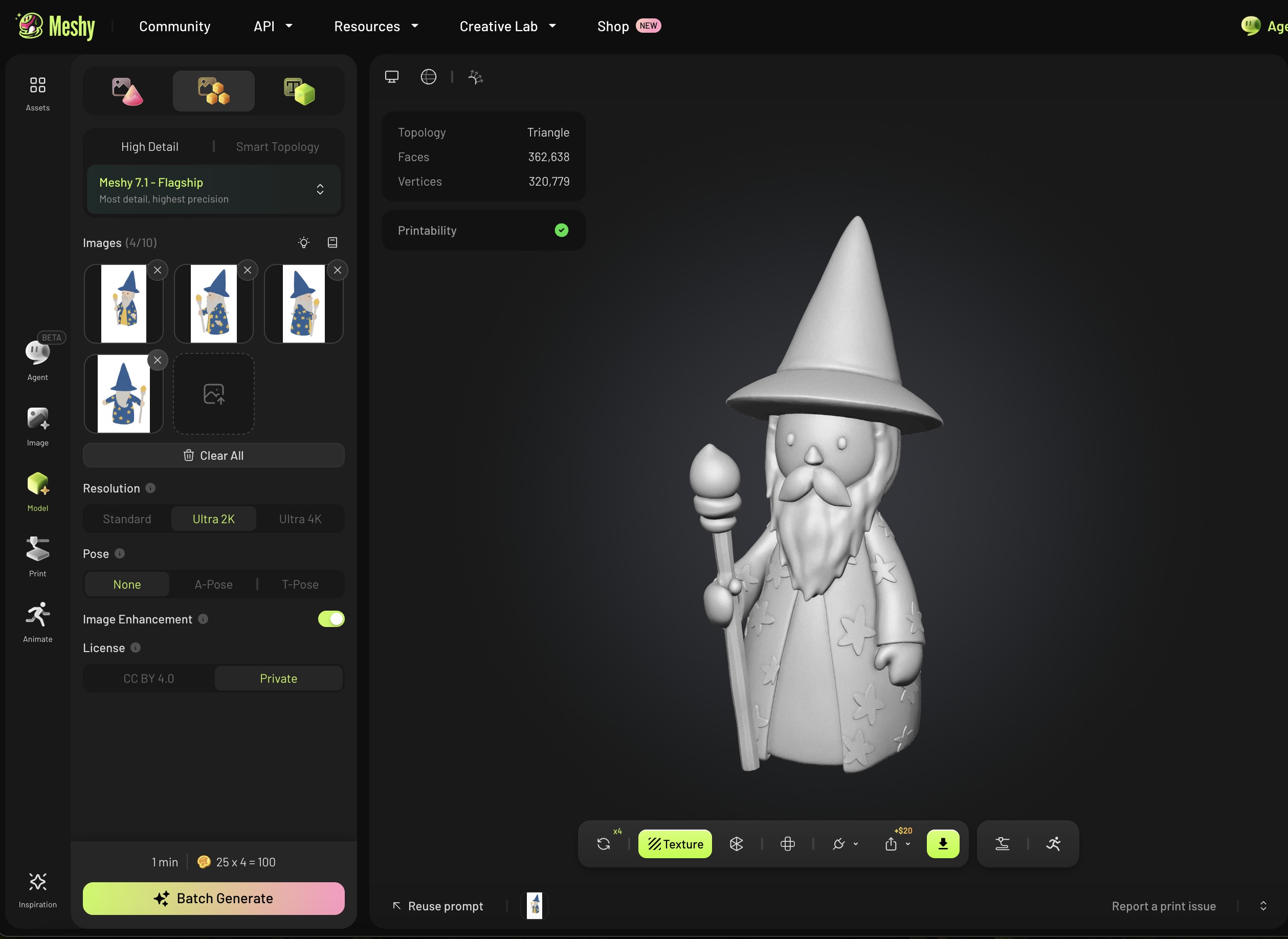
Then I tried the Batch Generate tab, expecting it to combine the views, and got four separate wizards instead, because Batch treats each image as its own job, 25 credits apiece. That mistake produced the model I printed. One of the four, made from the front three-quarter drawing alone, had the round body of her drawing, a face that matched it, eyes, nose, moustache and beard where she put them, and every star sculpted into the robe as relief. A single-view job has nothing to average against, so it keeps what it sees. It also has to invent what it cannot see, and that is why the back of the printed wizard is not quite her back view: the beard that hangs down his back in her drawing is a guess on the model, because the drawing it came from never showed it.
I ran the Texture tool over that model with all four views, and every painted star landed exactly on its sculpted bump, front, flanks and back, crisp and five-pointed. The texture stage reads the mesh. For a patterned character this inverts the recipe: a single-view model with the pattern in relief, then Texture with all views, beat the four-view generation whose reconciled mesh had nothing for the paint to hold on to. It cost 110 credits against 45, and it is the version that Sonja called fantastic.
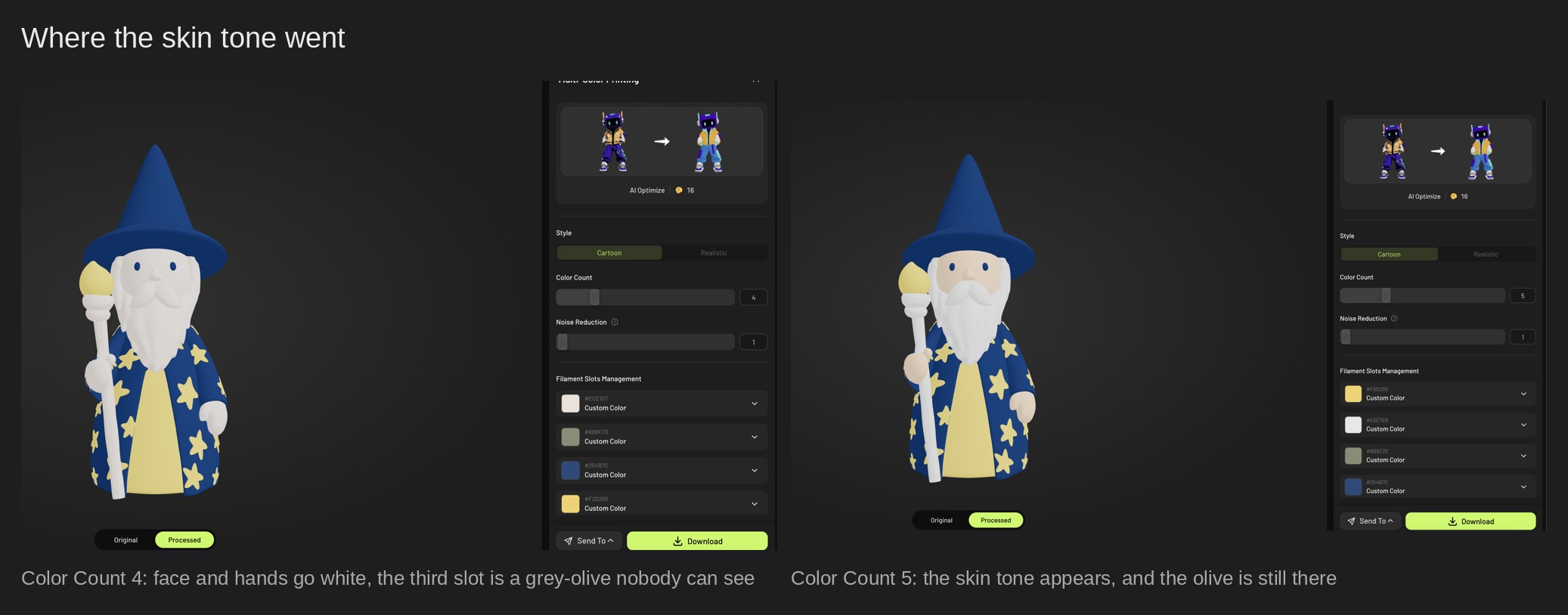
Then Multicolor 2.0 took the skin away. At four colors the panel picked blue, yellow, off-white and a gray-olive that appeared nowhere on the visible model; the face and hands went white with the beard. Realistic did the same. Noise Reduction cannot restore a color it never picked.
AI Optimize, sixteen credits, turned the face yellow and kept the olive; it saves its result as a new version of the model, so the plain segmentation stays available in the version strip at the bottom left of the viewer, and I went back to it. At five colors the skin came back, and the file told me where the olive had been all along: a dark outline the texture pass had painted around every relief star and along the panel edges, 3% of the surface, more than the face and hands together. The relief that made the stars crisp had cost the skin its vote.
I took the five-color export and merged the olive into whatever color bordered it, star by star, in the file, then gave the eyes, which the merge had also swallowed, their blue back. That is the one edit in this review that Meshy did not make, and it is here because the panel has no way to say “keep the skin” yet. Both controls that would have avoided it, locking a color to a slot and merging a slot into its neighbours, are one click of work on data the segmentation already has, and they are on the wishlist below.
The first print, at 65 mm, came off the U1 with a white face and hands, a story that belongs to the printer’s own review, and standing next to the dragon it also looked a size too small, so the reprint went to 75 mm to match. The wizard that came off the printer has a skin-toned face and hands, blue eyes, a white beard and every star raised and yellow on a blue robe, at 75 mm, from a drawing that is 471 pixels wide.
Of the three characters it is the one that looks most like her sheet, and she agreed: “Fantastic. All the small details came through so well, like the moustache and beard, all the little stars (one on his back got a bit creative, but that is fine), and even how his little hand sits around the staff. Color the eyes black with a marker and he is perfect.” Her one correction, then, is a marker: the eyes should be black, and in a four-color print with no black on the palette they came out blue. That limit belongs to the print, not to Meshy, and a marker fixes it in five seconds, which is more than can be said for the olive.
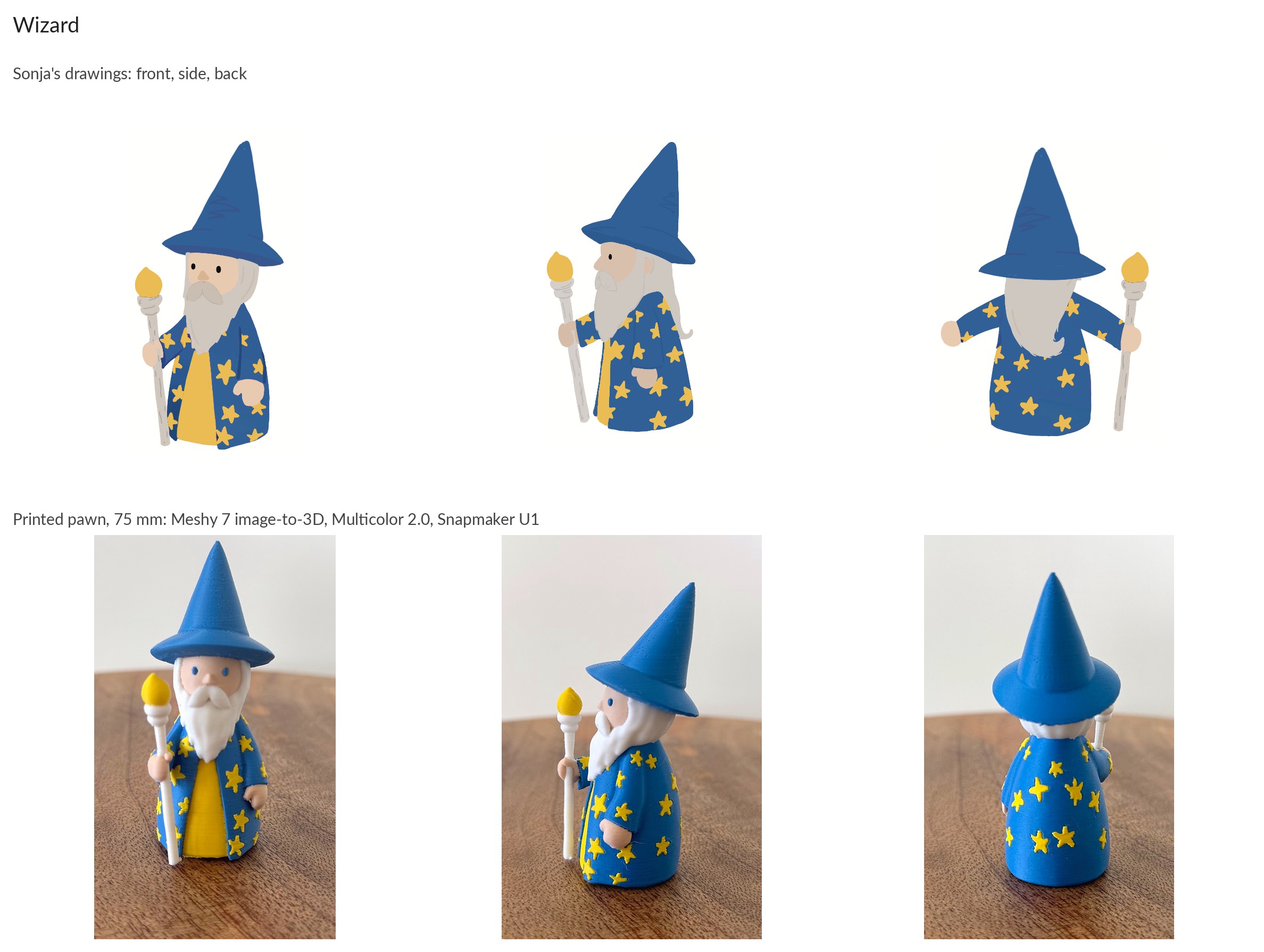
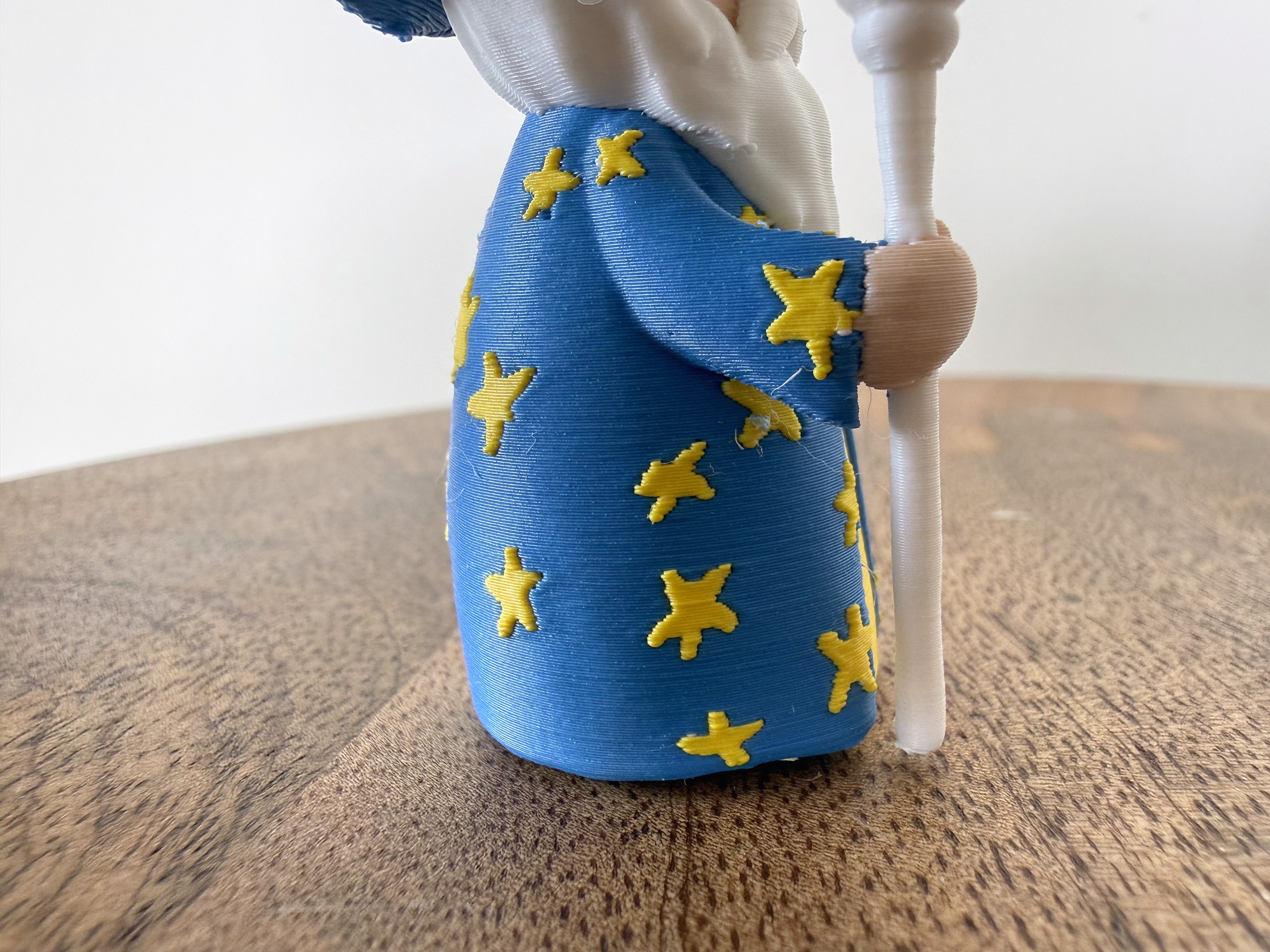
Raised stars, a skin-toned hand on the staff, and one fine string of filament near a star.
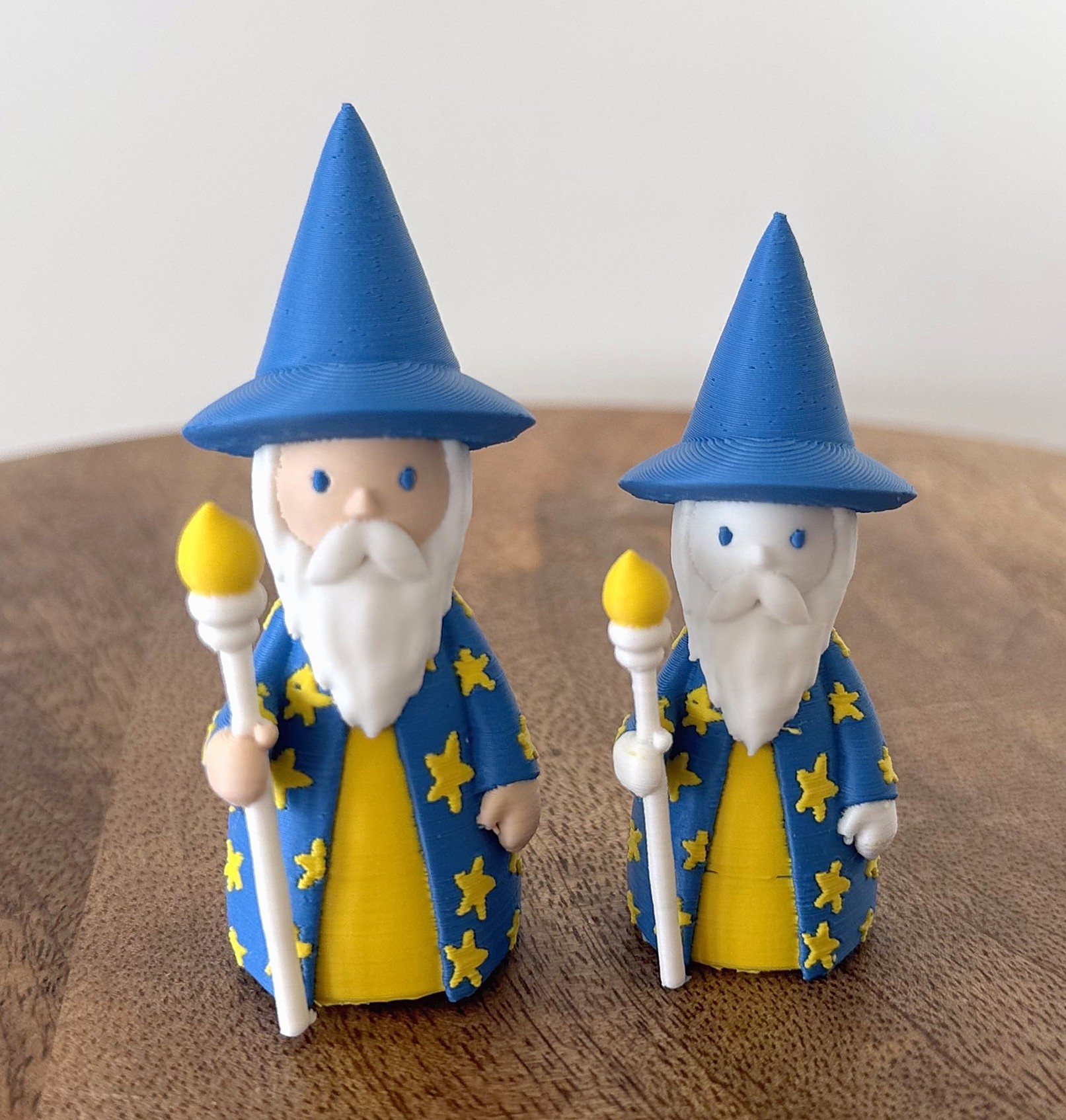
The final wizard (left, 75 mm) beside the first print (65 mm), where filament 4 never fired and the face and hands came out white. That story belongs to the U1 review.
Multicolor 2.0 and the road to the printer
The Multi-Color Printing panel is simple: a Cartoon or Realistic style, a color count, a noise reduction slider, a row per color where you can type the hex code of your actual spool and watch the preview recolor itself, an AI Optimize button, and Download or Send To. The recoloring is the best small feature in the product; a poor spool choice shows up on screen instead of on the bed, and the codes you enter stay as swatches for the next character.
Every spool in this review came from one range, Polymaker Panchroma Matte PLA, nine colors in all: Pastel Candy, Charcoal Black, Muted Purple and Pastel Beige for the dragon; Cotton White, Army Brown, Army Beige and Sapphire Blue for the owls; Cotton White, Pastel Candy, Sapphire Blue and Sunshine Yellow for the wizard. A matte range suits pawns: the layer lines hide, and the flat colors read like the drawing rather than like plastic.
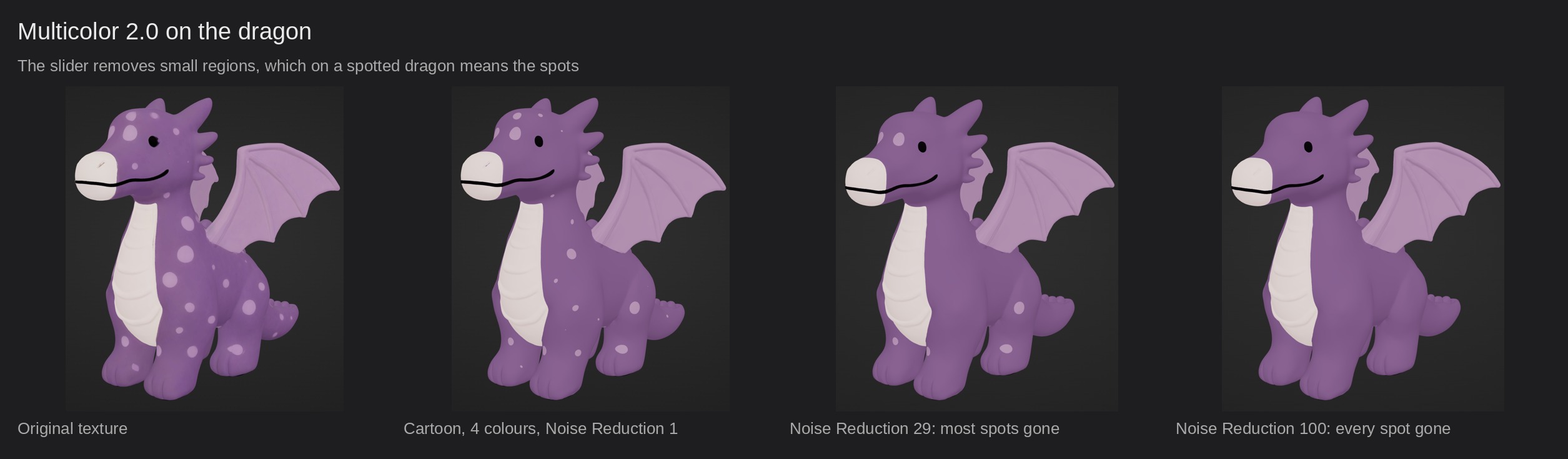
The segmentation is a quantizer, and it behaves like one, which is worth understanding rather than fighting. On the dragon, flat Nano Banana renders with big regions, it was right first time and the whole color preparation took under two minutes, as advertised. On hand-drawn textures it spent a slot on seam blends twice. Noise Reduction is a minimum-region filter: on the dragon it deleted the spots one by one and left the seams alone, so keep it low on any design whose character lives in small regions.
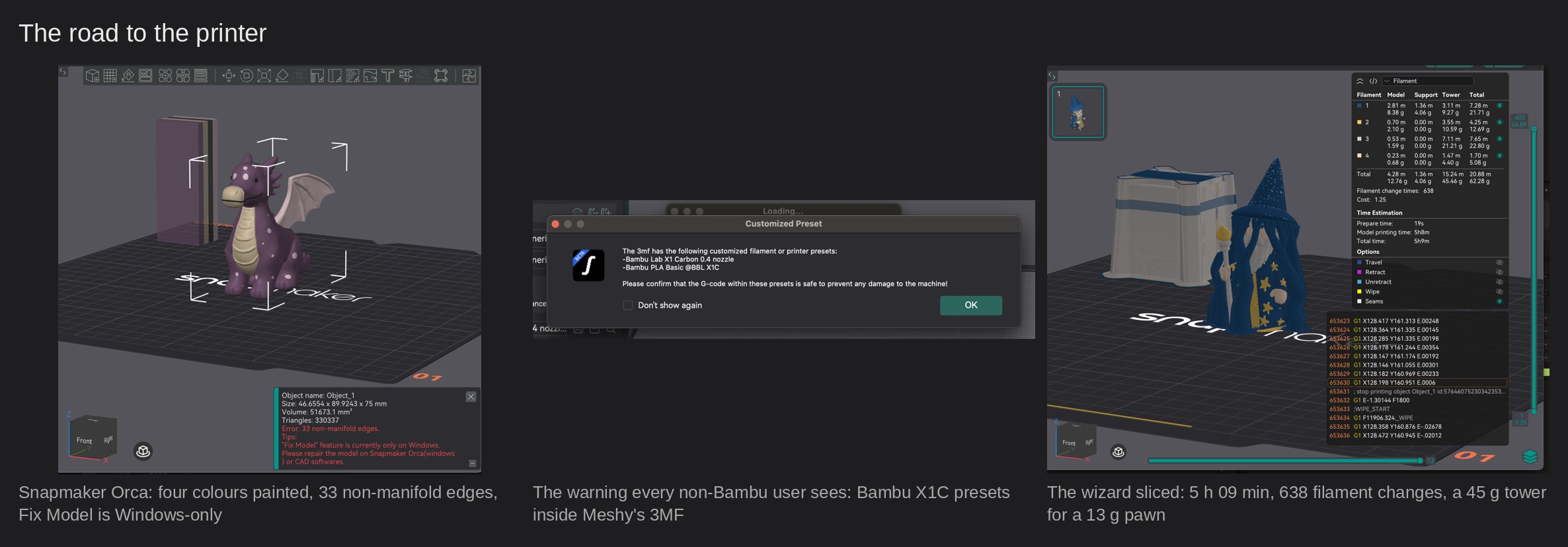
The export, as I tested it, was a Bambu Studio project: the painting is per-face, the mesh is complete, and the file carried a Bambu Lab X1 Carbon printer profile and Bambu PLA presets, so every non-Bambu slicer greeted it with a warning about custom presets and G-code that could damage the machine. It cannot; Snapmaker Orca kept its own U1 profile and asked me to set the four extruder colors by hand. Meshy has since added printer matching to the 3MF download, a Set up your printer step that asks for your model before the file is written; it arrived after my prints and I have not tested it. Orca also flagged a handful of mesh errors that Meshy’s Printability check had not. Harmless: every model sliced, every model printed, and the painting arrived per face exactly as the preview showed it.
What the slicer then shows is the cost of four colors. The dragon, 75 mm, sliced to 4 hours 46 minutes, 522 filament changes and 76 g of filament, of which 43 g was the prime tower. Setting supports to one extruder changed nothing, because the changes are set by the artwork: spots on every flank mean a color transition on nearly every layer. The three-owl plate shared one tower and got the tower down to 40%; the wizard alone, at 0.16 mm layers, spent 73% of its plastic priming. The remedy is to print several pawns at once, which a set of five conveniently allows. None of this is Meshy’s doing; it is what four colors cost on any printer, and Meshy’s job ends at a correct file, which it delivered every time.
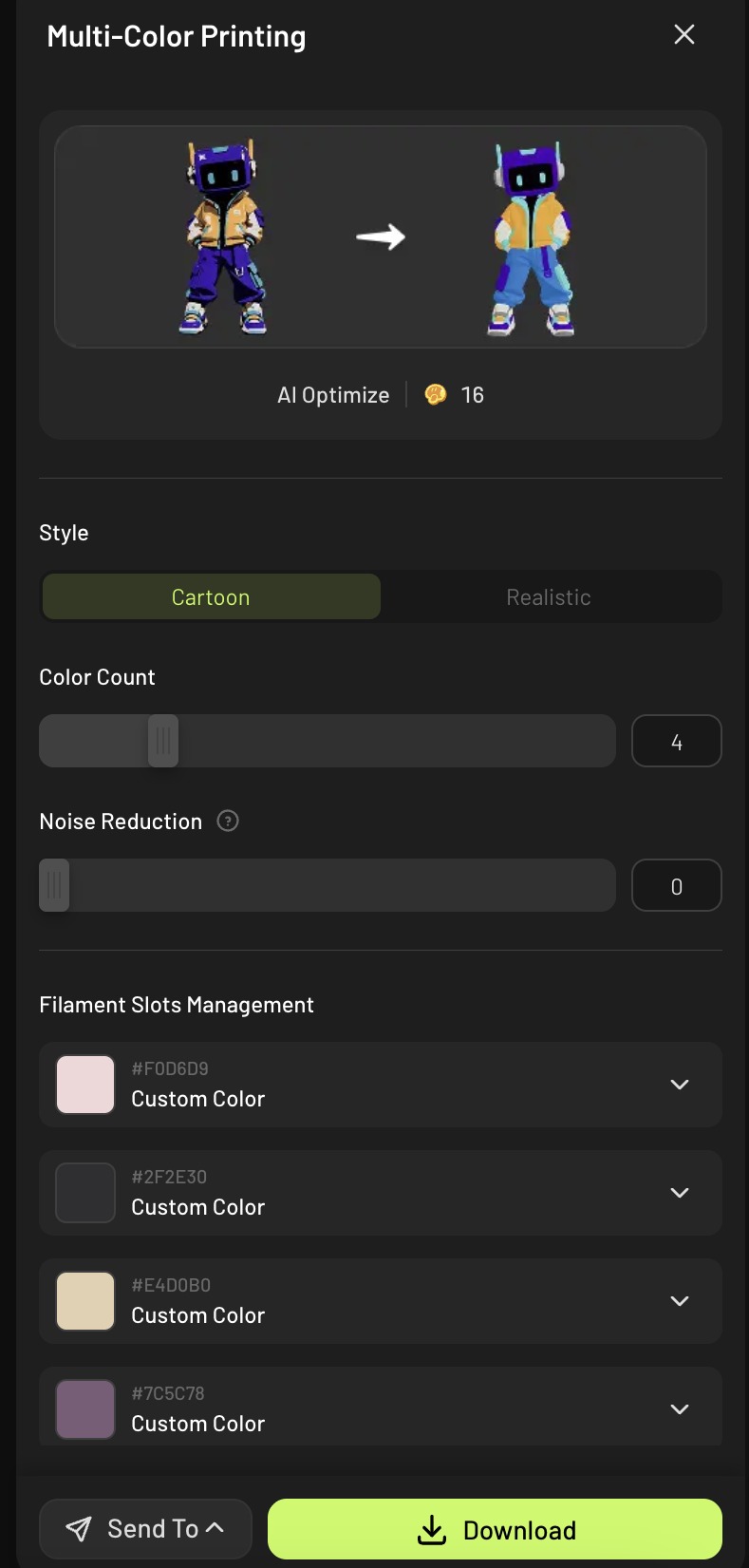
The Multi-Color Printing panel with the Polymaker hex codes typed in; the preview recolors live.
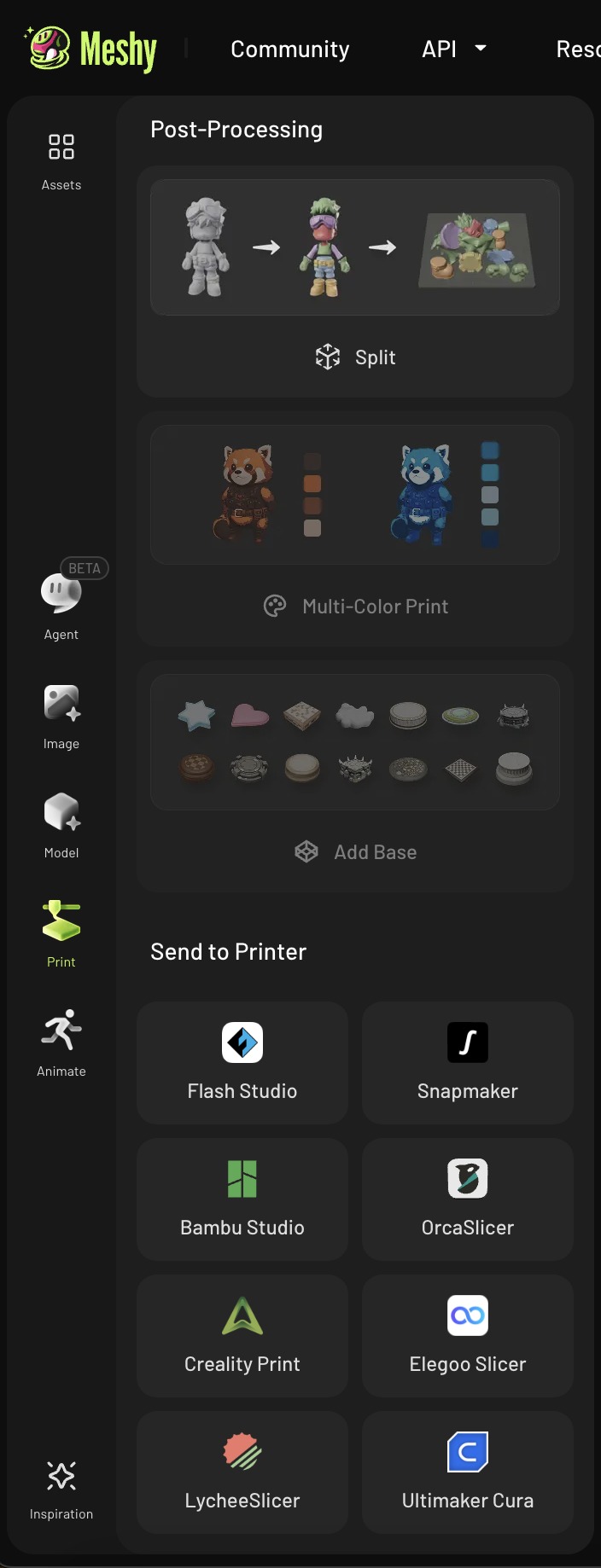
The Print panel: Split, Multi-Color Print, Add Base, and Send To eight slicers.
The numbers
The one print I clocked, the owl plate, came in twelve minutes under the slicer’s 9 h 21 min estimate. The recipe for a character with consistent drawn views is 35 credits for an Ultra 2K four-view generation, 10 for a 4K Retexture if the texture needs it, and about fifteen minutes of machine time. The whole review, eleven dragon runs included, cost 1,114 credits. On the Pro plan that is $20 a month for 1,000 credits, so about two cents a credit: a recipe pawn is under a dollar, the wizard’s detour about $3.60, and the entire review about one month’s subscription. The Ultra premium over Standard is five credits.
What we would tell Meshy
Before publication I sent Meshy ten questions about what I had found, and the product and engineering teams answered every one. Several answers shortened this list. The 3MF export now asks which printer you own. Model labels that said 7 in one tab and 7.1 in another were an old interface state, since fixed. Printability turns out to have a definition, mesh integrity at the print height you set, and the pawn that reported a volume of 390,389 cubic centimetres was being measured at the model’s internal scene scale, not at print size. The three-views question has a design answer. And the empty Auto Split file, the non-watertight mesh that passed the check and one of the detached-wing models are ones Meshy’s engineers want to trace at the source, and have asked for the files to do it.
What remains is short, because most of what we wanted was already there. Let a generated image go from the image library straight into a Model tool slot. Give the user a way to lock a color to a slot in Multicolor 2.0, which Meshy says is on its radar, and a merge-slot action. Have Printability show the height it is checking at, and label the volume figure with the scale it uses. And add a confirmation to the green Image to 3D button.
Two bigger asks, both born from the wizard afternoon, and both compliments in disguise, because they only make sense for a tool whose output is worth editing. First, let a new generation borrow from an earlier one. Every run is a fresh roll of the dice, so when one export gets the feet right and the next gets the face right, there is no way to say “use the feet from that one”. A reference-to-asset field in the prompt, or a per-part pick between two versions, would turn the re-roll lottery into an edit.
Second, let the user draw on the model in Multicolor 2.0. Circling a region and choosing its color is how every image editor has worked for thirty years; here the only controls are a color count, a noise slider and a button that re-segments everything. The segmentation already has the regions; it just does not let anyone touch them.
Reader tips: what I would do differently next time
The untextured check.
Before you texture or retexture anything, switch the viewer to its solid gray mode and look at the face. One socket per eye means a texture pass can fix a doubled eye. Two sockets means it cannot; regenerate with views that agree with each other.
Know where the versions live.
AI Optimize saves its result as a new version; both states sit in the version strip at the bottom left of the viewer, not in the panel. Typed spool codes do not carry over, so note them before you optimize. Free Retry is different: it replaces the asset, so download first.
Set the size before you trust the check.
Printability runs at the height set in the panel, 15 cm by default, and recalculates when you change it. A wall that passes at 15 cm can be too thin at 60 mm, so enter the print size first.
Four colors: what survives.
Multicolor 2.0 keeps the four largest color clusters in the texture, and a blend along a long edge can outrank a small real feature such as skin. If a color you need is missing at four, try five to see whether it exists, then decide what to merge.
Reading the slot list.
The extruder order in the exported 3MF is the reverse of the panel's list, and it changes between exports. Match your spools to the numbers in the file, not to the colors the slicer shows by default.
Verdict
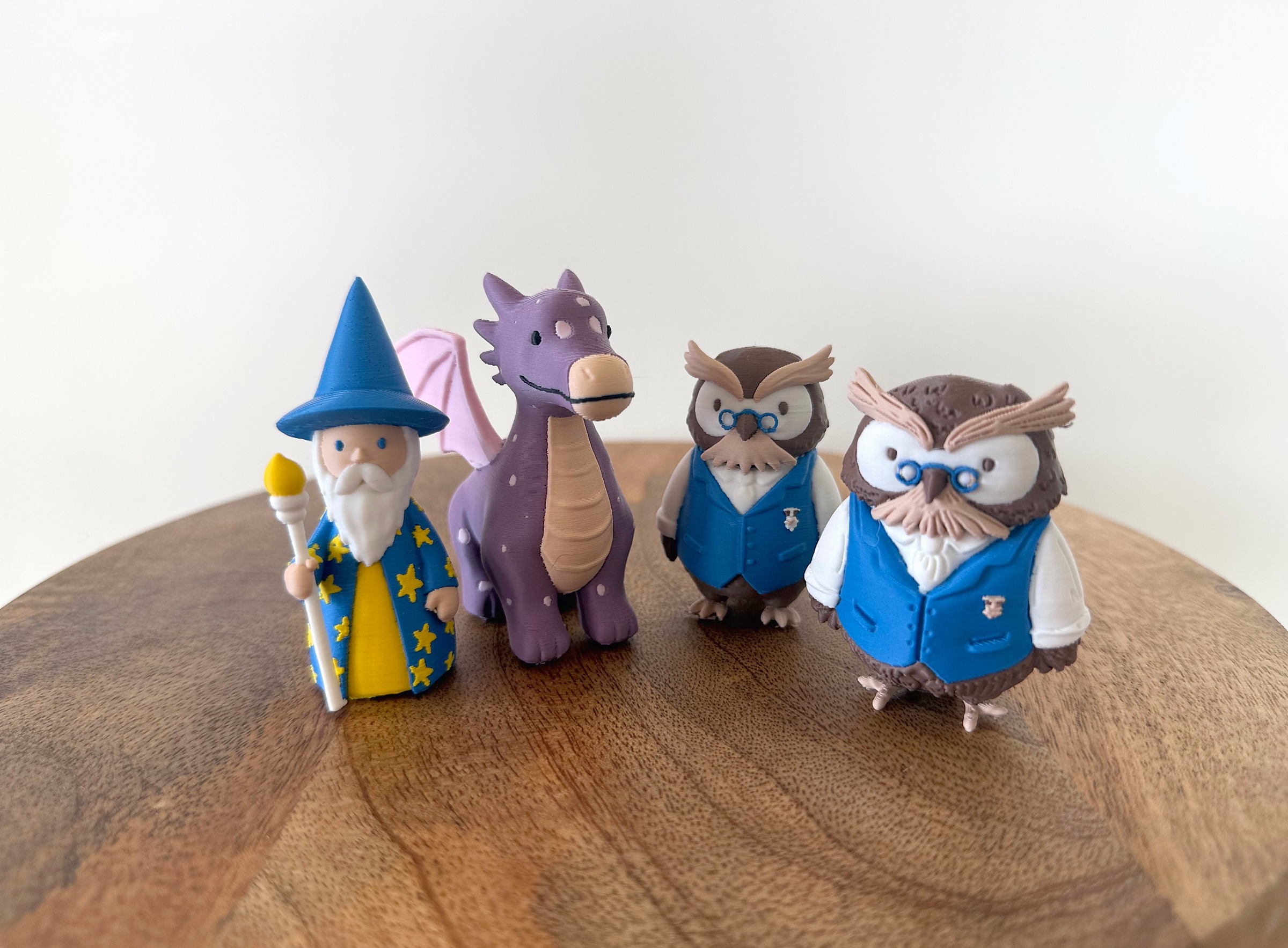
Put the drawing on the desk next to the pawn on the board and the review writes its own first line. A wizard that Sonja drew at 471 pixels wide stands on the table at 75 mm, in four colors, with his stars raised, his beard white and his hand around the staff, and nobody modeled him. The same is true of the dragon she called spot on and of the owl she would happily field with one waistcoat swapped. Three drawings went in, three pawns came out, and the designer accepted all three. Whatever the rest of this section says, that is the result, and until recently it was out of reach for anyone who could draw but not model.
The rest of this section is about what it took, because the readers who will use this tool deserve the recipe and not only the wonder. Geometry is Meshy’s strongest suit: given four consistent views it produced the right shape on the first attempt for the owl and the wizard, with relief fine enough to carry a badge and a moustache at 60 mm, and a printable mesh every time. Given inconsistent views, as with the dragon, it produced a shape that needed an afternoon and eleven runs, and the lesson is that the views must agree with each other before Meshy sees them. Texture is a step behind the mesh: soft sources give it blob stars and doubled eyes, and the fix is a Retexture pass, ten credits, which I came to treat as a normal step rather than a repair.
Color preparation is fast and pleasant when the quantizer chooses the right four colors, and offers no way to correct it when it does not; the wizard’s skin tone was the one place where the review had to step outside the tool, and both controls that would have kept me inside it are on the wishlist. Printability held: every file sliced, every file printed, and the painting arrived per face exactly as the preview showed it, on a slicer Meshy does not make.
The workflow is where the seams show: images carried by hand between two tools that live in the same window, a Bambu-shaped export and a slot order that changes between files, all of it survivable and all of it the kind of thing a product team fixes in a release, which, on the export, Meshy did while this review was being written. Value is not in question: a print-ready owl for 45 credits, under a dollar, and the whole review, dragon detours included, for about one month of the Pro plan.
So the score below is a four, with a named audience. Meshy 7.1 is the right tool for anyone with a multi-material printer, a character drawn in flat colors from consistent views, and the patience to look at the gray mesh before spending on texture. It is not yet the tool for anyone who needs the model to match the drawing line for line, or who needs a patterned design in more than four colors without opening the file. And it is not a tool that removes judgment from the process: every one of my best results came from a human noticing something, a doubled eye, a missing skin tone, a star sculpted into a single-view robe, and choosing the next step. What Meshy removes is the modeling, and for a designer who draws, that is the part that was in the way.
Sonja’s verdict on the wizard ended with a marker for the eyes, and then, in her words, he is perfect. The pawn stands on my desk next to her drawing, and the two look alike, a lot.
Scorecard
Reader offer
Meshy gives 3DPrinting.com readers 60% off the first month of Pro with the code 3DPRTG60, for new customers. The link below is an affiliate link from our promotional agreement with Meshy; it costs you nothing and did not influence this review.