3D Printing
News Videos Newsletter Contact us
Home / 3D Printers / 3D Printing Flexible Filament
qidi

3D Printing Flexible Filament

January 7, 2019

3D Printing flexible filament on a desktop 3D printer can be a bit tricky. Slicer software settings and 3D printer hardware both come into play when trying to get a successful print.

Slicer software settings
Mainly, print speed and retraction are the slicer software settings you need to get right. Our advice is to print really slow and to turn off retraction. Constant retracting and extruding can cause under-extrusion.

3D printer hardware
The build surface and extruder type of your 3D printer are also important. When printing on a cold print bed make sure to use some sort of adhesive layer. In case your printer has a heated bed with a glass surface there’s a fair chance you don’t need an extra adhesive layer.

Related Story
Bed Adhesion and Squish

Bowden versus Direct Extruder

A few years ago it was basically impossible to print flexible 3D printer filament with a bowden extruder. However, times have changed and extruders have improved a lot. Nowadays you have a good chance your bowden extruder is also up to the task.

Direct extruders are placed on top of the moving parts of a 3D printer. The weight of the stepper motor slows down the travel and print speeds. When you print at high speed with a direct extruder, the print quality might decrease.

Bowden printers on the other hand can achieve better print quality, while printing at high speed.
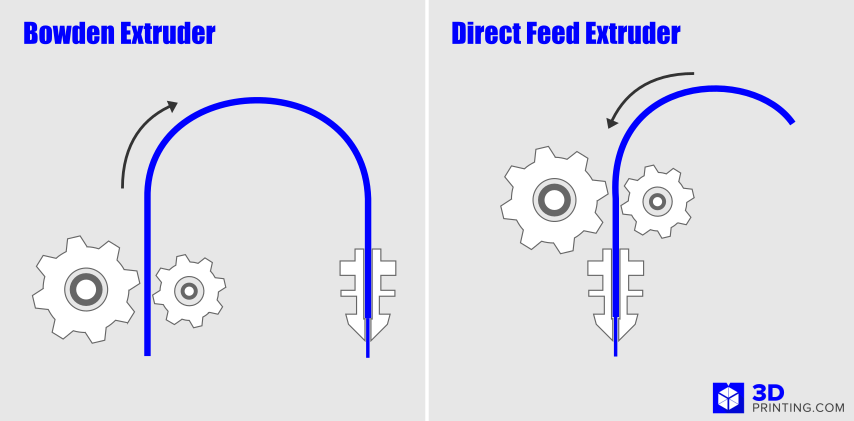
Bowden vs Direct feed extruder

Fully Constrained Filament Path

The most important element which decides if your printer is up to the task of printing flexible filament is the way it constrains the filament path. A fully constrained path from the idler/gear pinch point to the hot end means there is nowhere for the filament to escape or get stuck.

A good example of an extruder with a fully constrained filament path is the Bondtech QR. It can be configured either as a direct or bowden setup.

fusion 3 fully enclosed 3d printer
Related Story
The Benefits of Fully Enclosed Filament 3D Printers
Share:
WhatsApp Twitter Facebook LinkedIn Buffer Reddit E-mail
Join our newsletter

Our newsletter is free & you can unsubscribe any time.

Social

  • Facebook Facebook 3D Printing
  • Linkedin Linkedin 3D Printing
banner
banner
Join our newsletter

Our newsletter is free & you can unsubscribe any time.

Featured Industries

  • Automotive
  • Aerospace
  • Construction
  • Dental
  • Environmental
  • Electronics
  • Fashion
  • Medical
  • Military
  • Flashforge Adventurer 5M

    • - Print size: 220 x 220 x 220 mm
    • - 600mm/s travel speed
    More details »
    $299.00 Flashforge
    Buy Now
  • Qidi Max 4

    • - Print size: 390 x 390 x 340 mm
    • - active cooling air control
    More details »
    $1,219.00 Qidi
    Buy Now
  • Qidi Q2

    • - Print size: 270 x 270 x 256 mm
    • - enclosed heated chamber up to 65°C
    More details »
    $580.00 Qidi
    Buy Now
  • Snapmaker U1

    • - Print size: 270 x 270 x 270 mm
    • - multi-color printing with SnapSwap
    More details »
    $849.00 Snapmaker
    Buy Now
  • Flashforge Guider 3 Ultra

    • - Print size: 330 x 330 x 600 mm
    • - dual extruder system
    More details »
    $2,999.00 Flashforge
    Buy Now
  • Anycubic Photon Mono M7

    • - Print size: 223 x 126 x 230 mm
    • - 10.1 inch 14K screen
    More details »
    $279.00 Anycubic
    Buy Now
  • Flashforge AD5X

    • - Print size: 220 x 220 x 220 mm
    • - dual extrusion system
    More details »
    $399.00 Flashforge
    Buy Now
  • Anycubic Kobra S1 Combo

    • - Print size: 250 x 250 x 250 mm
    • - budget multicolor printing
    More details »
    $429.00 Anycubic
    Buy Now
  • Creality K2 Plus

    • - Print size: 350 x 350 x 350 mm
    • - multi-color printing
    More details »
    $1,199.00 Creality
    Buy Now
  • Creality Hi Combo

    • - Print size: 260 x 260 x 300 mm
    • - up to 16-color printing
    More details »
    $399.00 Creality
    Buy Now

Company Information

  • What is 3D Printing?
  • Contact us
  • Join our mailing list
  • Advertise with us
  • Media Kit
  • Nederland 3D Printing

Blog

  • Latest News
  • Use Cases
  • Reviews
  • 3D Printers
  • 3D Printing Metal

Featured Reviews

  • Anycubic Photon Mono M5s
  • Creality Ender 5 S1
  • The Mole 3D Scanner
  • Flashforge Creator 3 Pro

Featured Industries

  • Automotive
  • Aerospace
  • Construction
  • Dental
  • Environmental
  • Electronics
  • Medical
  • Military
  • Fashion
  • Art
2026 — Strikwerda en Dehue
  • Home
  • Join our mailing list
  • Contact us
Blog
  • Latest News
  • Use Cases
  • Reviews
  • 3D Printers
  • 3D Printing Metal
Featured Industries
  • Automotive
  • Aerospace
  • Construction
  • Dental
  • Environmental
  • Electronics
  • Medical
  • Military
  • Fashion
  • Art
Company Information
  • What is 3D Printing?
  • Contact us
  • Join our mailing list
  • Advertise with us
  • Media Kit
  • Nederland 3D Printing