3D Printing
News Videos Newsletter Contact us
Home / News / Optomec Reveals ‘Recipes’ For Metal Printing to Aid in Optimal Manufacturing Quality
qidi

Optomec Reveals ‘Recipes’ For Metal Printing to Aid in Optimal Manufacturing Quality

August 11, 2017

Metal printing is getting cheaper and more efficient as time goes on. While most news stories talk about technologies or materials, Optomec’s newest revelation goes in a different direction. The company that developed the famous LENS production technique has just unveiled what it calls ‘recipes’. Recipes are time-saving tools that aid customers in faster application of additive manufacturing. They have provided recipes for their LENS method and the Aerosol Jet Printing of electronics.

These recipes are an interesting concept. Optomec’s application experts developed these as a means of helping customers select and process materials best suited to meet their functional, performance and geometric requirements. Since metal printing requires so many factors to account for, Optomec’s customers save weeks of trial and error.

Related Story
Optomec Reveals Aerosol Jet HD High Resolution Electronics Printer
Multi-material metal printing
Related Story
WSU Use LENS For Multi-Material Metal Printing With Multiple Alloys

Advantages of Recipes

Optomec Recipes

Recipes allow experts to test and verify the best methods of producing with various tech and materials. They can give an exact blueprint for companies on what results they can expect with which inputs. Since there are so many factors to consider in metal printing and not enough good information, these recipes can go a long way in clarifying precision processing.

“These proven, pre-qualified recipes save weeks of trial and error while also enabling customers to fully leverage the advanced features of our printers to produce quality results,” said Ken Vartanian, Vice President of marketing at Optomec. “Over the years we have screened hundreds of materials from a variety of suppliers and now want to make this knowledge available to our customers. These printing recipes represent an important first step in our strategy to provide digital products that facilitate additive manufacturing capabilities from design through volume manufacturing.”

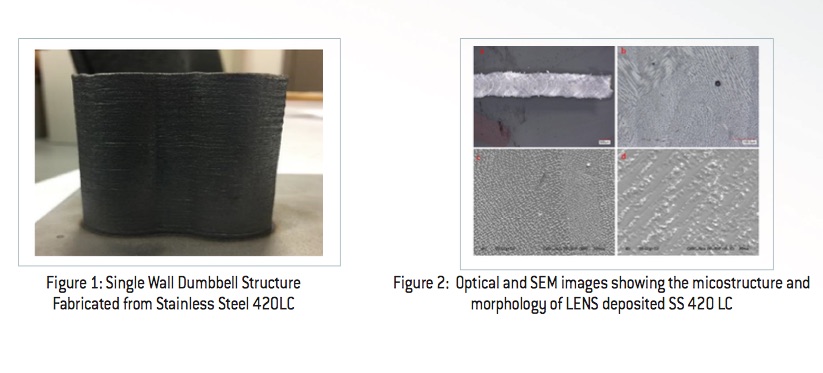
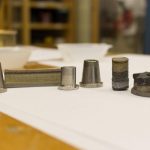
Each recipe takes into account feedstock characteristics, machine set-up, processing parameters. They are also geometry-specific, allowing the process to take precise shapes into account. These recipes also apply to commercially available powders, so companies can easily repeat results and do tests. Additionally, optical and SEM images (as referenced above) showing the microstructure and morphology of samples printed using each recipe are provided.

Brochures for the recipes are available on Optomec’s official website.

Share:
WhatsApp Twitter Facebook LinkedIn Buffer Reddit E-mail
Join our newsletter

Our newsletter is free & you can unsubscribe any time.

Social

  • Facebook Facebook 3D Printing
  • Linkedin Linkedin 3D Printing
banner
banner
Join our newsletter

Our newsletter is free & you can unsubscribe any time.

Featured Industries

  • Automotive
  • Aerospace
  • Construction
  • Dental
  • Environmental
  • Electronics
  • Fashion
  • Medical
  • Military
  • Qidi Q2

    • - Print size: 270 x 270 x 256 mm
    • - enclosed heated chamber up to 65°C
    More details »
    $580.00 Qidi
    Buy Now
  • Qidi Max 4

    • - Print size: 390 x 390 x 340 mm
    • - active cooling air control
    More details »
    $1,219.00 Qidi
    Buy Now
  • Flashforge AD5X

    • - Print size: 220 x 220 x 220 mm
    • - dual extrusion system
    More details »
    $399.00 Flashforge
    Buy Now
  • Anycubic Photon Mono M7

    • - Print size: 223 x 126 x 230 mm
    • - 10.1 inch 14K screen
    More details »
    $279.00 Anycubic
    Buy Now
  • Anycubic Kobra S1 Combo

    • - Print size: 250 x 250 x 250 mm
    • - budget multicolor printing
    More details »
    $429.00 Anycubic
    Buy Now
  • Creality Hi Combo

    • - Print size: 260 x 260 x 300 mm
    • - up to 16-color printing
    More details »
    $399.00 Creality
    Buy Now
  • Snapmaker U1

    • - Print size: 270 x 270 x 270 mm
    • - multi-color printing with SnapSwap
    More details »
    $849.00 Snapmaker
    Buy Now
  • Flashforge Adventurer 5M

    • - Print size: 220 x 220 x 220 mm
    • - 600mm/s travel speed
    More details »
    $299.00 Flashforge
    Buy Now
  • Creality K2 Plus

    • - Print size: 350 x 350 x 350 mm
    • - multi-color printing
    More details »
    $1,199.00 Creality
    Buy Now
  • Flashforge Guider 3 Ultra

    • - Print size: 330 x 330 x 600 mm
    • - dual extruder system
    More details »
    $2,999.00 Flashforge
    Buy Now

Company Information

  • What is 3D Printing?
  • Contact us
  • Join our mailing list
  • Advertise with us
  • Media Kit
  • Nederland 3D Printing

Blog

  • Latest News
  • Use Cases
  • Reviews
  • 3D Printers
  • 3D Printing Metal

Featured Reviews

  • Anycubic Photon Mono M5s
  • Creality Ender 5 S1
  • The Mole 3D Scanner
  • Flashforge Creator 3 Pro

Featured Industries

  • Automotive
  • Aerospace
  • Construction
  • Dental
  • Environmental
  • Electronics
  • Medical
  • Military
  • Fashion
  • Art
2025 — Strikwerda en Dehue
  • Home
  • Join our mailing list
  • Contact us
Blog
  • Latest News
  • Use Cases
  • Reviews
  • 3D Printers
  • 3D Printing Metal
Featured Industries
  • Automotive
  • Aerospace
  • Construction
  • Dental
  • Environmental
  • Electronics
  • Medical
  • Military
  • Fashion
  • Art
Company Information
  • What is 3D Printing?
  • Contact us
  • Join our mailing list
  • Advertise with us
  • Media Kit
  • Nederland 3D Printing