
3D Printing
News Back to school deals Contact us
Home / News / Palette 2 Showcases Multiple Material Color FFF Printing
qidi

Palette 2 Showcases Multiple Material Color FFF Printing

August 27, 2018

The Palette product line has had a rocky way forward. The company went from a promising start and being bought by 3D Systems to dying down a bit and then being revived by its kickstarter community. The prospects it presented are however still very notable in their ambition. Mosaic, the original company, has now launched the Palette 2, with more colors and more materials in its arsenal.

Related Story
Color Your 3D Prints With Hydro Dipping

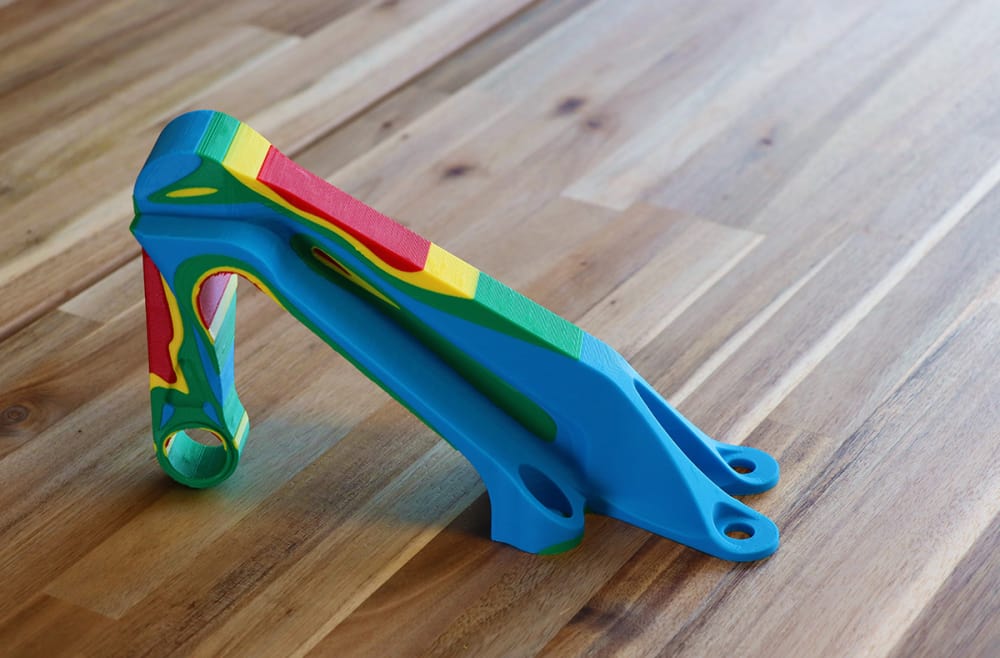
The system remains quite similar. Users feed multiple spools of filament into the device and splice them into colors using four different holes at the bottom of the unit. It employs a razor to cut one filament and retract it, leaving only a small piece of the feedstock. Then, the second filament goes into the “splice core” where both pieces undergo heating. The Palette then presses them together into one strand for feeding into the printer. It repeats the process hundreds of thousands of times (depending on the size of the print).
Palette 2 Showcases Multiple Material Color FFF Printing

The idea is very novel even now, using a small hardware add-on to 3D print with multiple colors. The company has now made it even more compact and far more versatile in usage. While the core concept stays the same, Palette 2 contains all of the necessary functions within a single piece of hardware. the Palette 2 is also far more user-friendly.

The Palette 2 also brings in some heavy hitting materials choices. Aside from PLA and ABS, it can process PETG, Flexible and Soluble filaments. Mosaic have also made it much handier by adding in a touch-screen and filament run-out detection.

Palette 2 Features

Previous iterations of the device could be very laborious for users. However, Mosaic have truly refined the software system down to the essentials. Previously, users would employ their slicer software and import various CAD files for each different color and material. Arranging these properly and assigning each filament profile to each CAD file was an intense hassle.

In a preview, Mosaic showed off just how much they’ve streamlined the entire process. With 4 different CAD files, they spliced a multicolor print in about 10 steps. This was thanks to the CANVAS software, which automatically arranges the files and enables users to simply drag and drop material profiles onto each CAD file, exporting all of it as one big g-code file. CANVAS also connects the printer to the Internet with the CANVAS Hub device.

“One of the key pieces of feedback [on previous generations] was that, if users were using brittle filament or something less standard, like wood filament, and they have a broken piece of filament stuck in their Palette, they would spend half an hour taking it apart with all of these tools,” said Chris Labelle, Mosaic Cofounder and Chief Operating Officer. “With Palette 2, you’re able to see where all of the filament would go and access every piece of the product without any tools.”

Featured image courtesy of Mosaic.

Share:
WhatsApp Twitter Facebook LinkedIn Buffer Reddit E-mail
Join our newsletter

Our newsletter is free & you can unsubscribe any time.

Latest posts

SHINING 3D Launches ShiningSpace, a Browser Platform for Real-World 3D Scans

SHINING 3D has launched ShiningSpace, a browser-based platform for storing, viewing, editing and sharing 3D scan data. The company says it accepts models... read more »

News

LLNL 3D-Prints a Bioreactor That Turns Waste Methane Into a Useful Chemical

Lawrence Livermore National Laboratory 3D-printed a bioreactor that uses bacteria in thin lattice walls to turn waste methane into succinate.

News

Snapmaker and Phaetus Launch Liber High Flow Hotend for the U1

Snapmaker and hotend specialist Phaetus have launched the Liber High Flow Hotend for the Snapmaker U1 toolchanger. According to Snapmaker, it delivers up... read more »

News

City University of Hong Kong and Cambridge Open a 3D Printing Centre

City University of Hong Kong and the University of Cambridge have opened a joint centre that will use 3D printing for data-centre cooling... read more »

News

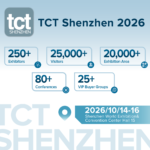
TCT Shenzhen 2026: Seven Highlights to Watch This October

TCT Shenzhen 2026 takes place at Shenzhen World from October 14 to 16 with, according to organizer TCT, more than 250 exhibitors, 80-plus... read more »

Events

ORNL and Boeing 3D-Print a Nearly Two-Ton Mold for Aircraft Parts

Oak Ridge National Laboratory and Boeing 3D-printed a nearly two-ton steel mold for stamping thermoplastic composite aircraft parts.

3D Printing Metal

Meshy 7 Review: From a Designer’s Drawings to Four-Color Board Game Pawns, With No Modelling Skills

Game designer Sonja Uittenboogaard (swurls.nl) draws her own characters. I took three of them, a dragon, an owl and a wizard, and tried... read more »

News

Creality Pika: The Pocket AI 3D Scanner That Wants Scanning to Feel Like Taking a Photo

Creality has shrunk a dual-mode 3D scanner to the size of a compact camera, given it a touchscreen and two swappable batteries, and... read more »

News

How to 3D Scan With Your Phone in 2026: Apps, Technique, and Limits

Yes, you can 3D scan with your phone, and the results are better than the price of admission suggests, which is zero. A... read more »

Scanners

LLNL Researchers Inspect Direct-Ink Prints Layer by Layer With Cameras

Lawrence Livermore mounted cameras on a direct-ink printer so software can measure filament diameter and flag broken strands before a part leaves the... read more »

News
LLNL Researchers Inspect Direct-Ink Prints Layer by Layer With Cameras

Social

  • Facebook Facebook 3D Printing
  • Linkedin Linkedin 3D Printing
Join our newsletter

Our newsletter is free & you can unsubscribe any time.

banner
banner
  • Qidi Q2

    • - Print size: 270 x 270 x 256 mm
    • - enclosed heated chamber up to 65°C
    More details »
    $580.00 Qidi
    Buy Now
  • Creality K2 Plus

    • - Print size: 350 x 350 x 350 mm
    • - multi-color printing
    More details »
    $1,199.00 Creality
    Buy Now
  • Flashforge Guider 3 Ultra

    • - Print size: 330 x 330 x 600 mm
    • - dual extruder system
    More details »
    $2,999.00 Flashforge
    Buy Now
  • Creality Hi Combo

    • - Print size: 260 x 260 x 300 mm
    • - up to 16-color printing
    More details »
    $399.00 Creality
    Buy Now
  • Anycubic Photon Mono M7

    • - Print size: 223 x 126 x 230 mm
    • - 10.1 inch 14K screen
    More details »
    $279.00 Anycubic
    Buy Now
  • Flashforge AD5X

    • - Print size: 220 x 220 x 220 mm
    • - dual extrusion system
    More details »
    $399.00 Flashforge
    Buy Now
  • Anycubic Kobra S1 Combo

    • - Print size: 250 x 250 x 250 mm
    • - budget multicolor printing
    More details »
    $429.00 Anycubic
    Buy Now
  • Flashforge Adventurer 5M

    • - Print size: 220 x 220 x 220 mm
    • - 600mm/s travel speed
    More details »
    $299.00 Flashforge
    Buy Now
  • Snapmaker U1

    • - Print size: 270 x 270 x 270 mm
    • - multi-color printing with SnapSwap
    More details »
    $849.00 Snapmaker
    Buy Now
  • Qidi Max 4

    • - Print size: 390 x 390 x 340 mm
    • - active cooling air control
    More details »
    $1,219.00 Qidi
    Buy Now

Company Information

  • What is 3D Printing?
  • Contact us
  • Join our mailing list
  • Advertise with us
  • Media Kit
  • Nederland 3D Printing

Blog

  • Latest News
  • Use Cases
  • Reviews
  • 3D Printers
  • 3D Printing Metal

Featured Reviews

  • Anycubic Photon Mono M5s
  • Creality Ender 5 S1
  • The Mole 3D Scanner
  • Flashforge Creator 3 Pro

Featured Industries

  • Automotive
  • Aerospace
  • Construction
  • Dental
  • Environmental
  • Electronics
  • Medical
  • Military
  • Fashion
  • Art
2026 — Strikwerda en Dehue
  • Home
  • Join our mailing list
  • Contact us
Blog
  • Latest News
  • Use Cases
  • Reviews
  • 3D Printers
  • 3D Printing Metal
Featured Industries
  • Automotive
  • Aerospace
  • Construction
  • Dental
  • Environmental
  • Electronics
  • Medical
  • Military
  • Fashion
  • Art
Company Information
  • What is 3D Printing?
  • Contact us
  • Join our mailing list
  • Advertise with us
  • Media Kit
  • Nederland 3D Printing