Anycubic has launched a limited-time flash sale on two of its best-selling FDM 3D printers. The Kobra X and the Kobra S1 Combo are both discounted through April 30, offering some of the lowest prices we have seen on these machines. If either has been on your list, now is the right time to buy.
Below you will find everything you need to know about both printers, their sale prices, and a few additional Anycubic deals worth knowing about.
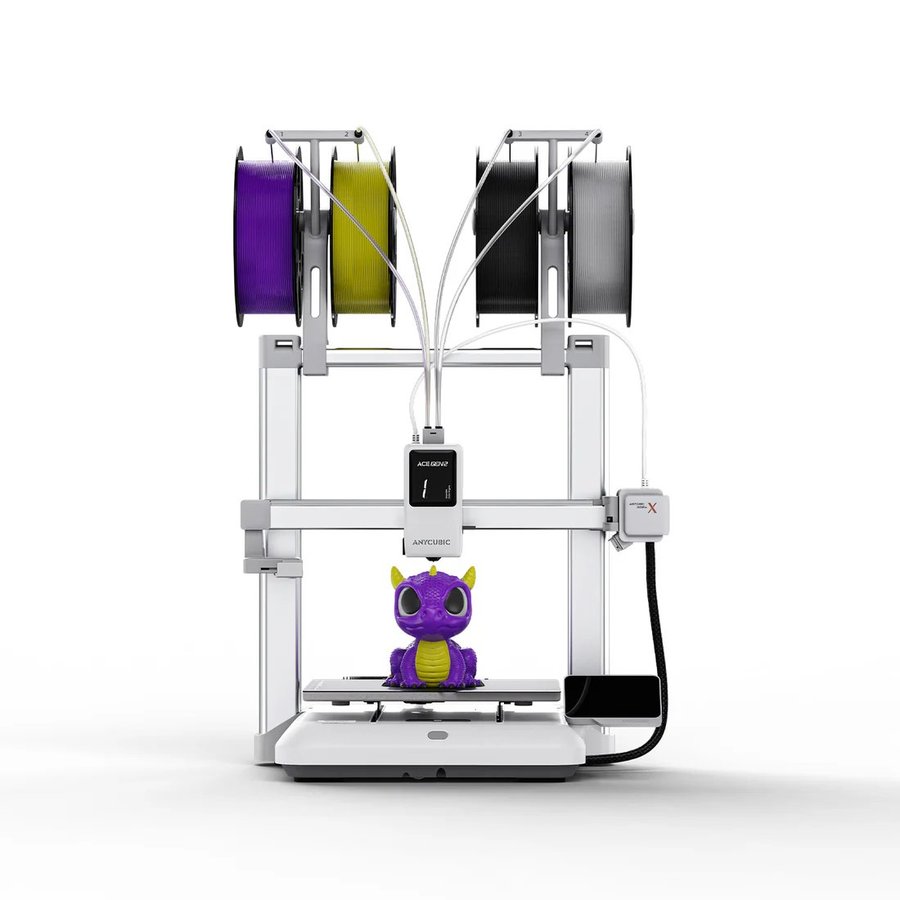
Anycubic Kobra X
Open-frame | Multi-material | Up to 19 colors
Save $100
The Kobra X is Anycubic’s open-frame multi-material system built around the second-generation ACE GEN2 integrated print head. Unlike most multi-colour systems that use a separate external box, the ACE GEN2 is built directly into the toolhead, cutting filament purge length by 81% compared to conventional setups. Out of the box it supports 4-colour printing with soft and hard materials simultaneously — PLA and TPU in the same print. Add up to four external ACE 2 Pro units to scale up to 19 colours. At 600mm/s maximum speed with LeviQ 3.0 auto-levelling and AI-assisted spaghetti detection via a built-in camera, this is one of the most capable open-frame printers at this price point.
Best for: Creators who want multi-colour and multi-material printing in an open-frame format at the lowest possible entry price.
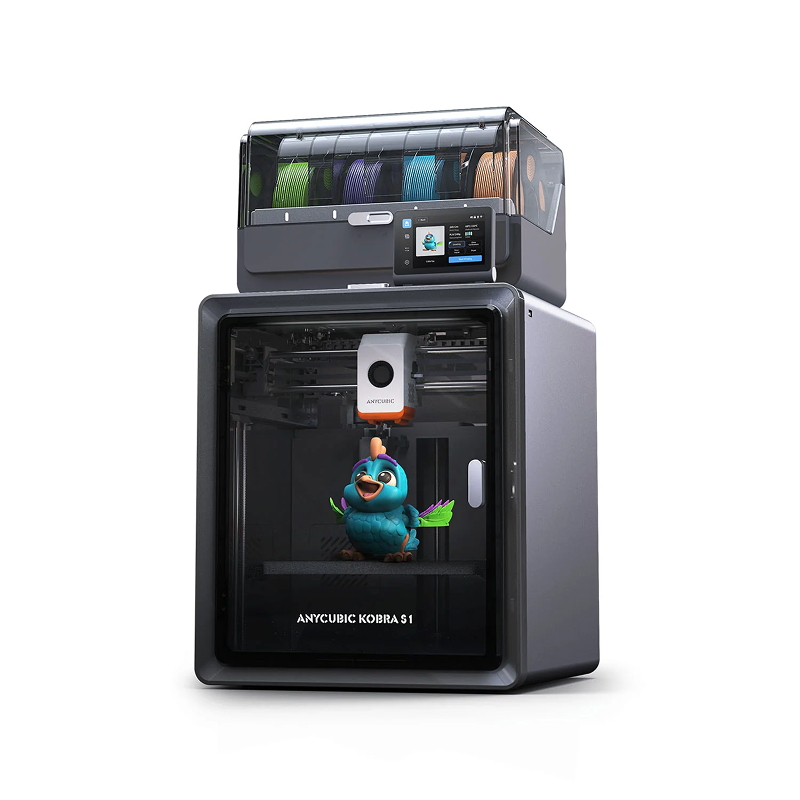
Anycubic Kobra S1 Combo
Fully enclosed CoreXY | Up to 8 colours | Active filament drying
Save $120
The Kobra S1 Combo pairs Anycubic’s enclosed CoreXY printer with the ACE Pro multi-material system in one package. The fully enclosed design gives a stable thermal environment for engineering materials like ABS and ASA — materials that the Kobra X technically supports but that benefit significantly from the controlled heat environment an enclosure provides. The included ACE Pro handles 4-colour printing and a second unit can be added for 8-colour capability. Active filament drying runs during printing using dual 200W PTC heating elements, keeping moisture-sensitive materials in top condition without a separate dryer. At $429 in this sale, it undercuts comparable enclosed multi-colour systems from competitors by a significant margin.
Best for: Users who want an enclosed multi-colour system capable of engineering materials, with active filament drying included, without spending over $500.
Kobra X vs Kobra S1 Combo — which one to choose?
Both printers are on sale, so the question is which suits your situation better rather than which is cheaper. The key difference is the enclosure and material support.
Choose the Kobra X if you print primarily with PLA, PETG, and TPU and want the maximum colour range at the lowest price. Choose the Kobra S1 Combo if you print with ABS, ASA, or moisture-sensitive materials, or if you want filament drying built into your workflow without a separate accessory.
Other Anycubic deals worth knowing about
Two more active promotions from Anycubic running alongside the flash sale.

Easter Filament and Resin Bulk Sale
Mix and match 6kg or 12kg bundles — up to $115 off
Mix and match 6kg or 12kg bundles of Anycubic filament and resin across multiple types and colours. Discounts are applied automatically at checkout once your cart reaches the qualifying quantity — no coupon needed. The savings scale with volume: 6kg filament saves $46, 12kg saves $115. On the resin side, 6kg saves $65 and 12kg saves $160. A practical option if you are stocking up on multiple colours for the Kobra X or S1 Combo, or running a high-volume resin setup.

Kobra S1 ACE 2 Pro Combo — Early Bird
Early bird price: $459
The next generation of the Kobra S1 platform arrives with the upgraded ACE 2 Pro multi-material system. The ACE 2 Pro doubles the feed rate of the original ACE Pro (50mm/s versus 25mm/s) and cuts colour-change time from around 84 seconds to 56 seconds. It adds high-temperature drying up to 65°C during printing — 15 degrees higher than the original — with temperature and humidity detection, sealed storage, and an electromagnetic valve that actively removes moisture from the filament while the print runs. If you have been considering the S1 platform and want the latest multi-material technology rather than the current generation, the early bird window through May 31 is the time to commit.
Snapmaker and Phaetus Launch Liber High Flow Hotend for the U1
Snapmaker and hotend specialist Phaetus have launched the Liber High Flow Hotend for the Snapmaker U1 toolchanger. According to Snapmaker, it delivers up... read more »
City University of Hong Kong and Cambridge Open a 3D Printing Centre
City University of Hong Kong and the University of Cambridge have opened a joint centre that will use 3D printing for data-centre cooling... read more »

TCT Shenzhen 2026: Seven Highlights to Watch This October
TCT Shenzhen 2026 takes place at Shenzhen World from October 14 to 16 with, according to organizer TCT, more than 250 exhibitors, 80-plus... read more »
ORNL and Boeing 3D-Print a Nearly Two-Ton Mold for Aircraft Parts
Oak Ridge National Laboratory and Boeing 3D-printed a nearly two-ton steel mold for stamping thermoplastic composite aircraft parts.
Meshy 7 Review: From a Designer’s Drawings to Four-Color Board Game Pawns, With No Modelling Skills
Game designer Sonja Uittenboogaard (swurls.nl) draws her own characters. I took three of them, a dragon, an owl and a wizard, and tried... read more »

Creality Pika: The Pocket AI 3D Scanner That Wants Scanning to Feel Like Taking a Photo
Creality has shrunk a dual-mode 3D scanner to the size of a compact camera, given it a touchscreen and two swappable batteries, and... read more »
How to 3D Scan With Your Phone in 2026: Apps, Technique, and Limits
Yes, you can 3D scan with your phone, and the results are better than the price of admission suggests, which is zero. A... read more »

LLNL Researchers Inspect Direct-Ink Prints Layer by Layer With Cameras
Lawrence Livermore mounted cameras on a direct-ink printer so software can measure filament diameter and flag broken strands before a part leaves the... read more »
CMU Researchers Turn a Single Photo Into Snap-Fit 3D Printed Parts
Carnegie Mellon software takes a photo, splits the object into 3D parts, and adds peg-and-socket joints so the pieces print and snap together... read more »

Artec Neo: Artec 3D Launches a Tolerance-Driven Handheld Metrology Scanner
Artec 3D says its new handheld blue-light scanner delivers 0.025 mm accuracy at target-anchored features only, while capturing the whole part in color... read more »