
3D Printing
News Videos Newsletter Contact us
Home / News / Simplify3D Set to Launch Version 4.0 of Their Professional Printing Software

Simplify3D Set to Launch Version 4.0 of Their Professional Printing Software

July 25, 2017

No doubt, astute readers have heard of Simplify3D, even if they’ve never used their software. They cemented their place as one of the most famous producers of slicing software with innovative features like the Dual Extrusion Wizard and Interactive Print Simulations as part of their own eponymous software. Simplify3D are now looking to wow print enthusiasts with their new version 4.0 upgrade.

Version 4.0 is a free update for all existing users. It is available on their website and brings out a host of new features that add to this already solid software package. The goal of the company has always been to make 3D printing easier and smoother. This new software is no different. The general trend they follow is one that allows for every minutiae of setting to be controlled and to alter on command at the right time.
Related Story
Best 3D Printers 2026 – Buyers Guide

Variable Print Settings

Simplify3D Chess Piece Variable Extrusion Density

The new variable print settings are probably the most exciting part of version 4.0. They enable users to divide their setting by section of the model. In this way, you can give each area of the eventual print a different series of settings to achieve the best results. Consequently, it allows for complex prints with shifting mechanical properties for each section. It is especially useful for prints with distinct sections that require varying features.

As the picture above illustrates, you can set zones of operation where users can vary up strength and weight. It also allows users to print faster by cutting out intense amounts of work on section that may not need it. The chess piece from the image above was printed 22% faster and with a better centre of gravity by optimising such settings.

Dynamic Feature Sizing
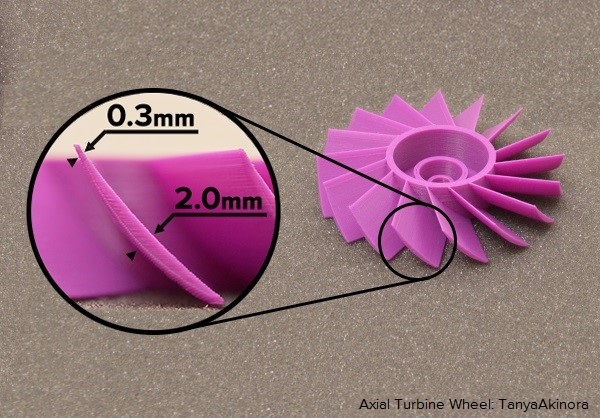
Fan Blade Dynamic Feature Setting Simplify3S

Another element that provides increased levels of control is the dynamic feature sizing option. This feature increases or decreases the amount of plastic used by the extruder depending on the needs of a particular section of the model. As a result, the extrusion process will change the thickness of a particular part of the total construction. This improves the minimum feature size of the printer and improves print accuracy.

This feature also allows for the dynamic gap fill option. This is a system where the software fills up empty spaces with a single dynamic extrusion. The software also takes the model interior into account and calibrates the best way to seal the walls. This greatly improves the strength of the print.

As the picture of the fan blade above shows, this features allows the printer to smoothly transition between thicknesses to better match the desired model. It allows a level of detail rivalling SLA and SLS.

Improved Supports and Foundations

Simplify3D Support Structures Dog

Simplify3D have also added features to assist with complex print structures that may need additional foundations. These improvements allow for better supports, brims and rafts. Simplify3D have earned critical acclaim for their previous version support structure calibration system. It boasts bettering anchoring, the ability to vary up the densities near the print allowing for easier removal (as shown in the picture above) and filament usage reduction.

Simplify3D have also developed a system that creates breakaway rafts for simple removal. It is also resource efficient, saving 50% of the filament in 40% of the standard time. The foundations in version 4.0 are easy to tear off and do not interfere with the print itself due to how the algorithm structures densities. This is a welcome feature in any print software’s arsenal.

Other Additions

Simplify3D Variable Print Settings

  • Animated preview of the print process.
  • New bridging algorithm.
  • New dual extrusion options.
  • Supports more 3D printer than ever before.
The new software can be found on their website.

Share:
WhatsApp Twitter Facebook LinkedIn Buffer Reddit E-mail
Join our newsletter

Our newsletter is free & you can unsubscribe any time.

Latest posts

Azure Printed Homes Opens Denver Factory, Backed by $3.9M State Loan

A California-based 3D home printing company opened a 25,000-square-foot manufacturing facility in Northeast Denver, backed by a $3.895 million state loan. Azure Printed... read more »

Construction

Rice Engineers 3D Print Electronics With Focused Microwaves, Bypassing a Decade-Long Barrier

Rice University researchers have developed a 3D-printing process that uses focused microwaves to heat electronic ink during fabrication without damaging surrounding materials, solving... read more »

News
microwaves to heat electronic ink

Bambu Lab Launches X2D With Dual-Nozzle System, Priced From $649

Bambu Lab has announced the X2D, the second-generation flagship of its X Series, featuring a dual-nozzle extrusion system with mechanical switching. The base... read more »

3D Printers
Bambu Lab Launches X2D With Dual-Nozzle System, Priced From $649

Tech Meets Culture: Creality RaptorX Powers the Digitization of 6,000-Year-Old Heritage

For 6,000 years, the ceramics and figurines of the Cucuteni civilization lay buried in Romanian soil. One of prehistoric Europe's most technically accomplished... read more »

News

Beehive Industries Wins $30 Million Air Force Contract for 3D-Printed Turbojets

Colorado-based propulsion startup Beehive Industries has secured a nearly $30 million contract from the US Air Force to advance testing and development of... read more »

Aerospace
Beehive Industries Wins $30 Million Air Force Contract for 3D-Printed Turbojets

Best 3D Printer Enclosures 2026

Open-frame 3D printers offer freedom and easy access, but they print into whatever environment surrounds them. Temperature drafts warp ABS corners. Ambient humidity... read more »

Accessories

SHINING 3D Launches EinScan Rigil Lite: A More Accessible All-in-One 3D Scanner for Professional Users

SHINING 3D has expanded its Rigil Series with the launch of the EinScan Rigil Lite, a hybrid light-source all-in-one 3D scanner aimed at... read more »

News

Meet the 3DeVOK MT Gen2: Quad-Light, Professional-Grade 3D Scanning in a Handheld Device

Professional 3D scanning has always involved trade-offs: you choose between detail and speed, between versatility and accuracy, between portability and reliability. The 3DeVOK... read more »

News

University of Utah, Penn State Win NASA Funding to 3D Print Rocket Engine Materials

The University of Utah, Penn State, and Colorado-based Elementum 3D have been awarded a NASA Small Business Technology Transfer (STTR) Phase I grant... read more »

Aerospace
QuesTek Partners with Niobium Producer to Develop High-Temperature 3D Printing Alloy

Revopoint Launches MetroY Ultra and Brings POP 4 to Kickstarter for Its 12th Anniversary

To mark twelve years in the 3D scanning industry, Revopoint is launching two new scanners built for very different users. The MetroY Ultra... read more »

News

Social

  • Facebook Facebook 3D Printing
  • Linkedin Linkedin 3D Printing
banner
Join our newsletter

Our newsletter is free & you can unsubscribe any time.

Featured Industries

  • Automotive
  • Aerospace
  • Construction
  • Dental
  • Environmental
  • Electronics
  • Fashion
  • Medical
  • Military
  • Anycubic Photon Mono M7

    • - Print size: 223 x 126 x 230 mm
    • - 10.1 inch 14K screen
    More details »
    $279.00 Anycubic
    Buy Now
  • Creality Hi Combo

    • - Print size: 260 x 260 x 300 mm
    • - up to 16-color printing
    More details »
    $399.00 Creality
    Buy Now
  • Snapmaker U1

    • - Print size: 270 x 270 x 270 mm
    • - multi-color printing with SnapSwap
    More details »
    $849.00 Snapmaker
    Buy Now
  • Qidi Q2

    • - Print size: 270 x 270 x 256 mm
    • - enclosed heated chamber up to 65°C
    More details »
    $580.00 Qidi
    Buy Now
  • Creality K2 Plus

    • - Print size: 350 x 350 x 350 mm
    • - multi-color printing
    More details »
    $1,199.00 Creality
    Buy Now
  • Qidi Max 4

    • - Print size: 390 x 390 x 340 mm
    • - active cooling air control
    More details »
    $1,219.00 Qidi
    Buy Now
  • Flashforge Guider 3 Ultra

    • - Print size: 330 x 330 x 600 mm
    • - dual extruder system
    More details »
    $2,999.00 Flashforge
    Buy Now
  • Anycubic Kobra S1 Combo

    • - Print size: 250 x 250 x 250 mm
    • - budget multicolor printing
    More details »
    $429.00 Anycubic
    Buy Now
  • Flashforge AD5X

    • - Print size: 220 x 220 x 220 mm
    • - dual extrusion system
    More details »
    $399.00 Flashforge
    Buy Now
  • Flashforge Adventurer 5M

    • - Print size: 220 x 220 x 220 mm
    • - 600mm/s travel speed
    More details »
    $299.00 Flashforge
    Buy Now

Company Information

  • What is 3D Printing?
  • Contact us
  • Join our mailing list
  • Advertise with us
  • Media Kit
  • Nederland 3D Printing

Blog

  • Latest News
  • Use Cases
  • Reviews
  • 3D Printers
  • 3D Printing Metal

Featured Reviews

  • Anycubic Photon Mono M5s
  • Creality Ender 5 S1
  • The Mole 3D Scanner
  • Flashforge Creator 3 Pro

Featured Industries

  • Automotive
  • Aerospace
  • Construction
  • Dental
  • Environmental
  • Electronics
  • Medical
  • Military
  • Fashion
  • Art
2026 — Strikwerda en Dehue
  • Home
  • Join our mailing list
  • Contact us
Blog
  • Latest News
  • Use Cases
  • Reviews
  • 3D Printers
  • 3D Printing Metal
Featured Industries
  • Automotive
  • Aerospace
  • Construction
  • Dental
  • Environmental
  • Electronics
  • Medical
  • Military
  • Fashion
  • Art
Company Information
  • What is 3D Printing?
  • Contact us
  • Join our mailing list
  • Advertise with us
  • Media Kit
  • Nederland 3D Printing