
3D Printing
News Back to school deals Contact us
Home / How to / How to Fuse Filament at Home
qidi

How to Fuse Filament at Home

If you do as much 3D printing as I do then you probably have a bunch of scrap pieces of filament lying around in your workshop. You know, the last meter or so that is too short to actually print anything with but too long to throw away without feeling guilty.

Why not make use of that filament by fusing it together and making awesome multi-colored prints?

The new Filament Fuser Block enables high quality splices of any 3D printing material in around 10 seconds. You can use it to extend the length of filament spools for super long prints and to add horizontal color changes to your projects!

It is built using 3D printed parts and best of all, you can download the parts for FREE here.
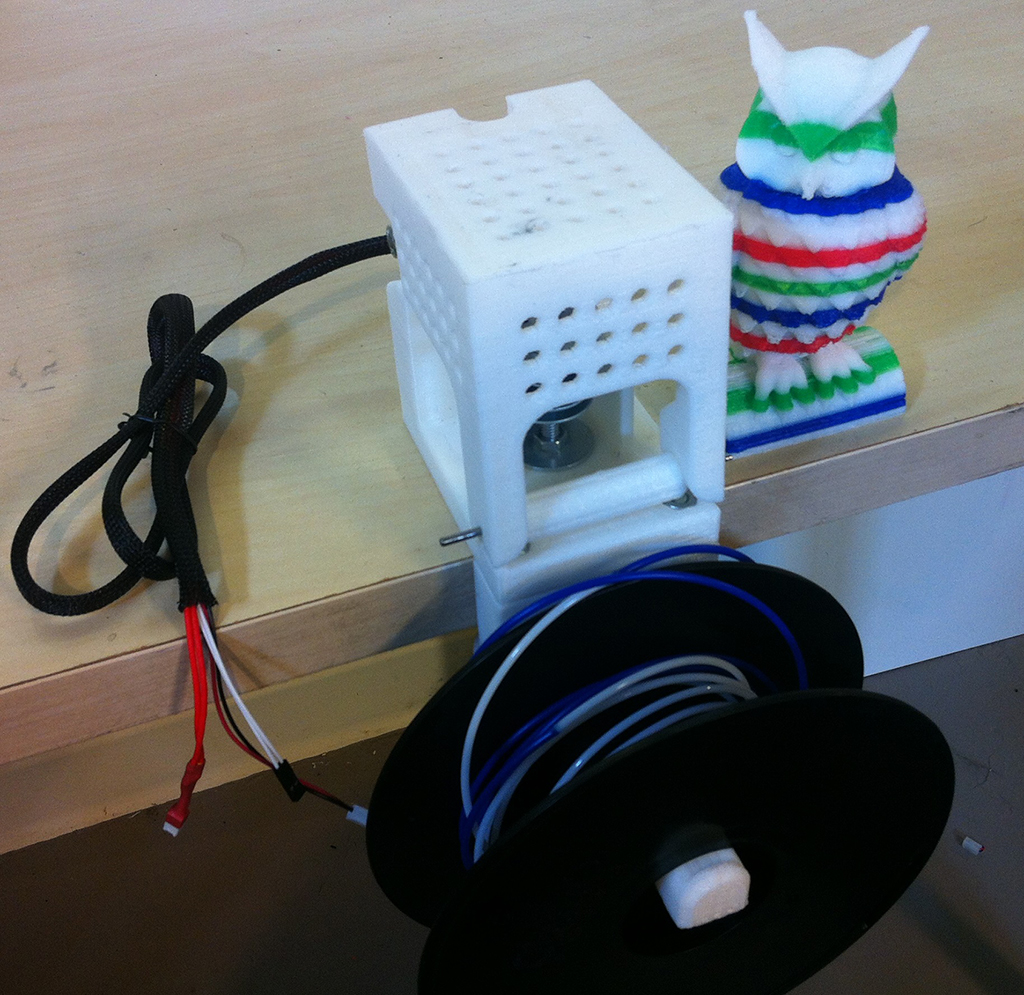
How does it work?

I’ve seen folks try to fuse filament with soldering irons, lighters, and the like with very unpredictable results. The bond is weak, uneven, unclean, or the filament itself is burned leaving you with a good chance the filament will break during a print.

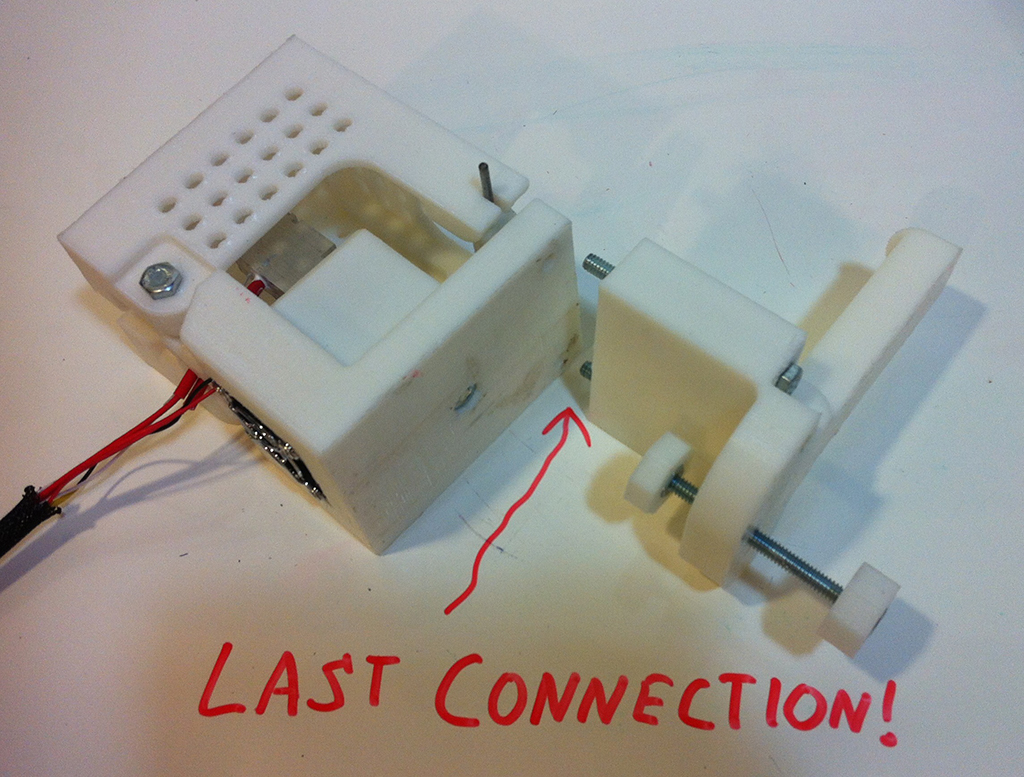
The Filament Fuser Block is a precision temperature controlled heated block that clamps to the edge of a table. The hot block has grooves that provide a guide for pushing the filament together.

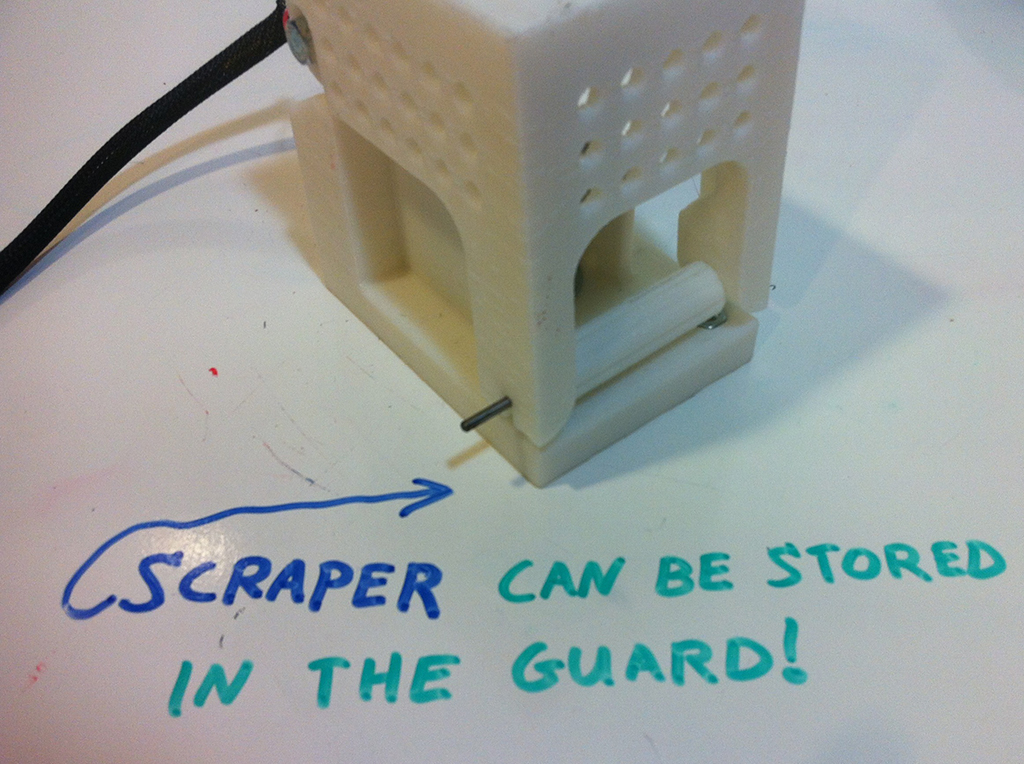
The 3D printed plastic parts create a complete guard to surround the hot block and prevent anything touching it on accident. There is also a fan to help you cool the filament after a fuse to speed up the process. The protruding rod in the front of the device gives you a place to set a filament spool.

The device is controlled via standard 3D printer electronic controllers such as the Printrboard or an Arduino with RAMPs, which means that you can control the temperature and fan speed on your computer with your existing 3D printing software!

thermistor-filament-fuser-block-tutorial

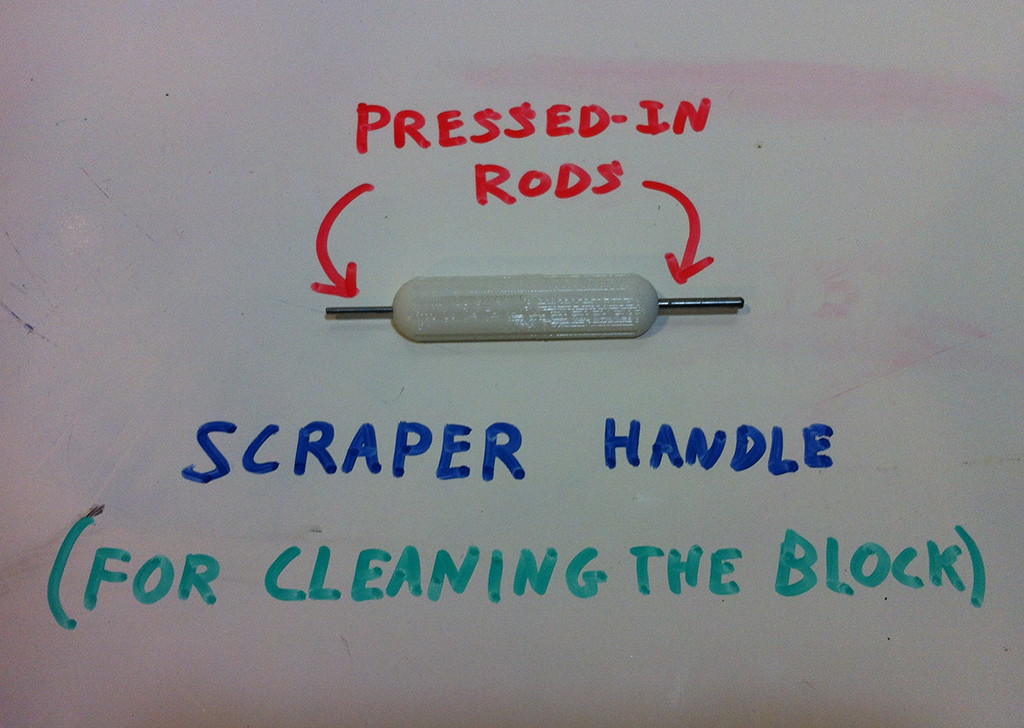
The standard kit can be used for 1.75 and 3mm filaments and even includes precision steel rods for cleaning the grooves.  The heated block also has a hole in the top for making a filament pool to give you a visual indication of the block temperature. This pool can also be borrowed from for gluing printed parts together too!

filament fuser pool

Assembling the kit

For the purposes of the demo shown below, please excuse the 3D print quality. Parts were printed in fast mode with my favourite machine the MakerGear M2.

Now let’s take a look at what is involved with assembling the kit.

First print the parts.

filament fuser parts

Open up your hardware kit:

filament fuser kit

Get your tools ready

philips-tools

And follow these directions:

Step 1

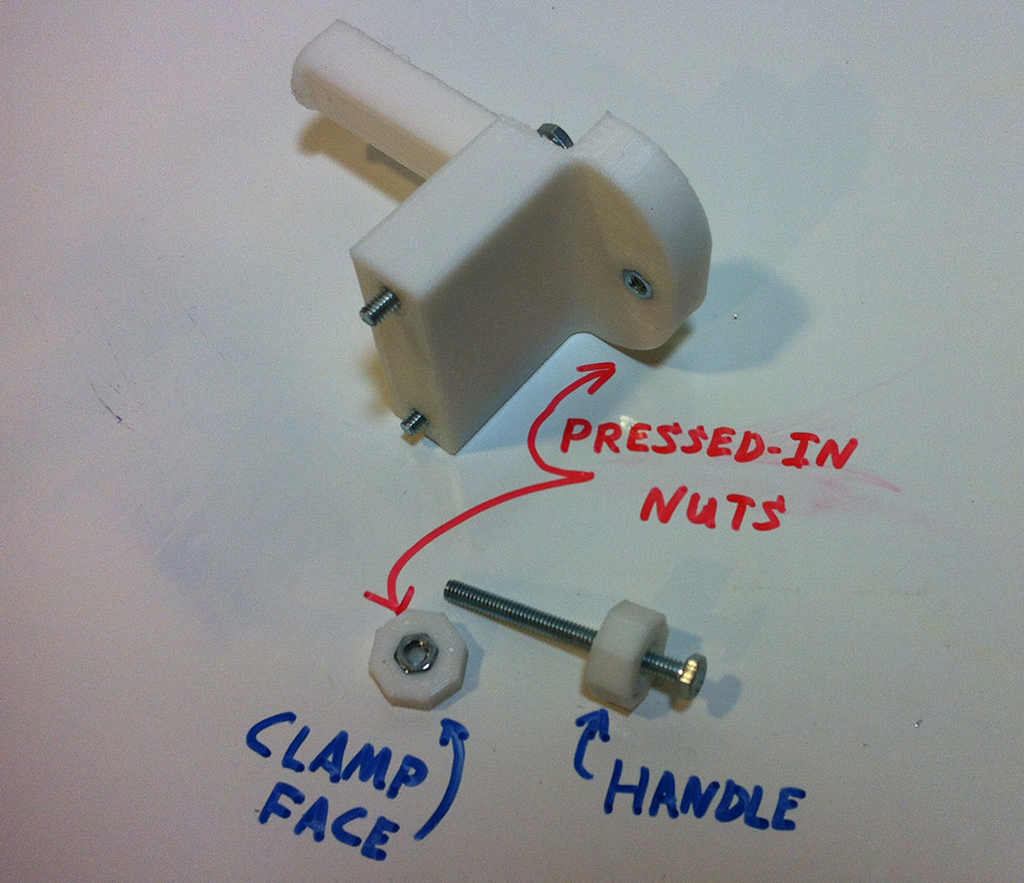
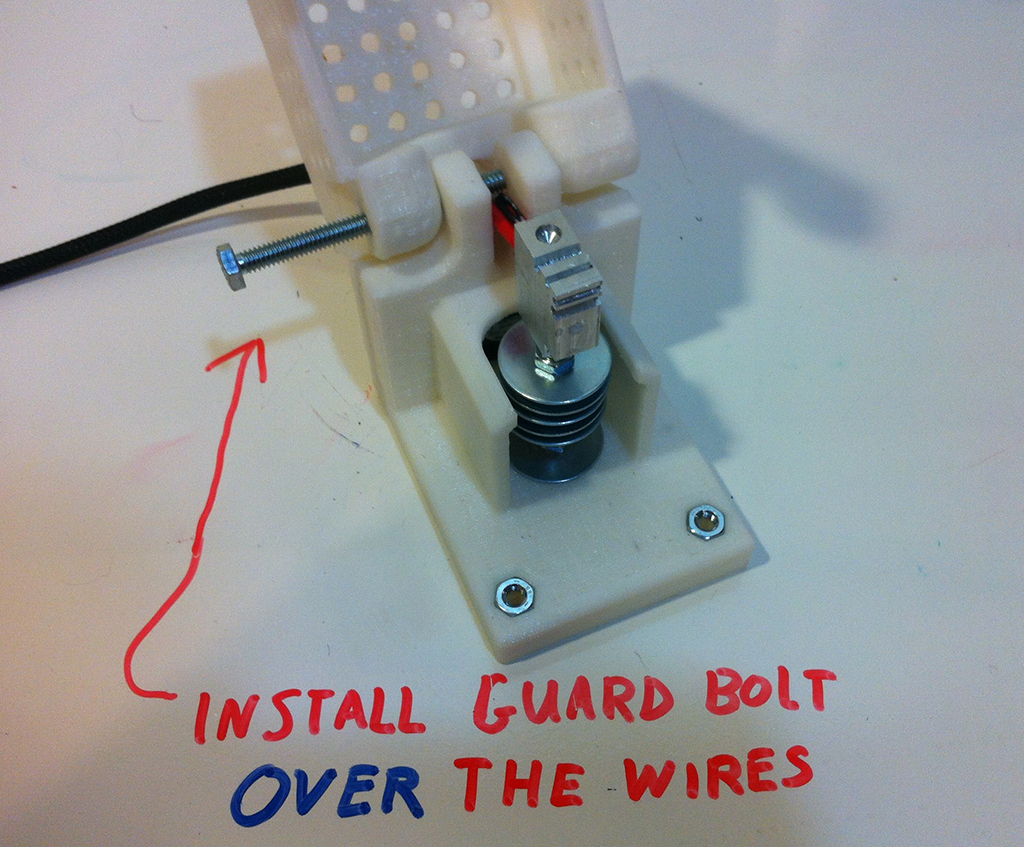
filament-fuser-instructions-1

Step 2

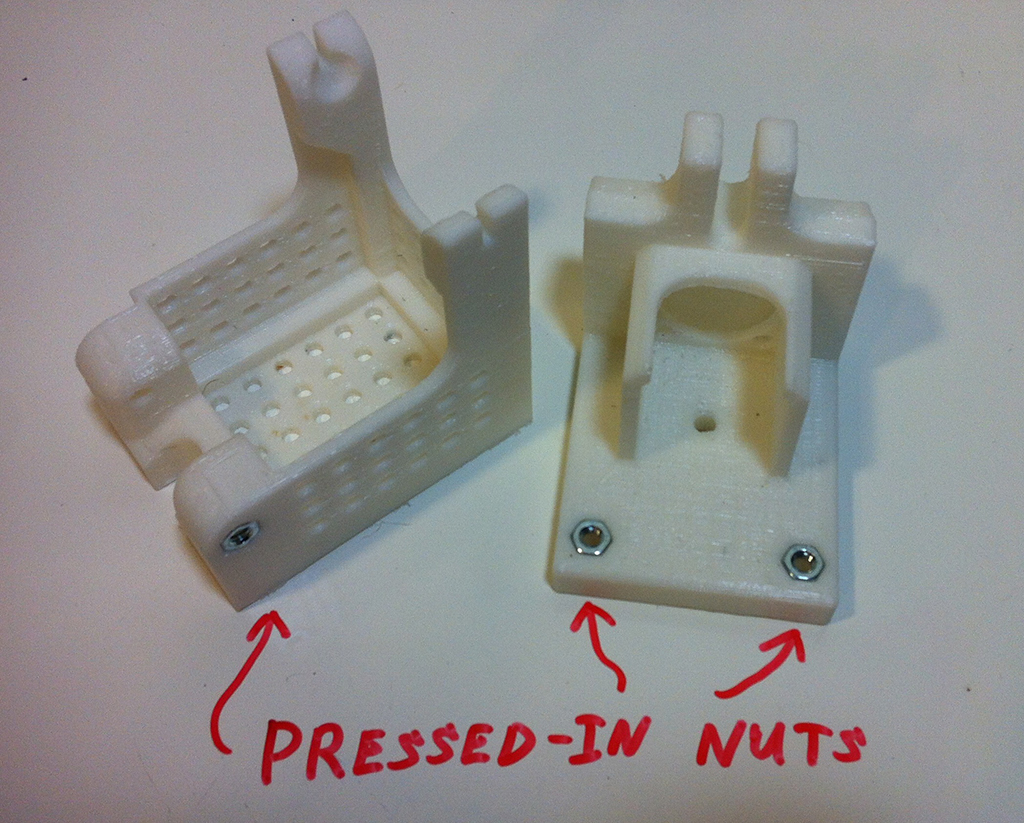
filament-fuser-instructions-2

Step 3

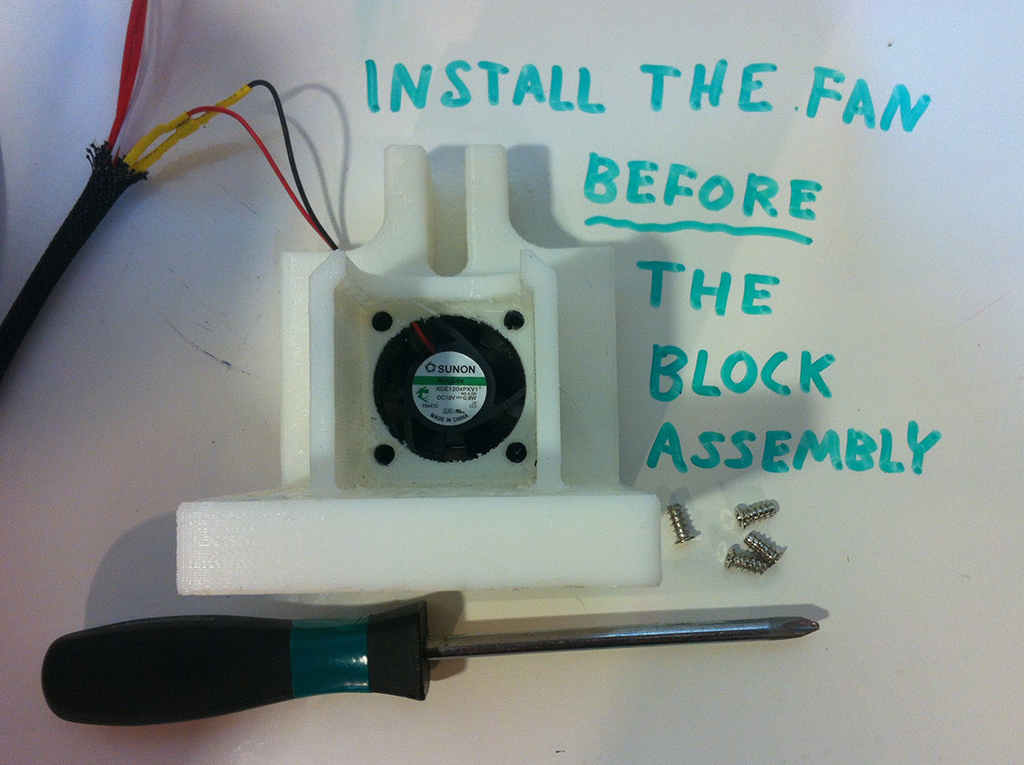
filament-fuser-instructions-3

Step 4

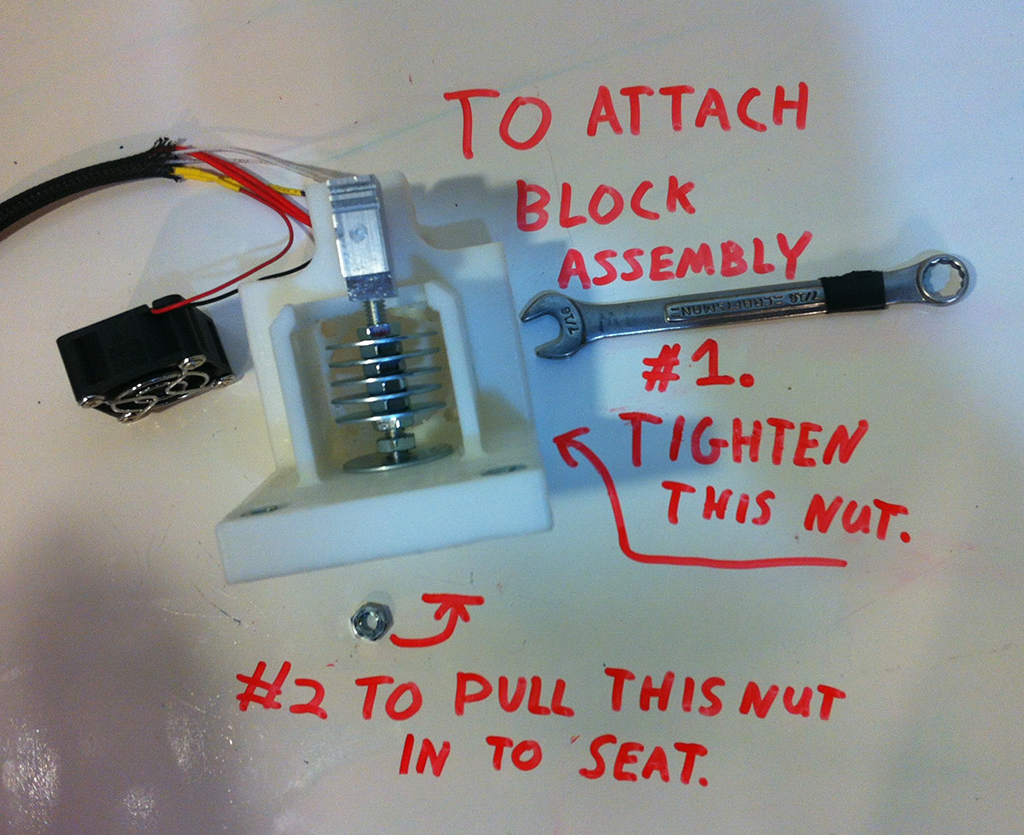
filament-fuser-instructions-4

Step 5

filament-fuser-instructions-5

Step 6

filament-fuser-instructions-6

Step 7

filament-fuser-instructions-7

Step 8

filament-fuser-instructions-8

Step 9

filament-fuser-instructions-9

How to fuse filament

The secret to getting a good bond is a combination of good tool and the right technique. First warm up your Block by plugging it into your 3D printer controller. Just borrow the same set of pins that your extruder uses.
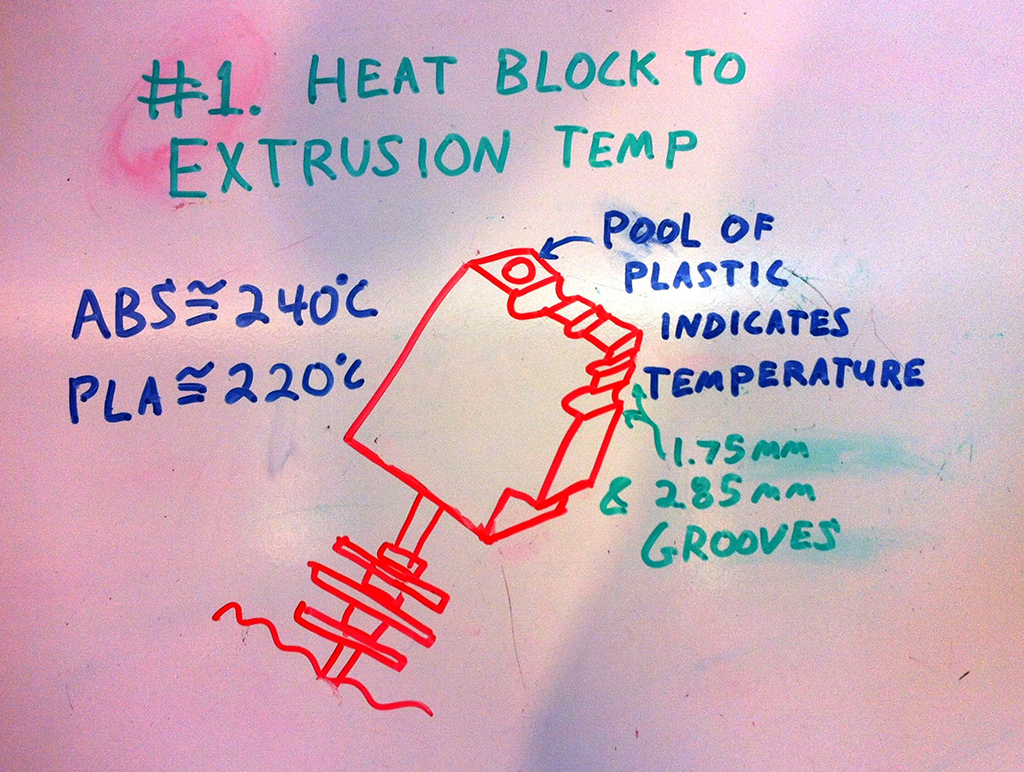
how-to-use-filament-fuser

Then take about 1” of filament in each hand and follow this quick procedure.

  1. Push the filament into the side of the block for a couple seconds until it starts to mushroom out. (so you know it’s hot)
  2. Push the separate pieces together using the top groove as a guide.
  3. Slide the fused filament from the guide so that you scrape off the mushroomed material, leaving a smooth side.
  4. Side the fused filament through the side groove to remove the rest of the mushroom.
  5. Hold the bond in front of the fan until it cools.
  6. If necessary use the various edges of the block to scrape off any excess material or re-smooth the bond.
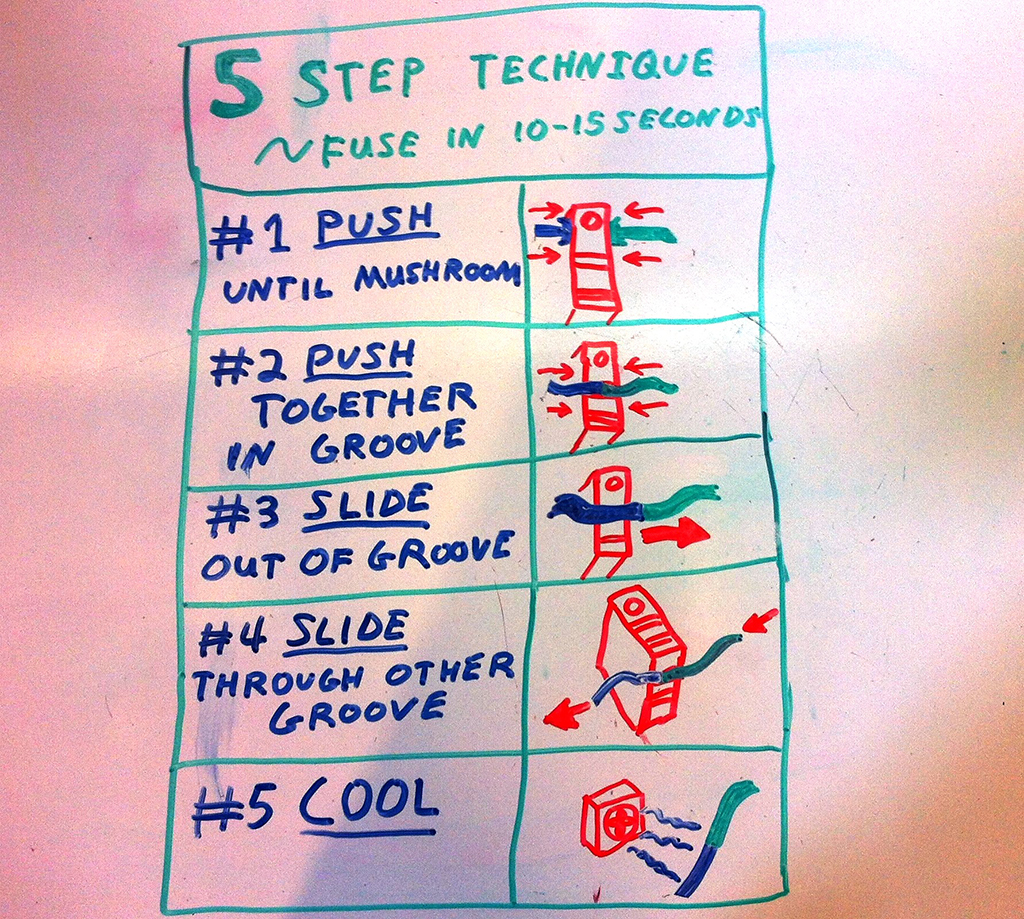
How to fuse filament at home

Let your slicing software to tell you how much filament the print needs and divide that length into segments to choose where certain colors will show up.

filament fuser block results

Conclusion

I hope you enjoyed this tutorial. If you have any questions, feel free to ask in the comments section below.

Non-Planar FDM 3D Printing
Related Story
No Layer Lines With Non-Planar FDM 3D Printing
Share:
WhatsApp Twitter Facebook LinkedIn Buffer Reddit E-mail
About the author | Michael Graham
Michael is a mechanical engineer, technical writer, and 3D printing enthusiast. He loves creating and sharing open source projects and writing about his professional experiences through his blog at EngineerDog.com.
Join our newsletter

Our newsletter is free & you can unsubscribe any time.

Latest posts

RMIT 3D Prints Titanium That Floats

RMIT engineers have created a 3D-printed titanium material that floats in water even after severe damage, a candidate for jetties, buoys and marine... read more »

3D Printing Metal
RMIT 3D Prints Titanium That Floats

University of Waterloo 3D Prints Diamond-Shaped Electrodes for Flow Batteries

University of Waterloo researchers 3D printed a diamond-geometry electrode that improved redox flow battery performance by 52 percent in lab tests.

News

University of Maine Launches 30-Foot 3D-Printed Offshore Boat

The University of Maine launched a 30-foot 3D-printed boat designed for offshore speeds near 40 knots, skipping a new mold for every hull.

News
University of Maine Launches 30-Foot 3D-Printed Offshore Boat

SUNLU FilaDC i10: 10-spool filament dehumidifying cabinet

A co-branded storage cabinet that SUNLU rates to hold up to ten 1 kg spools at 10 to 55 percent RH without heating... read more »

News

ORNL Combines 3D Printing and Electroforming for Leak-Free Nuclear Parts

Oak Ridge National Laboratory and A.J. Tuck combined 3D printing and electroforming to make leak-free HIP cans for nuclear and energy components.

News
ORNL Combines 3D Printing and Electroforming for Leak-Free Nuclear Parts

MIT Researchers 3D Print Modular Blocks for Shape-Changing Smart Devices

MIT researchers have 3D printed a set of modular building blocks that stay electrically connected no matter how you compress, stretch, rotate, or... read more »

Materials
MIT Team 3D-Prints Modular Blocks That Stay Wired When They Change Shape

SHINING 3D Launches the EinScan Trak: Wireless Marker-Free Tracking With a Detachable Handheld Scanner

SHINING 3D has launched the EinScan Trak, a wireless tracking and scanning system whose spherical scanner splits open to release a standalone handheld... read more »

News

Queen’s Belfast Team 3D Prints Dissolving Microneedle Patch for Skin Cancer

Queen’s University Belfast pharmacy researchers have 3D-printed a dissolving microneedle patch that carries two skin-cancer drugs in the resin itself, in a single... read more »

Medical
Queen's Belfast Team 3D Prints Dissolving Microneedle Patch for Skin Cancer

WSU Team Use AI to 3D Print NASA’s GRCop-42 Copper Alloy

Washington State University researchers used AI to find process settings that 3D print GRCop-42, a NASA copper-chromium-niobium alloy used in rocket engine combustion... read more »

3D Printing Metal
WSU Team Prints NASA's Copper Alloy at 500 Watts After AI Search

USC Researchers 3D Print $30 MRI Coils for Infant Heart Scans

University of Southern California researchers have 3D printed flexible MRI coils in under 10 minutes for about $30, and tests showed roughly four... read more »

Medical
USC Team Prints Stretchable MRI Coils in Under 10 Minutes

Social

  • Facebook Facebook 3D Printing
  • Linkedin Linkedin 3D Printing
Join our newsletter

Our newsletter is free & you can unsubscribe any time.

Featured Industries

  • Automotive
  • Aerospace
  • Construction
  • Dental
  • Environmental
  • Electronics
  • Fashion
  • Medical
  • Military
  • Flashforge Adventurer 5M

    • - Print size: 220 x 220 x 220 mm
    • - 600mm/s travel speed
    More details »
    $299.00 Flashforge
    Buy Now
  • Flashforge Guider 3 Ultra

    • - Print size: 330 x 330 x 600 mm
    • - dual extruder system
    More details »
    $2,999.00 Flashforge
    Buy Now
  • Anycubic Kobra S1 Combo

    • - Print size: 250 x 250 x 250 mm
    • - budget multicolor printing
    More details »
    $429.00 Anycubic
    Buy Now
  • Creality K2 Plus

    • - Print size: 350 x 350 x 350 mm
    • - multi-color printing
    More details »
    $1,199.00 Creality
    Buy Now
  • Qidi Max 4

    • - Print size: 390 x 390 x 340 mm
    • - active cooling air control
    More details »
    $1,219.00 Qidi
    Buy Now
  • Anycubic Photon Mono M7

    • - Print size: 223 x 126 x 230 mm
    • - 10.1 inch 14K screen
    More details »
    $279.00 Anycubic
    Buy Now
  • Flashforge AD5X

    • - Print size: 220 x 220 x 220 mm
    • - dual extrusion system
    More details »
    $399.00 Flashforge
    Buy Now
  • Qidi Q2

    • - Print size: 270 x 270 x 256 mm
    • - enclosed heated chamber up to 65°C
    More details »
    $580.00 Qidi
    Buy Now
  • Snapmaker U1

    • - Print size: 270 x 270 x 270 mm
    • - multi-color printing with SnapSwap
    More details »
    $849.00 Snapmaker
    Buy Now
  • Creality Hi Combo

    • - Print size: 260 x 260 x 300 mm
    • - up to 16-color printing
    More details »
    $399.00 Creality
    Buy Now

Company Information

  • What is 3D Printing?
  • Contact us
  • Join our mailing list
  • Advertise with us
  • Media Kit
  • Nederland 3D Printing

Blog

  • Latest News
  • Use Cases
  • Reviews
  • 3D Printers
  • 3D Printing Metal

Featured Reviews

  • Anycubic Photon Mono M5s
  • Creality Ender 5 S1
  • The Mole 3D Scanner
  • Flashforge Creator 3 Pro

Featured Industries

  • Automotive
  • Aerospace
  • Construction
  • Dental
  • Environmental
  • Electronics
  • Medical
  • Military
  • Fashion
  • Art
2026 — Strikwerda en Dehue
  • Home
  • Join our mailing list
  • Contact us
Blog
  • Latest News
  • Use Cases
  • Reviews
  • 3D Printers
  • 3D Printing Metal
Featured Industries
  • Automotive
  • Aerospace
  • Construction
  • Dental
  • Environmental
  • Electronics
  • Medical
  • Military
  • Fashion
  • Art
Company Information
  • What is 3D Printing?
  • Contact us
  • Join our mailing list
  • Advertise with us
  • Media Kit
  • Nederland 3D Printing