
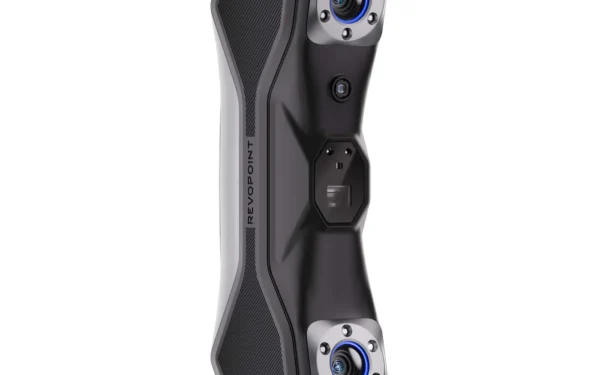
 Hands-On Review: Revopoint MetroX 3D Scanner
 3D-Printed Sports Bra Could Help Olympic Star Break Historic Athletics Record
 Vietnam Emerges in High-Tech Medicine as Vinmec Pioneers 3D-Printed Breakthroughs
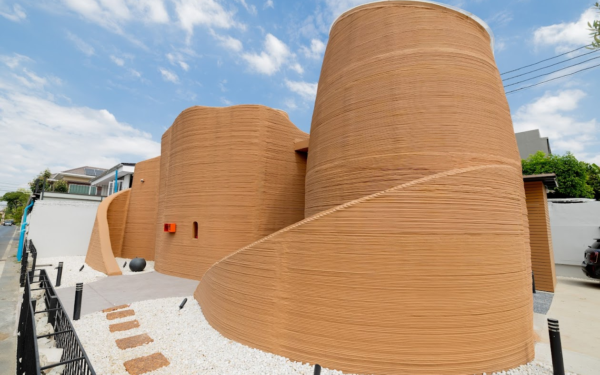 Ember Cafe & Wine Combines Nature-Inspired Architecture with SCG 3D Printed Construction
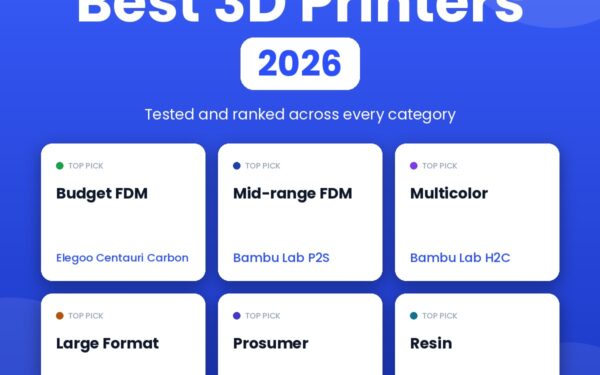 Best 3D Printers 2026: Buyer’s Guide
What is 3D Printing?
3D printing, also called additive manufacturing, is the process of making a three-dimensional object from a digital file by building it up one thin layer at a time. Instead of cutting or hollowing material away, a 3D printer adds material only where it is needed, each layer a thinly sliced cross-section of the final object, until the whole thing exists. That simple idea now spans everything from a child’s first keychain printed at home to certified metal parts flying in jet engines.
3D printing is the opposite of subtractive manufacturing, which carves an object out of a solid block with a tool like a mill or lathe. It also differs from formative manufacturing, such as injection molding or casting, which shapes material with a fixed mold and only becomes economical at high volumes, once the cost of that tooling is spread across many parts. Because it adds rather than removes, 3D printing can produce complex shapes using less material than traditional methods, and it can make geometries that would be difficult or impossible to machine, all without a mold. There is one exception to the layer-by-layer rule, volumetric 3D printing, which forms an entire structure at once; it is promising but still mostly in the research phase as of 2026.
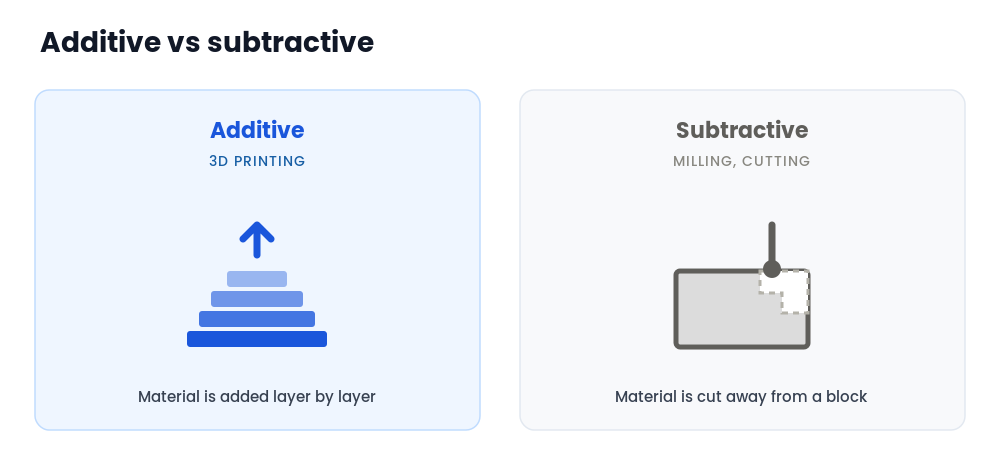
3D printing in four lines
It is additive. Material is added layer by layer, not cut away.
It starts with a digital file. A 3D model is sliced into layers, then printed.
Many materials. Plastics, resins, metals, ceramics, concrete, even food.
Home to industry. A $200 desktop printer and an aerospace metal system share the same core idea.
Jump to a section
How does 3D printing work?
Every print follows the same three steps, whether it is a toy on a desktop machine or a turbine part on an industrial system: you start with a model, slice it into layers, then print it.
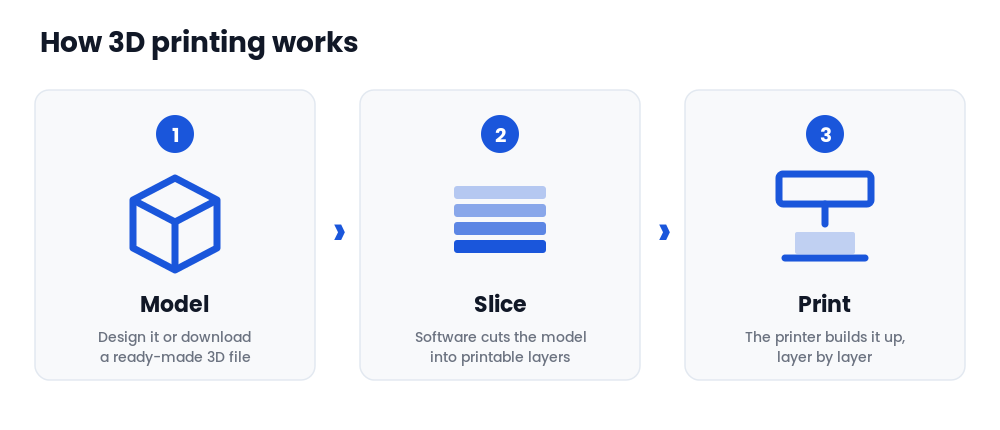
1. Start with a 3D model
It all starts with a digital 3D model. You can design one from scratch in CAD software or download a ready-made file from a model library. Beginners often start with Tinkercad, a free browser-based tool that exports printable files such as STL or OBJ. If you would rather print than design, our guide to the best free 3D printable models covers where to find quality files.
2. Slice the model into layers
A printer cannot read a 3D model directly, so the file is prepared by slicing it into hundreds or thousands of horizontal layers. Slicing software turns the model into instructions the printer follows, layer by layer, and lets you set things like quality, infill, and speed. Our best 3D printer slicers guide compares the main options.
3. Print it, layer by layer
The sliced file goes to the printer by USB, SD card, or Wi-Fi, and the machine builds the object one layer at a time. How each layer is formed depends on the technology, plastic melted through a nozzle, resin cured by light, or metal powder fused by a laser, which is what the types of 3D printing section below explains. For the vocabulary you will meet along the way, keep our 3D printing glossary handy.
Getting started with 3D printing at home
3D printing is more accessible in 2026 than it has ever been. A capable, genuinely easy printer now costs around $200, prints out of the box with no assembly or calibration ritual, and pairs with huge libraries of free models you can print with a single click. If you are thinking about starting, here is the short version of everything you need to decide, with a deeper guide behind each step.
Choosing your first printer
The biggest decision is the machine itself, and the good news is that the entry-level bar has dropped dramatically. For most people the right first printer is an easy, well-supported filament machine that prints with no fuss. Our best 3D printers for beginners guide walks through the friendliest options, and the broader best 3D printers roundup covers every level from first machine to prosumer.
Filament or resin?
The two consumer technologies are FDM (melted filament) and resin (liquid cured by light). FDM is the easier, cleaner, more forgiving starting point and the right call for almost everyone new. Resin wins on fine detail for things like miniatures, but it involves chemical handling and more careful safety. Our FDM vs resin comparison lays out the trade-offs, and if you lean resin, the best resin 3D printers guide has the picks.
What it costs
A capable first setup runs roughly $200 to $350 including the printer, a few rolls of filament, and a basic toolkit, and the consumables are cheap, around $20 to $25 per kilogram of PLA. Costs scale with how much you print and whether you add resin or more machines. Our 3D printing cost guide breaks down the real first-year numbers for everyone from a casual hobbyist to a small print farm.
Staying safe
Done sensibly, 3D printing is about as risky as running a hot glue gun: the main things to manage are the hot nozzle and bed, ventilation, and, for resin, skin and fume protection. None of it is exotic, but it is worth getting right before your first print. Our 3D printing safety guide covers fumes, burns, fire, and resin handling in plain language.
For kids and classrooms
3D printing is a superb way to get children into hands-on STEM, and the right machine plus a little supervision makes it safe and rewarding. Whether you are a parent buying a first printer or a teacher setting up a classroom, our 3D printing for kids and schools guide covers the best printers by age, supervision, project ideas, and classroom setup.
Learn the basics
These guides break the fundamentals into focused reads, from the machine itself to the process and the technologies behind it:
The machine explained: its parts, what each one does, and the types.
The full process step by step: model, slice, print, and finish.
FDM, SLA, DLP, SLS, MJF, and metal compared side by side.
Which of the two consumer technologies is right for you.
Real first-year budgets, from hobby to small print farm.
Fumes, burns, fire, and resin handling, the read-once reference.
Ready to start printing?
When you are ready to choose hardware and print your first files, these are the guides most people need:
Most popular guide
Our flagship buyer’s guide: the best picks at every price and skill level, from your first machine to a prosumer workhorse.
The friendliest first machines, with the easy plug-and-play picks.
Where to find quality files to print on day one.
Best printers by age, supervision, and classroom setup.
Types of 3D printing technologies and processes
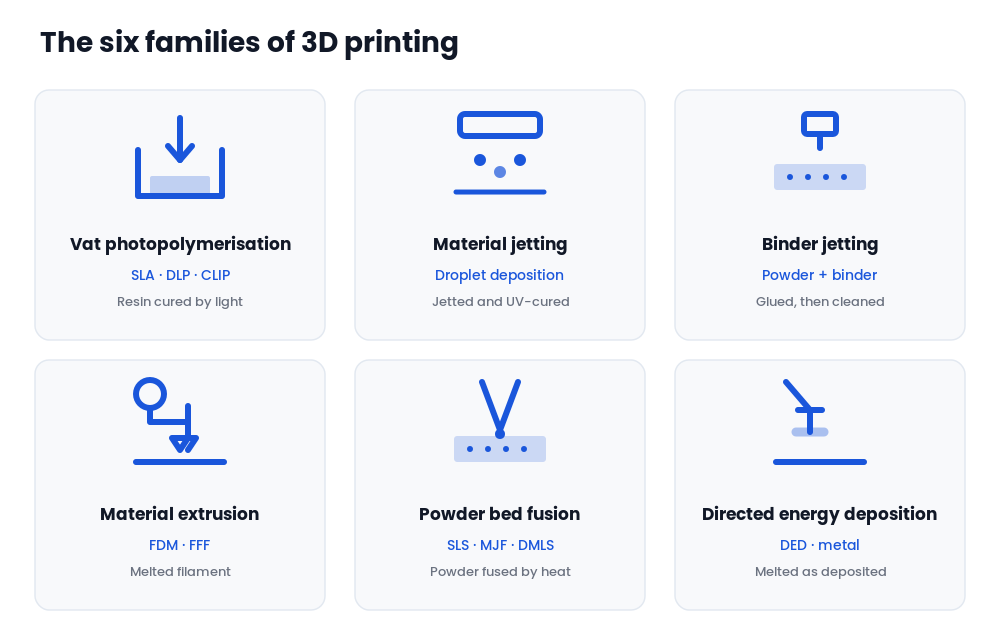
“3D printing” is an umbrella term for several distinct technologies that all build objects layer by layer but do it in very different ways. The international ISO/ASTM standard groups them into seven categories; in practice they fall into the six families below. The right one depends on the material, the detail you need, and the budget, from a desktop filament printer to an industrial metal system. If you are printing at home, the one you will almost certainly use is material extrusion (FDM), the fourth family below.
1. Vat photopolymerisation
A printer based on vat photopolymerisation has a container of liquid resin that is hardened, layer by layer, with a UV light source. It is the highest-detail family and the basis of consumer resin printing.
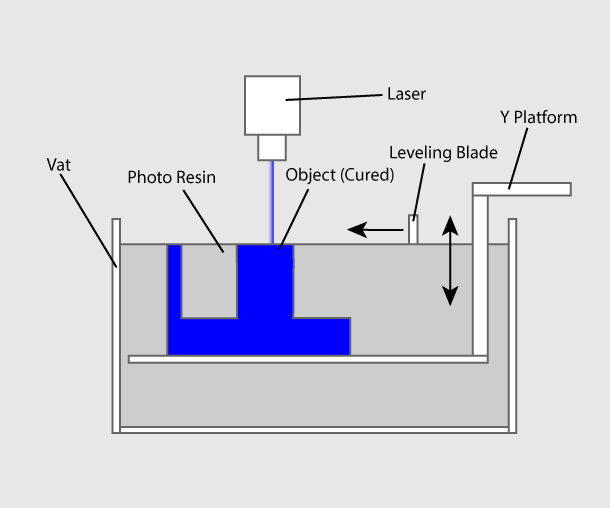
Vat photopolymerisation: UV light cures liquid resin layer by layer.
Stereolithography (SLA) was invented in 1986 by Charles Hull, who founded 3D Systems. An ultraviolet laser traces each cross-section on the surface of the resin, curing it and fusing it to the layer below; the platform then moves by one layer thickness and the process repeats. SLA usually needs support structures. Digital Light Processing (DLP) works the same way but flashes an entire layer at once using a digital light projector instead of tracing it with a laser, which makes it faster. Continuous Liquid Interface Production (CLIP), developed by Carbon, uses an oxygen-permeable window to create a thin “dead zone” of uncured resin so the part never sticks to the bottom, enabling fast, continuous printing.
Resin is where most hobbyists meet this family. See our FDM vs resin comparison for how it stacks up against filament printing, and the best resin 3D printers for the current picks.
2. Material jetting
Material jetting applies the build material in tiny droplets through nozzles, much like a paper inkjet printer, depositing it onto the build platform layer by layer and curing it with UV light. Because it can place different materials and colours droplet by droplet, it excels at smooth, full-colour, multi-material parts, though the photopolymers are costly.
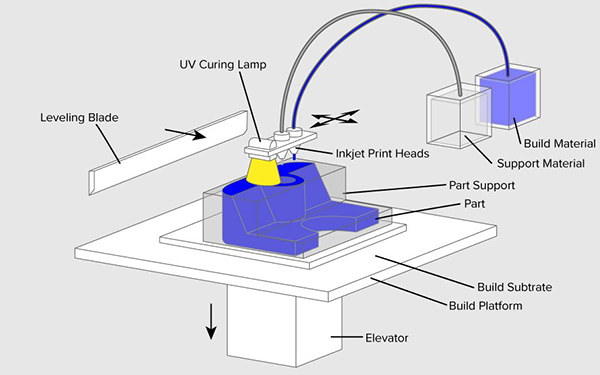
Material jetting: droplets are jetted and cured layer by layer.
3. Binder jetting
Binder jetting uses two materials: a powder base and a liquid binder. A layer of powder is spread across the build chamber and jet nozzles apply binder to “glue” the particles into the required shape, then the next layer of powder is spread on top. When the print finishes, the loose surrounding powder is cleaned off and can often be reused. The technology was first developed at MIT in 1993, and it is widely used for full-colour sandstone models and for metal parts that are later sintered.
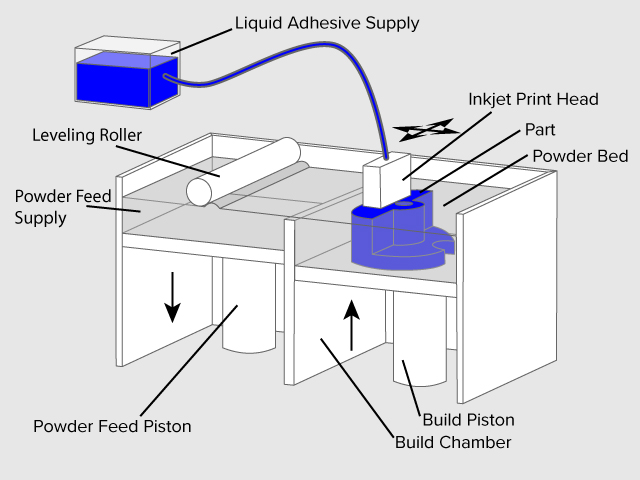
Binder jetting: a binder bonds powder particles layer by layer.
4. Material extrusion (FDM)
Material extrusion is the most common technology and the one nearly every home printer uses. A plastic filament is unwound from a spool and fed into a heated nozzle that melts it and lays it down in horizontal and vertical paths under computer control; the material hardens almost immediately to form each layer.
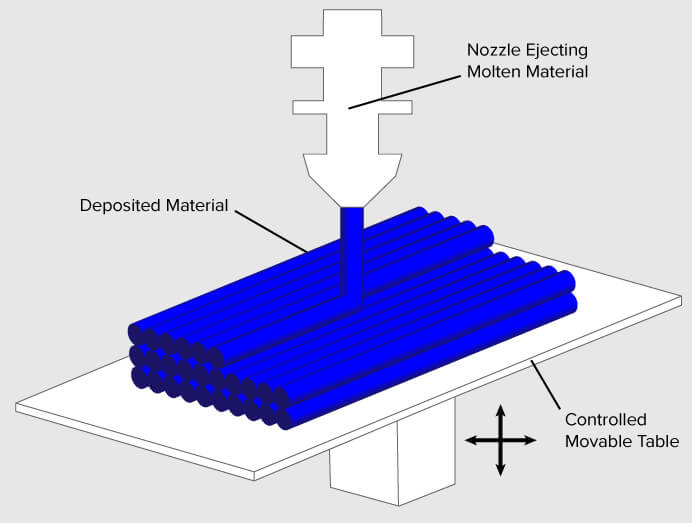
Fused deposition modeling: melted filament is extruded layer by layer.
Fused Deposition Modeling (FDM) was invented by Scott Crump in the late 1980s, who then founded Stratasys in 1988. Fused Filament Fabrication (FFF) is an equivalent term coined by the RepRap project so it could be used without trademark constraints. This is the family to start with: see our best 3D printers for beginners.
5. Powder bed fusion
Powder bed fusion uses heat to fuse small particles of powder together inside a bed of material. A heat source scans each cross-section to fuse the powder, the bed lowers by one layer, fresh powder is spread on top, and the cycle repeats. Selective Laser Sintering (SLS) uses a laser to fuse polymer powder and needs no support structures, since the surrounding powder supports the part. Multi Jet Fusion (MJF), developed by HP, lays down powder then jets binding and detailing agents before a burst of thermal energy fuses the layer. Direct Metal Laser Sintering (DMLS) applies the same idea to metal powder and has evolved into full laser melting for dense metal parts.
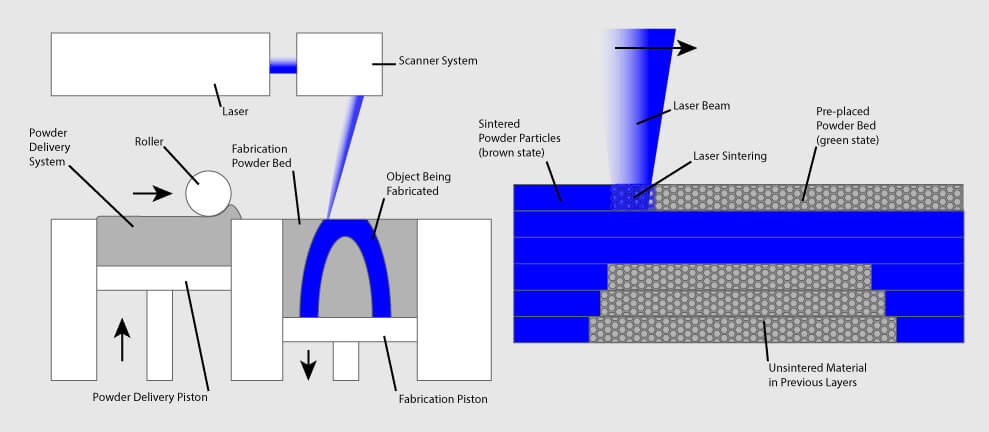
Powder bed fusion: a laser fuses powder layer by layer.
Metal powder bed fusion is a cornerstone of industrial additive manufacturing. For the different metal processes, see our overview of metal 3D printing types.
6. Directed energy deposition
Directed energy deposition (DED) is used mostly with metals and in repair and large-part applications. The print head, often mounted on a multi-axis robotic arm, feeds metal powder or wire through a nozzle while an energy source, a laser, electron beam, or plasma arc, melts it onto the surface to form the object. It deposits material quickly and can add metal to existing parts, which makes it valuable for repairing high-value components.
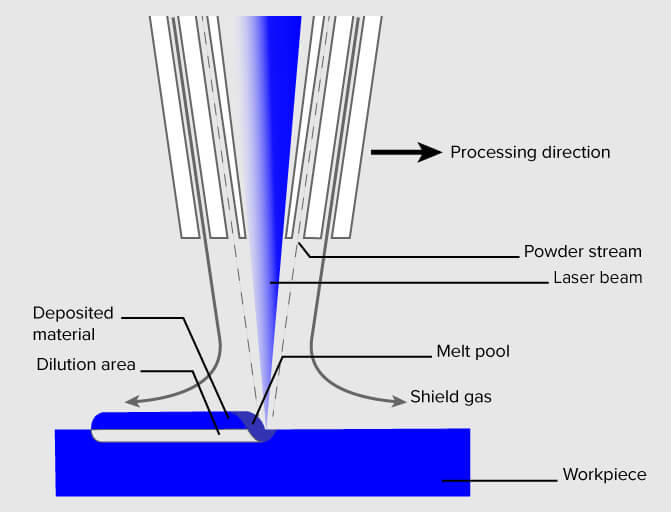
Directed energy deposition: metal is melted onto a surface as it is deposited.
3D printing materials
Additive manufacturing works with a wide range of materials: plastics, metals, resins, ceramics, concrete, paper, and even edibles like chocolate. They usually come in one of three forms: wire feedstock (filament), powder, or liquid resin. For home printing, the most common starting material is PLA, a plant-based plastic that is cheap, easy, and low-odour.
Most home printing happens with FDM filament, and even within that one category the choice matters. PLA is the easy default, cheap and forgiving, and ideal for models, toys, and learning. PETG trades a little of that ease for water resistance and toughness, which suits functional parts. ABS and ASA handle heat and outdoor use but want an enclosure and good ventilation. For parts that need to bend or grip, flexible filaments such as TPU do the job. When strength and temperature resistance matter, engineering filaments like nylon and polycarbonate step up, and composite filaments blended with carbon or glass fibre add stiffness. Our 3D printer filament guide compares every material type in one place. There is also a growing range of bio-based filaments made from renewable feedstocks.
Beyond filament, resin printing uses liquid photopolymers cured by light, while industrial systems work with metal, ceramic, and even concrete powders. To go deeper across all of them, browse our materials category.
Advantages and disadvantages of 3D printing
3D printing is not the right tool for every job. It shines when designs are complex, volumes are low, or customization matters, and it struggles when you need thousands of identical parts as cheaply as possible. Here is the honest trade-off.
Advantages
- It can build complex geometries, internal channels, and lattices that are hard or impossible to machine or mold.
- Prototyping is fast and cheap: an idea becomes a part in hours or days, with no tooling or molds.
- Customization is essentially free, which is why hearing aids, dental aligners, and prosthetics are printed this way.
- It adds only the material it needs and can print on demand, close to where the parts are used.
Limitations
- It is slow and costly for mass production; for thousands of identical parts, injection molding wins easily.
- Build volume is limited on most machines, and fewer certified materials are available than in traditional manufacturing.
- Many prints need finishing work such as support removal, sanding, or curing.
- Printed parts can be weaker along the layer lines, so orientation affects strength.
What 3D printing is used for
3D printing is best understood not as one industry but as a cluster of them, with a huge range of applications. A short list gives the flavour: consumer products such as eyewear, footwear, and furniture; industrial tools, jigs, and end-use parts; dental products and prosthetics; architectural scale models; reconstructing fossils and ancient artefacts; forensic evidence; and movie props.
Rapid prototyping and manufacturing is where it began. Designers have used 3D printers to make prototypes since the late 1970s because it is fast and cheap, taking an idea to a part in hand in days rather than weeks, with no expensive molds. The same speed now drives short-run production.
Automotive and aerospace were early heavy adopters. Car makers print spare parts, tooling, jigs, and end-use components for on-demand manufacturing, and enthusiasts print parts to restore vintage cars. Aerospace prizes the lightweight, consolidated structures additive makes possible, and certified printed metal parts now fly in commercial aircraft and rocket engines. See the automotive and aerospace hubs for the latest.
Construction has moved from novelty to reality: 3D printed houses are commercially available, with some companies printing parts prefab and others printing on-site with large concrete systems.
Consumer products now include mass-produced 3D printed shoe midsoles, custom eyewear frames and even lenses, and jewelry made directly or via cast patterns.
Healthcare is one of the deepest adopters. More than 100,000 hip replacements have been 3D printed by GE Additive over the past decade, an estimated 99% of hearing aids are made with additive manufacturing, and in dental work, clear-aligner molds are among the most 3D printed objects in the world. Researchers are also advancing bio-printing, building tissue structures from living cells.
Food and education round out the picture. Restaurants use printed food as a signature, and classrooms use 3D printers to let students turn ideas into objects cheaply and fast. If you are introducing it to young makers, our 3D printing for kids and schools guide covers printers, supervision, and lesson ideas.
The 3D printing industry
Adoption has reached critical mass, and additive manufacturing has shifted from a prototyping tool to a genuine production technology. Most demand is still industrial, and the industrial-printer segment generates the large majority of revenue, but the consumer side has grown enormously as desktop machines became cheap and reliable.
Hardware spans an enormous price range. A capable desktop FDM printer starts around $200, hobbyist resin machines run a few hundred dollars, and prosumer systems reach the low thousands. Professional and industrial machines climb from roughly ten thousand dollars into the hundreds of thousands for large metal systems, which is why most production capacity still sits with industrial buyers. For what a real setup costs at the consumer end, our full cost breakdown runs the first-year numbers from hobby to small print farm.
The global 3D printing market was valued at roughly $35 billion in 2026 and is forecast to grow past $150 billion by 2035, a compound annual growth rate near 18%, according to Precedence Research. As the technology matures, it is poised to reshape almost every major industry it touches.
3D printing services
Not ready to buy a printer, or need a part in a material or size your own machine cannot handle? Online 3D printing services, sometimes called print bureaus, will produce a part to order from your file and ship it to you. It is a low-commitment way to get a one-off printed in resin, nylon, or metal without owning the equipment, and a useful option for materials and build volumes that desktop machines cannot reach.