
3D Printing
News Back to school deals Contact us
Home / Reviews / Hands-on Review: PLX Filament
qidi

Hands-on Review: PLX Filament

Editors rating:

As previously mentioned, we’re working our way through reviewing most of BigRep’s filament offerings. Today, we’ll be looking at PLX, a PLA-derived material that’s engineered to be especially versatile. BigRep claims that printer settings can be tuned to print PLX very quickly or to produce “beautifully smooth surface finishes,” all while boasting mechanical properties that rival ABS. If that’s all true, this should be an amazing material. Let the tests commence!

As with all the other filaments we’ve received from BigRep, the PLX is professionally packaged and perfectly spooled. There are no tangles to unwind and there don’t appear to be noticeable deviations in the roundness. It loaded into the Ultimaker S5 using standard PLA settings just fine; all prints were done at 200°C for the hotend and 60°C for the bed.

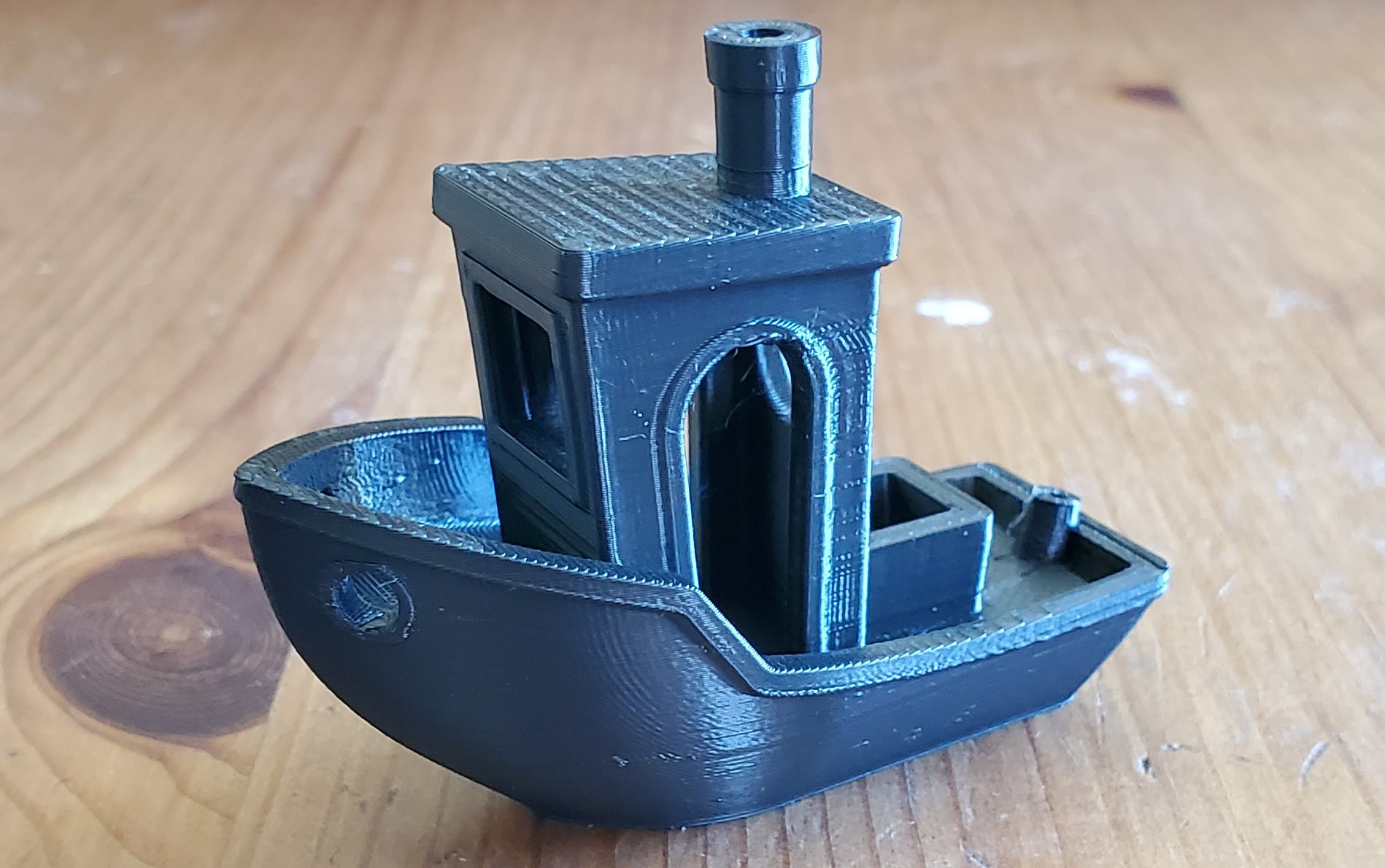
The trusty Benchy gets us started printed in the default 0.15mm layer profile for PLA in Cura.
plx benchy

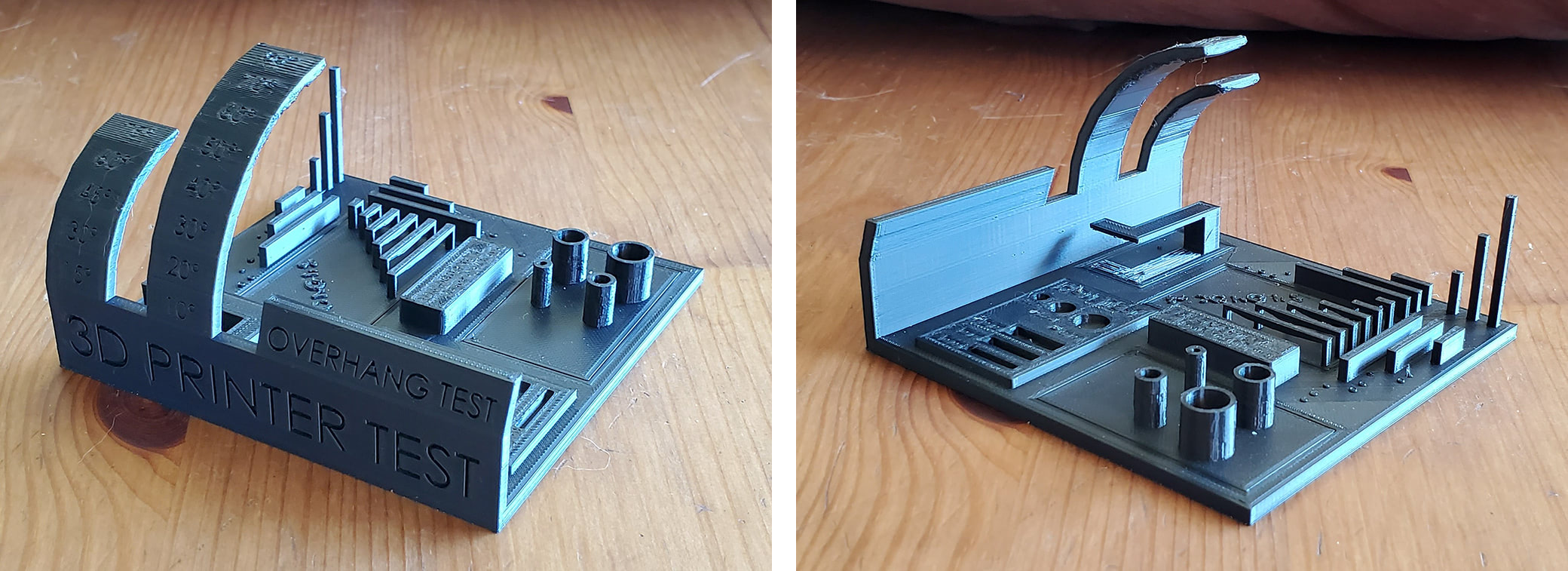
That’s a very good showing. Every feature is crisp and smooth. There are no signs of trouble on the overhangs of the bow and all the pillars are clean. The material is rather shiny so what look like imperfections are really just glare. That’s one of the reasons I prefer more matte colors but that’s beside the point. This is an excellent first print. Let’s move on to the All In One 3D Printer Test.
plx filament 3d printer test

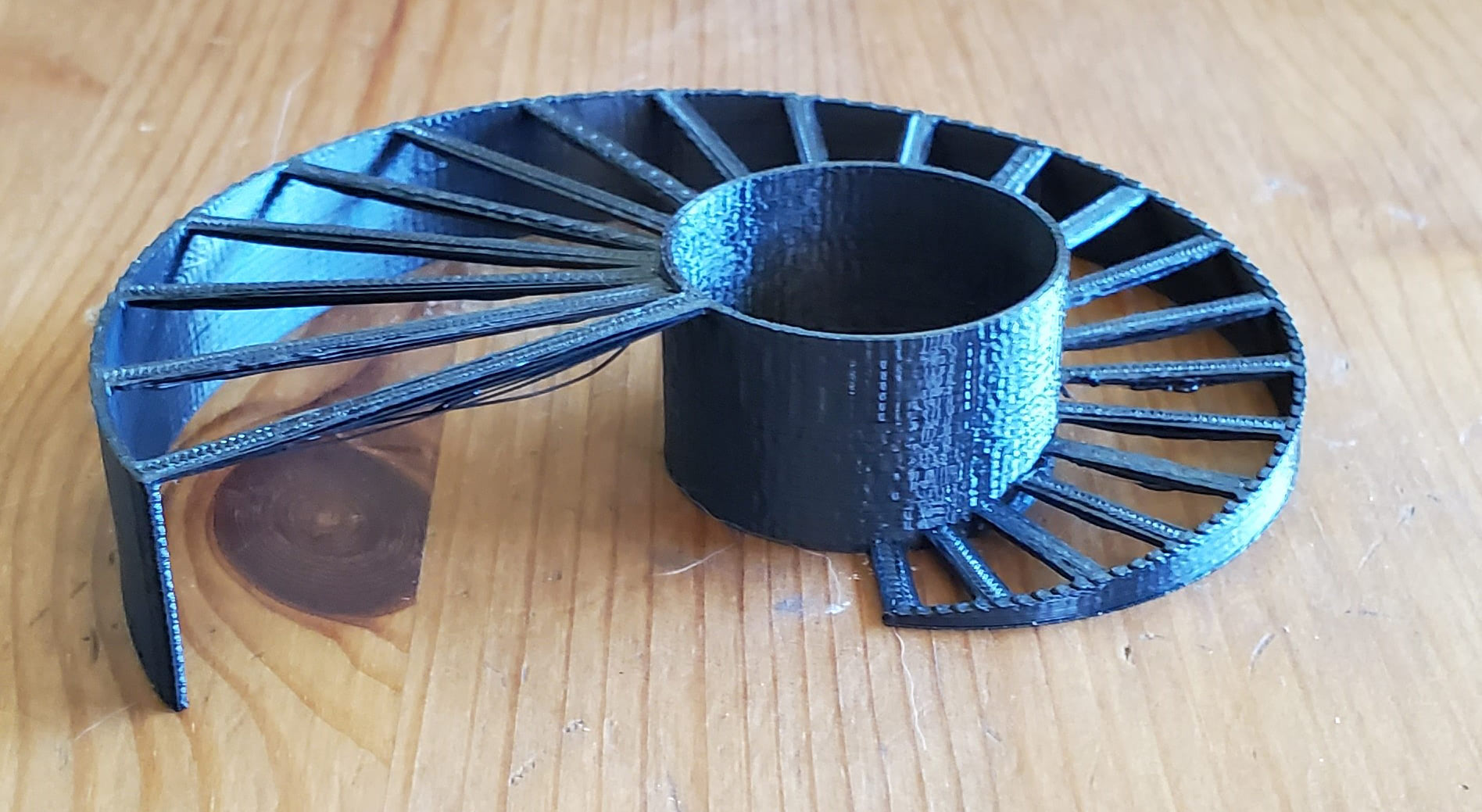
Again, an excellent result. Look at how straight the corners of the pillars are. There were only the faintest of strings on the pillars that were easily removed with a light brushing of the fingers. Top surfaces are incredibly smooth and solid. The overhangs don’t start deteriorating until 70+°, which is as good as the best I’ve seen. I don’t usually remove the support (under the floating L shape) when I print this model because it’s included in the model and thus can’t be tuned; that means the gap between the support and the model is static and won’t work as well for all materials and print settings. In short, it’s usually incredibly difficult to remove the support material on this model without breaking the print. But the surfaces came out so well that I decided to try, after taking some pictures first of course. As you can see, the support came out and the part survived. There’s a bit of scarring on the top surface where it was removed but that’s mostly related to the same problem of the support not being tunable in the slice parameters. The only issue is that the bridges are sagging just a bit so let’s see how PLX handles the Bridging Test.
plx bridging

It did alright. Not terrible but we’ve seen better. Most of the bridges are flat on top with slight sagging on the bottom, though several are fairly flat on the bottom as well. Bridging is one of those tricks that usually takes some tuning for each material to get consistent results and I’m working with mostly default print settings for these tests so there’s plenty of room for improvement.

Layer adhesion was tested by printing three Vertical Tensile Bars and applying weight on each one until it breaks. They broke at 63lbs, 65lbs, and 68lbs for an average of 65.3lbs. That’s a good performance, especially for a material that prints so easily.

I also tested heat deflection by comparing the dimensions of a printed bar to its dimensions after going through an annealing run in my oven.

  • Original dimensions: 20.5mm x 120.4mm x 5.95mm
  • Post-annealing dimensions: 20.3mm x 119.2mm x 6mm

It shrank about a millimeter in the longest dimension and got a hair thicker in the Z axis, both of which represent a change of less than 1%. That means PLX is fairly resistant to heat and can be used in a broad range of applications.

Finally, I wanted to test their claims of being able to print quickly and being able to get smooth walls with this material, but I wanted to test both in a single print. I needed a large object that also had a lot of details so the Cthulhu Dice Tower fit the bill perfectly. It’s 200mm tall and has lots of different textures and shapes. To print it quickly, I cranked up the infill print speeds, increased solid layer line width, made it mostly hollow with very little infill, and went with 0.2mm layers. To make it look good, I reduced the outer wall print speeds and outer wall line width.
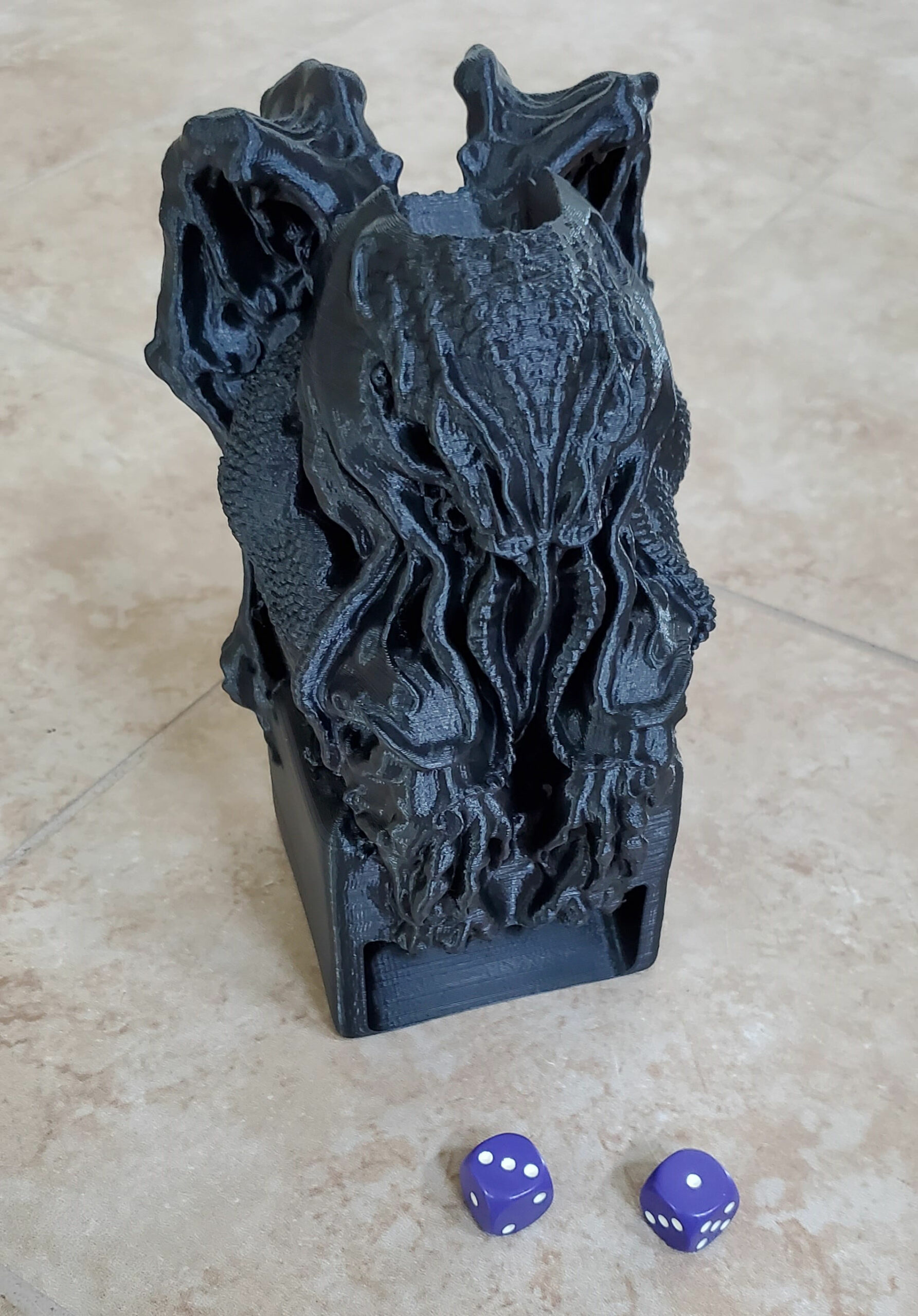
plx filament Cthulhu Idol Dice Tower

This thing took only 14 hours to print and is absolutely gorgeous. The smallest of details are fully captured and the surfaces are like satin. I was planning on painting it but I almost don’t want to because it looks so good as-is. It will be haunting my game cabinet until I decide. So yes, you can print fast with this material and you can get stunning prints, even at the same time. What’s more, the supports (generated in Cura) peeled off with very little effort.

Conclusion

I’m a big fan of PLX. It prints just as easily as PLA with standard print settings and delivers top-notch results. I had no parts peel or warp and every print came out looking great. I generally avoid the use of supports as much as possible but they’re totally manageable with this material. And being able to reduce print times by printing faster is a huge value add for manufacturers of all sizes. BigRep hit it out of the park with PLX.

Share:
WhatsApp Twitter Facebook LinkedIn Buffer Reddit E-mail
About the author | Cameron Naramore
Cameron is a 3D printer and CNC operator. He's fond of cooking, traveling, and science fiction.
Join our newsletter

Our newsletter is free & you can unsubscribe any time.

Latest posts

SHINING 3D Launches ShiningSpace, a Browser Platform for Real-World 3D Scans

SHINING 3D has launched ShiningSpace, a browser-based platform for storing, viewing, editing and sharing 3D scan data. The company says it accepts models... read more »

News

LLNL 3D-Prints a Bioreactor That Turns Waste Methane Into a Useful Chemical

Lawrence Livermore National Laboratory 3D-printed a bioreactor that uses bacteria in thin lattice walls to turn waste methane into succinate.

News

Snapmaker and Phaetus Launch Liber High Flow Hotend for the U1

Snapmaker and hotend specialist Phaetus have launched the Liber High Flow Hotend for the Snapmaker U1 toolchanger. According to Snapmaker, it delivers up... read more »

News

City University of Hong Kong and Cambridge Open a 3D Printing Centre

City University of Hong Kong and the University of Cambridge have opened a joint centre that will use 3D printing for data-centre cooling... read more »

News

TCT Shenzhen 2026: Seven Highlights to Watch This October

TCT Shenzhen 2026 takes place at Shenzhen World from October 14 to 16 with, according to organizer TCT, more than 250 exhibitors, 80-plus... read more »

Events

ORNL and Boeing 3D-Print a Nearly Two-Ton Mold for Aircraft Parts

Oak Ridge National Laboratory and Boeing 3D-printed a nearly two-ton steel mold for stamping thermoplastic composite aircraft parts.

3D Printing Metal

Meshy 7 Review: From a Designer’s Drawings to Four-Color Board Game Pawns, With No Modelling Skills

Game designer Sonja Uittenboogaard (swurls.nl) draws her own characters. I took three of them, a dragon, an owl and a wizard, and tried... read more »

News

Creality Pika: The Pocket AI 3D Scanner That Wants Scanning to Feel Like Taking a Photo

Creality has shrunk a dual-mode 3D scanner to the size of a compact camera, given it a touchscreen and two swappable batteries, and... read more »

News

How to 3D Scan With Your Phone in 2026: Apps, Technique, and Limits

Yes, you can 3D scan with your phone, and the results are better than the price of admission suggests, which is zero. A... read more »

Scanners

LLNL Researchers Inspect Direct-Ink Prints Layer by Layer With Cameras

Lawrence Livermore mounted cameras on a direct-ink printer so software can measure filament diameter and flag broken strands before a part leaves the... read more »

News
LLNL Researchers Inspect Direct-Ink Prints Layer by Layer With Cameras

Social

  • Facebook Facebook 3D Printing
  • Linkedin Linkedin 3D Printing
Join our newsletter

Our newsletter is free & you can unsubscribe any time.

banner
banner
  • Flashforge Adventurer 5M

    • - Print size: 220 x 220 x 220 mm
    • - 600mm/s travel speed
    More details »
    $299.00 Flashforge
    Buy Now
  • Anycubic Photon Mono M7

    • - Print size: 223 x 126 x 230 mm
    • - 10.1 inch 14K screen
    More details »
    $279.00 Anycubic
    Buy Now
  • Anycubic Kobra S1 Combo

    • - Print size: 250 x 250 x 250 mm
    • - budget multicolor printing
    More details »
    $429.00 Anycubic
    Buy Now
  • Qidi Q2

    • - Print size: 270 x 270 x 256 mm
    • - enclosed heated chamber up to 65°C
    More details »
    $580.00 Qidi
    Buy Now
  • Flashforge Guider 3 Ultra

    • - Print size: 330 x 330 x 600 mm
    • - dual extruder system
    More details »
    $2,999.00 Flashforge
    Buy Now
  • Creality Hi Combo

    • - Print size: 260 x 260 x 300 mm
    • - up to 16-color printing
    More details »
    $399.00 Creality
    Buy Now
  • Flashforge AD5X

    • - Print size: 220 x 220 x 220 mm
    • - dual extrusion system
    More details »
    $399.00 Flashforge
    Buy Now
  • Creality K2 Plus

    • - Print size: 350 x 350 x 350 mm
    • - multi-color printing
    More details »
    $1,199.00 Creality
    Buy Now
  • Qidi Max 4

    • - Print size: 390 x 390 x 340 mm
    • - active cooling air control
    More details »
    $1,219.00 Qidi
    Buy Now
  • Snapmaker U1

    • - Print size: 270 x 270 x 270 mm
    • - multi-color printing with SnapSwap
    More details »
    $849.00 Snapmaker
    Buy Now

Company Information

  • What is 3D Printing?
  • Contact us
  • Join our mailing list
  • Advertise with us
  • Media Kit
  • Nederland 3D Printing

Blog

  • Latest News
  • Use Cases
  • Reviews
  • 3D Printers
  • 3D Printing Metal

Featured Reviews

  • Anycubic Photon Mono M5s
  • Creality Ender 5 S1
  • The Mole 3D Scanner
  • Flashforge Creator 3 Pro

Featured Industries

  • Automotive
  • Aerospace
  • Construction
  • Dental
  • Environmental
  • Electronics
  • Medical
  • Military
  • Fashion
  • Art
2026 — Strikwerda en Dehue
  • Home
  • Join our mailing list
  • Contact us
Blog
  • Latest News
  • Use Cases
  • Reviews
  • 3D Printers
  • 3D Printing Metal
Featured Industries
  • Automotive
  • Aerospace
  • Construction
  • Dental
  • Environmental
  • Electronics
  • Medical
  • Military
  • Fashion
  • Art
Company Information
  • What is 3D Printing?
  • Contact us
  • Join our mailing list
  • Advertise with us
  • Media Kit
  • Nederland 3D Printing