

3D Printing

Buyer guides

  • Best 3D printers
  • For beginners
  • Multicolor
  • Resin printers
  • Budget (under $400)
  • For kids and schools
  • For miniatures
  • Large format
All printer guides

Brands and compare

  • Bambu Lab lineup compared
  • Compare printers
  • Full color 3D printers
  • Large scale and industrial

Reviews

  • Elegoo Mars 5 Ultra
  • FLSun T1 Pro
  • QIDI Tech Q1 Pro
All reviews
Best 3D Printers 2026: Buyer’s Guide

Start with the top picks

Best 3D Printers 2026: Buyer’s Guide

Twenty printers tested and ranked, from $169 to the H2D.

See the picks

Filament

  • Best PETG filament
  • Best PLA filament
  • Best TPU filament
  • Best ABS and ASA filament
  • Engineering filaments
  • Composite filaments
  • Flexible filaments
  • Bio filaments
All filament guides

Resin

  • For miniatures
  • Tough and ABS-like
  • Castable resin
  • Water-washable
  • Flexible resin
All resin guides

Accessories

  • Filament dryers
  • Printer enclosures
  • Wash and cure stations
Best Filament Dryers (2026 Guide)

Most-clicked accessory

Best Filament Dryers (2026 Guide)

Wet filament causes most failed prints; the fix costs less than a spool.

Compare dryers

Buyer guides

  • Small objects
  • Medium objects
  • Large objects
  • Professional scanners
  • Scan with your phone
All scanner guides

Software and service

  • 3D scanner software
  • Scanning service vs buying

Reviews

  • Revopoint MetroY Pro
  • Revopoint Inspire 2
  • Revopoint Trackit
All scanner reviews
3D Scanners 2026: The Complete Buying Guide

Find the right scanner

3D Scanners 2026: The Complete Buying Guide

Nineteen scanners from $400 to $40,000, sorted by object size.

Open the guide

Design and AI

  • AI 3D model generators
  • 3D modeling and CAD software

Print prep and control

  • Slicers
  • STL repair tools
  • Printer host and remote control

Reviews

  • Meshy Edit
  • Tripo H3.1
  • Meshy 7.1
All software reviews
Best AI 3D Model Generators for 3D Printing (2026)

Fastest-growing guide

Best AI 3D Model Generators for 3D Printing (2026)

Type a prompt, get a printable model: the tools we tested, free tiers first.

Try the tools

Start here

  • What is 3D printing?
  • How much does it cost?
  • FDM vs resin
  • Best printers for beginners

How it works

  • What is a 3D printer?
  • How does 3D printing work?
  • Types of 3D printing
  • Metal 3D printing

How-tos and glossary

  • 3D printing glossary
  • Food-safe 3D printing
  • Setting up a school program
  • Free 3D printable models
What is 3D Printing?

Start here

What is 3D Printing?

The one-page explainer, then how much it costs and which technology to buy.

Start reading
Black FridayNEW

Latest

  • Atomik AM and Concr3de Launch CoBound HiC, a High-Carbon Binder for Silicon Carbide Binder Jetting
  • Prusa Introduces Turnkey 3D Printing Farm, Combining FDM and SLA Printers With Software, Materials and Training
  • UC San Diego 3D Prints a Soft Six-Legged Robot in One Piece That Runs Without Electronics
  • Revopoint MIRACO 2 Launches on Kickstarter: A Standalone 3D Scanner From $1,425
  • Stark Future Orders Multiple Farsoon FS4X Laser Powder Bed Fusion 3D Printers for a Series Production Line
All news

Use cases

  • Dutch Machine Builder Swaps a Welded Part for One Metal 3D Printed by K3D
  • Prague Firefighters 3D Print Their Own Gear on a Prusa CORE One L
  • OECHSLER Scales Carbon Lattice Production to 40 Printers Running Around the Clock
  • Reverse Engineering Without CAD Data: How the MetroY Ultra Turns Physical Parts into Digital Designs
  • Michigan State Engineers 3D Printed Helmet Inserts to Help Quarterbacks Tackle Crowd Noise
All use cases

Industry

  • Automotive
  • Aerospace
  • Medical
  • Dental
  • Construction
  • Rapid prototyping
  • Electronics
  • Food
  • Fashion
  • Bioprinting
Atomik AM and Concr3de Launch CoBound HiC, a High-Carbon Binder for Silicon Carbide Binder Jetting

Latest

Atomik AM and Concr3de Launch CoBound HiC, a High-Carbon Binder for Silicon Carbide Binder Jetting

Atomik AM and Concr3de launched CoBound HiC, a high-carbon binder for silicon carbide binder jetting whose carbon contributes…

Read more
Contact
  • Home
  • Products
  • Videos
  • Newsletter
  • Contact us

Buyer guides

  • Best 3D printers
  • For beginners
  • Multicolor
  • Resin printers
  • Budget (under $400)
  • For kids and schools
  • For miniatures
  • Large format
All printer guides

Brands and compare

  • Bambu Lab lineup compared
  • Compare printers
  • Full color 3D printers
  • Large scale and industrial

Reviews

  • Elegoo Mars 5 Ultra
  • FLSun T1 Pro
  • QIDI Tech Q1 Pro
All reviews

Filament

  • Best PETG filament
  • Best PLA filament
  • Best TPU filament
  • Best ABS and ASA filament
  • Engineering filaments
  • Composite filaments
  • Flexible filaments
  • Bio filaments
All filament guides

Resin

  • For miniatures
  • Tough and ABS-like
  • Castable resin
  • Water-washable
  • Flexible resin
All resin guides

Accessories

  • Filament dryers
  • Printer enclosures
  • Wash and cure stations

Buyer guides

  • Small objects
  • Medium objects
  • Large objects
  • Professional scanners
  • Scan with your phone
All scanner guides

Software and service

  • 3D scanner software
  • Scanning service vs buying

Reviews

  • Revopoint MetroY Pro
  • Revopoint Inspire 2
  • Revopoint Trackit
All scanner reviews

Design and AI

  • AI 3D model generators
  • 3D modeling and CAD software

Print prep and control

  • Slicers
  • STL repair tools
  • Printer host and remote control

Reviews

  • Meshy Edit
  • Tripo H3.1
  • Meshy 7.1
All software reviews

Start here

  • What is 3D printing?
  • How much does it cost?
  • FDM vs resin
  • Best printers for beginners

How it works

  • What is a 3D printer?
  • How does 3D printing work?
  • Types of 3D printing
  • Metal 3D printing

How-tos and glossary

  • 3D printing glossary
  • Food-safe 3D printing
  • Setting up a school program
  • Free 3D printable models
Black FridayNEW

Latest

  • Atomik AM and Concr3de Launch CoBound HiC, a High-Carbon Binder for Silicon Carbide Binder Jetting
  • Prusa Introduces Turnkey 3D Printing Farm, Combining FDM and SLA Printers With Software, Materials and Training
  • UC San Diego 3D Prints a Soft Six-Legged Robot in One Piece That Runs Without Electronics
  • Revopoint MIRACO 2 Launches on Kickstarter: A Standalone 3D Scanner From $1,425
  • Stark Future Orders Multiple Farsoon FS4X Laser Powder Bed Fusion 3D Printers for a Series Production Line
All news

Use cases

  • Dutch Machine Builder Swaps a Welded Part for One Metal 3D Printed by K3D
  • Prague Firefighters 3D Print Their Own Gear on a Prusa CORE One L
  • OECHSLER Scales Carbon Lattice Production to 40 Printers Running Around the Clock
  • Reverse Engineering Without CAD Data: How the MetroY Ultra Turns Physical Parts into Digital Designs
  • Michigan State Engineers 3D Printed Helmet Inserts to Help Quarterbacks Tackle Crowd Noise
All use cases

Industry

  • Automotive
  • Aerospace
  • Medical
  • Dental
  • Construction
  • Rapid prototyping
  • Electronics
  • Food
  • Fashion
  • Bioprinting
Contact
Blog
  • Latest News
  • Use Cases
  • Reviews
  • 3D Printers
  • 3D Printing Metal
Featured Industries
  • Automotive
  • Aerospace
  • Construction
  • Dental
  • Environmental
  • Electronics
  • Medical
  • Military
  • Fashion
  • Art
Company Information
  • What is 3D Printing?
  • Advertise with us
  • Media Kit
  • Nederland 3D Printing
creality header

Hands-On Review

Craftbot FLOW IDEX XL

In the desktop 3D printer market, overall build quality ranges across the board, with options at every price point between $200 and $10,000. The cheaper ones usually have lightweight frames while the more expensive ones are as sturdy as a workbench, and frame rigidity has a significant impact on print quality. Craftbot has a reputation for building affordable printers that are built like tanks. We got our hands on the new FLOW IDEX XL for a review, and it’s hard to say if it’s built more like a tank or a highrise.

craftbot company

CraftBot logo

The Unboxing

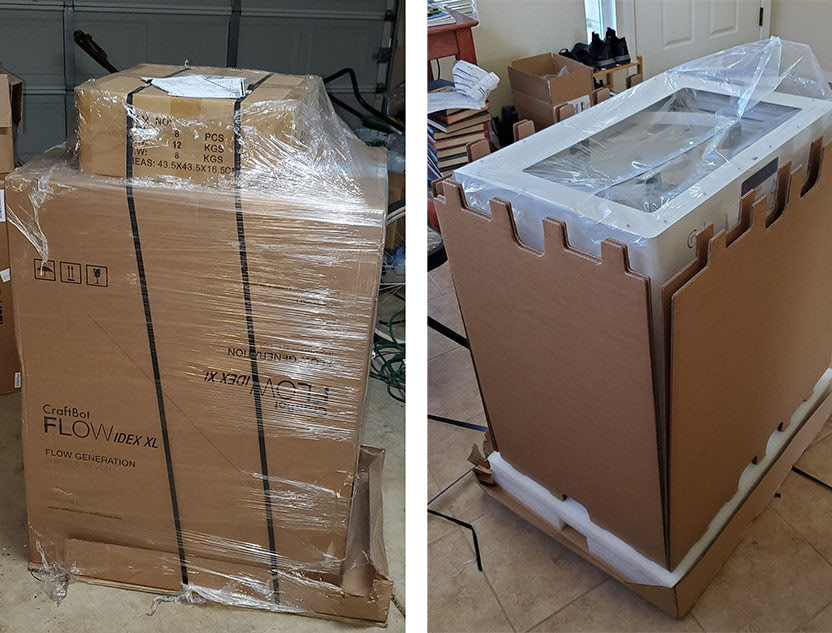
If you think I’m exaggerating, consider that it’s delivered on a pallet with the use of a small forklift.
flow idex unboxing

This is probably about as big as a printer can be before it’s no longer in the desktop category. While the size is intimidating, it’s rather easy to unpackage. It does require two people to move due to its size and weight, and thankfully it does have lift handles that are appropriately positioned near the top. A setup sheet in the box provides step-by-step instructions that involve removing the security clamps for shipping and attaching the spool holders and filament guide tubes; it’s well illustrated and clear. And it’s only one page, just how I like my directions.
toolkit

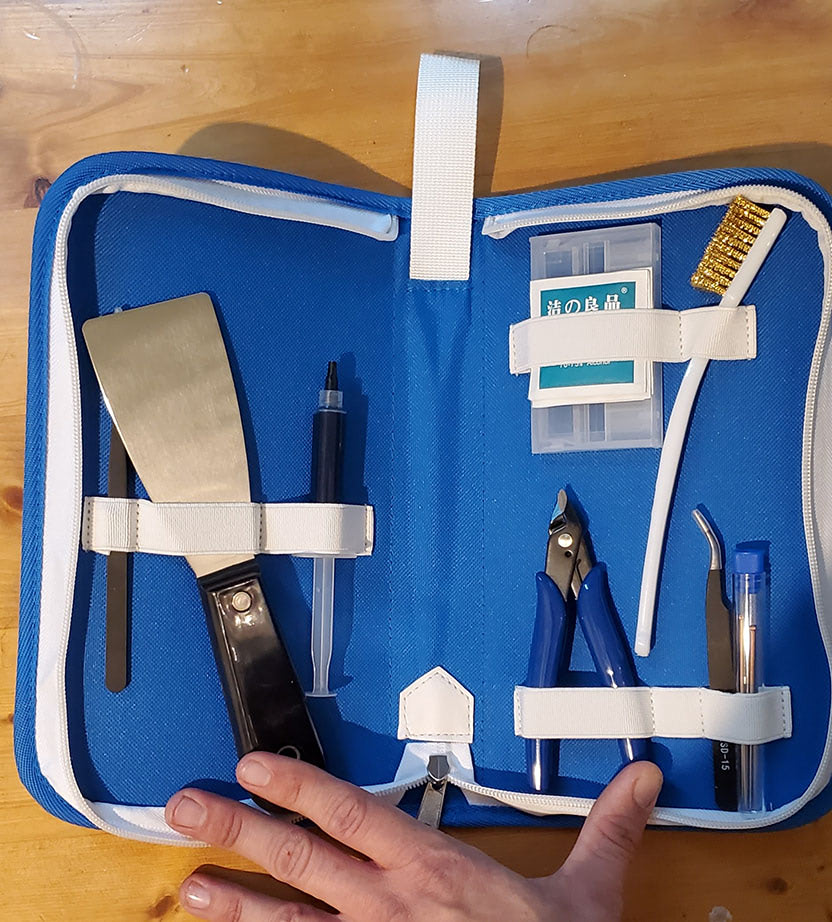
This nice accessory kit includes some handy tools not found in most kits, like nozzle cleaning wires and micro cutters, as well as the typical items such as a spatula, some grease, and a wire brush.
gigantic IDEX 3D printer

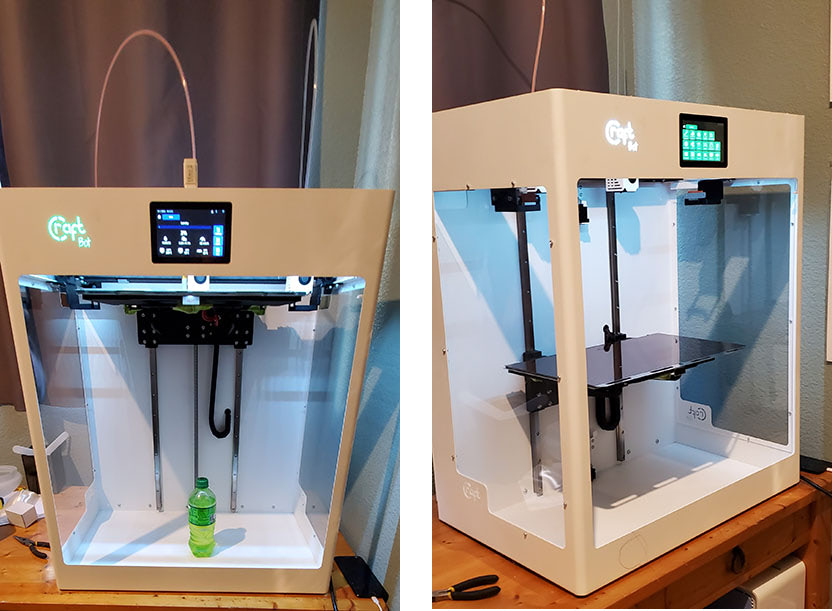
Did I mention this thing is big? That’s a 20oz bottle, for scale. They really aren’t kidding about the XL. It has a build volume of 425mm x 250mm x 500mm. The smallest dimension is larger than the largest dimension of most desktop 3D printers. But the FLOW IDEX XL isn’t a one-trick pony because, as we all know, size isn’t everything. IDEX stands for independent dual extrusion, meaning users can print with different colors and materials as well as print duplicate and mirrored objects. And that’s not all; this printer has features and sensors a plenty. It has mesh bed leveling, filament runout detection, dual-drive extruders, an onboard camera, print resume function, wifi, a Kapton-coated magnetic flexible/removable bed, and even a sensor that tells you if the bed isn’t set correctly. Basically, if a desktop 3D printing feature exists, this printer has it. Craftbot has set a (500mm) high bar for themselves, so let’s see if they can clear it.

The Setup

There are quite a few calibration options and I ran most of them. There are two bed leveling steps: the first step is assisted by a probe that shows you how much to turn each knob and then there’s an automated mesh leveling process. The first process is simple and intuitive with good visual indicators on the screen as to how the knobs should be turned, though the knobs were so hard to turn that I had to use pliers. The second process doesn’t require any interaction but it does take a while because the head probes many points of the bed at 60°C, then heats to 90°C and repeats the probing, and then it heats to 120°C and does it all again. A thorough process, to say the least. The only thing left to do was load some filament and get printing. Loading filament takes only a few seconds by using the touchscreen or by controlling the printer through its web interface (wifi setup is simple after you look up the default login info on their site), and the extruders heat up quickly.
benchies

Standardized Tests

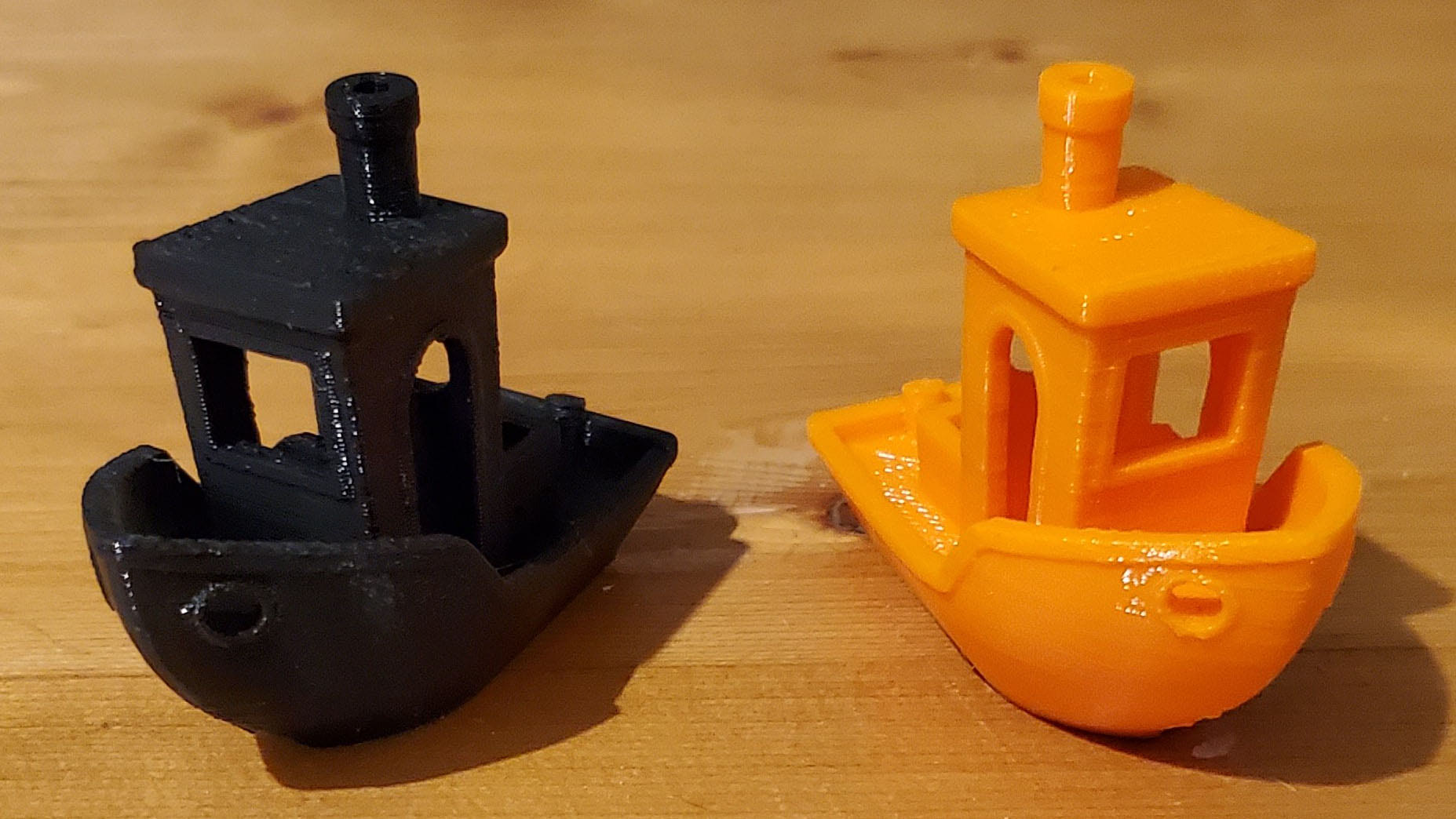
Seeing as this is an IDEX printer, I found it fitting to print two Benchies at the same time. They came out quite well with the mostly default print settings of 0.2mm in their slicer CraftWare. There was virtually no stringing, the arches are clean, and the bridges aren’t sagging. The only issue is some over-extrusion on the black one because I was running their brand of PLA alongside some generic PLA, and their PLA prints with a higher flow rate than most PLA that I’ve worked with. Their PLA prints at a higher temperature and seems to be stiffer as well. I said “mostly default print settings” because despite all of the bed leveling and probing, my first prints weren’t sticking to the bed due to the nozzle being too far away from the bed. CraftWare allows you to make first layer Z adjustments, though, so it was an easy fix. Next up was the All In One 3D Printer Test.
3d printer test
Click for full-size

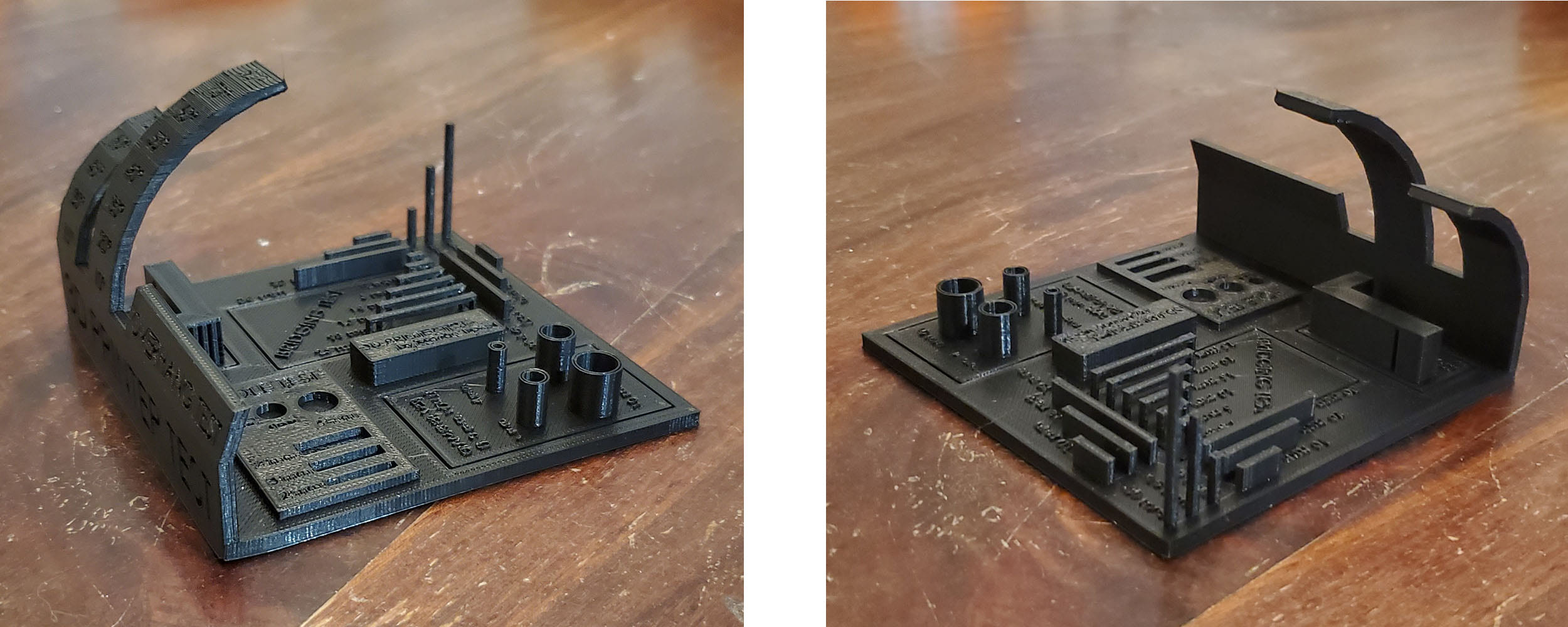
That’s an outstanding print and passes all of the individual tests. Top surfaces are solid, circles are round, text is legible, overhangs are clean all the way to 80°, bridges don’t sag, and the pillars are straight and smooth though not in focus (apologies). The only standardized test remaining is the Bridging Test.
bridging
Click for full-size

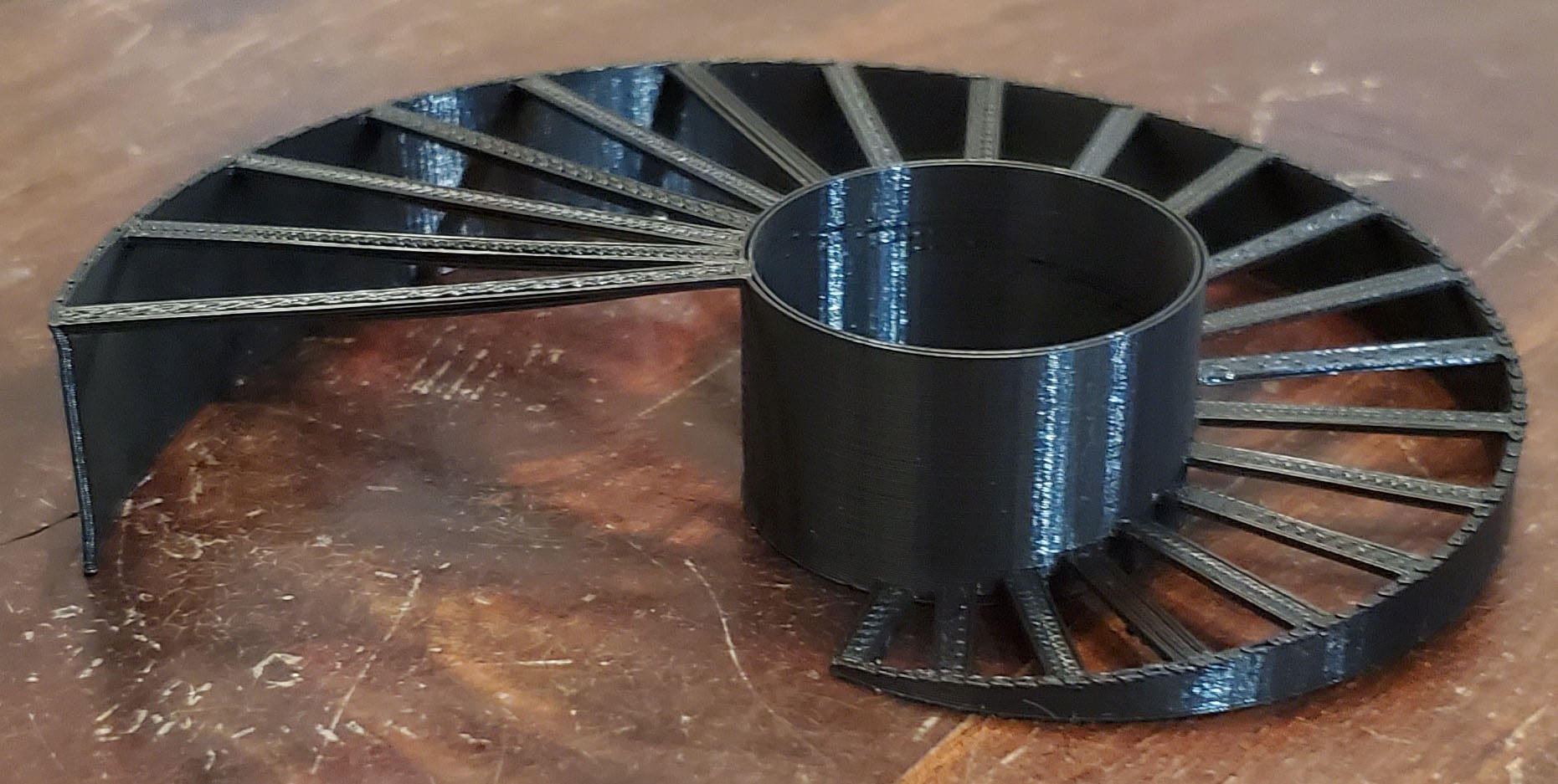
Even at 50mm, there’s no sagging at all. The IDEX XL passed all the initial tests with flying colors so let’s see how it handles more complex tasks.

Advanced Tests

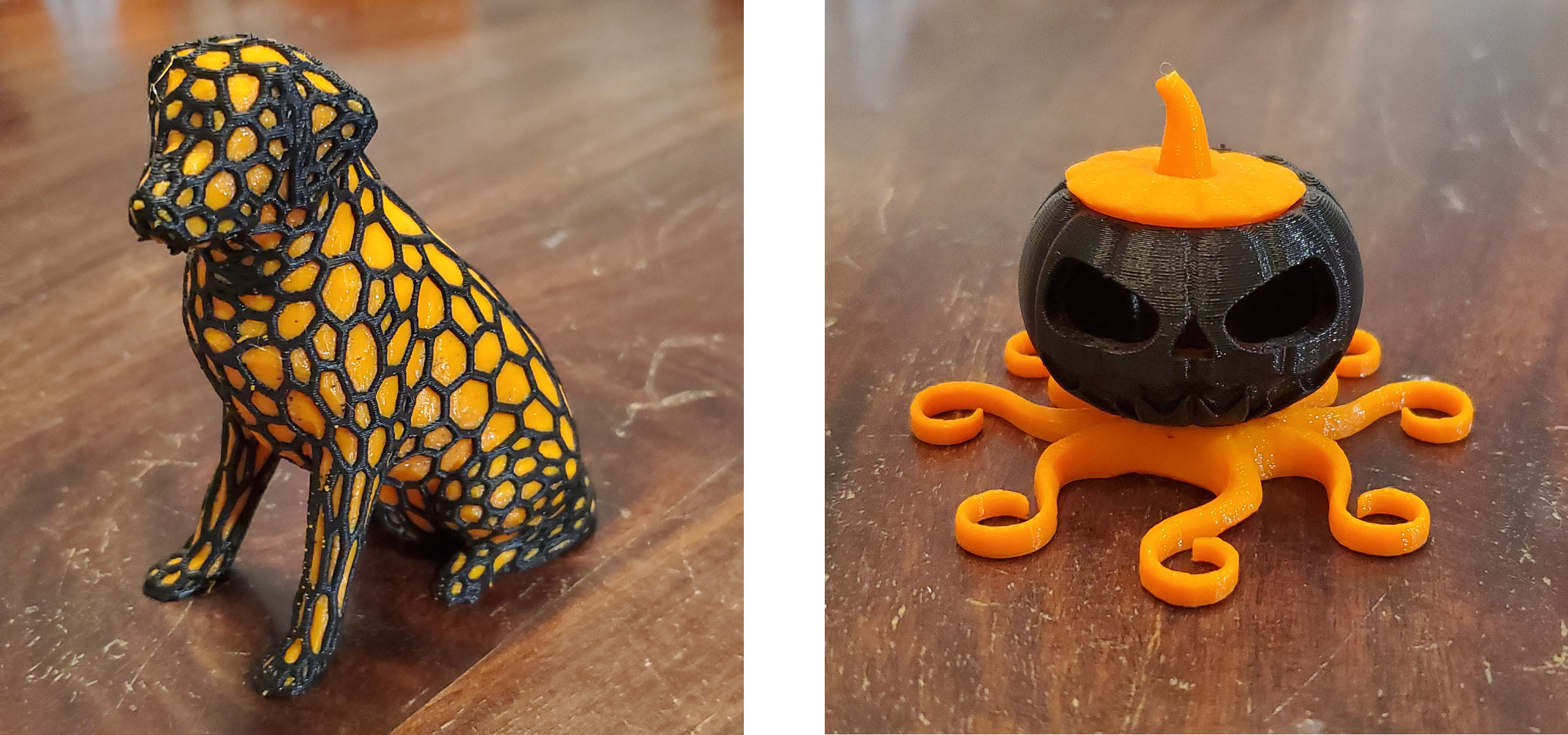
With any dual-extruder printer, one of the first things I like to test is two-color printing because it’s one of the features that has evolved the most over the last few years.
dual color
Click for full-size

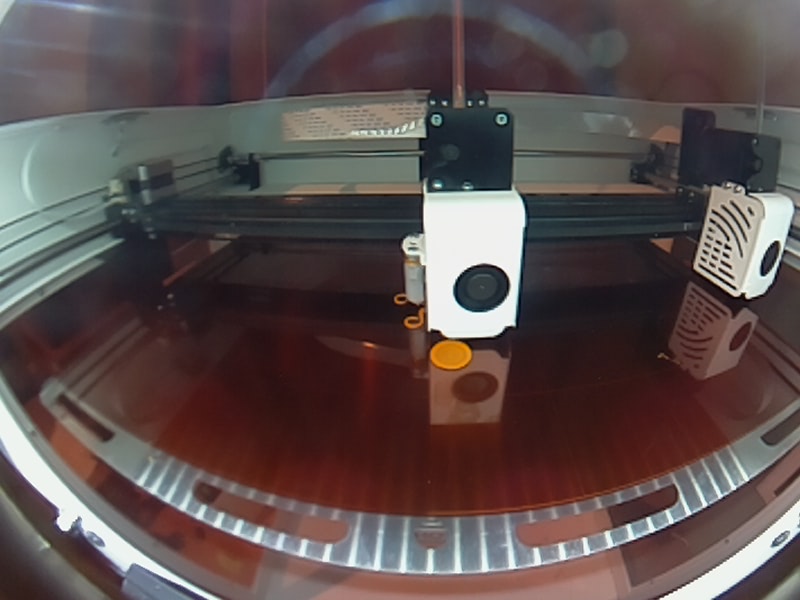
I can happily report that this printer does the best two-color printing that I’ve experienced. There are only a couple off-color dots on the extremely complex Dual Color Labrador. And I was reviewing this printer through Halloween so I had to print the Octolantern, which came out just as well. Both of these were printed without an ooze shield, just the prime pillar; you can see that in the snapshot I took with the onboard camera.
onboard camera

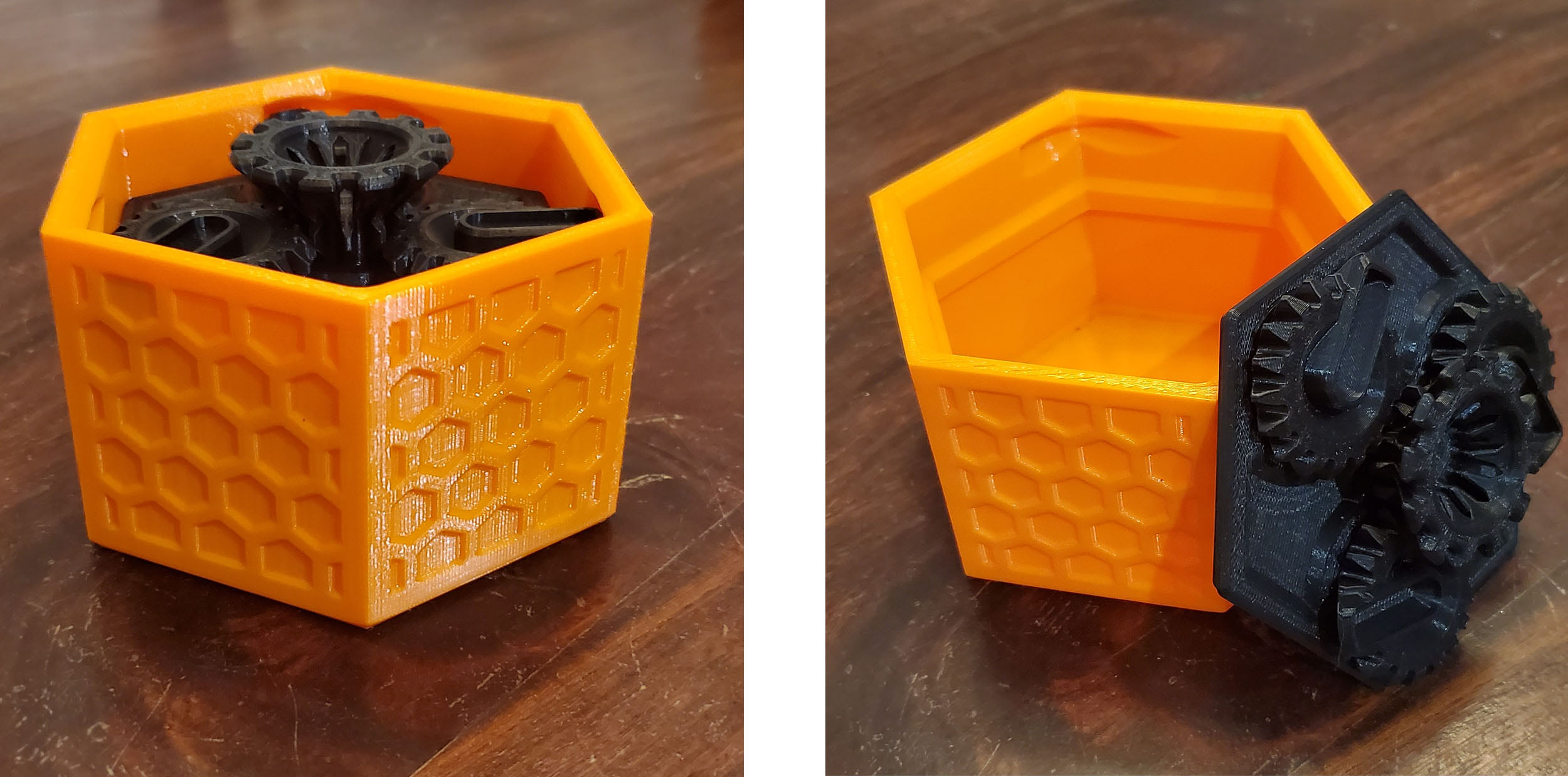
Next, I wanted to test moving parts. Print-in-place parts are growing in popularity because they greatly reduce assembly times. I print a lot of moving parts so this is an important one for me.
moving parts
Click for full-size

This Machine Canister is my go-to test for moving parts and it came out working right out of the printer, and with smooth action at that. Next up was some high-res printing.

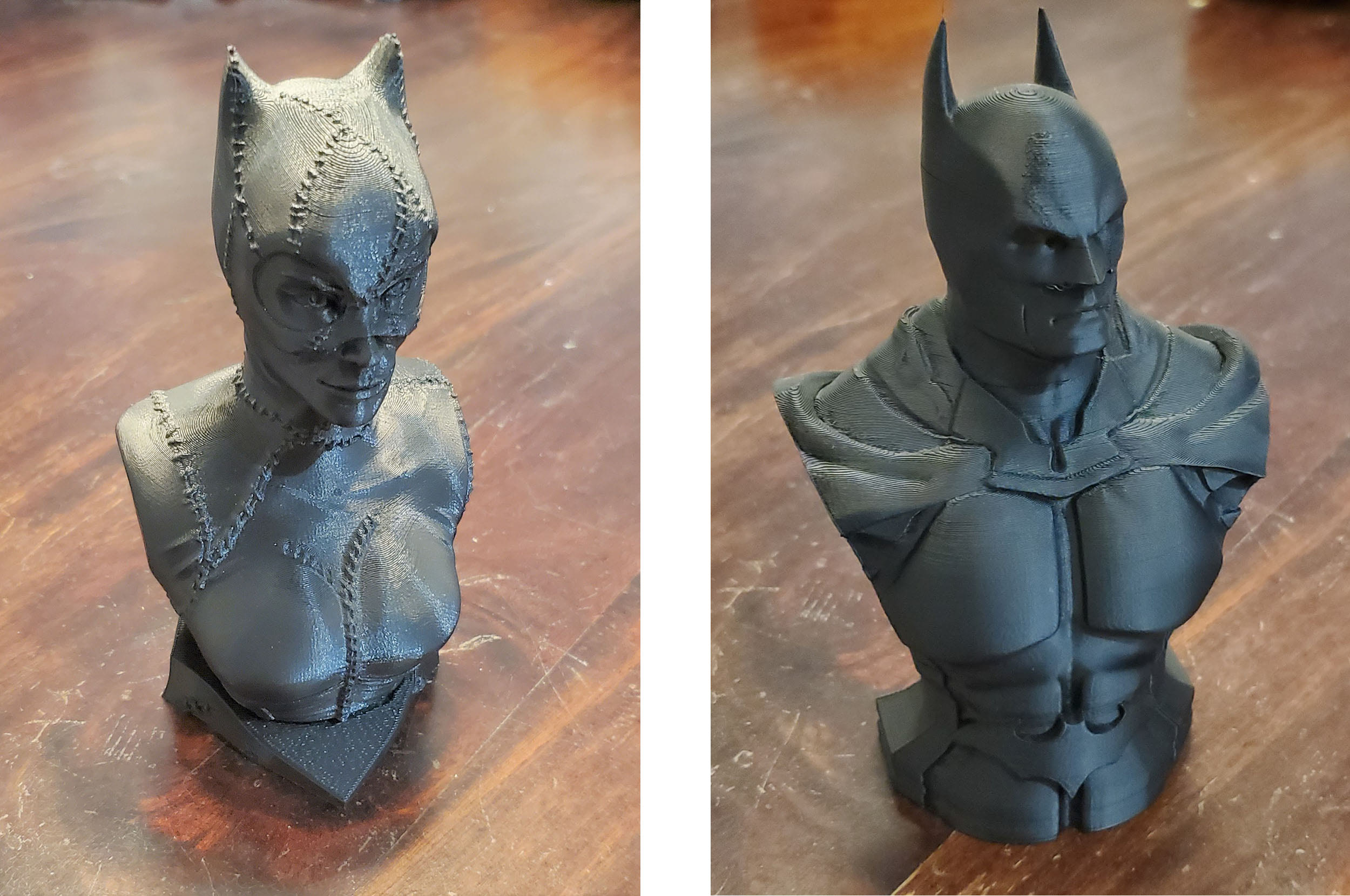
This Catwoman Bust printed beautifully. All of the stitches and details are captured perfectly. Let’s move on to some other materials.
batman and batwoman
Click for full-size

Batman looks good in ABS, and this printer handles ABS just fine. Check out how clean those pointy ears are.

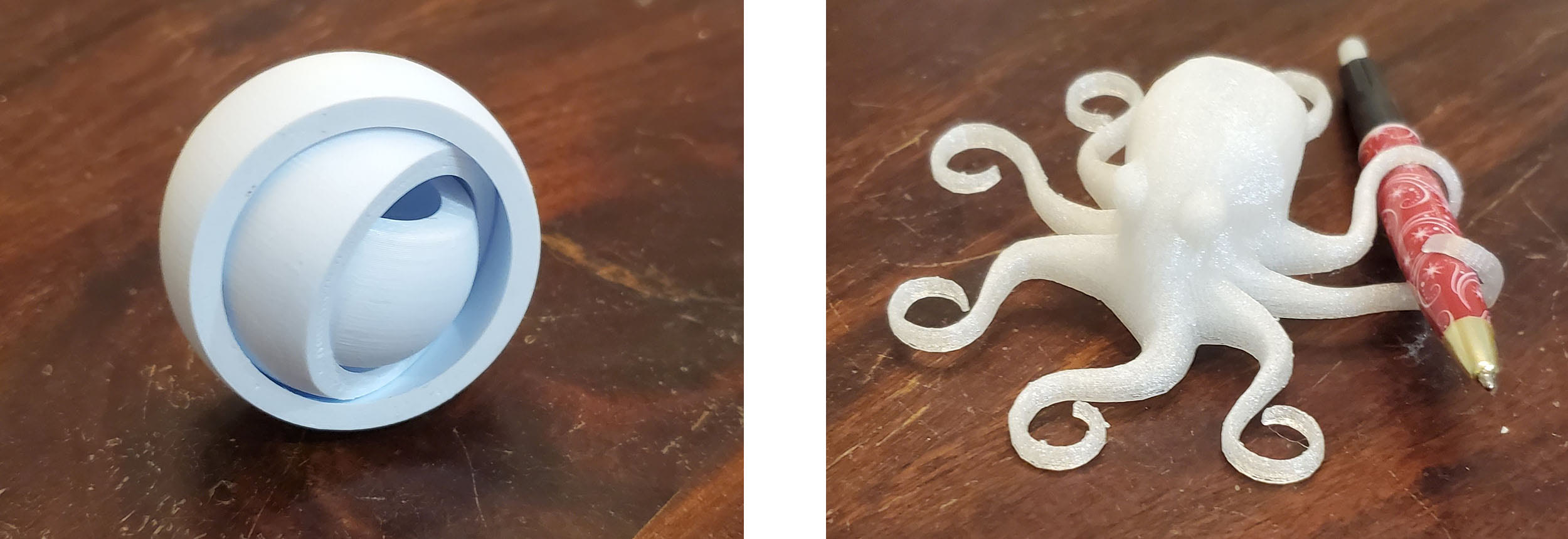
This Gyro was printed in Craftbot’s PET and it came out looking good and spinning well.
Gyro
Click for full-size

An Octopus makes for a great TPU test, and the results are quite good. There were a few strings but the overall print quality is exceptional, and some small adjustments to temperature or retraction could help with the stringing.

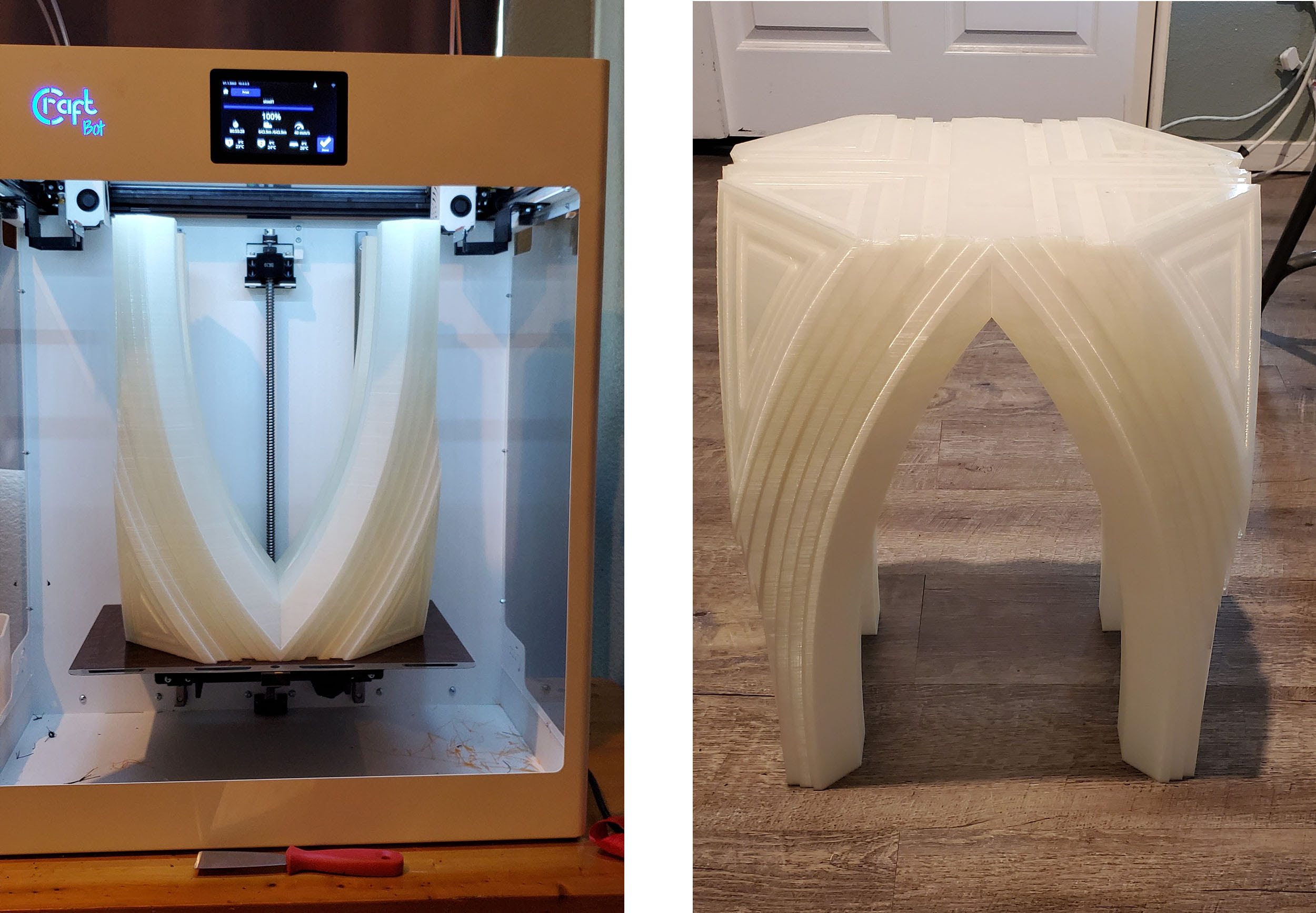
Finally, I wanted to try something with the IDEX XL that I’ve never been able to do with a 3D printer: print furniture. I designed a stool just for the occasion.
3D printed stool
Click for full-size

Using 0.3mm layers, this monolith took 80 hours to print and it weighs 2kg, which is quite light for a stool and incredibly heavy for a desktop print. Here it is in the printer where you can see I used nearly the entire build volume (the stool is 345mm x 240mm x 465mm).

And here it is after a paint job that’s as bold as its existence:
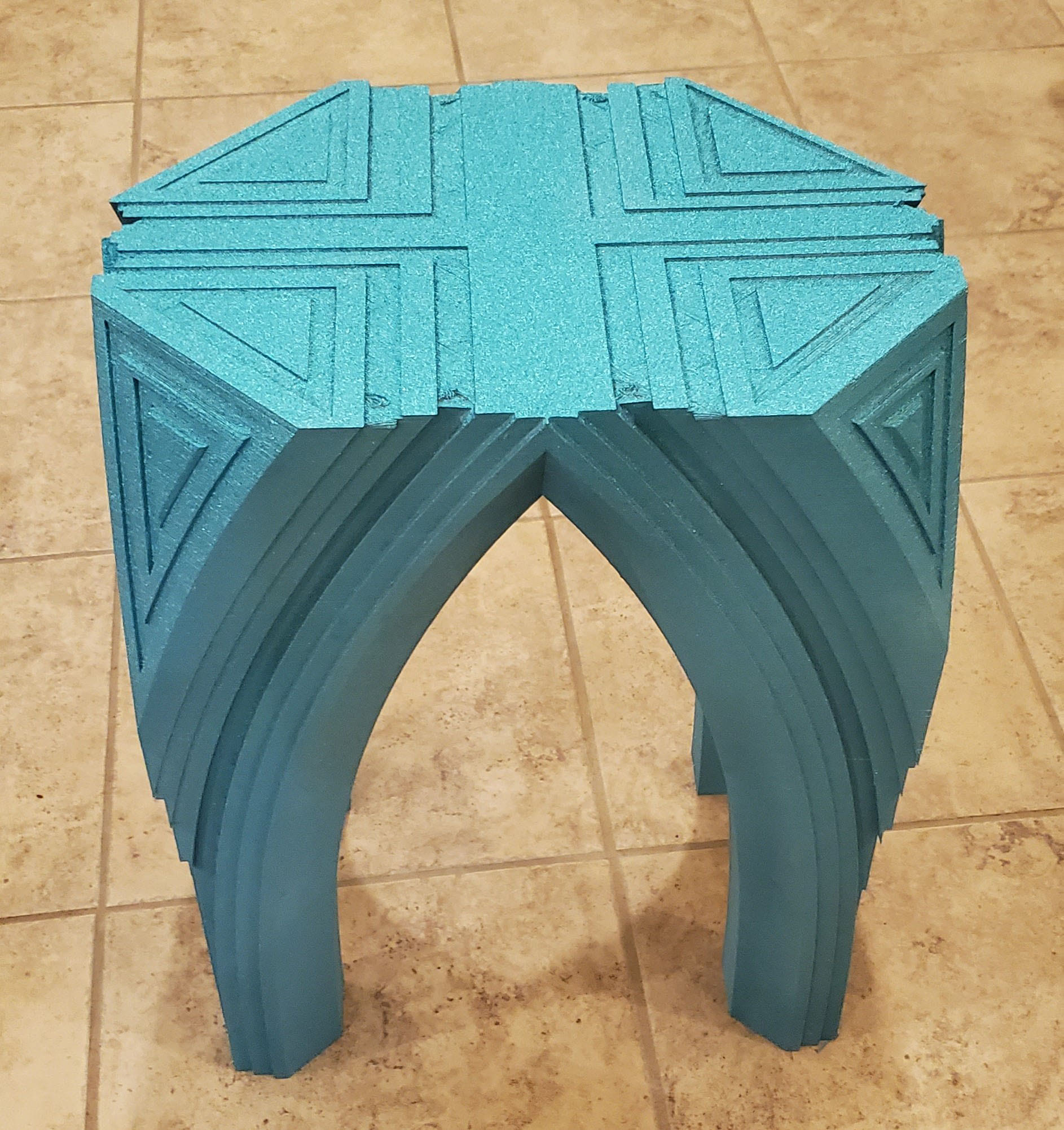
3d printed stool painted

It’s difficult to tell from the picture but it’s actually sparkly. And yes, it works. So you can definitely print functional furniture with this printer.

Conclusion

I always like to get my gripes out of the way first, and there aren’t many here. The biggest issue was the poorly-configured print profiles, which were only set up for their brand of materials that have different print settings than what most users are accustomed to. Their profiles have a flow rate of 100% for PLA, which I found was too high even for their PLA as the over-extrusion was causing prints to fail. Besides that, I think that the front doors should come as a standard feature and not an add-on.

The FLOW IDEX XL may be a bit intimidating with all of its bells and whistles (and mass) but it’s actually very user friendly. It really is built like a tank with linear rails rather than the standard rods, and everything is metal, which means print quality is high. It handles all common materials with its 300°C all-metal hotends. Wi-Fi printing works well, and the browser control with video monitoring is useful. It’s very quiet, enough so that three-day long prints don’t drive you mad, and it’s reliable as it can complete three-day long prints. The removable build plate does everything it’s supposed to do, making it easy to remove prints without having to reach into the printer or scrape up the surface with the spatula. Dual-extrusion works well and is easy to use. There’s also a thriving and active user base to get help and feedback from. Overall, the FLOW IDEX XL is a highly-functional professional 3D printer.

Share:
WhatsApp Twitter Facebook LinkedIn Buffer Reddit E-mail

Cameron Naramore

Cameron is a 3D printer and CNC operator. He's fond of cooking, traveling, and science fiction.

Site footer

The 3DPrinting.com newsletter

The week’s best reviews, buyer’s guides and deals. One email every Friday, no spam.

By subscribing you agree to our privacy policy. Unsubscribe anytime.

3D PRINTING.COM

Independent reviews, buyer’s guides and news about 3D printers, materials, scanners and software.

Reviews

  • All reviews
  • 3D printers
  • Filament & materials
  • 3D scanners
  • Software
  • Compare products

Buyer's guides

  • Best 3D printers
  • Best resin 3D printers
  • 3D printers for beginners
  • Best PLA filament
  • Best slicers
  • Best pro 3D scanners

Learn & news

  • Latest news
  • Deals
  • What is 3D printing?
  • FDM vs resin
  • Use cases by industry
  • Glossary

Company

  • About us
  • Contact us
  • Advertise with us
  • Media kit
  • Nederland 3D Printing

© 2026 3DPrinting.com · Strikwerda en Dehue

  • Privacy policy
  • Terms of use
  • Affiliate disclosure
  • RSS