
3D Printing

Buyer guides

  • Best 3D printers
  • For beginners
  • Multicolor
  • Resin printers
  • Budget (under $400)
  • For kids and schools
  • For miniatures
  • Large format
All printer guides

Brands and compare

  • Bambu Lab lineup compared
  • Compare printers
  • Full color 3D printers
  • Large scale and industrial

Reviews

  • Elegoo Mars 5 Ultra
  • FLSun T1 Pro
  • QIDI Tech Q1 Pro
All reviews
Best 3D Printers 2026: Buyer’s Guide

Start with the top picks

Best 3D Printers 2026: Buyer’s Guide

Twenty printers tested and ranked, from $169 to the H2D.

See the picks

Filament

  • Best PETG filament
  • Best PLA filament
  • Best TPU filament
  • Best ABS and ASA filament
  • Engineering filaments
  • Composite filaments
  • Flexible filaments
  • Bio filaments
All filament guides

Resin

  • For miniatures
  • Tough and ABS-like
  • Castable resin
  • Water-washable
  • Flexible resin
All resin guides

Accessories

  • Filament dryers
  • Printer enclosures
  • Wash and cure stations
Best Filament Dryers (2026 Guide)

Most-clicked accessory

Best Filament Dryers (2026 Guide)

Wet filament causes most failed prints; the fix costs less than a spool.

Compare dryers

Buyer guides

  • Small objects
  • Medium objects
  • Large objects
  • Professional scanners
  • Scan with your phone
All scanner guides

Software and service

  • 3D scanner software
  • Scanning service vs buying

Reviews

  • Creality Pika
  • Revopoint MetroY Pro
  • Revopoint Inspire 2
All scanner reviews
3D Scanners 2026: The Complete Buying Guide

Find the right scanner

3D Scanners 2026: The Complete Buying Guide

Nineteen scanners from $400 to $40,000, sorted by object size.

Open the guide

Design and AI

  • AI 3D model generators
  • 3D modeling and CAD software

Print prep and control

  • Slicers
  • STL repair tools
  • Printer host and remote control

Reviews

  • Meshy Edit
  • Tripo H3.1
  • Meshy 7.1
All software reviews
Best AI 3D Model Generators for 3D Printing (2026)

Fastest-growing guide

Best AI 3D Model Generators for 3D Printing (2026)

Type a prompt, get a printable model: the tools we tested, free tiers first.

Try the tools

Start here

  • What is 3D printing?
  • How much does it cost?
  • FDM vs resin
  • Best printers for beginners

How it works

  • What is a 3D printer?
  • How does 3D printing work?
  • Types of 3D printing
  • Metal 3D printing

How-tos and glossary

  • 3D printing glossary
  • Food-safe 3D printing
  • Setting up a school program
  • Free 3D printable models
What is 3D Printing?

Start here

What is 3D Printing?

The one-page explainer, then how much it costs and which technology to buy.

Start reading
Black FridayNEW

Latest

  • Keio’s Strecs3D Brings Free Stress-Driven Infill to 3D Printing Slicers
  • Bambu Lab P3C Puts a Seven-Slot Tool Changer on the Desktop for $1,149
  • Queensland Backs NIOA With A$15 Million for Metal and Ceramic 3D Printing in Maryborough
  • Army Lab and ZYLtech Scale Up Dual-Polymer Filament for 3D Printing
  • Creality Pika review: the pocket 3D scanner that made me stop the car for a mushroom
All news

Use cases

  • Daniel Winter’s Fits Kids’ Shoe Expands Across Five Sizes
  • Bigshot Tinkers Prints Lifelike Multicolor Wildlife Models
  • Dutch Machine Builder Swaps a Welded Part for One Metal 3D Printed by K3D
  • Prague Firefighters 3D Print Their Own Gear on a Prusa CORE One L
  • OECHSLER Scales Carbon Lattice Production to 40 Printers Running Around the Clock
All use cases

Industry

  • Automotive
  • Aerospace
  • Medical
  • Dental
  • Construction
  • Rapid prototyping
  • Electronics
  • Food
  • Fashion
  • Bioprinting
Keio’s Strecs3D Brings Free Stress-Driven Infill to 3D Printing Slicers

Latest

Keio’s Strecs3D Brings Free Stress-Driven Infill to 3D Printing Slicers

Strecs3D runs a stress analysis on a part and writes per-region infill densities into a 3MF file for…

Read more
Contact
  • Home
  • Products
  • Videos
  • Newsletter
  • Contact us

Buyer guides

  • Best 3D printers
  • For beginners
  • Multicolor
  • Resin printers
  • Budget (under $400)
  • For kids and schools
  • For miniatures
  • Large format
All printer guides

Brands and compare

  • Bambu Lab lineup compared
  • Compare printers
  • Full color 3D printers
  • Large scale and industrial

Reviews

  • Elegoo Mars 5 Ultra
  • FLSun T1 Pro
  • QIDI Tech Q1 Pro
All reviews

Filament

  • Best PETG filament
  • Best PLA filament
  • Best TPU filament
  • Best ABS and ASA filament
  • Engineering filaments
  • Composite filaments
  • Flexible filaments
  • Bio filaments
All filament guides

Resin

  • For miniatures
  • Tough and ABS-like
  • Castable resin
  • Water-washable
  • Flexible resin
All resin guides

Accessories

  • Filament dryers
  • Printer enclosures
  • Wash and cure stations

Buyer guides

  • Small objects
  • Medium objects
  • Large objects
  • Professional scanners
  • Scan with your phone
All scanner guides

Software and service

  • 3D scanner software
  • Scanning service vs buying

Reviews

  • Creality Pika
  • Revopoint MetroY Pro
  • Revopoint Inspire 2
All scanner reviews

Design and AI

  • AI 3D model generators
  • 3D modeling and CAD software

Print prep and control

  • Slicers
  • STL repair tools
  • Printer host and remote control

Reviews

  • Meshy Edit
  • Tripo H3.1
  • Meshy 7.1
All software reviews

Start here

  • What is 3D printing?
  • How much does it cost?
  • FDM vs resin
  • Best printers for beginners

How it works

  • What is a 3D printer?
  • How does 3D printing work?
  • Types of 3D printing
  • Metal 3D printing

How-tos and glossary

  • 3D printing glossary
  • Food-safe 3D printing
  • Setting up a school program
  • Free 3D printable models
Black FridayNEW

Latest

  • Keio’s Strecs3D Brings Free Stress-Driven Infill to 3D Printing Slicers
  • Bambu Lab P3C Puts a Seven-Slot Tool Changer on the Desktop for $1,149
  • Queensland Backs NIOA With A$15 Million for Metal and Ceramic 3D Printing in Maryborough
  • Army Lab and ZYLtech Scale Up Dual-Polymer Filament for 3D Printing
  • Creality Pika review: the pocket 3D scanner that made me stop the car for a mushroom
All news

Use cases

  • Daniel Winter’s Fits Kids’ Shoe Expands Across Five Sizes
  • Bigshot Tinkers Prints Lifelike Multicolor Wildlife Models
  • Dutch Machine Builder Swaps a Welded Part for One Metal 3D Printed by K3D
  • Prague Firefighters 3D Print Their Own Gear on a Prusa CORE One L
  • OECHSLER Scales Carbon Lattice Production to 40 Printers Running Around the Clock
All use cases

Industry

  • Automotive
  • Aerospace
  • Medical
  • Dental
  • Construction
  • Rapid prototyping
  • Electronics
  • Food
  • Fashion
  • Bioprinting
Contact
Blog
  • Latest News
  • Use Cases
  • Reviews
  • 3D Printers
  • 3D Printing Metal
Featured Industries
  • Automotive
  • Aerospace
  • Construction
  • Dental
  • Environmental
  • Electronics
  • Medical
  • Military
  • Fashion
  • Art
Company Information
  • What is 3D Printing?
  • Advertise with us
  • Media Kit
  • Nederland 3D Printing
Home / News / Creality’s Falcon 2 Range: Quality Laser Engraving for All
creality header

Creality’s Falcon 2 Range: Quality Laser Engraving for All

August 22, 2023

It’s been a couple of years since Creality turned their collective hand to laser engraving machines with the release of the Falcon laser engraver. The Falcon laser engravers turned out to be very successful, so to follow on that success, the company has recently launched their Falcon 2 laser engraver range, offering higher quality machines with enhanced laser engraving (and cutting) capabilities.

In this article, we will be taking a look at the Falcon 2 laser engravers, and seeing what is on offer from the new range.

Three New Models

Creality is known for producing laser engravers that meet rigorous performance standards, boasting user-friendly aesthetics and budget-friendly affordability. The Creality Falcon2 series encompasses three laser engraver models, each crafted to cater to diverse user requirements (and pockets). This ensures widespread appeal, catering to both novices and experienced professionals alike.

Creality Falcon2 12W: Pocket-friendly Laser Engraving

First up, let’s take a look at the entry-level of the Falcon 2 range, the cost-effective Falcon2 12W.

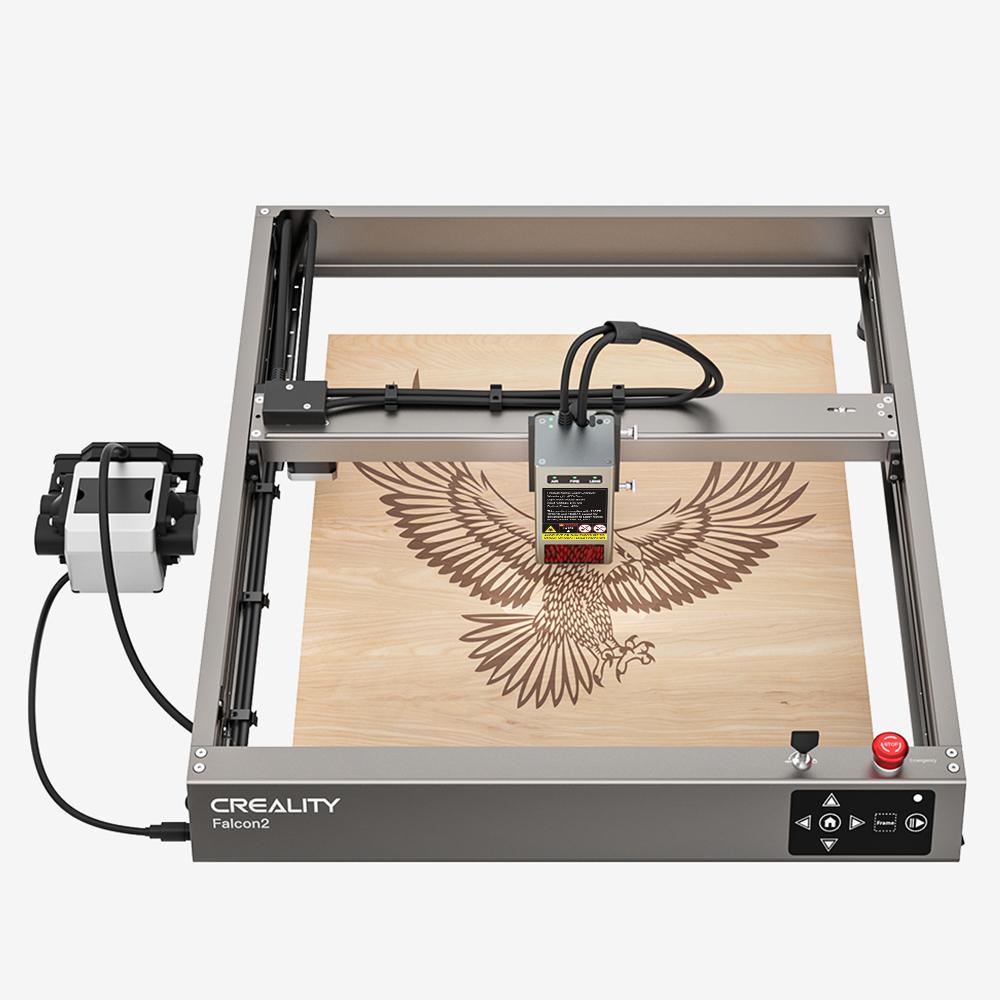
Setting itself apart from typical 10W laser engravers in the market, this product shines through three notable enhancements: an advanced air-assisted system, a triple-intelligent system, and effortless plug-and-play usability. These upgrades ensure an unparalleled user experience, setting a new benchmark that surpasses the capabilities of most existing laser engravers.
Creality’s Falcon 2 Range: Quality Laser Engraving for All
Falcon2 12W. Good for beginners. (Image Credit: Creality)

Boasting an exceptional configuration, the 12W laser engraver variant stands out not only for its superior features but also for its remarkably affordable price point. This makes it the ultimate selection for users seeking exceptional value without sacrificing enhanced functionality.

Availability

You can get the Falcon 12W at the Creality Official Store (and enjoy 20% off with the code: FN12W)

You can also get it at the Creality Amazon, and get 20% off with the code 20FALCON.

Creality Falcon2 22W: Versatility On Your Desktop

The Creality Falcon2 22W is the next in the lineup, striking a balance of performance, versatility and cost. It is engineered to cater to a broad spectrum of individuals, spanning novices, seasoned practitioners, and small business proprietors.

Falcon2 22W
Enhanced capabilities with the Falcon2 22W. (Image Credit: Creality)

Harnessing a 22W power output, this engraver adeptly tackles a diverse array of tasks. The Falcon2 22W boasts integrated air assist, ensuring operational security while streamlining usage intricacies. Notably, users will find assurance in the presence of five safety features and a pre-assembled frame, which collectively contribute to a seamless experience.

Moreover, the 22W version is capable of an engraving speed of 25,000mm/min similar to the larger version we will look at next. While it has a lower power than the 40W beast, it still has the ability to carve through 15mm of wood material in a solitary sweep.

The expansive scope of applications further enhances its allure, rendering it suitable for an eclectic range of user categories. From DIY aficionados and educators to vloggers, influencers, 3D printing enthusiasts, and individuals seeking to imbue their jewelry with a personalized touch, this machine accommodates diverse aspirations.

Availability

You can get the Falcon 22W at the Creality Official Store (and enjoy 15% off with the code:FN22W)

You can also get it at Amazon, and get 15% off with the code 20FALCON.

Creality Falcon2 40W: Powerful and Vibrant

Finally, we arrive at the Creality Falcon2 40W, the pinnacle of laser engraving prowess within the product range. It transcends mere utility, emerging as a transformative tool that redefines the boundaries of laser engraving capabilities. The standout highlight lies in its remarkable 40W power output that empowers it to effortlessly carve through 20mm of wood in a single pass, a feat hitherto unprecedented in the realm of desktop laser engravers.
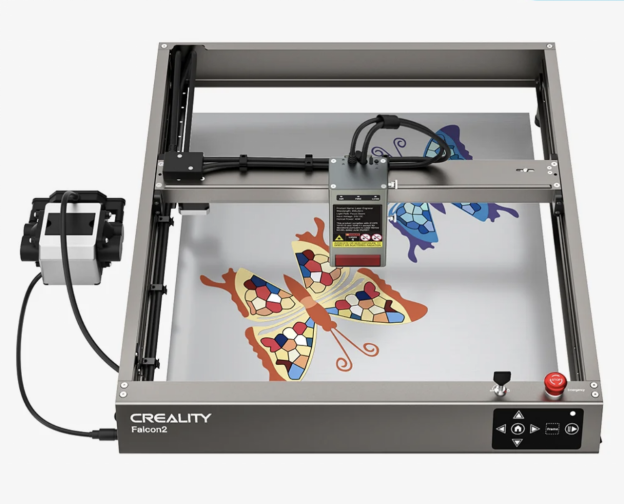
Creality Falcon2 40W
The 40W powerhouse model. (Image Credit: Creality)

However, its truly unique feature lies in the ingenious adjustable beam spot. This addition allows users to manipulate the laser’s focal point, imparting an adaptability for intricate detailing or commanding high-power incisions. The Falcon2 40W maintains an unwavering commitment to safety, employing a triple-tiered monitoring system and integrated air assist to ensure a secure and worry-free user experience.

Notably, the Falcon2 40W introduces an element of vivacity to your creative projects with its enchanting and vibrant color engraving function. This captivating feature infuses an additional layer of aesthetic allure into your artistic endeavors, causing them to radiate with distinction.

Positioned at the zenith of the laser engraving hierarchy, this robust machinery is tailor-made with the discerning professional creator in mind.

Availability

You can get the Falcon 40W at the Creality Official Store (and enjoy 20% of with the code:FN40W)

You can also get it at the Amazon store, and get 20% off with the code 20FALCON.

Original Falcon Series

Let’s not forget the original Falcon printer series, which are still available if you would like to dip your toe in the laser-cutting pool.

Creality CR-Laser Falcon 5W: Perfect for Starters

Tailored for newcomers, the CR-Laser Falcon 5W emerges as an introductory laser engraver. However, don’t be deceived by its ‘beginner-friendly’ label. It remains an adaptable piece of kit, achieving intricate engravings effortlessly.

The Falcon 5W
The Falcon 5W. (Image Credit: Creality)

Capable of engraving and cutting across a spectrum of over ten materials like wood, bamboo, rubber, leather, fabric, plastic, and paper, this machine becomes an exceptional asset for individuals eager to embark on a laser engraving journey and unravel its endless potential.

Availability

You can get the CR-Laser Falcon 5W at the Creality Official Store (and enjoy 10% off with the code:FN5W)

You can also get it on Amazon and get 20% off with the 20FALCON code.

Creality CR-Laser Falcon 10W: Affordable and Capable

The CR-Laser Falcon 10W is a laser engraving machine ideal for beginners, yet its capabilities extend beyond the designation of “beginner machine”. Despite being user-friendly, it offers exceptional precision and effortless engraving. It is capable of engraving and cutting over ten diverse materials, such as wood, bamboo, rubber, leather, fabric, plastic, and paper. This wide range of applications makes it an excellent choice for individuals interested in entering the realm of laser engraving and discovering its potential.
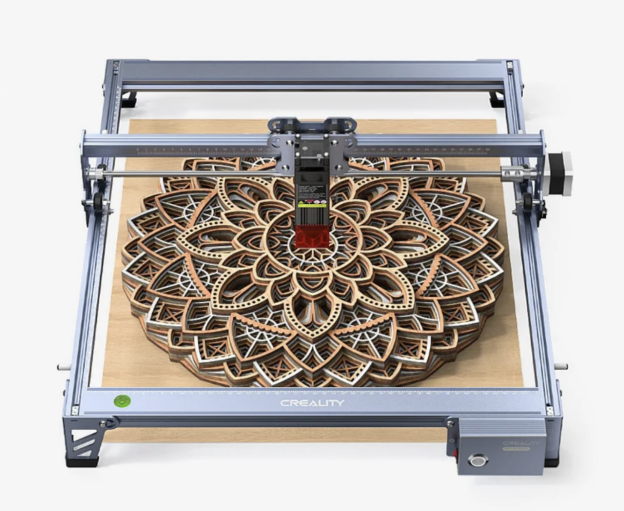
Creality CR-Laser Falcon 10W
Creality CR-Laser Falcon 10W (Image Credit: Creality)

The features of the CR-Laser Falcon 10W include its spacious work area spanning 400x415mm and a compressed laser spot measuring 0.06mm. This generous working space permits users to handle larger material pieces without the need for constant repositioning. Despite its lower power rating, this machine can cut through 12mm of wood in one pass, rivaling some higher-powered engravers.

For added versatility, an optional extender can elevate the engraving height to around 150mm. This extender enables users to engrave on more sizable objects such as guitars or skateboards, broadening its range of applications. It serves as the perfect companion for hobbyists or creators seeking to explore the artistic potential of laser engraving technology.

Availability

You can get the CR-Laser Falcon 10W at the Creality Official Store (and enjoy 10% off with the code:FN10W)

You can also get it on Amazon and get 20% off with the 20FALCON code.

Go Forth, and Engrave…

So there we have it, three great new laser cutters from the 3D printing giant that is Creality. To help you choose which version you would like, why not become a part of the Creality Falcon Official User Group and delve into a showcase of impressive projects crafted by fellow Falcon enthusiasts.

Come and let us know your thoughts on our Facebook, Twitter, and LinkedIn pages, and don’t forget to sign up for our weekly additive manufacturing newsletter to get all the latest stories delivered right to your inbox.
Share:
WhatsApp Twitter Facebook LinkedIn Buffer Reddit E-mail

Phillip Keane

Phillip is an aerospace engineer from UK. He is a graduate of Coventry University (UK), International Space University (France) and Nanyang Technological University (Singapore), where he studied Advanced Manufacturing at the Singapore Centre for 3D Printing.

Join our newsletter

Our newsletter is free & you can unsubscribe any time.

Latest posts

Keio’s Strecs3D Brings Free Stress-Driven Infill to 3D Printing Slicers

Strecs3D runs a stress analysis on a part and writes per-region infill densities into a 3MF file for Bambu Studio, Cura and PrusaSlicer.

News
Keio’s Strecs3D Brings Free Stress-Driven Infill to 3D Printing Slicers

Bambu Lab P3C Puts a Seven-Slot Tool Changer on the Desktop for $1,149

Bambu Lab's P3C brings the H3C's Swaptek tool changer to a $1,149 desktop printer with seven slots, five PrintTools and 6-second material changes.

3D Printers
Bambu Lab P3C Puts a Seven-Slot Tool Changer on the Desktop for $1,149

Queensland Backs NIOA With A$15 Million for Metal and Ceramic 3D Printing in Maryborough

NIOA gets A$15 million from Queensland to add industrial-scale ceramic and metal 3D printing to its Maryborough munitions plant by late 2028.

News
Queensland Backs NIOA With A$15 Million for Metal and Ceramic 3D Printing in Maryborough

Army Lab and ZYLtech Scale Up Dual-Polymer Filament for 3D Printing

ARL's patented dual-polymer filament doubles interlayer strength, and Houston's ZYLtech now runs pilot production for Army field tests.

Military
Army Lab and ZYLtech Scale Up Dual-Polymer Filament for 3D Printing

Creality Pika review: the pocket 3D scanner that made me stop the car for a mushroom

Hands-On Review Creality says the Pika should make 3D scanning feel like taking a photo: a 260 g scanner you carry in a... read more »

News
Creality Pika review: the pocket 3D scanner that made me stop the car for a mushroom

Emna Hussein’s 3D Printed Bags Up for Fashion Tech Prize in Doha

Tunisian-Italian designer Emna Hussein prints sculptural bags in corn-based PLA and pine or oyster-shell composites, then finishes each one by hand.

Fashion
Emna Hussein’s 3D Printed Bags Up for Fashion Tech Prize in Doha

Formnext 2026 Recap: What We Saw in Frankfurt

Formnext 2026 drew as many visitors as last year with fewer exhibitors and one hall less. Our recap covers the numbers, the desktop... read more »

Events
Formnext 2026 Recap: What We Saw in Frankfurt

Daniel Winter’s Fits Kids’ Shoe Expands Across Five Sizes

Fits uses linked perimeter segments that flex open as a child's foot grows, so one 3D printed shoe covers five full sizes.

News
Daniel Winter’s Fits Kids’ Shoe Expands Across Five Sizes

Bigshot Tinkers Prints Lifelike Multicolor Wildlife Models

Jason Black of Bigshot Tinkers in Meridian, Idaho, designs lifelike multicolor wildlife models and shares tested print profiles for other makers.

News
Bigshot Tinkers Prints Lifelike Multicolor Wildlife Models

HKUST Researchers 3D Print a Titanium Alloy That Keeps Hardening Under Strain

Molybdenum waves printed into Ti-6Al-4V give each region its own deformation mechanism, more than doubling the usual strain-hardening limit.

3D Printing Metal
HKUST Researchers 3D Print a Titanium Alloy That Keeps Hardening Under Strain

Social

  • Facebook Facebook 3D Printing
  • Linkedin Linkedin 3D Printing
longer
Join our newsletter

Our newsletter is free & you can unsubscribe any time.

revopoint bf sidebar

Tripo

Free to $110/mo
  • 60% off Tripo Pro with code 3DPRINTING.
Tripo
View at Tripo tripo3d.ai

iNEW3D QC2A

from $7,199
  • A desktop photopolymer color jetting 3D printer with six channels (including soluble su…
iNEW3D QC2A
Buy Now kickstarter.com

3DMakerpro Seal

~$699
  • First sub-$1,000 consumer scanner to hit 0.01mm point accuracy, with blue structured li…
3DMakerpro Seal
Buy Now store.3dmakerpro.com

3DMakerpro Mole

~$649
  • NIR-light scanner safe and comfortable around skin, covering 15mm up to 1.5m for both s…
3DMakerpro Mole
Buy Now store.3dmakerpro.com

Hatchbox ABS

  • Long-standing community staple offering pure ABS formulation with full heat deflection…
Hatchbox ABS
Buy Now amazon.com

Creality SparkX i7 Combo

~$399
  • The easiest entry into multicolor printing for first-time owners, bundling four-color C…
Creality SparkX i7 Combo
Buy Now creality.com

Revopoint INSPIRE 2

~$549
  • Entry-level dual-mode scanner combining infrared structured light with an 11-line IR la…
Revopoint INSPIRE 2
Buy Now revopoint3d.com

Overture PETG

~$19 to 22/kg
  • Most consistently recommended budget PETG in the community, producing fewer first-layer…
Overture PETG
Buy Now amazon.com

Site footer

The 3DPrinting.com newsletter

The week’s best reviews, buyer’s guides and deals. One email every Friday, no spam.

By subscribing you agree to our privacy policy. Unsubscribe anytime.

3D PRINTING.COM

Independent reviews, buyer’s guides and news about 3D printers, materials, scanners and software.

Reviews

  • All reviews
  • 3D printers
  • Filament & materials
  • 3D scanners
  • Software
  • Compare products

Buyer's guides

  • Best 3D printers
  • Best resin 3D printers
  • 3D printers for beginners
  • Best PLA filament
  • Best slicers
  • Best pro 3D scanners

Learn & news

  • Latest news
  • Deals
  • What is 3D printing?
  • FDM vs resin
  • Use cases by industry
  • Glossary

Company

  • About us
  • Contact us
  • Advertise with us
  • Media kit
  • Nederland 3D Printing

© 2026 3DPrinting.com · Strikwerda en Dehue

  • Privacy policy
  • Terms of use
  • Affiliate disclosure
  • RSS