
3D Printing

Buyer guides

  • Best 3D printers
  • For beginners
  • Multicolor
  • Resin printers
  • Budget (under $400)
  • For kids and schools
  • For miniatures
  • Large format
All printer guides

Brands and compare

  • Bambu Lab lineup compared
  • Compare printers
  • Full color 3D printers
  • Large scale and industrial

Reviews

  • Elegoo Mars 5 Ultra
  • FLSun T1 Pro
  • QIDI Tech Q1 Pro
All reviews
Best 3D Printers 2026: Buyer’s Guide

Start with the top picks

Best 3D Printers 2026: Buyer’s Guide

Twenty printers tested and ranked, from $169 to the H2D.

See the picks

Filament

  • Best PETG filament
  • Best PLA filament
  • Best TPU filament
  • Best ABS and ASA filament
  • Engineering filaments
  • Composite filaments
  • Flexible filaments
  • Bio filaments
All filament guides

Resin

  • For miniatures
  • Tough and ABS-like
  • Castable resin
  • Water-washable
  • Flexible resin
All resin guides

Accessories

  • Filament dryers
  • Printer enclosures
  • Wash and cure stations
Best Filament Dryers (2026 Guide)

Most-clicked accessory

Best Filament Dryers (2026 Guide)

Wet filament causes most failed prints; the fix costs less than a spool.

Compare dryers

Buyer guides

  • Small objects
  • Medium objects
  • Large objects
  • Professional scanners
  • Scan with your phone
All scanner guides

Software and service

  • 3D scanner software
  • Scanning service vs buying

Reviews

  • Revopoint MetroY Pro
  • Revopoint Inspire 2
  • Revopoint Trackit
All scanner reviews
3D Scanners 2026: The Complete Buying Guide

Find the right scanner

3D Scanners 2026: The Complete Buying Guide

Nineteen scanners from $400 to $40,000, sorted by object size.

Open the guide

Design and AI

  • AI 3D model generators
  • 3D modeling and CAD software

Print prep and control

  • Slicers
  • STL repair tools
  • Printer host and remote control

Reviews

  • Meshy Edit
  • Tripo H3.1
  • Meshy 7.1
All software reviews
Best AI 3D Model Generators for 3D Printing (2026)

Fastest-growing guide

Best AI 3D Model Generators for 3D Printing (2026)

Type a prompt, get a printable model: the tools we tested, free tiers first.

Try the tools

Start here

  • What is 3D printing?
  • How much does it cost?
  • FDM vs resin
  • Best printers for beginners

How it works

  • What is a 3D printer?
  • How does 3D printing work?
  • Types of 3D printing
  • Metal 3D printing

How-tos and glossary

  • 3D printing glossary
  • Food-safe 3D printing
  • Setting up a school program
  • Free 3D printable models
What is 3D Printing?

Start here

What is 3D Printing?

The one-page explainer, then how much it costs and which technology to buy.

Start reading
Black FridayNEW

Latest

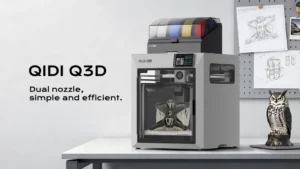
  • QIDI Launches Q3D Dual-Nozzle Filament 3D Printer With a 70°C Heated Chamber at Formnext 2026
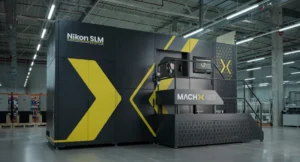
  • Nikon SLM Solutions Launches MACHX Selective Laser Melting 3D Printers With Up to 8 kW of Laser Power
  • Inkera Brings Full-Color UV Material Jetting 3D Printing to the Desktop With the C1
  • Longer Black Friday 2026: ePrint UV Printer from $1,899
  • Tripo AI Previews H3.5 Print-Ready Model and Polipop Print Agent at Formnext
All news

Use cases

  • Dutch Machine Builder Swaps a Welded Part for One Metal 3D Printed by K3D
  • Prague Firefighters 3D Print Their Own Gear on a Prusa CORE One L
  • OECHSLER Scales Carbon Lattice Production to 40 Printers Running Around the Clock
  • Reverse Engineering Without CAD Data: How the MetroY Ultra Turns Physical Parts into Digital Designs
  • Michigan State Engineers 3D Printed Helmet Inserts to Help Quarterbacks Tackle Crowd Noise
All use cases

Industry

  • Automotive
  • Aerospace
  • Medical
  • Dental
  • Construction
  • Rapid prototyping
  • Electronics
  • Food
  • Fashion
  • Bioprinting
QIDI Launches Q3D Dual-Nozzle Filament 3D Printer With a 70°C Heated Chamber at Formnext 2026

Latest

QIDI Launches Q3D Dual-Nozzle Filament 3D Printer With a 70°C Heated Chamber at Formnext 2026

QIDI launched the Q3D at Formnext 2026, a dual-nozzle 3D printer with two independent hotends, a 350°C primary…

Read more
Contact
  • Home
  • Products
  • Videos
  • Newsletter
  • Contact us

Buyer guides

  • Best 3D printers
  • For beginners
  • Multicolor
  • Resin printers
  • Budget (under $400)
  • For kids and schools
  • For miniatures
  • Large format
All printer guides

Brands and compare

  • Bambu Lab lineup compared
  • Compare printers
  • Full color 3D printers
  • Large scale and industrial

Reviews

  • Elegoo Mars 5 Ultra
  • FLSun T1 Pro
  • QIDI Tech Q1 Pro
All reviews

Filament

  • Best PETG filament
  • Best PLA filament
  • Best TPU filament
  • Best ABS and ASA filament
  • Engineering filaments
  • Composite filaments
  • Flexible filaments
  • Bio filaments
All filament guides

Resin

  • For miniatures
  • Tough and ABS-like
  • Castable resin
  • Water-washable
  • Flexible resin
All resin guides

Accessories

  • Filament dryers
  • Printer enclosures
  • Wash and cure stations

Buyer guides

  • Small objects
  • Medium objects
  • Large objects
  • Professional scanners
  • Scan with your phone
All scanner guides

Software and service

  • 3D scanner software
  • Scanning service vs buying

Reviews

  • Revopoint MetroY Pro
  • Revopoint Inspire 2
  • Revopoint Trackit
All scanner reviews

Design and AI

  • AI 3D model generators
  • 3D modeling and CAD software

Print prep and control

  • Slicers
  • STL repair tools
  • Printer host and remote control

Reviews

  • Meshy Edit
  • Tripo H3.1
  • Meshy 7.1
All software reviews

Start here

  • What is 3D printing?
  • How much does it cost?
  • FDM vs resin
  • Best printers for beginners

How it works

  • What is a 3D printer?
  • How does 3D printing work?
  • Types of 3D printing
  • Metal 3D printing

How-tos and glossary

  • 3D printing glossary
  • Food-safe 3D printing
  • Setting up a school program
  • Free 3D printable models
Black FridayNEW

Latest

  • QIDI Launches Q3D Dual-Nozzle Filament 3D Printer With a 70°C Heated Chamber at Formnext 2026
  • Nikon SLM Solutions Launches MACHX Selective Laser Melting 3D Printers With Up to 8 kW of Laser Power
  • Inkera Brings Full-Color UV Material Jetting 3D Printing to the Desktop With the C1
  • Longer Black Friday 2026: ePrint UV Printer from $1,899
  • Tripo AI Previews H3.5 Print-Ready Model and Polipop Print Agent at Formnext
All news

Use cases

  • Dutch Machine Builder Swaps a Welded Part for One Metal 3D Printed by K3D
  • Prague Firefighters 3D Print Their Own Gear on a Prusa CORE One L
  • OECHSLER Scales Carbon Lattice Production to 40 Printers Running Around the Clock
  • Reverse Engineering Without CAD Data: How the MetroY Ultra Turns Physical Parts into Digital Designs
  • Michigan State Engineers 3D Printed Helmet Inserts to Help Quarterbacks Tackle Crowd Noise
All use cases

Industry

  • Automotive
  • Aerospace
  • Medical
  • Dental
  • Construction
  • Rapid prototyping
  • Electronics
  • Food
  • Fashion
  • Bioprinting
Contact
Blog
  • Latest News
  • Use Cases
  • Reviews
  • 3D Printers
  • 3D Printing Metal
Featured Industries
  • Automotive
  • Aerospace
  • Construction
  • Dental
  • Environmental
  • Electronics
  • Medical
  • Military
  • Fashion
  • Art
Company Information
  • What is 3D Printing?
  • Advertise with us
  • Media Kit
  • Nederland 3D Printing
Home / Reviews / Dremel DigiLab 3D40 Flex Review
creality header

Dremel DigiLab 3D40 Flex Review

Editors rating:

Five years ago, the popular rotary tool company Dremel released its first 3D printer, the Idea Builder (model
3D20). It was the first major launch of a 3D printer from a company that didn’t specialize in 3D printing. Recently, Dremel unleashed a new family of 3D printers: the 3D45 and the 3D40 Flex. They’re both single extruder and have a larger build volume of 10” x 6” x 6.7”. The 3D45 can print several materials while the 3D40 Flex is optimized for PLA only. Dremel was kind enough to send us a 3D40 Flex to review, so let’s get to it.

Reliability
5 out of 5
User friendliness
5 out of 5
Print quality
5 out of 5
Print consistency
5 out of 5
Range of materials
1 out of 5
Support / helpdesk
4 out of 5
Slicer software
5 out of 5
Availability replacement parts
4.5 out of 5

Unboxing & setup

Packaging may seem trivial but it was a real problem in the early days of desktop 3D printers as many arrived damaged from poor packaging. The 3D40 Flex is very well packaged; as it’s entirely box-shaped, it comes with only a few custom inserts, mostly to hold everything in place within the build chamber.
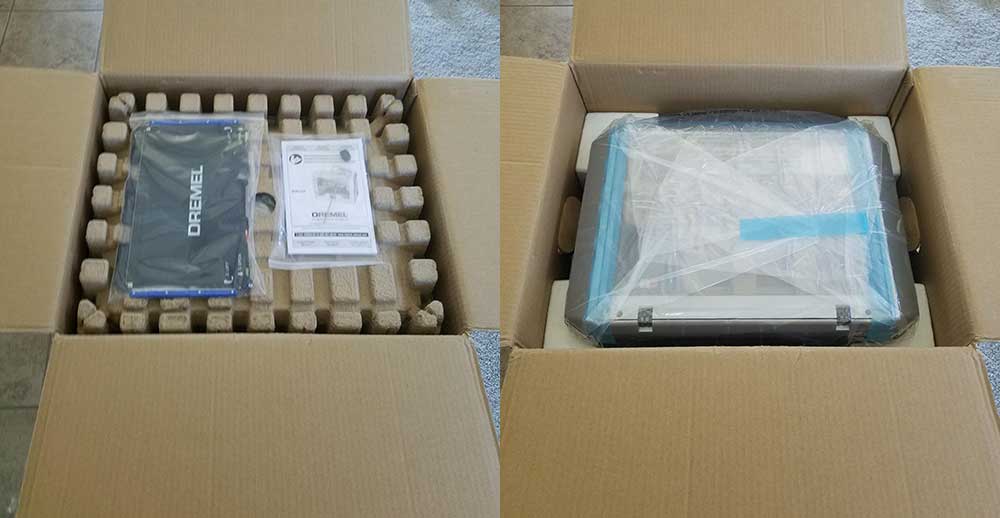
3D40 flex unboxing

It’s rather light so it’s easy to lift out, and removing the inserts did not break them, which is especially relevant here as I’ll be returning this printer after the review. The blue tape was a bit cumbersome but not a big deal.
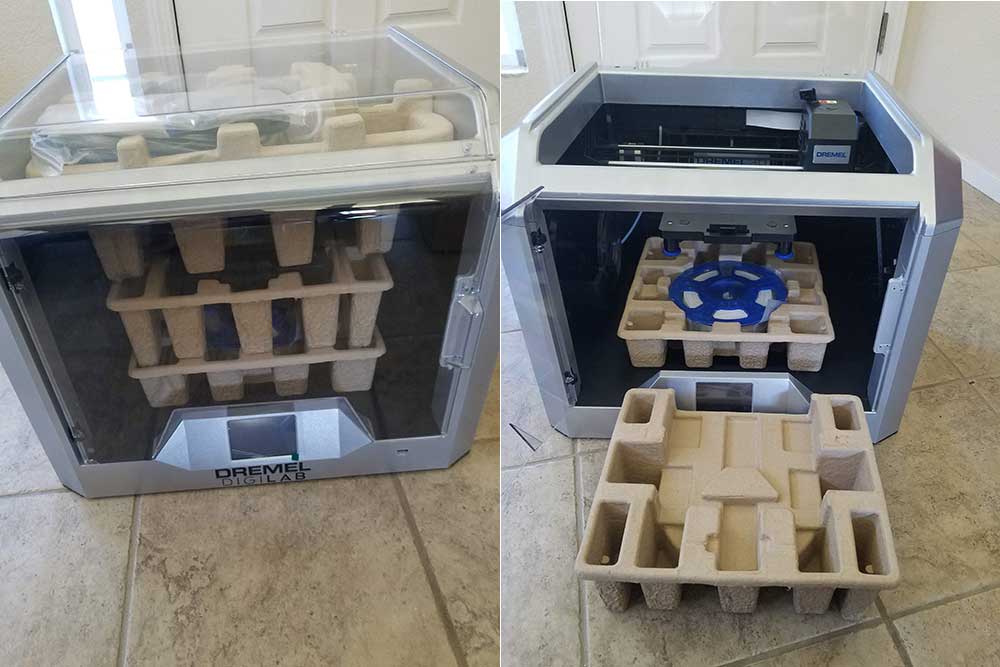
3D40 flex inner packaging

Everything seems well put together and sturdy. I like the decision to use a ribbon cable on the extruder, and the flexible (where it gets its namesake), magnetic bed is a wonderfully convenient feature that’s well designed; we’ll cover it more later. I was eager to get printing so I immediately got it into my office.

I’ve worked with paper printers that took longer to set up than this 3D printer. It comes FULLY assembled and the only steps to get going include loading the filament and leveling the bed. The filament spool is loaded into the left side where the filament is fed through a guide tube before reaching the extruder; the touchscreen prompts users when to insert the filament into the top of the extruder and it takes it from there. For leveling, the touchscreen also guides users through the process, which involves turning each of the two knobs below the bed until it prompts to stop. I then installed the included slicing software onto my computer and connected the printer to my wifi. The last step is optional as files can be moved to the printer via the included USB drive, but this is 2019. Why go three feet across my office when I can instantly send a 3D file through the air?

What’s in the box

  • USB Flash Drive (with slicing software and a few 3D models)
  • Nozzle unclog device
  • Extra bed liner
  • 1x filament spool
  • User manual
  • Quick start guide
  • Power cable
  • USB cable
  • Object removal scraper
  • DigiLab 3D40 Flex 3D Printer

The First Print

For the first print, I wanted to simulate how a certain type of potential customer might use the printer: someone who has little-to-no 3D printing experience or knowledge but has high expectations. So I loaded up Benchy, a standard torture test, and sliced it with the standard High Quality (0.1mm/100 micron layers) profile without even looking at the parameters/settings and sent it to the printer. To my amazement, the printer initiated its nine-point self-leveling process (it does this before every print and takes only a couple minutes) and then started printing. From the unboxing to the beginning of the print, perhaps 15 minutes had past. This was, by far, the fastest, easiest, most straightforward 3D printer setup I’ve personally experienced.

The default settings included supports, which are not necessary for the Benchy model. After easily removing the bed from the machine and bending the plate slightly, the part popped right off. And then after some difficulty removing most of the supports, this was the result:
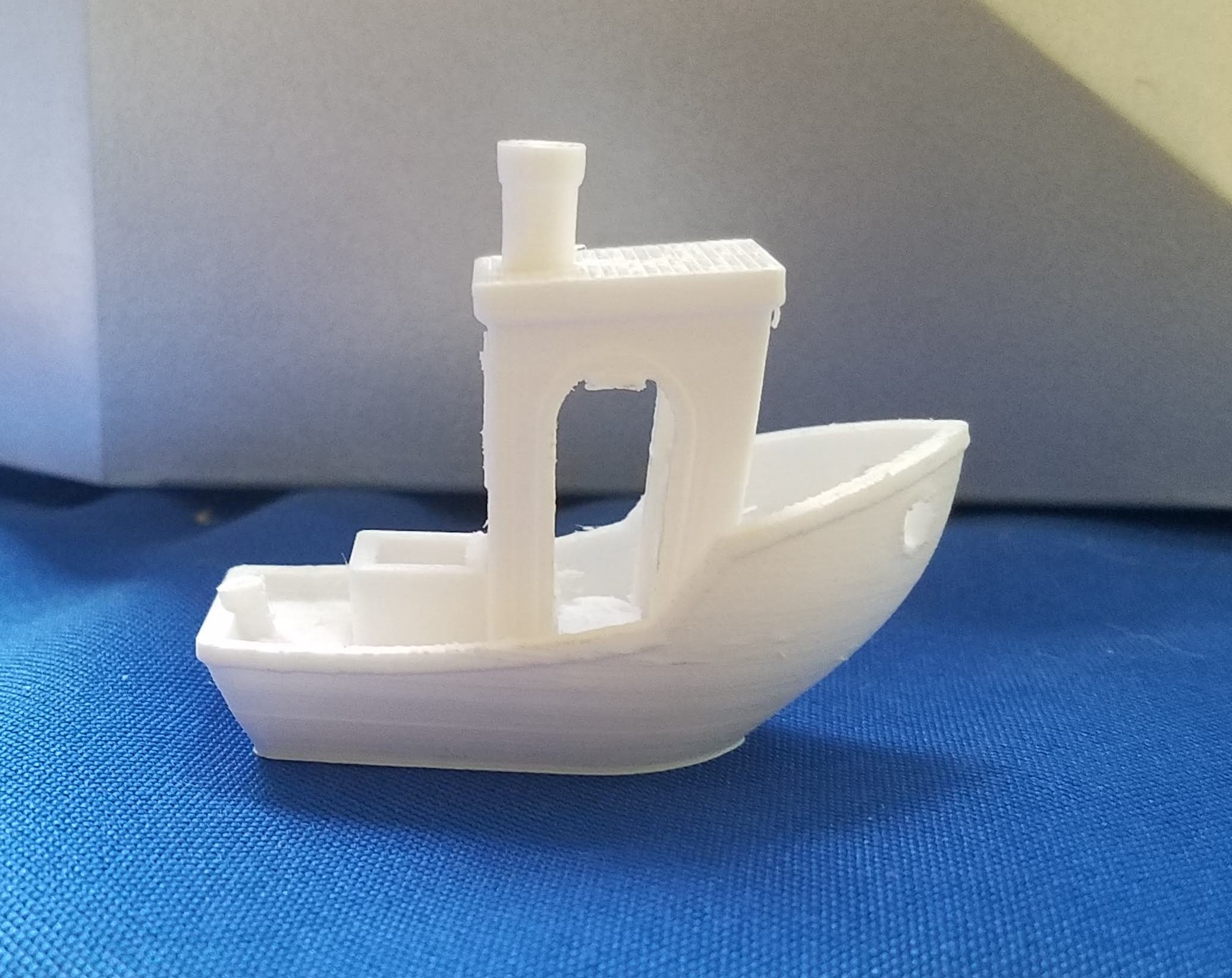
3D40 flex benchy

For a first print, it’s pretty good; some users would be pleased while others might feel a bit disappointed with what they believe is the best quality the machine can produce. That’s certainly not the best the 3D40 Flex can do, though. Supports weren’t needed for this print, but some of the print settings were causing the supports to merge with the print, making them impossible to fully remove. Beyond that, there are minor inconsistencies in the layers that I attribute to motion backlash and not enough cooling, both of which are easily addressed by slowing the print speeds. Some stringing and the merging of the support pillars with the part indicate that the temperature might be a bit high, and some dotting told me that more retraction was needed.

The Adjustments

It is a misconception that layer height is the primary driver of 3D print quality. While it does increase Z resolution and surface appearance, there are several other print settings that need to be correctly configured in order to realize the quality improvements gained by using lower layer heights. To demonstrate that claim, I increased the layer height to the Medium Quality 0.2mm/200 micron setting and lowered the print speed from 50 to 35; I also lowered the extrusion temperature from 220 to 218, decreased the flow rate from 100% to 99.5%, and increased the retraction distance from 2mm to 2.5mm. Support was disabled as well. These are all very minor adjustments. Here is the result:
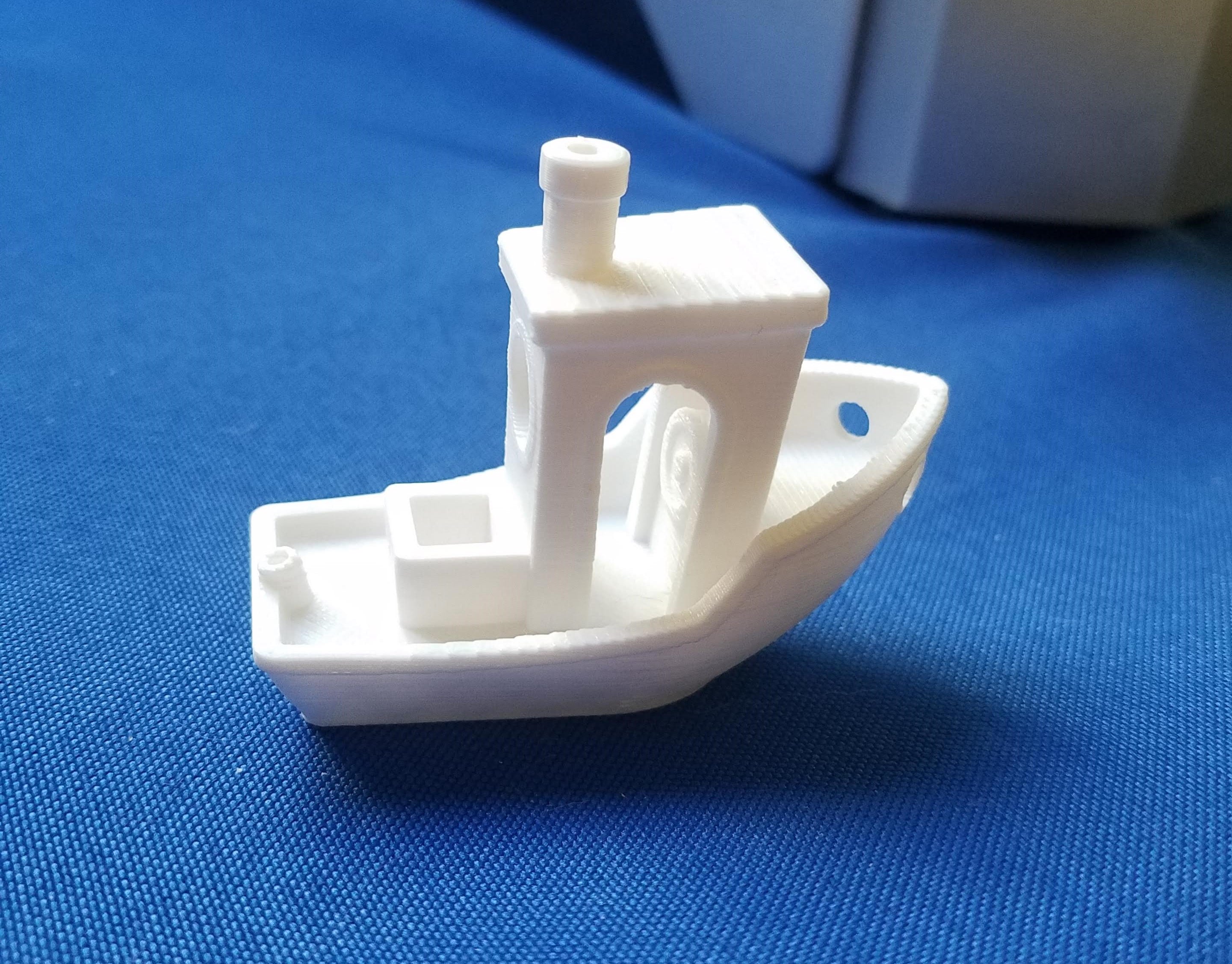
3D4o flex benchy 2

By nearly every objective measure, the “Medium Quality” print is superior to the “High Quality” print. The only way the HQ print outshines the MQ print is that it has less layer stepping, which is hard to notice past its other faults. I could speculate about why the Dremel engineers are setting the print speeds of the profiles too high, but that’s not the point of this review.

The Tests

To assess the various capabilities of the machine, I printed several objects of varying geometries that are known to test the limits of FDM 3D printing. I used the same print settings for all of them. First off was the All in One 3D Printer test that tests supports, overhang, holes, dimensionality, and bridging.

3D40 flex torture test

It performed well in most metrics, with successful overhangs achieved at 75° and 80°. Bridging was excellent with no sag on the longest gap. The support area did well but I accidentally broke a small wall when removing them. The circles are very close to spec, with the 10mm pillar measuring 9.93mm to 9.97mm. There’s some slight dotting on the thin, tall features, but that’s to be expected.
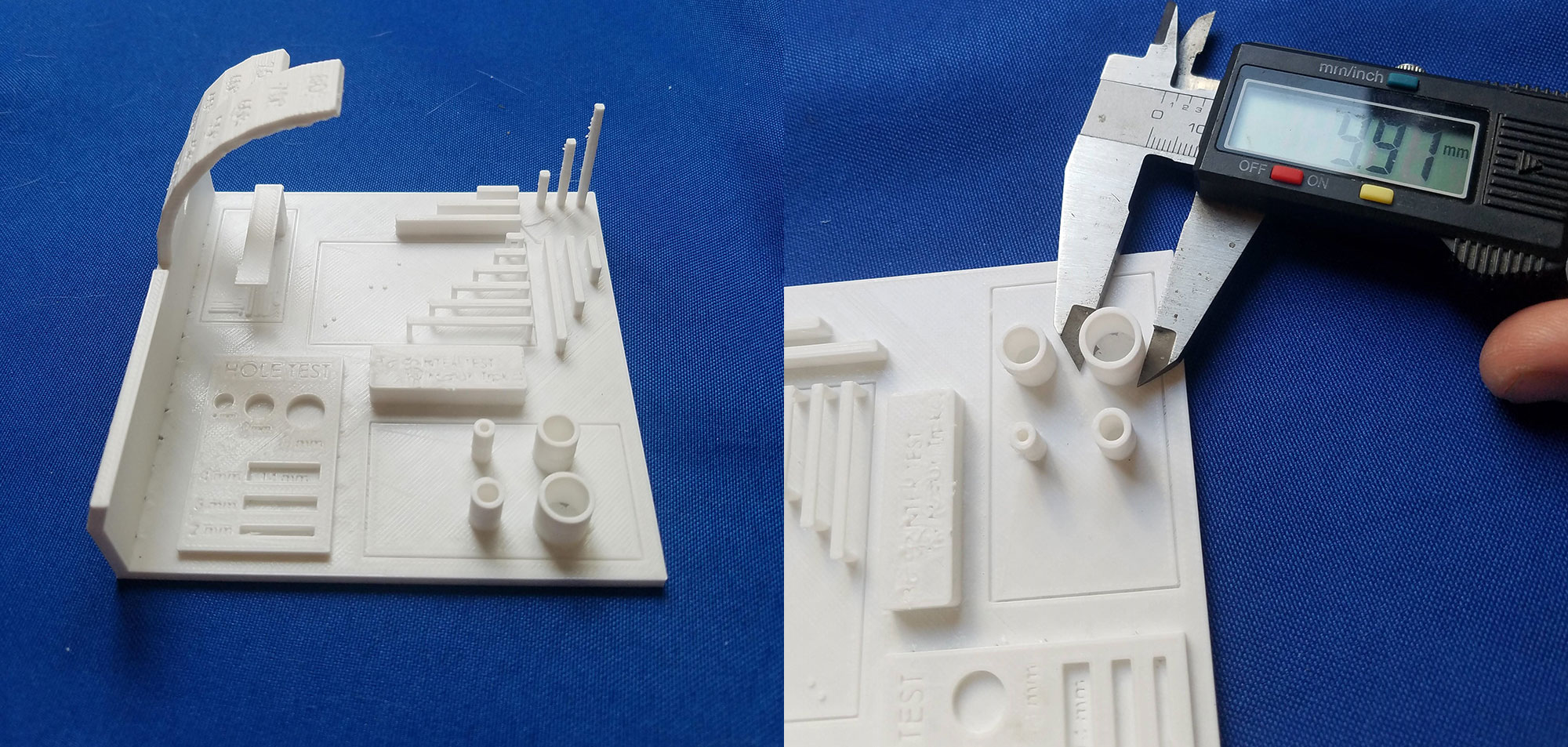
3D40 flex torture test 2

Next, I printed three different animal sculptures all at once:
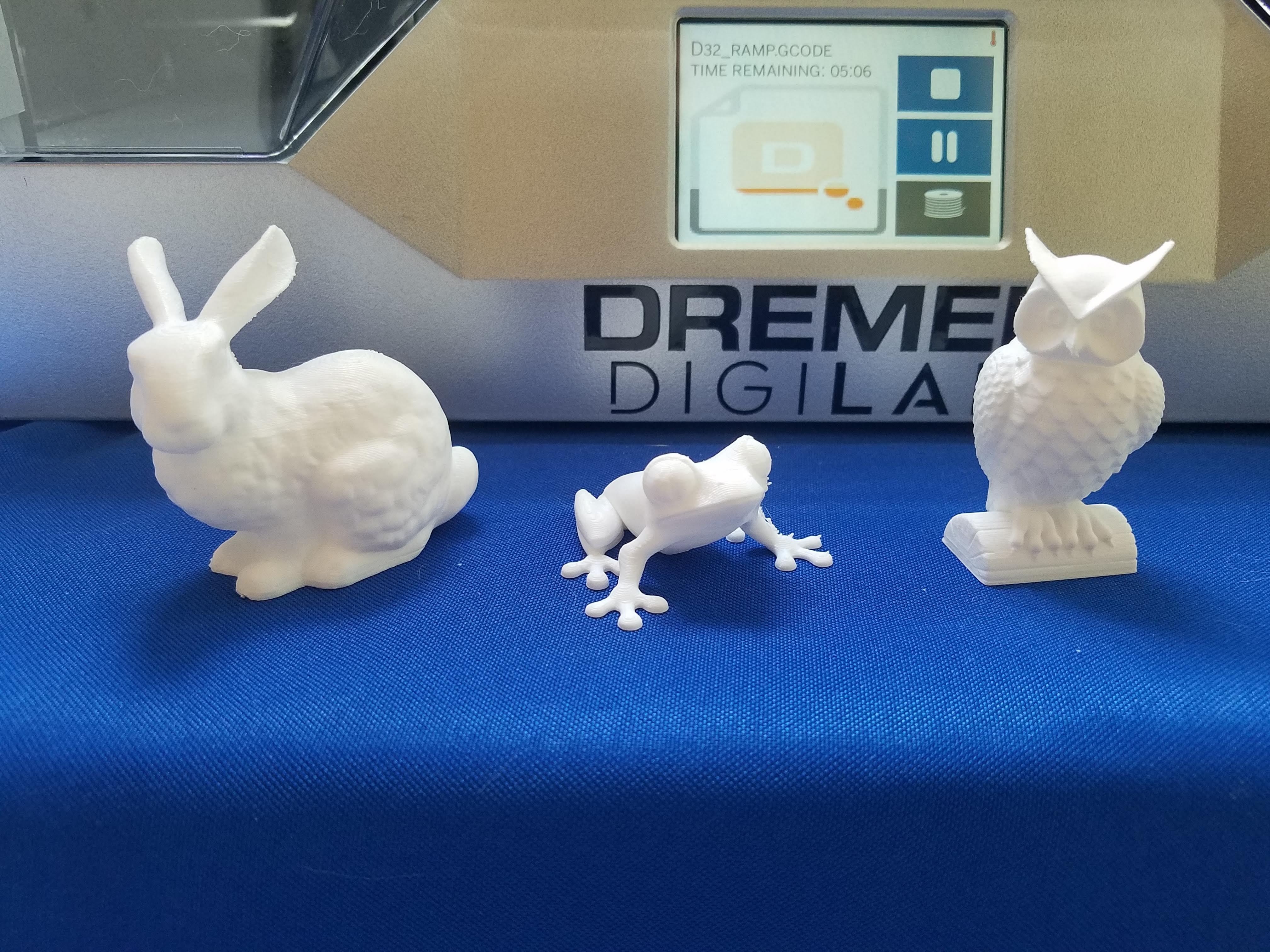
They all came out great. Both the Stanford Bunny and the Tree Frog test extreme overhang and had no issues. The Owl tests a printer’s wisdom and the 3D40 Flex gets high marks. There’s some dotting on the frog that can be easily removed, but I left it for journalistic transparency; increasing retraction a little more would likely help.

I then wanted to test moving parts that are assembled after printing as well as moving parts that are printed all together. The C-clamp fulfilled the former and the Fidget Spinner the latter.
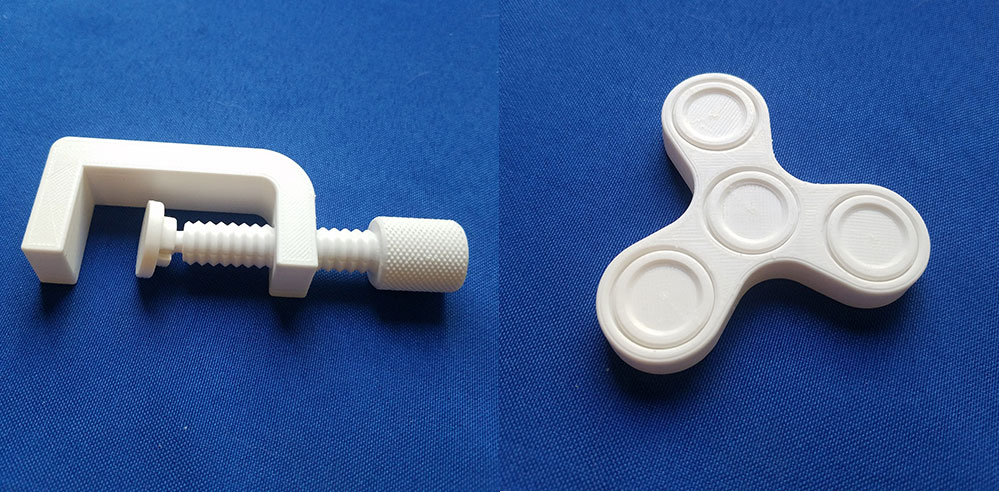
The Fidget Spinner spins freely and the C-clamp functions just as it should. Dremel is using high-temp PLA so the parts are all rather strong.

Everything I printed looks and feels nice, so I moved on to the other colors they sent: black and blue. Naturally, I had to print the 3DPrinting.com keychain we designed in our Tinkercad VS Fusion360 tutorial.
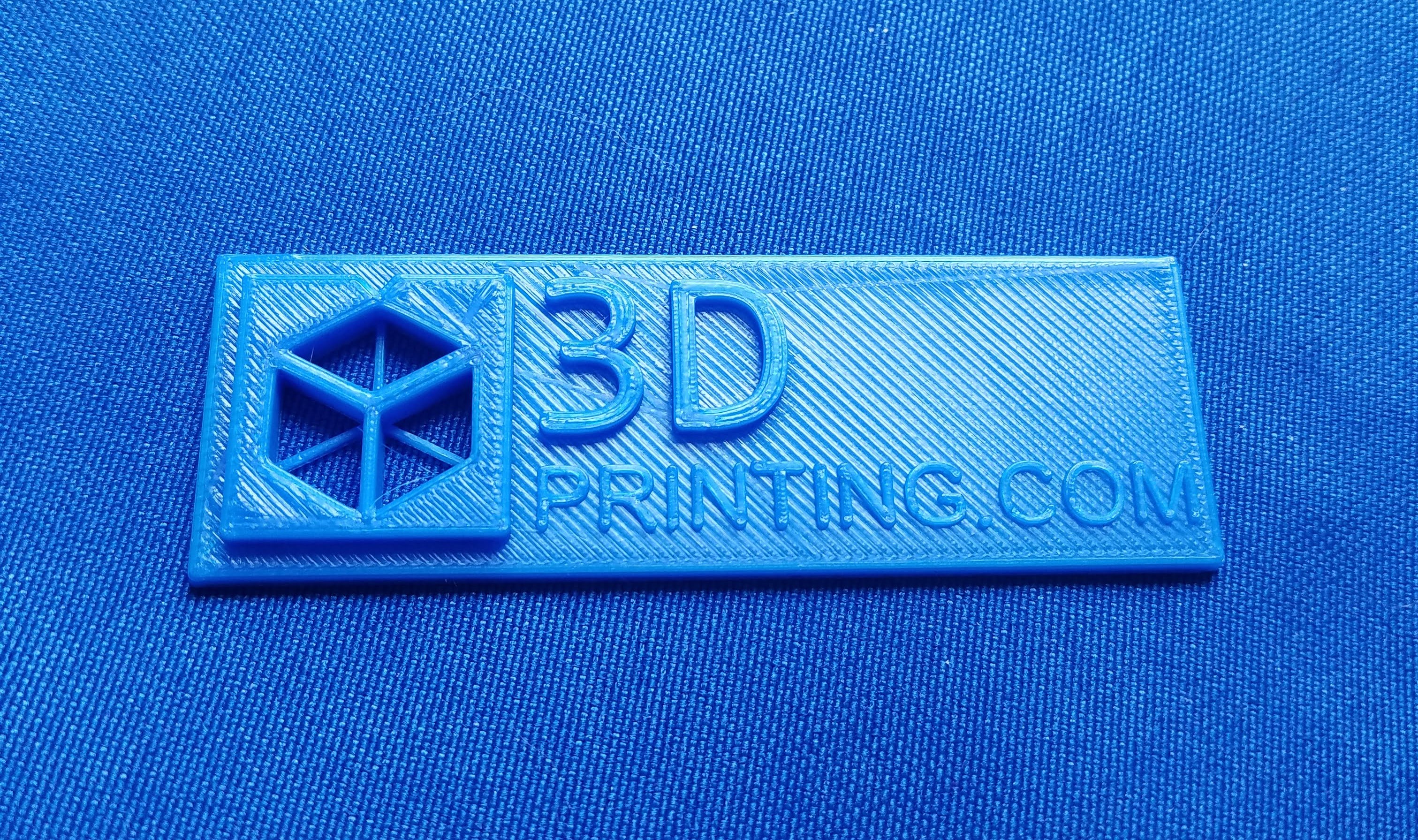
I’ll be the first to admit that it looks better than the one I printed on my TAZ, so kudos to Dremel. The single-line text is phenomenal.

I keep my TAZ in the garage for two reasons: because it’s loud and because cats. But the 3D40 Flex is not loud as it’s fully enclosed, and because it’s fully enclosed, I don’t have to worry about my cats being tempted to play with the twitching filament. But my cats were certainly intrigued with the printer so I just had to print them a toy. Here’s Moose playing with it:

I moved on to the black filament to run an endurance test. My backdoor has a small step so I printed four wedges to attach to the bottom of some plywood to make a ramp for my wheelchair. Printing two wedges at a time with 0.3mm layers, 4 perimeters, and 20% infill at 50mm/s took 8 hours, though it calculated that it would take only 7 hours and 23 minutes. Both sets printed fine, though there’s minor curling on the narrow end of the wedges that were towards the front. They’ll still function the same and some extra bed adhesion may have prevented the issue. I had my 120lb brother stand on one of the wedges and it didn’t creak, crack, or bend in any way.

Finally, I needed to test the maximum resolution of the machine, which is 50 micron layers. I chose the 3D Hubs Marvin for this test because it has a good mixture of curves and hard angles. It was printed at 25mm/s. The result:
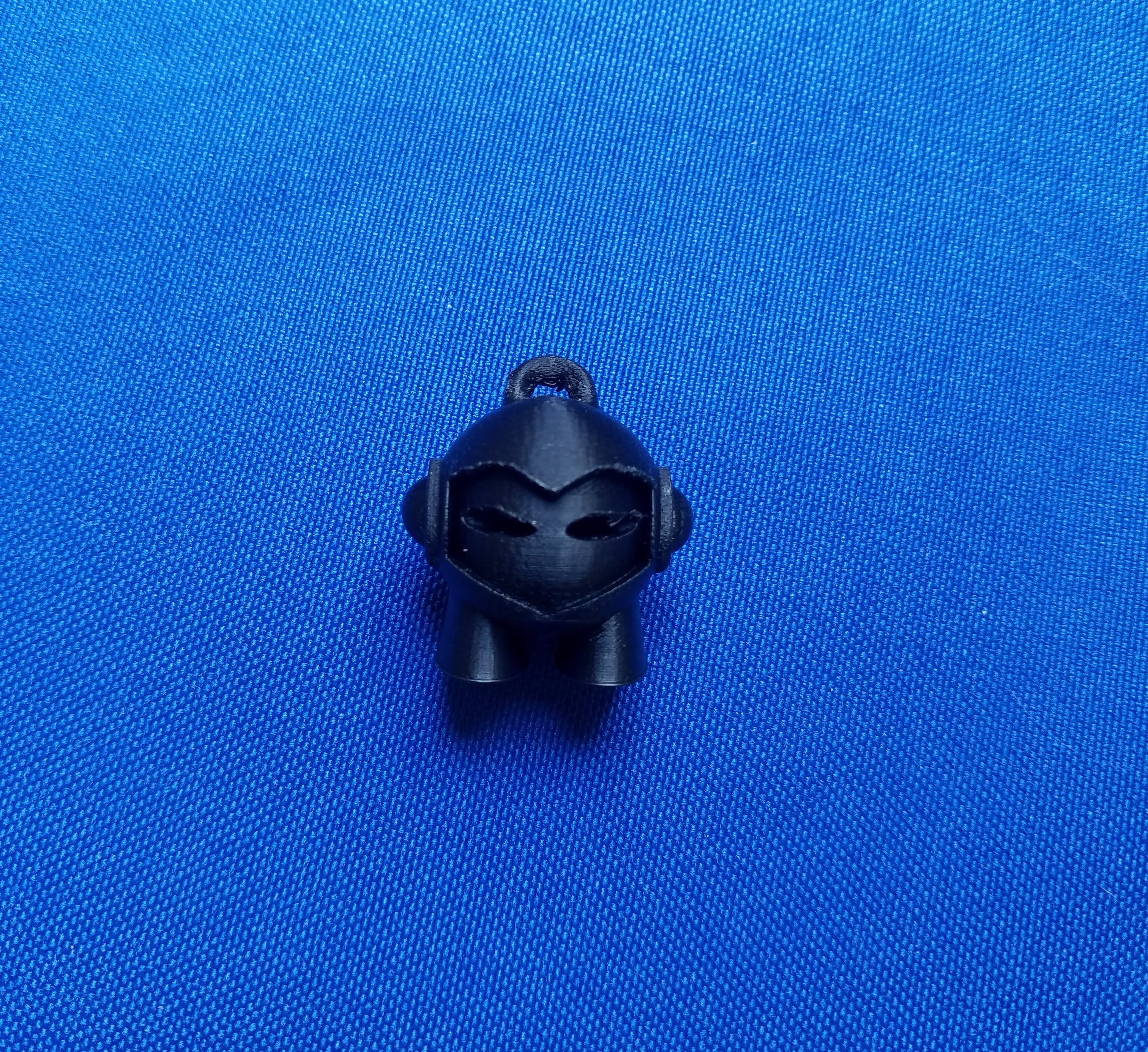
A 50 micron layer quality is a tall order and the 3D40 Flex is up to the task. It’s not a perfect print but it is a very good print. The imperfections on the top are likely the result of cooling issues that can be solved with some settings tweaking.

My Verdict

Dremel 3D40 Flex pros

  • Reliably prints with PLA with high quality
  • Easy and safe to use
  • Print via Wi-Fi
  • Low operating sound
  • Perfect for K-12 education institutions

Dremel 3D40 Flex cons

  • PLA only

Overall, using this 3D printer has been a fantastic experience. Dremel has removed (most of) the guesswork out of 3D printing, making the process fun and intuitive. After the first couple prints, I never worried that a print was going to fail. The only problem that I experienced was when I changed from white to blue filament, the filament wound around the spool holder during the loading process without my noticing; this caused tension on the extruder that led to one print failure. Likely, it was user error. The enclosed build chamber makes the machine more consistent (due to temperature stability), quieter, and safer (around children and pets). It’s quiet enough to have a normal conversation right beside it.

The magnetic build plate is also a major upgrade. Not only does it make removing parts easier but it also preserves the calibration of the bed; on most 3D printers, parts have to be removed from the bed with spatulas, sometimes with great force that can shake the whole printer and affect levelness. The 3D40 Flex’ removable bed protects the machine from all of that jarring part removal. The flexible bed has a replaceable layer on top that helps parts stick during printing and come off easily afterwards, and a replacement sheet is included. Dremel let us know that these sheets typically last 50+ prints, similar to BuildTak sheets. So they will last a while if they don’t get marred and scratched by the included spatula, so be careful.

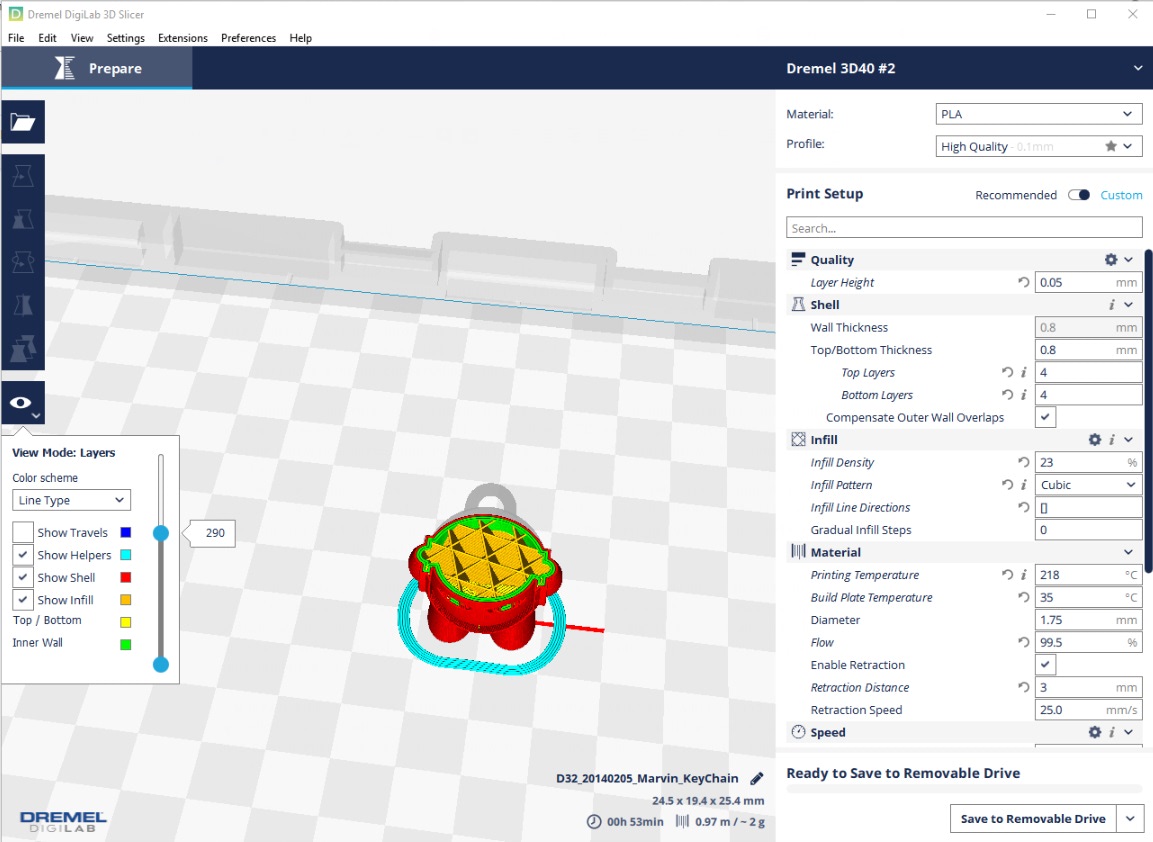
DigiLab 3D Slicer is a custom version of Cura and Cura is an amazing slicer. This was a smart decision on Dremel’s part to defer to the experts. The software allows users to select which slice parameters to display on the Print Setup screen, so users are not at all locked down by simplistic controls as it’s all there under the hood to tinker with, from Z seam alignment to minimum infill area and everything in between. The Layers View Mode is especially helpful when slicing complex objects. There’s also a Pause feature, which I tested and it works, albeit with some stringing.
If you only print with Dremel PLA, the cost of operation is a little bit high; Their 0.5kg spools of filament cost more than third-party filament. But, the Dremel 3D printers allow to use 3rd party filament, they updated their warranty policy last year to reflects this.
Share:
WhatsApp Twitter Facebook LinkedIn Buffer Reddit E-mail

Cameron Naramore

Cameron is a 3D printer and CNC operator. He's fond of cooking, traveling, and science fiction.

Join our newsletter

Our newsletter is free & you can unsubscribe any time.

Latest posts

QIDI Launches Q3D Dual-Nozzle Filament 3D Printer With a 70°C Heated Chamber at Formnext 2026

QIDI launched the Q3D at Formnext 2026, a dual-nozzle 3D printer with two independent hotends, a 350°C primary hotend and a chamber heated... read more »

3D Printers
QIDI Launches Q3D Dual-Nozzle Filament 3D Printer With a 70°C Heated Chamber at Formnext 2026

Nikon SLM Solutions Launches MACHX Selective Laser Melting 3D Printers With Up to 8 kW of Laser Power

Nikon SLM Solutions launched MACHX, a mid-size selective laser melting platform in three sizes with up to 8 kW of laser power and... read more »

3D Printing Metal
Nikon SLM Solutions Launches MACHX Selective Laser Melting 3D Printers With Up to 8 kW of Laser Power

Inkera Brings Full-Color UV Material Jetting 3D Printing to the Desktop With the C1

Newcomer Inkera debuts the C1 at Formnext 2026, a desktop UV material jetting 3D printer with eight material channels and more than 10... read more »

Events
Inkera Brings Full-Color UV Material Jetting 3D Printing to the Desktop With the C1

Longer Black Friday 2026: ePrint UV Printer from $1,899

Longer's Black Friday sale runs until December 2, with discounts on its laser engravers, the new ePrint UV printer and the LK5 Pro... read more »

News
Longer Black Friday 2026: ePrint UV Printer from $1,899

Tripo AI Previews H3.5 Print-Ready Model and Polipop Print Agent at Formnext

Tripo AI used the opening day of Formnext in Frankfurt to preview H3.5, its next 3D generation model, and to introduce Polipop, an... read more »

News
Tripo AI Previews H3.5 Print-Ready Model and Polipop Print Agent at Formnext

UK Horse Hospital Set to Treat Wobbler Syndrome With 3D Printed Titanium Implants

Rainbow Equine Hospital in Malton is set to be the first in the UK to use a 3D printed titanium cage in neck... read more »

News
UK Horse Hospital Set to Treat Wobbler Syndrome With 3D Printed Titanium Implants

Siemens Demonstrates Agentic AI Workflow for Prompt-Based Engineering of 3D Printed Robotic Grippers

Siemens and AGIBOT show an agentic AI workflow that prepares task-specific robot grippers for 3D printing, while a production cell with EOS is... read more »

News
Siemens Demonstrates Agentic AI Workflow for Prompt-Based Engineering of 3D Printed Robotic Grippers

Boom Supersonic Buys Three Lithoz CeraFab S65 Printers to 3D Print Ceramic Casting Cores With LCM Technology

Boom Supersonic bought three Lithoz CeraFab S65 printers to make ceramic casting cores for single-crystal turbine blades in its Superpower gas turbine.

News
Boom Supersonic Buys Three Lithoz CeraFab S65 Printers to 3D Print Ceramic Casting Cores With LCM Technology

Fraunhofer IGD Brings Shape Dithering, Software That Reduces Staircase Artifacts in Voxel-Based 3D Printing, to Formnext 2026

Fraunhofer IGD's patented Shape Dithering spreads out the rounding errors that cause visible steps on 3D printed surfaces, demonstrated on a binder-jetted mold.

Events
Fraunhofer IGD Brings Shape Dithering, Software That Reduces Staircase Artifacts in Voxel-Based 3D Printing, to Formnext 2026

Social

  • Facebook Facebook 3D Printing
  • Linkedin Linkedin 3D Printing
elegoo
Join our newsletter

Our newsletter is free & you can unsubscribe any time.

revopoint bf sidebar

Tripo

Free to $110/mo
  • 60% off Tripo Pro with code 3DPRINTING.
Tripo
View at Tripo tripo3d.ai

H3C Combo with Filament Starter Pack

$2,589
  • The H3C Combo bundled with PLA Palette CMYKW filament set and TPU, providing everything…
H3C Combo with Filament Starter Pack
Buy Now bambulab.com

Polymaker PolyMax PC

  • Most cited polycarbonate filament for mid-range enclosed printers, running at 260 to 28…
Polymaker PolyMax PC
Buy Now polymaker.com

Prusa CORE One L

~$1,799
  • Doubles the print volume of the original CORE One with a 300 × 300 × 330 mm build, AC…
Prusa CORE One L
Buy Now prusa3d.com

Lynxel LynChrom LC1

  • An upcoming desktop full color 3D printer using a claimed Layered Membrane Stereolithog…
Lynxel LynChrom LC1
Buy Now lynxel3d.com

Anycubic ABS-Like Resin Pro 2

~$29 to $39/kg
  • The direct successor to ABS-Like Resin Plus with 35-40% elongation at break (114% impro…
Anycubic ABS-Like Resin Pro 2
Buy Now anycubic.com

H3C Station Bundles

$2,799
  • The H3C Combo with Filament Starter Pack plus the Bambu Station L stand, available in a…
H3C Station Bundles
Buy Now bambulab.com

Qidi Max 4

~$1,219
  • Pairs a 390 x 390 x 340 mm build volume with a 65°C actively heated chamber and high-t…
Qidi Max 4
Buy Now qidi3d.com

Site footer

The 3DPrinting.com newsletter

The week’s best reviews, buyer’s guides and deals. One email every Friday, no spam.

By subscribing you agree to our privacy policy. Unsubscribe anytime.

3D PRINTING.COM

Independent reviews, buyer’s guides and news about 3D printers, materials, scanners and software.

Reviews

  • All reviews
  • 3D printers
  • Filament & materials
  • 3D scanners
  • Software
  • Compare products

Buyer's guides

  • Best 3D printers
  • Best resin 3D printers
  • 3D printers for beginners
  • Best PLA filament
  • Best slicers
  • Best pro 3D scanners

Learn & news

  • Latest news
  • Deals
  • What is 3D printing?
  • FDM vs resin
  • Use cases by industry
  • Glossary

Company

  • About us
  • Contact us
  • Advertise with us
  • Media kit
  • Nederland 3D Printing

© 2026 3DPrinting.com · Strikwerda en Dehue

  • Privacy policy
  • Terms of use
  • Affiliate disclosure
  • RSS